Camera movement can make a live stream feel more polished, but the best setup depends on your camera weight, available space, and how much control you need during a broadcast.
This roundup compares motorized sliders, tabletop skater dollies, tripod dollies, monopod wheels, and support arms so you can match your gear to your studio or location workflow.
Best 10 Camera Dollies for Live Streaming Picks for 2026
Best Smart-Motion Option
NEEWER DL400 Motorized Camera Dolly

- App control for live video and manual movement
- Quiet dual motors rated below 30 dB
- Up to 6.6 lb capacity with included NP-F750 battery
Best For: Streamers seeking quiet, app-controlled camera motion
Best Desk Mount
SMALLRIG 22-Inch Magic Arm Clamp

- 22-inch adjustable arm for overhead and POV views
- Clamp fits desks and round tubes
- Supports phones, webcams, lights, and microphones
Best For: Stationary desk-based streaming setups
Best Compact Manual Dolly
Vidpro SK-22 Professional Skater Dolly
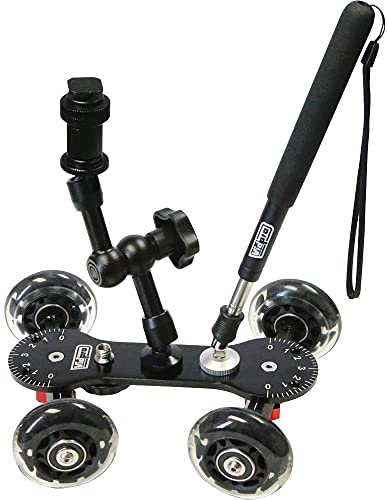
- 25 lb capacity for DSLRs and camcorders
- Adjustable axles support curves and 360-degree pans
- Seven mounting points plus handle and magic arm
Best For: Manual low-angle tracking and panning
Best Heavy-Duty Production System
Proaim Swift Camera Track Dolly
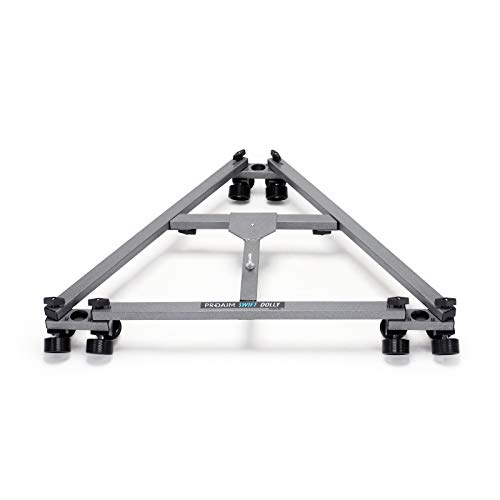
- Supports up to 159 kg/350 lb
- Track-based movement for controlled camera motion
- 28-inch central distance supports stability
Best For: Professional studios and large camera rigs
Best Full-Size Tripod Dolly

- 33-pound load capacity for tripods and light stands
- 3-inch rubber wheels with brakes and 360-degree rotation
- Folds compactly and includes a carrying bag
Best For: Tripod-based live-streaming and studio camera setups
Best Compact Tabletop Dolly

- Supports straight and circular tabletop movement
- Quiet rubber wheels for recording-friendly operation
- Includes a ball head and versatile phone clamp
Best For: Phones, action cameras, and lightweight tabletop live streams
Best Monopod Dolly for Live Broadcasts

- 30 kg maximum load rating for heavy monopod rigs
- One-click opening and automatic locking for quick setup
- Silent damping wheels and three adjustable shooting angles
Best For: Heavy monopod-based live broadcasts and location production
Best Lightweight Option
EVTSCAN Quiet Tabletop Skater Dolly

- Lightweight 476-gram design
- Quiet, non-scratch silicone wheels
- Supports up to 22 pounds
Best For: Portable tabletop streaming setups
Best for Circular Tracking
NEEWER Scaled Camera Table Dolly

- 22-pound maximum load
- Straight, curved, or circular tracking
- Flexible 1/4-inch and 3/8-inch mounts
Best For: Heavier tabletop rigs and circular product shots
Best Smart-Motion Option – NEEWER DL400 Motorized Camera Dolly
For creators comparing camera dollies for live streaming, the NEEWER DL400 stands out for app-based control and quiet motorized movement. It supports up to 6.6 pounds, offers five speeds, and includes an NP-F750 battery rated for up to five hours of runtime.
Best For: Live streamers and video creators who want remotely controlled, low-noise camera movement.
Pros:
- App control supports manual, live video, and time-lapse modes.
- Ultra-quiet dual motors operate below 30 dB.
- Ball head provides 360-degree rotation and 90-degree tilt.
- Includes an NP-F750 battery and USB-C charging cable.
Cons:
- Time-lapse photography requires a separately purchased shutter cable.
- Maximum load is 6.6 pounds.
- Starting at the highest speed uphill may cause shaking.
The DL400 is a practical fit when silent, repeatable motion matters during a stream. Its app and battery add convenience, while the relatively modest load limit makes it better suited to compact camera setups.
Best Desk Mount – SMALLRIG 22-Inch Magic Arm Clamp
Although it is not a rolling dolly, the SMALLRIG Magic Arm is a useful alternative for camera dollies for live streaming when a fixed overhead or desk-mounted angle is more practical. Its 22-inch articulating arm supports phones, webcams, lights, microphones, and compatible cameras up to the stated load limit.
Best For: Desk-based streamers who need an adjustable overhead, POV, webcam, or lighting mount.
Pros:
- 22-inch arm provides flexible positioning for overhead shots.
- Clamp opens up to 63.5 mm and works on desks or round tubes.
- Silicone pads and rubber rings help prevent slipping and scratches.
- Includes a phone holder, two 1/4-inch screws, and a 3/8-inch adapter.
Cons:
- Recommended load capacity is limited to 600 g/21 oz.
- Heavy phones may require shortening the arm to prevent ball-head slippage.
- It provides fixed mounting rather than rolling camera movement.
The SMALLRIG makes sense for stationary live-stream layouts where stability and quick angle changes matter more than tracking shots. Its compact clamp format is especially useful for phones, webcams, and small accessories.
Best Compact Manual Dolly – Vidpro SK-22 Professional Skater Dolly
The Vidpro SK-22 is a manual option for creators evaluating camera dollies for live streaming and low-level production. Its rubber wheels, adjustable axles, and multiple mounting points support straight tracking, broad curves, and 360-degree panning with DSLRs and camcorders.
Best For: Streamers and videographers who want hands-on, low-angle camera movement without motors.
Pros:
- Supports up to 25 pounds of camera or recording equipment.
- Adjustable axles allow straight lines, curves, and full 360-degree circles.
- CNC-machined aluminum chassis and rubber wheels are built for durability.
- Includes seven 1/4-inch-20 mounting points, an extendable handle, and a magic arm.
Cons:
- Manual operation requires the user to guide the dolly.
- It is intended for low-level shooting rather than elevated camera movement.
- It lacks app control and motorized repeatability.
The SK-22 offers broad positioning flexibility and a generous payload for a compact manual dolly. It is a strong choice when a stream or recording setup can accommodate an operator physically controlling the camera path.
Best Heavy-Duty Production System – Proaim Swift Camera Track Dolly
The Proaim Swift is a professional track-based system for production teams needing camera dollies for live streaming, studio work, interviews, or larger video setups. Its 159 kg payload rating and 28-inch central distance are designed for stable, controlled camera movement with substantial equipment.
Best For: Professional productions requiring heavy-duty tracking movement and support for large camera rigs.
Pros:
- Supports payloads up to 159 kg/350 pounds.
- Track-based design is intended for smooth, controlled movement.
- 28-inch central distance helps provide balance and stability.
- Suitable for studio, commercial, documentary, and other demanding production work.
Cons:
- At 15.4 pounds, it is substantially heavier than compact dolly options.
- Its track-based design requires a suitable track setup.
- It is likely excessive for lightweight desktop or solo-streaming rigs.
The Swift is aimed at crews rather than casual streamers. Its high payload capacity and track-based motion make it appropriate when stability and professional camera movement outweigh portability and setup simplicity.
Best Full-Size Tripod Dolly – SIRUI AM-DF02
For camera dollies for live streaming, the SIRUI AM-DF02 is a practical choice when you need to move a full tripod or light stand smoothly across hard, even surfaces. Its adjustable legs, 3-inch rubber wheels, independent brakes, and 33-pound capacity suit larger camera setups.
Best For: Tripod-mounted cameras, camcorders, or lighting supports used in studios and other smooth-surface shooting environments.
Pros:
- 3-inch rubber wheels provide smooth movement, while 360-degree rotation improves maneuverability.
- Adjustable clamps and legs fit a broad range of tripod-foot sizes and angles.
- 33-pound load capacity supports substantial camera or lighting setups.
- Folds to 16.9 by 5.9 inches, weighs 3.97 pounds, and includes a carrying bag.
Cons:
- Designed for smooth surfaces, so it may be less suitable for uneven terrain.
- Its tripod-dolly format is larger and less compact than a tabletop camera dolly.
The AM-DF02 is a strong all-around option for live-streaming rigs that already use a tripod. Choose it when load capacity, adjustable tripod support, and controlled rolling matter more than pocket-sized portability.
Best Compact Tabletop Dolly – NEEWER SD001
Among camera dollies for live streaming, the NEEWER SD001 stands out for tabletop work and compact mobile setups. Its four rubber-padded wheels support straight or circular movement, while the included ball head and phone clamp make it useful for cameras, action cameras, and smartphones.
Best For: Tabletop product shots, phone-based live streams, vlogs, and compact panoramic or sliding movements.
Pros:
- Adjustable wheels enable linear and circular movement for sliding and panning shots.
- Soft rubber wheel rings are designed for smooth, quiet operation.
- 360-degree rotating and 90-degree tilting ball head adds framing flexibility.
- Pocket-sized aluminum design weighs about 7.76 ounces and includes a rotatable phone clamp.
Cons:
- Not suitable for telephoto lenses.
- Its maximum recommended load is 6.6 pounds, limiting larger camera rigs.
- It is not water resistant.
The SD001 is best when portability and tabletop versatility are priorities. It offers creative movement in a very small package, but its load limit and compact wheelbase make it better for lightweight cameras and phones than full-size production rigs.
Best Monopod Dolly for Live Broadcasts – COMAN DF3 with PH70
The COMAN DF3 with PH70 is built for camera dollies for live streaming when a monopod-based rig needs fast setup and a high load rating. Its one-click opening, silent 360-degree damping wheels, adjustable shooting angles, and quick-release mount support mobile studio, event, and location work.
Best For: Professional monopod rigs, live broadcasts, interviews, weddings, and fast-moving on-location productions.
Pros:
- Supports up to 30 kg, with a stated 20 kg safe load when paired with the PH70 head.
- One-click snap-open design with automatic locking speeds up transitions.
- 2-inch damping wheels are designed for smooth, quiet rolling with reduced vibration.
- Three adjustable angle levels and a 3/8-inch screw support flexible rig configurations.
Cons:
- Designed primarily for monopods and compatible modular accessories rather than standard tripod mounting.
- Its 1.38 kg weight is higher than that of a small tabletop dolly.
- It is not water resistant.
The DF3 is the most production-oriented option of the three for demanding mobile shooting. Its quick deployment and high capacity are valuable for live events, while its larger footprint and monopod-focused design may be unnecessary for lightweight tabletop streaming.
Best Motorized Pick – NEEWER Wireless Motorized Camera Dolly
For camera dollies for live streaming, the NEEWER DL100 offers remote-controlled movement without requiring a track. Its three adjustable speeds, rechargeable battery, and configurable wheels support straight-line or circular shots with compatible cameras, smartphones, and action cameras.
Best For: Solo streamers and creators who want repeatable motorized motion during tabletop or studio broadcasts.
Pros:
- Wireless remote changes speed, direction, or pauses movement from up to 6 meters away.
- Three speed settings range from 1.4 to 3.0 cm/s.
- Adjustable wheel angles support straight paths, circles, and pitch shooting.
- Built-in 1,800mAh battery provides up to six hours of service time.
Cons:
- It is not water resistant.
- Accessories such as smartphone holders and action-camera adapters are not included.
- Its 6.6-pound maximum load may limit heavier setups.
The DL100 is the most convenient option here when remote operation matters. Confirm that your complete camera and accessory setup stays within the stated load limit.
Best Lightweight Option – EVTSCAN Quiet Tabletop Skater Dolly
This EVTSCAN model is a practical choice among camera dollies for live streaming when portability and quiet operation are priorities. Its four silicone wheels roll across tabletops, flat ground, or tracks, while adjustable wheel angles allow straight or curved movement.
Best For: Mobile creators using DSLR cameras, smartphones, or action cameras on smooth surfaces.
Pros:
- Weighs approximately 476 grams for easy transport and setup.
- Silicone wheels are designed to operate quietly and avoid scratching desk surfaces.
- Aluminum-alloy construction supports loads up to 22 pounds.
- Adjustable wheels can follow straight paths or round objects.
Cons:
- It is intended for flat surfaces or tracks rather than uneven terrain.
- A ball head or phone clip may be needed for some camera configurations.
- The supplied notes do not indicate motorized or remote-controlled movement.
Choose the EVTSCAN when a compact, manually guided dolly fits your streaming workflow. Its high stated load capacity is useful, but smooth surfaces will be important for consistent movement.
Best for Circular Tracking – NEEWER Scaled Camera Table Dolly
The NEEWER scaled table dolly suits camera dollies for live streaming when you need controlled manual tracking around a subject. Its adjustable aluminum rods, rotatable rubber wheels, fluid roller bearings, and marked disc support straight paths, curves, and complete circles.
Best For: Streamers creating smooth product demonstrations, follow shots, and circular tabletop moves with heavier camera rigs.
Pros:
- Supports up to 22 pounds, accommodating substantial camera setups.
- Adjustable rods enable straight, curved, or circular tracking.
- Rotatable rubber wheels and fluid bearings are designed for quiet, smooth movement.
- Includes 1/4-inch and 3/8-inch mounting threads plus four 1/4-inch screw holes.
Cons:
- It is designed for flat surfaces such as tables or floors.
- The dolly uses manual movement rather than a motor or remote control.
- Its larger folded dimensions may be less convenient for travel.
This model is a strong fit when mounting flexibility and circular tracking matter more than automation. The marked disc and adjustable hardware can help create repeatable moves around a live subject.
How We Picked These Camera Dollies for Live Streaming
We selected these models to cover the main ways creators add movement to a live production: tabletop tracking, floor-level panning, tripod repositioning, monopod mobility, and app- or motor-controlled motion. We considered payload ratings, wheel and track design, portability, adjustment options, control methods, and compatibility with cameras, phones, tripods, and common mounting hardware.
Because live-streaming rigs vary widely, the list includes both compact options for desks and larger systems intended for cameras, camcorders, and production environments. Always verify the manufacturer’s stated load limit and mounting-thread compatibility before use.
Quick Comparison
| Type | Best For | Main Advantage | Watch For |
|---|---|---|---|
| Motorized slider dolly | Repeatable movement | Consistent speed and remote control | Battery life, setup time, and payload |
| Tabletop skater dolly | Close-up desk shots | Compact and easy to reposition | Needs a smooth, level surface |
| Tripod dolly | Moving a supported tripod | Fast studio repositioning | Wheel locks and floor clearance |
| Monopod dolly | Lightweight mobile rigs | Portable, low-profile support | Limited stability with heavy cameras |
| Track dolly system | Long, controlled moves | Smoother production-style tracking | More space and assembly required |
Key Buying Factors for Camera Dollies for Live Streaming
Camera and Accessory Capacity
Add the weight of the camera, lens, battery, monitor, microphone, cage, and any wireless accessories. Choose a dolly with a meaningful margin above that total rather than operating at its maximum rating.
Movement Style and Control
Motorized models are useful when you need repeatable pans, slow pushes, or hands-free operation. Manual skater dollies are often better for quick framing changes and simple tabletop shots. For a live broadcast, look for smooth starts, predictable speed, and controls you can reach without disturbing the camera.
Surface, Wheels, and Stability
Rubber wheels can help reduce noise and protect floors, but they still need a clean, reasonably flat surface. Check whether wheel angles are adjustable, whether the dolly includes brakes or locks, and whether the base remains stable when the camera is tilted or extended.
Mounting Compatibility and Workflow
Confirm whether the dolly uses a standard screw, ball head, quick-release plate, tripod mount, or a dedicated track carriage. Phone clamps and magic arms can expand the setup, but they also increase leverage and vibration, so keep accessories compact and balanced.
Portability and Setup Time
Foldable wheels, compact frames, and app control are valuable for creators who change locations frequently. Larger track systems can produce more controlled movement, but they require room to assemble and a repeatable placement plan.
Who Should Buy Which Camera Dollies for Live Streaming?
- Choose a motorized NEEWER dolly or slider if you want repeatable movement, remote operation, or cinematic motion during a solo stream.
- Choose a tabletop skater dolly if your broadcasts use desk-based product demonstrations, tutorials, or close-up camera moves.
- Choose the SIRUI tripod dolly if your priority is moving a tripod-mounted camera around a studio rather than creating a tracking shot.
- Choose the DF3 monopod dolly for a lightweight, portable setup that needs quick repositioning.
- Choose the Vidpro or Proaim system when you need more deliberate floor-level movement, heavier support, or a production-oriented tracking workflow.
- Choose the SMALLRIG arm when an overhead phone or accessory mount is more useful than rolling camera movement.
Before buying, measure your available floor or tabletop space, test the surface for vibration and noise, and confirm that the selected mounting hardware matches your camera rig.
