The right camera dolly can turn basic footage into smoother pans, tracking shots, and repeatable motion sequences without requiring a full studio setup. This roundup compares 10 options suited to content creators, from lightweight tabletop designs to motorized rail systems.
We focus on movement control, payload capacity, portability, setup, and shooting style so you can choose equipment that matches your camera, workspace, and production goals.
Best 10 Camera Dollies for Content Creators Picks for 2026
Best Manual Skater Dolly
Vidpro SK-22 Professional Skater Dolly
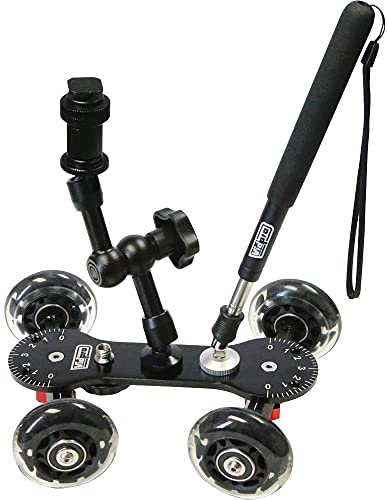
- 25-pound maximum capacity
- Adjustable axles for lines, curves, and circles
- Includes handle and articulated magic arm
Best For: Manual low-level tracking and panning
Best Heavy-Duty System
Proaim Swift Camera Track Dolly
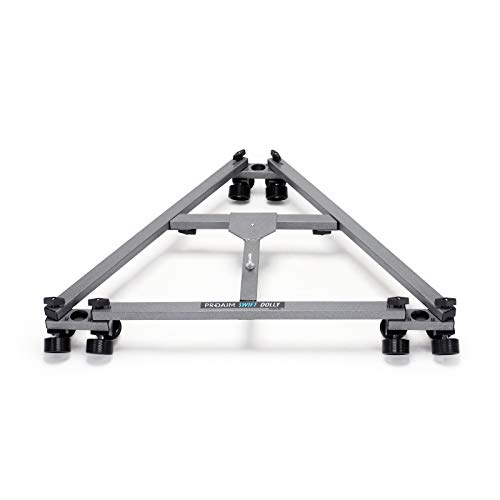
- Supports up to 350 pounds
- Track-based smooth camera movement
- 28-inch central distance for stability
Best For: Professional crews with large camera rigs
Best Tripod Upgrade

- Adds wheels to a compatible tripod
- Quiet two-inch rubber wheels
- 33-pound capacity with carrying bag
Best For: Portable tripod and lighting repositioning
Best for Easy Setup

- App-controlled motorized movement
- Supports tracking, time-lapse, and panorama modes
- 120 cm carbon-fiber rail with multiple mounting ports
Best For: Automated video, time-lapse, and repeatable tracking shots
Best Pocket Tabletop Dolly

- Compact 220 g tabletop design
- Linear or circular movement
- Includes ball head and rotatable phone clamp
Best For: Portable smartphone and small-camera tabletop videos
Best Manual Rail Slider
Zecti 24-Inch Carbon Fiber Dolly

- Lightweight 24-inch carbon-fiber slider
- Supports multiple shooting orientations
- Adjustable legs and nonskid feet
Best For: Manual rail moves with compact cameras and phones
Best Surface Dolly

- Supports up to 22 pounds
- Adjustable straight, curved, and circular paths
- Smooth rotatable rubber wheels
Best For: Manual tabletop and flat-surface tracking shots
Best App-Controlled Dolly

- Wireless app control for video and time lapse
- Quiet dual motor below 30 dB
- Includes NP-F750 battery with up to five hours of runtime
Best For: Light camera setups needing repeatable motorized movement
Best Long-Rail Slider
ER1 47.2-Inch Motorized Slider

- 47.2-inch carbon-fiber rail
- Supports up to 11 pounds horizontally
- App-controlled video and time-lapse modes
Best For: Extended automated moves and product-video production
Best Motorized Pick – NEEWER 3-Wheels Wireless Camera Dolly
For content creators looking for camera dollies for content creators, the NEEWER DL100 adds motorized movement without requiring a track. Its remote control, adjustable wheel angles, and support for cameras, phones, and action cameras make it useful for repeatable tabletop and floor-level shots.
Best For: Solo creators who want remote-controlled circular, straight-line, or pitch-style camera movement.
Pros:
- Wireless remote changes speed, direction, and pauses movement from up to 6 meters away.
- Three adjustable speeds support controlled motion for different shot styles.
- 180-degree wheel adjustment enables straight or circular routes.
- Built-in 1,800mAh battery offers up to six hours of service time.
Cons:
- The dolly is not water resistant.
- Accessories such as smartphone holders and action-camera adapters are not included.
- Its maximum recommended load is 6.6 pounds.
The DL100 is a compact choice when remote operation and creative movement matter more than heavy payload capacity. Charge it fully before first use and use the included wrench for wheel adjustments.
Best Manual Skater Dolly – Vidpro SK-22 Professional Skater Dolly
The Vidpro SK-22 is a manual option among camera dollies for content creators, built for low-level tracking and panning with DSLRs, camcorders, and recording equipment. Its rubber wheels, adjustable axles, and included handle support both controlled pushes and creative curved movements.
Best For: Creators and small crews who want a durable manual dolly for straight, curved, or 360-degree shots.
Pros:
- CNC-machined aluminum chassis is designed for long-term durability.
- Rubber wheels with stainless steel ball bearings provide smooth rolling.
- Angle markers help set straight lines, broad curves, or full circles.
- Seven quarter-inch mounting points, a 27-inch handle, and an articulated magic arm add flexibility.
Cons:
- It requires manual operation rather than motorized movement.
- The dolly is not water resistant.
- Its 2-pound body is less compact than a small motorized tabletop unit.
With a 25-pound capacity and multiple mounting points, the SK-22 suits creators who want hands-on control and room for accessories. It is especially practical for low-angle product, interview, and reveal shots.
Best Heavy-Duty System – Proaim Swift Camera Track Dolly
For productions that need substantial support, the Proaim Swift is a heavy-duty entry among camera dollies for content creators. Its track-based design, 28-inch central distance, and 350-pound payload rating are aimed at professional camera rigs and demanding studio or location workflows.
Best For: Film and video teams using large camera setups, operators, and production equipment.
Pros:
- Supports up to 350 pounds, including camera rigs, operators, and equipment.
- Track-based movement is designed for controlled, smooth straight-line shots.
- The 28-inch central distance helps balance and stability.
- Suitable for films, commercials, interviews, documentaries, and content creation.
Cons:
- At 15.4 pounds, it is substantially heavier than compact creator dollies.
- Its 28-by-28-by-14-inch dimensions require dedicated transport and setup space.
- The dolly is not water resistant.
The Swift makes the most sense when payload capacity and professional tracking performance outweigh portability. It is overbuilt for casual tabletop work but well matched to crews producing larger, more controlled camera moves.
Best Tripod Upgrade – NEEWER NW-600 Tripod Dolly
The NEEWER NW-600 is a practical tripod accessory for creators comparing camera dollies for content creators. Rather than carrying a dedicated camera platform, it adds quiet, movable rubber wheels to a compatible tripod and supports cameras, camcorders, and lighting equipment.
Best For: Creators who already own a tripod and need portable repositioning for studio or event setups.
Pros:
- Transforms a compatible tripod into a movable platform.
- Two-inch rubber wheels are designed for sturdy, quiet movement.
- Adjustable legs extend from 10.8 to 15.7 inches.
- Folds for storage and includes a carrying bag.
Cons:
- It is a tripod dolly, not a dedicated camera-tracking platform.
- Compatibility depends on the tripod leg size and clamp fit.
- It is not water resistant.
The NW-600 is best viewed as a mobility upgrade rather than a cinematic motion-control system. Its 33-pound capacity and portable folding design make it useful for moving tripod-mounted cameras or lights between positions.
Best for Easy Setup – GVM 48-Inch APP Camera Slider
For content creators who want repeatable camera movement, the GVM 48-inch motorized slider is one of the more feature-rich camera dollies for content creators. Its app control, programmable motion, and carbon-fiber rail support automated tracking, panoramic, time-lapse, and video shots.
Best For: Creators producing automated product videos, time-lapses, tracking shots, and panoramic footage.
Pros:
- Supports multiple programmable shooting modes, including tracking, time-lapse, and panoramic movement.
- iOS and Android app control allows wireless management of motorized motion.
- Multiple 1/4-inch and 3/8-inch ports support horizontal, vertical, and 45-degree setups.
- Includes adjustable legs, a carry bag, six shutter-release cables, and an extension cable.
Cons:
- At 120 cm and 4 kg, it is less portable than a compact tabletop dolly.
- Its listed average battery life is approximately two hours.
- It is not water resistant.
The GVM is a strong choice when programmable movement matters more than minimal setup size. Its 20-pound maximum weight recommendation and broad mounting options make it versatile, while the longer rail is better suited to larger motion sequences than tight tabletop shots.
Best Pocket Tabletop Dolly – NEEWER SD001 Camera Dolly
The NEEWER SD001 is a compact manual choice for creators who need portable camera dollies for content creators. Its four rubber-padded wheels can travel in straight lines or circles, while the included phone clamp makes it practical for smartphone, action-camera, and small-camera setups.
Best For: Tabletop product videos, phone content, compact camera rigs, and portable 360-degree shots.
Pros:
- Supports both linear and circular movement by adjusting the wheels from -45° to +45°.
- Soft rubber wheel rings provide smooth, quiet movement on floors, tables, and slider surfaces.
- Ball head offers 360-degree rotation and 90-degree tilt.
- Rotatable phone clamp supports vertical or horizontal shooting and includes a cold shoe for accessories.
Cons:
- Not suitable for telephoto lenses.
- Its maximum weight recommendation is 6.6 pounds.
- It is a manual dolly, so movement is not motorized or app-controlled.
Choose the SD001 when portability and quick tabletop setup are priorities. At roughly 220 g and under four inches wide, it is easy to carry, though its compact design is better suited to small rigs than heavy camera-and-lens combinations.
Best Manual Rail Slider – Zecti 24-Inch Carbon Fiber Dolly
The Zecti 24-inch slider is a straightforward manual option for camera dollies for content creators who want rail-based movement without a motor. Its carbon-fiber double-rail system, adjustable legs, and multiple mounting threads support horizontal, vertical, diagonal, and sideways shooting.
Best For: Travel-friendly manual camera moves, product footage, and creators using small cameras or phones.
Pros:
- Four precision bearings and a double interior carbon-fiber rail system are designed for stable, quiet movement.
- Adjustable legs, nonskid rubber feet, and a bubble level help with positioning on different surfaces.
- Multiple 1/4-inch and 3/8-inch screw holes support several mounting configurations.
- Lightweight 654 g design includes a carrying bag and supports cameras, phones, action cameras, and small camcorders.
Cons:
- The supplied notes warn that overtightened screws can cause noise and rough movement.
- Its maximum weight recommendation is 4.4 pounds.
- Movement is manual rather than motorized.
The Zecti offers a useful balance of rail length, portability, and setup flexibility for smaller rigs. It is a good fit for creators who prefer hands-on control, provided they adjust the hardware correctly for smooth movement.
Best Surface Dolly – Scaled Camera Table Dolly
For content creators looking for camera dollies for content creators, the NEEWER Scaled Camera Table Dolly is a practical manual option for smooth tabletop, floor-level, and other flat-surface shots. Its adjustable rods and rotatable wheels support straight, curved, and circular tracking paths.
Best For: Creators who want flexible, non-motorized camera movement on flat surfaces.
Pros:
- Supports camera equipment up to 22 pounds.
- Adjustable aluminum rods allow straight, curved, or circular paths.
- Rotatable rubber wheels and fluid roller bearings enable quiet, smooth movement.
- Offers 1/4-inch and 3/8-inch mounting threads plus four 1/4-inch screw holes.
Cons:
- Designed for flat surfaces rather than elevated or uneven setups.
- Manual operation requires you to guide the dolly during a shot.
The strong load rating and configurable track make this a versatile choice for tabletop product videos, demonstrations, and tracking shots. Choose it if you value path flexibility over motorized control.
Best App-Controlled Dolly – DL400 Motorized Camera Dolly
The NEEWER DL400 adds motorized movement and smartphone control to the camera dollies for content creators category. Its quiet dual motor, multiple speed settings, and included NP-F750 battery make it suited to repeatable filming without manually pushing the dolly.
Best For: Creators who want app-controlled motion for video, live shooting, or time-lapse work.
Pros:
- Runs with a quiet motor rated below 30 dB.
- NEEWER App supports Manual, Live Video, and Time Lapse modes.
- Includes an NP-F750 battery with up to five hours of runtime.
- Provides five speeds and a ball head with 360-degree rotation and 90-degree tilt.
Cons:
- Maximum load is 6.6 pounds.
- Time-lapse photography requires a separately purchased camera shutter cable.
- The supplied guidance cautions against starting at the fastest speed when moving uphill.
The DL400 is a strong fit for creators who want consistent, remotely controlled movement in a compact dolly format. Its lower load capacity makes it better suited to lighter camera setups.
Best Long-Rail Slider – ER1 47.2-Inch Motorized Slider
For longer camera moves, the NEEWER ER1 combines a 47.2-inch carbon-fiber rail with motorized control, making it one of the more capable camera dollies for content creators. App control, time-lapse modes, and support for horizontal or tilted shooting give it room for polished product and video work.
Best For: Creators who need extended, automated camera moves for product videos, tracking shots, and time lapses.
Pros:
- 47.2-inch rail supports extended back-and-forth camera movement.
- Supports up to 11 pounds horizontally and 5.5 pounds at a 45-degree tilt.
- Offers app control, manual, video, and time-lapse modes.
- Carbon-fiber construction, four roller bearings, and 1/4-inch and 3/8-inch mounting holes support stable setups.
Cons:
- 2.4G remote control is not included.
- Charger is not included.
- Minor shake may occur during macro photography.
The ER1 is the most suitable choice here when rail length and automated repeatability matter. Its larger format is especially useful for controlled product footage and time-lapse sequences, while the missing charger and optional remote add setup considerations.
How We Picked the Best Camera Dollies for Content Creators
We evaluated these Camera Dollies for Content Creators based on the features that have the greatest effect on real-world shooting. The comparison considers dolly type, construction, supported payload, wheel or rail design, motorization, control options, portability, and compatibility with cameras, phones, tripods, and accessories.
We also separated simple rolling platforms from motorized slider systems. A skater dolly can be fast to position and useful for low-angle product footage, while a rail-based motorized dolly is better for controlled time-lapse, repeatable moves, and longer tracking shots.
Quick Comparison
- Best for simple tabletop movement: Compact three- or four-wheel skater dollies with adjustable wheels.
- Best for heavier camera setups: Tripod dollies and professional track systems with higher load ratings.
- Best for repeatable motion: Motorized sliders with app control, variable speed, and time-lapse functions.
- Best for portability: Short carbon-fiber rails and lightweight manual dollies.
- Best for longer tracking shots: 47- to 48-inch motorized slider systems.
Key Buying Factors for Camera Dollies for Content Creators
Movement Style
Decide whether you need curved pans, straight tracking, push-ins, or repeatable programmed movement. Wheeled skater dollies are flexible on smooth surfaces, whereas rail systems provide a more predictable path.
Load Capacity and Mounting
Check the total weight of your camera, lens, cage, microphone, monitor, and other accessories—not just the camera body. Confirm whether the dolly uses a standard tripod screw, ball head, phone clamp, or tripod platform.
Surface and Stability
Rubber wheels work best on clean, smooth floors and tabletops. Uneven surfaces may cause vibration or inconsistent tracking. Rails generally provide better stability, but they require more setup space.
Manual Versus Motorized Control
Manual dollies are quick, quiet, and often easier to carry. Motorized models can deliver consistent speed, time-lapse movement, and app-based control, but they add batteries, setup time, and potential noise or compatibility considerations.
Size, Power, and Portability
Measure your available shooting area before choosing a long rail. For mobile creators, consider packed dimensions, battery capacity, charging requirements, and whether the system can be operated without an outlet.
Who Should Buy Which Camera Dollies for Content Creators?
Choose a compact skater dolly if you make product videos, tabletop demonstrations, social clips, or low-angle shots and want quick repositioning. Choose a tripod dolly if you need to move a mounted tripod and camera across a smooth floor. Choose a professional track system when stability, heavier payloads, and production-ready movement matter most.
Choose a short manual slider for portable talking-head shots, product push-ins, and small studio setups. Choose a motorized slider if you regularly shoot time-lapse, automated B-roll, or repeatable moves. Longer 47- to 48-inch systems are most useful when you have room for extended camera travel and need broader cinematic motion.
