The right clamp can make a live-streaming setup cleaner, safer, and easier to adjust. These camera super clamps for live streaming help mount cameras, lights, monitors, microphones, and other accessories to desks, poles, shelves, and crossbars without relying on a traditional tripod.
We selected 10 versatile options with different jaw sizes, thread standards, ball heads, magic arms, and load-bearing designs so you can match the mount to your equipment and workspace.
Best 10 Camera Super Clamps for Live Streaming Picks for 2026
Compact Rig Mount
ULANZI 360° Super Clamp with Ballhead

- 60mm jaw opening for rods, plates, and handlebars
- 360° positioning with 1/4" and 3/8" threads
- Supports equipment up to 3.3lb
Best For: Lightweight cameras, monitors, lights, and action cameras
Heavy-Duty Studio Clamp

- Supports up to 33lb of equipment
- Clamps round poles or desks up to 1.6in thick
- Includes a 5/8in stud for studio lights
Best For: Heavy cameras, lights, and studio streaming setups
Two-Clamp Flexibility
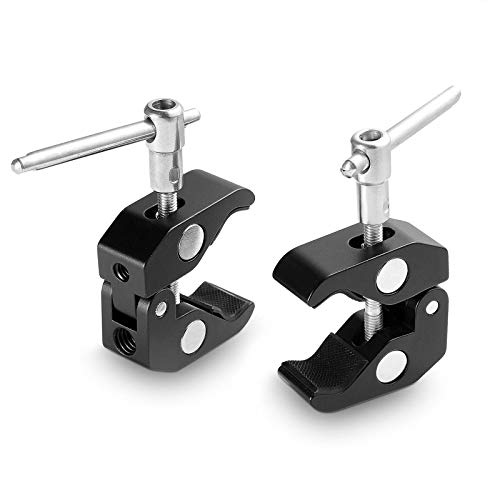
- Includes two versatile super clamps
- 1/4in-20 and 3/8in-16 mounting threads
- Works with 15mm–40mm rods and varied surfaces
Best For: Multi-point camera, monitor, and lighting rigs
Flexible Creator Mount
NEEWER ST83 Clamp with Dual Ballhead
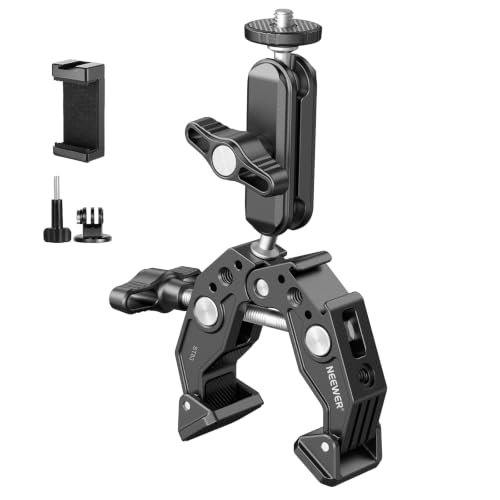
- Dual 360° ballheads enable flexible angle adjustment
- 60mm clamp fits desks, poles, stands, and handlebars
- Includes cold shoe, 1/4in threads, and device adapter
Best For: Cameras, phones, webcams, action cameras, and lights
Best Heavy-Duty Pick

- Supports up to 7.7 pounds
- 1/4-inch and 3/8-inch mounting holes
- Padded adjustable jaw for stable clamping
Best For: Heavier cameras, monitors, and lights in multi-scene streaming setups
Best Adjustable Arm
K&F CONCEPT Magic Arm Clamp

- 360-degree dual-ball-head positioning
- 6-inch arm with 1/4-inch screws
- 15–55 mm clamp opening
Best For: Flexible webcam, monitor, microphone, and compact-camera positioning
Best Multi-Station Value

- Includes four clamps
- 1/4-inch and 3/8-inch threaded holes
- 12–54 mm adjustable jaws
Best For: Lightweight accessories and multiple streaming stations
Best with Extra Features

- 11-inch articulating arm with dual ball heads
- Supports up to 4.4 pounds
- ARRI locating pins and tool-free locking
Best For: Flexible camera, light, monitor, or microphone positioning
Value Two-Pack

- Two clamps included
- Jaws adjust from 12 to 54 mm
- 1/4-inch and 3/8-inch threads
Best For: Simple, multi-point mounting on a budget
Heavy-Duty Dual Clamp

- Double clamps support up to 7.7 pounds
- Dual 360-degree ball heads
- Two cold shoes and ARRI mounting features
Best For: Heavier, multi-accessory streaming rigs
Compact Rig Mount – ULANZI 360° Super Clamp with Ballhead
For camera super clamps for live streaming, the ULANZI R094 is a compact option for attaching a camera, monitor, LED light, microphone, or action camera to rods, plates, and handlebars. Its 60mm jaw opening, adjustable ballhead, and standard threads suit smaller streaming and video rigs.
Best For: Compact camera, monitor, and accessory setups that need flexible positioning.
Pros:
- 360° adjustable ballhead helps position mounted gear during shooting.
- 60mm maximum opening works with rods, plates, shoulder rigs, and bike handles.
- Includes 1/4″-20 and 3/8″-16 female threads plus an action-camera adapter.
- Aluminum construction and protective rubber padding help provide a sturdy, scratch-resistant grip.
Cons:
- Maximum recommended load is 3.3lb, so it is intended for lighter equipment.
- The package includes one clamp and one action-camera adapter rather than a larger mounting kit.
The ULANZI is a practical choice when flexibility and compact size matter more than heavy-duty capacity. It fits well into lightweight live-streaming rigs with cameras, monitors, or lights.
Heavy-Duty Studio Clamp – NEEWER UA017 with 5/8in Stud
Among camera super clamps for live streaming, the NEEWER UA017 stands out for its high stated load capacity and included 5/8-inch stud. Its large jaw can grip round poles or flat surfaces, making it useful for lights and other heavier studio equipment.
Best For: Heavy-duty streaming, studio-lighting, and desk-mounted equipment setups.
Pros:
- Supports equipment loads of up to 33lb according to the supplied specifications.
- Grips round items from 0.5 to 6cm and flat desks up to 4cm thick with the wedge insert.
- Included 5/8-inch stud suits ring lights, strobes, monolights, and LED panels.
- Long tightening lever, spring lock, and nonslip rubber pads make mounting more convenient and stable.
Cons:
- At approximately 637g, it is considerably heavier than compact clamp options.
- The 5/8-inch stud is primarily suited to compatible lighting equipment; additional adapters may be needed for some cameras.
The UA017 is a strong choice for creators who prioritize load capacity and secure studio mounting. Its multiple mounting points also allow connection to a magic arm or other super clamps.
Two-Clamp Flexibility – SmallRig Super Clamp 2-Pack
The SmallRig 2058 is a useful two-pack for camera super clamps for live streaming, especially when a setup needs several mounting points. Its 1/4″-20 and 3/8″-16 threads, rod compatibility, and rubber-lined jaws support cameras, lights, monitors, and other rig accessories.
Best For: Multi-point camera rigs and creators who want two clamps for flexible positioning.
Pros:
- Two clamps provide more mounting flexibility than a single-clamp kit.
- Compatible with 15mm to 40mm rods and a range of surfaces and rig components.
- 1/4″-20 and 3/8″-16 thread holes support a variety of accessories.
- Stainless steel and anodized aluminum construction offer durability, while inner rubber helps reduce scratches.
Cons:
- The supplied notes do not specify a maximum load capacity.
- No magic arm or camera adapter is identified in the supplied package details.
The SmallRig two-pack is well suited to modular rigs where multiple clamps are more useful than a single heavy-duty mount. It offers broad compatibility for cameras, lights, shelves, rods, and other streaming accessories.
Flexible Creator Mount – NEEWER ST83 Clamp with Dual Ballhead
The NEEWER ST83 combines a 60mm super clamp with a 3-inch dual-ballhead magic arm, making it a versatile pick among camera super clamps for live streaming. It can hold compatible cameras, phones, action cameras, microphones, monitors, and LED lights at adjustable angles.
Best For: Flexible camera, phone, webcam, and accessory positioning on desks, poles, tripods, or handlebars.
Pros:
- Two 360° ballheads allow broad angle adjustment for recording and streaming.
- 60mm grip range suits poles, desks, tripods, selfie sticks, stands, and handlebars.
- Includes 1/4-inch threads, ARRI locating points, a cold shoe, and a phone/action-camera adapter.
- Supports a stated maximum payload of 6.6lb and uses nonslip pads to improve stability.
Cons:
- It is not suitable for on-camera speedlite flashes.
- Its 6.6lb capacity is lower than the heavy-duty NEEWER UA017.
The ST83 is a strong all-around option when one mount needs to accommodate several types of creator gear. Its dual-ballhead arm is particularly useful for quickly changing camera or light angles during live streams.
Best Heavy-Duty Pick – SmallRig Super Clamp
For live-streaming setups that need a secure mount on a table, pipe, handlebar, or tripod, this SmallRig model is one of the more capable camera super clamps for live streaming. Its aluminum-alloy and stainless-steel construction supports up to 7.7 pounds, while padded jaws help protect the clamped surface.
Best For: Mounting cameras, monitors, LED lights, and action cameras in heavier multi-scene streaming or production setups.
Pros:
- Supports up to 7.7 pounds.
- Works with 1/4-inch and 3/8-inch threaded accessories.
- Adjusts for rods and surfaces from 0.55 to 2.36 inches, with surface thickness up to 2.56 inches.
- Anti-slip cushions improve grip and help prevent damage.
Cons:
- It is not water resistant.
- Its larger capacity may be more than needed for lightweight accessories.
Choose this clamp when load capacity and broad mounting compatibility matter more than keeping the setup minimal. The 7.7-pound rating gives it useful headroom for cameras and multiple accessories, provided the support surface is suitable.
Best Adjustable Arm – K&F CONCEPT Magic Arm Clamp
This K&F CONCEPT combination adds a 6-inch articulating magic arm to a super clamp, making it a flexible choice among camera super clamps for live streaming. The dual ball heads rotate 360 degrees, so you can position a webcam, monitor, microphone, flash, or action camera at a variety of angles.
Best For: Streamers who need flexible positioning for webcams, monitors, microphones, or compact cameras on desks, tables, poles, or handlebars.
Pros:
- 360-degree dual-ball-head adjustment supports varied shooting angles.
- Both arm ends use 1/4-inch screws for compatible accessories.
- Clamp opens from 15 to 55 mm.
- Rubber and silicone pads increase friction and help protect equipment and surfaces.
Cons:
- Maximum load is 2 kg, or about 4 pounds.
- The arm-and-clamp design is less suited to heavier camera rigs.
The standout feature is positioning flexibility rather than maximum capacity. Its simultaneous thumbscrew adjustment makes angle changes straightforward, but keep the mounted gear within the 2 kg limit for a dependable live-streaming setup.
Best Multi-Station Value – QYXINC 4-Pack Super Clamps
If you are building several streaming stations or mounting multiple small accessories, this four-pack offers a practical way to add camera super clamps for live streaming throughout a workspace. Each aluminum-alloy clamp includes 1/4-inch and 3/8-inch threaded holes and uses rubber pads for grip and surface protection.
Best For: Multi-camera or multi-accessory setups using lightweight cameras, lights, hooks, shelves, rods, or crossbars.
Pros:
- Four clamps are included for simultaneous mounting points.
- 1/4-inch and 3/8-inch threads support a range of accessories.
- Adjustable jaws accommodate 12 to 54 mm.
- Rubber pads improve grip and help prevent scratches.
Cons:
- The supplied maximum weight recommendation is 120 g, limiting heavier camera use.
- Unlike a magic-arm system, the clamps do not provide articulated positioning by themselves.
This pack makes the most sense when quantity is more important than high load capacity. It can efficiently organize lightweight streaming accessories across several mounting points, but verify the weight of each device before clamping it overhead or in an extended position.
Best with Extra Features – NEEWER ST16C Magic Arm Clamp
For streamers who need flexible camera super clamps for live streaming, the NEEWER ST16C combines an 11-inch articulating arm with a single super clamp. Its dual ball heads, ARRI locating features, and tool-free tightening make it practical for positioning cameras, lights, microphones, or monitors.
Best For: Live-streaming setups that need precise angle adjustment for a camera, monitor, light, or microphone.
Pros:
- Dual ball heads provide 360-degree rotation and 90-degree tilt adjustments.
- Supports up to 4.4 pounds and includes 1/4-inch and 3/8-inch ARRI locating holes.
- Aluminum alloy and stainless steel construction with nonslip silicone pads.
- Enlarged lever enables quick, tool-free locking.
Cons:
- Its 4.4-pound capacity is lower than the heavier-duty double-clamp option.
- The 11-inch arm and clamp weigh 12.9 ounces, which may be more hardware than compact setups need.
The ST16C is a versatile choice when precise positioning matters more than maximum payload. Its ARRI-compatible locating features and broad device compatibility suit creators building a flexible desk or mobile streaming rig.
Value Two-Pack – QYXINC Super Clamp Set
The QYXINC two-pack is a straightforward option for creators seeking camera super clamps for live streaming at multiple mounting points. Each clamp fits surfaces or tubing from 12 to 54 mm and provides both 1/4-inch and 3/8-inch threaded mounting options.
Best For: Budget-conscious streamers who need two basic clamps for cameras, lights, rods, shelves, or crossbars.
Pros:
- Includes two clamps for mounting gear in more than one location.
- Adjustable jaws accommodate objects from 12 to 54 mm.
- Offers both 1/4-inch and 3/8-inch threaded holes.
- Aluminum alloy, stainless steel, and nonslip rubber pads support a secure grip.
Cons:
- No articulating magic arm is included for angle adjustment.
- The listed maximum weight recommendation is 1.1 pounds, so heavier equipment may not be suitable.
- Its feature set is more basic than clamps with ball heads or cold shoes.
This set makes sense when you primarily need dependable attachment points rather than built-in positioning hardware. Check the equipment weight carefully, especially when mounting a camera or light overhead.
Heavy-Duty Dual Clamp – NEEWER UA036 Magic Arm Mount
The NEEWER UA036 is built for streamers who want camera super clamps for live streaming with a higher payload rating and two attachment points. Its double super clamps, dual ball heads, cold shoes, and broad 14 to 60 mm grip range support flexible mounting on desks, stands, rods, handlebars, and similar surfaces.
Best For: Heavier or multi-accessory streaming rigs using cameras, lights, microphones, or monitors.
Pros:
- Double clamps and a 7.7-pound payload capacity provide robust support.
- Dual 360-degree ball heads allow flexible angle positioning.
- Includes two cold shoes plus 1/4-inch threads and ARRI locating holes.
- Clamps objects from 14 to 60 mm and uses nonslip pads to help prevent sliding and scratches.
Cons:
- The magic arm and super clamps are fixed together as one unit.
- A phone holder is not included.
- At 11.3 ounces, it may be more substantial than a basic single-clamp setup.
Choose the UA036 when stability, payload, and accessory expansion are priorities. The integrated dual-clamp design is especially useful for more demanding rigs, though it offers less modularity than separate components.
How We Picked the Best Camera Super Clamps for Live Streaming
We focused on practical features that matter during real broadcasts: clamp strength, jaw capacity, thread compatibility, adjustment range, included arms or studs, and overall flexibility. We also considered whether each design suits compact webcams and cameras, heavier monitors, LED panels, microphones, or multi-device streaming stations.
Because a clamp’s performance depends on the surface and equipment attached, specifications should be treated as a starting point. Always check the manufacturer’s stated load capacity and tighten the clamp securely before going live.
Quick Comparison
| Best For | Look For |
|---|---|
| Compact camera or webcam | 1/4-inch thread, small jaw, ballhead adjustment |
| Lights and monitors | Strong jaw grip, 5/8-inch stud, or magic arm |
| Flexible positioning | Dual ballheads or an articulating arm |
| Multiple accessories | Dual clamps, cold shoes, and 1/4-20 or 3/8-16 threads |
| Several streaming stations | Multi-packs with consistent hardware |
Key Buying Factors for Camera Super Clamps for Live Streaming
Jaw Size and Surface Compatibility
Measure the desk edge, shelf, pole, or crossbar before buying. A larger opening is more versatile, while a compact clamp may be easier to position in a crowded setup. Padded contact points can help protect furniture and improve grip.
Threads, Studs, and Adapters
The 1/4-20 thread is common on cameras, webcams, and small accessories. The 3/8-16 thread is useful for arms and larger support hardware, while a 5/8-inch stud can simplify mounting lights and other studio equipment. Confirm that the clamp includes the adapter you need.
Arm Length and Adjustment
Short ballheads are compact and generally easier to keep stable. Longer magic arms offer more positioning freedom but create greater leverage, so they require a firm surface and careful tightening. For monitors or heavier lights, avoid extending an arm farther than necessary.
Load, Stability, and Safety
Weight ratings are only meaningful when the clamp is attached to a suitable surface. Keep heavy equipment close to the support point, test for movement, and use a safety tether when mounting expensive cameras or lights overhead.
Who Should Buy Which Camera Super Clamps for Live Streaming?
Choose a compact single clamp with a ballhead for a webcam, mirrorless camera, or small microphone. A model with a 5/8-inch stud is a better match for studio lights. Pick a dual-ballhead or articulating-arm design when you need frequent angle changes or extra reach. Multi-packs make sense for creators building several stations or mounting a camera, light, and monitor at once. If your setup includes heavier gear, prioritize a sturdy jaw, short extension, and direct support over maximum arm length.
