The best video editing keyboards can reduce repetitive mouse movements, put essential shortcuts within reach, and make long editing sessions more efficient. The right choice depends on your software, preferred workflow, and whether you want a full keyboard or a dedicated control surface.
Our roundup includes purpose-built DaVinci Resolve and Premiere Pro keyboards, programmable macro pads, wireless shortcut controllers, and compact editing consoles for different budgets and setups.
Best 10 Video Editing Keyboards Picks for 2026
Best Dedicated Editing Controller

- Built-in search dial for timeline control
- Bluetooth and USB connectivity
- Includes DaVinci Resolve 17 Studio activation card
Best For: DaVinci Resolve editors wanting a compact, dedicated controller
Best Multi-App Creative Console

- Works with Premiere Pro, Final Cut Pro, and Resolve
- Tactile dial and roller for precise adjustments
- Customizable LCD keys and up to 15 keypad pages
Best For: Multi-application creative workflows
Best Wireless Dial Controller

- Stepless haptic-feedback control dial
- Seven customizable keys with dual modes
- Bluetooth pairing for up to three devices
Best For: Wireless editing and color-adjustment workflows
Best Hotkey Expansion Keypad
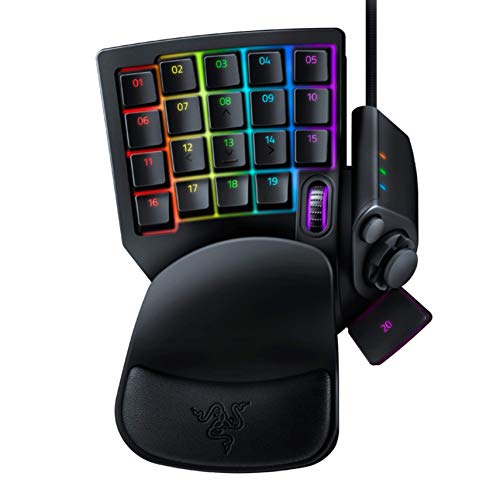
- 32 programmable keys for shortcut access
- Hypershift supports complex macros
- Eight-way thumbpad and RGB backlighting
Best For: One-handed shortcut expansion beside a standard keyboard
Best Creative Control Surface

- 14 dedicated controls for editing and color work
- Custom presets for creative applications
- Compact wired design for Windows and macOS
Best For: Editors wanting tactile, customizable control beyond a standard keyboard
Best Customizable Macro Deck

- Six LCD keys and three knobs per page
- Records macros and multi-step workflows
- Hot-swappable mechanical switches
Best For: Creators building layered, visual shortcut controls
Best DaVinci Resolve Keyboard
Logickeyboard Titan for Resolve

- Visual shortcuts for DaVinci Resolve
- Wireless Bluetooth Mac keyboard
- Backlit, rechargeable 109-key layout
Best For: Mac-based DaVinci Resolve editors wanting a full keyboard
Flexible Shortcut Control

- Up to 40 programmable shortcuts
- Dial for tactile adjustment control
- Bluetooth, dongle, or USB connectivity
Best For: Portable, customizable shortcut control
Wireless Premiere Workflow

- Shortcut-labeled Adobe Premiere Pro layout
- Backlit keys with Bluetooth connectivity
- Rechargeable full-size keyboard
Best For: Mac-based Premiere Pro editing
Plug-and-Play Premiere Editing
KB Covers Windows Premiere Pro Keyboard

- 150+ color-coded Premiere Pro shortcuts
- Backlit aluminum full-size design
- Wired USB-C with USB-A adapter
Best For: Windows Premiere Pro editing without setup
Best Dedicated Editing Controller – DaVinci Resolve Speed Editor
The Blackmagic Design DaVinci Resolve Speed Editor is a focused option for video editing keyboards, pairing dedicated editing controls with a built-in search dial. Its compact design, tactile switches, Bluetooth and USB connectivity, and included DaVinci Resolve 17 Studio activation card make it especially appealing to Resolve users.
Best For: DaVinci Resolve editors who want a compact, purpose-built control surface with included software.
Pros:
- Built-in search dial supports timeline navigation and editing control.
- Dedicated shortcuts match DaVinci Resolve editing functions.
- Bluetooth or USB connectivity and a built-in battery support flexible setups.
- Bundle includes a DaVinci Resolve 17 Studio activation card.
Cons:
- Its 17-key layout is specialized rather than a full keyboard replacement.
- The included software and controls are most relevant to DaVinci Resolve users.
- It is not water resistant.
Choose this model when dedicated Resolve controls matter more than a general-purpose keyboard. Its small footprint and dual connectivity make it practical for focused editing stations.
Best Multi-App Creative Console – Logitech MX Creative Console
The Logitech MX Creative Console is a flexible choice among video editing keyboards, combining a customizable keypad with a tactile control dial and roller. It supports profiles and integrations for Premiere Pro, Final Cut Pro, DaVinci Resolve, and other creative apps, while its LCD display keys can show custom icons.
Best For: Creators who switch between video editors and other applications and want customizable shortcuts.
Pros:
- Supports profiles for Premiere Pro, Final Cut Pro, DaVinci Resolve, and more.
- Dial, roller, and programmable keys provide tactile control for adjustments.
- Up to 15 keypad pages can be customized for different apps.
- LCD display keys support uploaded custom icons.
Cons:
- It is a standalone console rather than a full keyboard.
- The included keypad has nine customizable keys.
- USB-C connectivity and battery power requirements may add setup considerations.
This is a strong fit for a mixed creative workflow rather than a single editing application. Its broad integrations and layered profiles give it room to adapt as your shortcut needs grow.
Best Wireless Dial Controller – ULANZI D100H Editing Keyboard
The ULANZI D100H adds a wireless dial and customizable keys to the video editing keyboards category. Its stepless aluminum dial provides haptic feedback, while Bluetooth pairing, app-aware profiles, and presets for CapCut, DaVinci Resolve, and Lightroom make it approachable for both new and experienced creators.
Best For: Wireless editors who want tactile timeline, color, and creative-app adjustments in a compact controller.
Pros:
- Stepless dial offers haptic feedback for precise adjustments.
- Seven customizable keys and dual working modes support different workflows.
- Bluetooth BLE 5.0 can pair with up to three devices.
- Can control compatible Ulanzi, Philips Hue, Nanoleaf, and Govee lighting through software.
Cons:
- Continuous dial operation is rated at approximately 2.5 hours per charge.
- Some app-aware customization features require Ulanzi Studio software.
- Bluetooth compatibility depends on the computer and supported operating system.
The D100H is a practical choice if cable-free operation and a responsive dial are priorities. Its presets reduce setup time, while the software-based customization offers more control as your workflow develops.
Best Hotkey Expansion Keypad – Razer Tartarus V2
The Razer Tartarus V2 is a left-handed keypad that can expand a video editing keyboard setup with 32 programmable keys. Its mecha-membrane switches, thumbpad, macros, and RGB backlighting are designed for gaming, but the programmable layout can also provide quick access to editing commands.
Best For: Editors who want many one-handed programmable shortcuts and already use a separate primary keyboard.
Pros:
- 32 programmable keys provide substantial shortcut capacity.
- Razer Hypershift supports remapped keys and complex command combinations.
- Eight-way thumbpad adds an alternative control method.
- Mecha-membrane switches and RGB backlighting provide tactile, customizable operation.
Cons:
- It is designed primarily as a gaming keypad, not a dedicated editing controller.
- USB-A wired connectivity limits cable-free placement.
- Its left-handed layout may require an adjustment period.
The Tartarus V2 makes sense when shortcut volume is the main concern. It is less specialized for editing than the other options here, but its programmable keys can complement a standard keyboard effectively.
Best Creative Control Surface – TourBox NEO
For editors looking beyond traditional video editing keyboards, the TourBox NEO offers a compact, dedicated control surface for Premiere Pro and other creative applications. Its tactile buttons, dial, scroll control, and D-pad can keep frequently used actions within reach while reducing dependence on keyboard shortcuts and software panels.
Best For: Video editors and colorists who want customizable, ergonomic controls for Premiere Pro, Lightroom, Photoshop, and similar workflows on Windows or macOS.
Pros:
- Provides 14 dedicated controls, including a dial, scroll control, D-pad, and buttons.
- Supports application-specific presets and full customization for complex shortcuts.
- Compact design keeps frequently used controls close at hand.
- Supports creative functions such as color control and color picking through TourBox Console.
Cons:
- Wired USB connectivity limits desk placement and portability.
- Requires Windows or macOS; it does not support iPadOS, iOS, Linux, or Android.
- It supplements a keyboard rather than replacing a full keyboard.
The TourBox NEO is a focused choice for editors who value tactile, software-aware control more than a conventional keyboard layout. Its usefulness depends on spending time configuring presets around your preferred applications.
Best Customizable Macro Deck – VSD K1 Pro Macro Keyboard
The VSD K1 Pro is a programmable macro keyboard for editors who want visual shortcuts and physical knobs. Its six LCD keys, three knobs, switchable pages, and macro support can organize multi-step actions for editing, media control, app launching, or other desktop workflows.
Best For: Creators who want a highly configurable macro deck with LCD key displays, knobs, hot-swappable switches, and Windows/macOS compatibility.
Pros:
- Offers six LCD keys and three knobs per switchable page.
- Supports shortcut assignment, macro recording, and multi-step operation flows.
- LCD keys can display custom JPG, PNG, and GIF images.
- Hot-swappable PCB accepts 3-pin or 5-pin switches without soldering.
Cons:
- Display and date/time features require software installation and a wired connection.
- The standard package includes USB-A to USB-C, but not USB-C to USB-C.
- Its gaming-oriented mechanical design may be more than a straightforward editing setup needs.
The K1 Pro suits buyers who prioritize customization and visible command labels. It is especially flexible for layered workflows, though setup through the VSD software is part of getting the most from it.
Best DaVinci Resolve Keyboard – Logickeyboard Titan for Resolve
The Logickeyboard Titan is a dedicated wireless keyboard for DaVinci Resolve on Mac. Among video editing keyboards, its visual shortcut labeling, backlit keys, Bluetooth connectivity, and rechargeable battery make it a practical option for editors who want familiar full-keyboard operation with Resolve commands easier to identify.
Best For: Mac users working in DaVinci Resolve who want a full-size, backlit wireless keyboard with visible editing shortcuts.
Pros:
- Designed specifically for DaVinci Resolve on Mac.
- Backlit keys make shortcut references easier to see.
- Bluetooth connectivity and a rechargeable battery support wireless use.
- Full 109-key QWERTY layout provides conventional keyboard functionality.
Cons:
- Compatibility is focused on DaVinci Resolve and macOS rather than broad platform support.
- Backlighting supports a single color.
- It is not water resistant.
The Titan is a straightforward choice for Resolve editors who prefer a familiar keyboard over a separate macro controller. Its main advantage is the combination of dedicated visual shortcut guidance and wireless Mac operation.
Flexible Shortcut Control – XPPen ACK05 Mini Keydial
The XPPen ACK05 is a compact option for video editing keyboards when you want programmable shortcuts and dial control without giving up desk space. Its wireless, Bluetooth, dongle, and USB connection options make it easy to position beside a laptop, tablet, or main keyboard.
Best For: Editors who want portable shortcut control, customizable key layers, and a dial for timeline, zoom, or other adjustable functions.
Pros:
- Customize up to 40 shortcuts across four key sets.
- Dial provides tactile control for functions such as zooming and brush-size adjustment.
- Compact 75 g design and 1000 mAh battery offer convenient portable use.
- Supports Windows, macOS, and Linux with three connection methods.
Cons:
- Custom programming requires the appropriate driver; iPad use requires the Shortcut Remote app.
- It is a shortcut controller rather than a full-size typing keyboard.
- Charging input is limited to 5V-2A, so fast-charging plugs should not be used.
The ACK05 is best viewed as a focused editing companion rather than a standalone keyboard. Its programmable layers and dial can speed up repetitive commands, especially in a compact or mobile editing setup.
Wireless Premiere Workflow – Logickeyboard Titan for Mac
The Logickeyboard Titan is a full-size choice among video editing keyboards for Mac users working in Adobe Premiere Pro. Its dedicated shortcut labeling, backlighting, Bluetooth connectivity, and rechargeable battery are designed to keep common editing commands visible and accessible.
Best For: Mac editors who want a full-size wireless keyboard with visually labeled Adobe Premiere Pro shortcuts.
Pros:
- Designed specifically for Adobe Premiere Pro CC on Mac.
- Backlit keys make shortcut labels easier to see in dim editing spaces.
- Wireless Bluetooth operation and rechargeable battery reduce cable clutter.
- Includes USB-C connectivity and a full-size layout with 104 listed buttons.
Cons:
- Requires Mac OS 13 Ventura according to the supplied specifications.
- Its Premiere Pro focus makes it less suitable for editors using other software.
- At 2.1 pounds, it is less portable than a compact shortcut controller.
The Titan makes the most sense when Adobe Premiere Pro is central to your Mac-based workflow. The labeled, illuminated layout can reduce shortcut memorization while preserving the feel of a conventional full-size keyboard.
Plug-and-Play Premiere Editing – KB Covers Windows Premiere Pro Keyboard
The KB Covers Premiere Pro keyboard is a practical Windows option for video editing keyboards, with more than 150 color-coded shortcuts printed directly on the keys. Its wired USB-C connection, full-size layout, and standard key legends let you edit in Premiere Pro while still typing normally.
Best For: Windows Premiere Pro users who want visible shortcuts, a stable wired connection, and no driver or pairing setup.
Pros:
- Displays more than 150 color-coded Premiere Pro shortcuts on the keys.
- Full-size Windows layout includes standard Ctrl, Alt, and Windows keys.
- Backlit aluminum construction suits dim studios and late editing sessions.
- USB-C plug-and-play connection includes a USB-C to USB-A adapter.
Cons:
- Designed for Windows PC and Premiere Pro rather than broad platform use.
- Wired operation does not provide Bluetooth or wireless placement flexibility.
- Membrane switches may appeal less to users seeking a mechanical typing feel.
This keyboard is a straightforward fit for Premiere Pro editors who value visible command references over wireless convenience. The wired design avoids battery charging and pairing, while the printed labels remain useful during everyday typing and editing.
How We Picked the Best Video Editing Keyboards
We focused on keyboards and controllers that offer practical advantages for video editing rather than general typing alone. Our selections cover dedicated layouts for DaVinci Resolve and Adobe Premiere Pro, programmable keys for custom shortcuts, dials or knobs for timeline and parameter control, and compact designs suited to smaller desks.
We also considered connection options, software compatibility, backlighting, portability, and how easily each device can fit into an existing keyboard-and-mouse setup. A specialized editing controller can be valuable, but only if its controls match the applications and commands you use most.
Quick Comparison
- Best for DaVinci Resolve: The Blackmagic Design Speed Editor is built around Resolve’s editing workflow and includes Resolve Studio activation.
- Best for a flexible creative setup: Logitech MX Creative Console offers customizable controls for supported creative applications.
- Best compact wireless options: ULANZI D100H and XPPen ACK05 combine shortcut keys with a dial in portable formats.
- Best for extensive remapping: Razer Tartarus V2 and VSD K1 Pro provide programmable controls for custom layouts.
- Best dedicated software layouts: Logickeyboard Titan models and the KB Covers Premiere Pro keyboard label familiar application shortcuts directly on the keys.
Key Buying Factors for Video Editing Keyboards
Software and Shortcut Compatibility
Start with your primary editing application. A keyboard labeled for Resolve or Premiere Pro can shorten the learning curve, while a programmable controller may be more useful if you switch between applications or use custom shortcuts.
Controls Beyond Standard Keys
Dials, jog controls, knobs, and layered buttons can make timeline navigation, zooming, scrubbing, audio adjustment, and effect parameters faster. Consider whether you prefer tactile controls or a conventional full-size keyboard with shortcut legends.
Customization and Profiles
Programmable keys are most useful when the accompanying software supports macros, layers, profiles, and application-specific commands. Check how many controls can be reassigned and whether settings are stored on the device or require background software.
Connection, Size, and Lighting
Wireless models reduce cable clutter but may require charging or a receiver. Wired keyboards are typically simpler for fixed editing stations. Backlighting helps in dim rooms, while compact controllers save desk space but may not replace a full typing keyboard.
Who Should Buy Which Video Editing Keyboards?
Choose a dedicated Resolve keyboard if DaVinci Resolve is your main application and you want clearly labeled controls or a workflow designed around its tools. Choose a Premiere Pro keyboard if memorizing shortcuts is slowing you down and you prefer visible key references.
Choose a programmable macro pad or dial controller if you already own a comfortable keyboard and want faster access to custom commands. These are especially useful for editors who work across multiple applications. Choose a full creative console if you want a broader set of configurable controls for editing, design, and other creative software.
Before buying, confirm operating-system support, application compatibility, available desk space, and whether the device replaces or supplements your main keyboard. The best option is the one whose controls match the tasks you repeat throughout every editing session.
