Editing video in a home theater requires more than a comfortable keyboard. You need fast access to timelines, playback, color tools, and streaming controls without cluttering your desk or interrupting the viewing experience.
We selected 10 keyboards and shortcut controllers that suit different workflows, including DaVinci Resolve and Premiere Pro users, wireless setups, compact editing stations, and PC-connected TVs.
Best 10 Video Editing Keyboards for Home Theaters Picks for 2026
Dedicated Editing Control

- Search dial and Resolve-matched shortcuts
- Bluetooth or USB connectivity
- Includes DaVinci Resolve 17 Studio activation card
Best For: DaVinci Resolve users wanting a portable editing controller
Custom Creative Console

- Nine customizable display keys
- Dial and roller for precise adjustments
- Profiles support up to 15 keypad pages
Best For: Multi-application creative workflows
Macro Workflow Deck

- 18 programmable keys with LCD visuals
- Supports multi-step macro sequences
- USB-C connection with RGB surround lighting
Best For: Video editors and streamers using one-touch macros
Living-Room Control Pick

- Integrated touchpad for cursor control
- Up to 33-foot wireless range
- Up to 18 months of battery life
Best For: PC-connected TV and sofa-based media navigation
Custom Shortcut Pick

- Six programmable LCD keys and three knobs
- Switchable pages for custom workflows
- Hot-swappable 3-pin and 5-pin switches
Best For: Desktop editors building personalized shortcut and media-control layouts
DaVinci Resolve Specialist
Logickeyboard ASTRA2 for DaVinci Resolve

- Purpose-built for DaVinci Resolve
- Backlit 108-key Windows layout
- Includes USB cable and two-year warranty
Best For: Windows-based DaVinci Resolve editing stations
Versatile Control Hub
ULANZI D200X Stream Controller
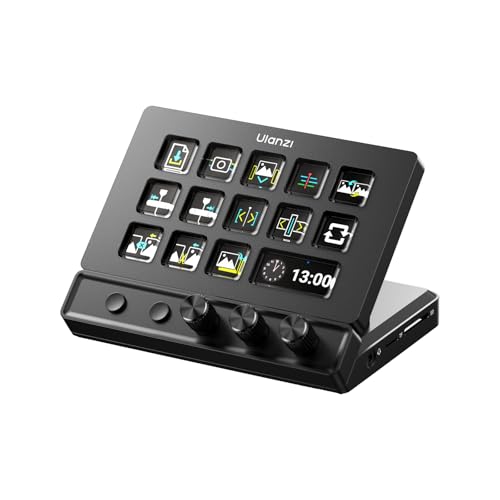
- 14 LCD keys, three knobs, and page controls
- Works with major video-editing applications
- Includes 4K HDMI and multiple hub ports
Best For: Creators who want customizable editing controls and built-in connectivity
Premiere Shortcut Workhorse
KB Covers Premiere Pro Keyboard

- 150+ printed, color-coded Premiere shortcuts
- Full-size keyboard supports normal typing
- Backlit aluminum design with USB-C connection
Best For: Windows Premiere Pro editors who prefer a familiar full keyboard
Compact Wireless Dial Pad

- Ten keys support up to 40 shortcuts
- Dial and three connection methods add flexibility
- Lightweight design with long battery life
Best For: Space-conscious editors needing a portable programmable controller
Dedicated Editing Control – DaVinci Resolve Speed Editor
For shoppers comparing video editing keyboards for home theaters, the Blackmagic Design DaVinci Resolve Speed Editor is a compact controller built around Resolve-specific editing functions. Its search dial, tactile controls, and Bluetooth or USB connectivity make it suited to a PC or Mac editing setup where fast timeline control matters.
Best For: DaVinci Resolve users who want a portable, purpose-built editing controller.
Pros:
- Built-in search dial supports precise editing navigation.
- Keyboard shortcuts are matched to editing functions.
- Bluetooth and USB connectivity provide flexible setup options.
- Bundle includes a DaVinci Resolve 17 Studio activation card.
Cons:
- Its 17-key layout is specialized rather than a full keyboard replacement.
- It is not water resistant.
- Compatibility is centered on Windows and Mac systems.
This is a strong choice when DaVinci Resolve is the center of your workflow. Buyers seeking broad customization across many applications may prefer a general-purpose macro controller instead.
Custom Creative Console – Logitech MX Creative Console
The Logitech MX Creative Console is a flexible option among video editing keyboards for home theaters, especially for users who move between creative software and media controls. It combines a programmable keypad with a tactile control dial, roller, and customizable LCD display keys.
Best For: Creators who want customizable controls for multiple editing and productivity applications.
Pros:
- Supports profiles with up to 15 keypad pages for app-specific actions.
- Works with applications including Premiere Pro, Final Cut Pro, DaVinci Resolve, Photoshop, and Lightroom.
- Control dial and roller allow precise adjustments and navigation.
- Includes a stand and three-month Adobe Creative Cloud membership offer.
Cons:
- USB-C is the listed connectivity option.
- The keypad has nine programmable keys, so extensive workflows may require multiple pages.
- It uses two AAA batteries.
Choose this console if adaptable software profiles and cross-application control are more important than a traditional keyboard layout. Its display keys and dial also make it practical for a desk-based editing station near a home theater.
Wireless Dial Controller – ULANZI D100H Video Editing Keyboard
The ULANZI D100H brings wireless control to the category of video editing keyboards for home theaters. Its aluminum alloy knob, seven customizable buttons, Bluetooth 5.1, and rechargeable battery are designed for timeline editing, color grading, photo adjustments, and everyday media controls.
Best For: Windows and Mac editors who want a compact wireless dial controller.
Pros:
- Aluminum alloy knob provides tactile adjustment with motor vibration feedback.
- Supports CapCut, DaVinci Resolve, Final Cut Pro, Photoshop, and Lightroom Classic.
- Can connect and switch between up to three devices through Bluetooth.
- Rechargeable 1000mAh battery and portable design suit flexible setups.
Cons:
- Only Bluetooth is used for connection; the USB port is for charging.
- It does not support iPad or iPhone mobile devices.
- Battery specifications list 2.5 hours of continuous use after a full charge.
The D100H is appealing when wireless placement and hands-on dial adjustments are priorities. Check your operating system and device requirements carefully before buying, particularly if mobile compatibility is important.
Macro Workflow Deck – VSD M18 Programmable Keypad
The VSD M18 is a macro-focused alternative for video editing keyboards for home theaters, offering 18 programmable keys and visual LCD icons for quick access to shortcuts. Its USB-C connection and compatibility with OBS, Photoshop, and other desktop software make it useful for editing, streaming, and media-control tasks.
Best For: Editors and streamers who need one-touch macros, app launches, and media controls.
Pros:
- Provides 18 programmable keys, including 15 LCD visual keys and three physical buttons.
- Supports single actions and multi-step macro sequences.
- LCD keys accept JPG, PNG, and GIF images or animations.
- RGB surround lighting suits dim editing, gaming, or streaming spaces.
Cons:
- Requires a wired USB-C connection.
- Native Linux plug-and-play support is not available.
- It is a macro keypad rather than a full editing keyboard.
This model makes sense for buyers who value customizable one-touch actions and clear visual labeling. It is particularly useful beside a standard keyboard for triggering editing commands, OBS scenes, launches, and playback controls.
Living-Room Control Pick – Logitech K400 Plus
The Logitech K400 Plus is a practical choice among video editing keyboards for home theaters when your setup centers on a PC-connected TV. Its integrated touchpad, wireless range, quiet keys, and media-focused layout make it useful for navigating entertainment from the sofa.
Best For: PC-to-TV entertainment setups needing wireless keyboard and cursor control in one device.
Pros:
- Built-in touchpad eliminates the need for a separate mouse.
- Wireless range reaches up to 33 feet for comfortable room-wide control.
- Battery life is rated for up to 18 months, with an on/off switch.
- Spill-resistant construction and compatibility with Windows, Android, and Chrome OS add versatility.
Cons:
- It is designed primarily for media navigation rather than dedicated editing shortcuts.
- It uses batteries and a USB Unifying receiver instead of rechargeable Bluetooth connectivity.
- The keyboard is not backlit.
Choose the K400 Plus if sofa-friendly navigation matters more than specialized video-editing controls. The touchpad and long wireless range are its main advantages for a home theater environment.
Custom Shortcut Pick – VSD K1 Pro Macro Keyboard
The VSD K1 Pro takes a customizable approach to video editing keyboards for home theaters. Its programmable LCD keys, multiple pages, knobs, and macro support can be configured for application launches, media controls, or repeated editing actions, though setup requires software and a wired connection for certain features.
Best For: Users who want programmable shortcuts, visual key labels, and dedicated knobs at a desktop editing station.
Pros:
- Six LCD keys and three knobs support custom shortcuts, macros, and media controls.
- Switchable pages allow multiple control layouts, with custom images and animations on LCD keys.
- Hot-swappable PCB accepts 3-pin or 5-pin switches without soldering.
- RGB lighting, a TFT display, and adjustable stands provide extensive customization.
Cons:
- It is wired and does not include a USB-C-to-USB-C cable.
- Screen images, GIFs, and date/time calibration require Windows or macOS software and a wired connection.
- Its specialized macro layout may require configuration before it is useful for a particular editing workflow.
The K1 Pro is the strongest fit here for hands-on customization. Its knobs and programmable pages can make frequently repeated actions more accessible, provided you are comfortable managing the companion software and a wired desk setup.
DaVinci Resolve Specialist – Logickeyboard ASTRA2 for DaVinci Resolve
The Logickeyboard ASTRA2 is the most directly specialized option among these video editing keyboards for home theaters. It is a full-size, backlit Windows USB keyboard made specifically for Blackmagic DaVinci Resolve, making it a better match for a dedicated Windows editing station than casual TV navigation.
Best For: Windows users editing in Blackmagic DaVinci Resolve who want a dedicated, backlit keyboard.
Pros:
- Designed specifically for Blackmagic DaVinci Resolve software.
- Backlighting helps with keyboard visibility in a dim home theater or editing room.
- Full-size 108-key layout provides conventional typing and editing access.
- Includes a USB cable and a two-year warranty.
Cons:
- It requires a wired USB connection.
- Compatibility is listed for Windows 10 and later, limiting cross-platform use.
- It is not water resistant and does not include an integrated touchpad.
For DaVinci Resolve users, the ASTRA2 offers the clearest software-specific focus in this roundup. It is less suitable for couch-based control, but its backlit full-size design makes sense for a dedicated Windows editing workstation.
Versatile Control Hub – ULANZI D200X Stream Controller
For shoppers comparing video editing keyboards for home theaters, the ULANZI D200X stands out as a compact control hub rather than a conventional typing keyboard. Its LCD keys, physical knobs, and page controls provide quick access to editing, playback, volume, brightness, and timeline adjustments.
Best For: Video editors and home-theater creators who want customizable controls, dial-based adjustments, and built-in connectivity in one desk accessory.
Pros:
- 14 LCD keys, three knobs, and page-turning keys expand access to 42+ functions.
- Supports Premiere Pro, Final Cut Pro, DaVinci Resolve, CapCut, and more through Ulanzi Studio.
- Built-in hub includes 4K HDMI, USB 3.2, SD/TF readers, 3.5mm audio, and 100W PD charging.
- Aluminum construction, non-slip base, and wired USB-C connection support a stable setup.
Cons:
- It is a control surface, not a full-size keyboard for regular typing.
- Advanced customization depends on Ulanzi Studio software.
The D200X is a strong fit when your home-theater editing station needs fast macro access and extra ports. Choose it over a traditional keyboard if tactile knobs and screen-based controls matter more than a full typing layout.
Premiere Shortcut Workhorse – KB Covers Premiere Pro Keyboard
For Windows users seeking video editing keyboards for home theaters, this KB Covers model combines a familiar full-size typing layout with more than 150 printed Premiere Pro shortcuts. Color-coded key labels make common cutting, trimming, timeline, and playback commands easier to identify.
Best For: Windows-based Premiere Pro editors who want a conventional keyboard with visible shortcut references and dependable wired connectivity.
Pros:
- Displays 150+ color-coded Adobe Premiere Pro shortcuts directly on the keys.
- Retains standard lettering, allowing normal typing and shortcut use on the same keyboard.
- Backlit keys and an aluminum frame suit dim studios and late-night editing.
- USB-C connection includes a USB-C-to-USB-A adapter for flexible Windows PC compatibility.
Cons:
- Designed for Windows PCs and Premiere Pro rather than broad platform compatibility.
- Shortcut markings may be less useful if you edit primarily in other software.
This is the most straightforward choice for Premiere Pro users who want shortcuts visible without giving up a full keyboard. It is less adaptable than a programmable control pad, but its plug-and-play design keeps setup simple.
Compact Wireless Dial Pad – XPPen ACK05 Shortcut Keyboard
The XPPen ACK05 offers a compact alternative for shoppers comparing video editing keyboards for home theaters. Its programmable shortcut keys, clickable dial, and wireless options make it useful when desk space is limited or you want a small controller beside a larger keyboard.
Best For: Editors who want a lightweight, portable shortcut remote with customizable key sets and dial control.
Pros:
- Ten keys can be configured across four sets for up to 40 shortcuts.
- Dial provides stepped control for adjustments such as zooming and other application functions.
- Supports Bluetooth 5.0, dongle, and USB cable connections.
- 75 g design and a 1000 mAh battery provide portability and up to about 300 hours of use.
Cons:
- Customization requires downloading and configuring the driver.
- It is a shortcut remote rather than a complete typing keyboard.
- Bluetooth support varies by operating system, and iPad use requires the Shortcut Remote app.
The ACK05 works well as a secondary editing controller for a compact home-theater workstation. Its wireless flexibility and programmable layers are appealing, though users wanting immediate, software-free customization may prefer a dedicated shortcut keyboard.
How We Picked the Best Video Editing Keyboards for Home Theaters
We focused on control, compatibility, connectivity, and physical practicality. The lineup includes dedicated editing keyboards, programmable macro pads, LCD-key controllers, wireless shortcut devices, and a touchpad keyboard for navigating a PC-connected television.
We also considered whether each product fits a shared or space-conscious room. Backlighting, Bluetooth, USB-C, customizable keys, rotary dials, and application-specific shortcuts can make a meaningful difference when editing from a sofa, side table, or dim theater environment.
Quick Comparison
| Best For | What to Look For |
|---|---|
| DaVinci Resolve editing | Dedicated Resolve shortcuts, jog controls, and bundled software where applicable |
| Premiere Pro workflows | Clearly labeled shortcuts, backlighting, and Windows compatibility |
| Compact desks | Small macro pads with programmable keys and rotary controls |
| Wireless theater setups | Bluetooth, rechargeable operation, and dependable range |
| TV and media control | Integrated touchpad, comfortable typing, and broad computer compatibility |
Key Buying Factors for Video Editing Keyboards for Home Theaters
Software and Shortcut Compatibility
Choose a dedicated keyboard if you want labeled commands and a faster learning curve in DaVinci Resolve or Premiere Pro. Programmable controllers offer more flexibility, but they may require time to configure and maintain profiles.
Layout and Control Types
Rotary knobs are useful for scrubbing, volume, zoom, and color adjustments. LCD keys can display icons or custom labels, while standard shortcut keyboards are better for frequent typing and familiar command combinations.
Connectivity and Room Placement
Bluetooth reduces cable clutter in a theater, but USB connections can provide more consistent performance during long editing sessions. Check operating-system support, charging requirements, and wireless range before placing a controller across the room.
Lighting, Size, and Comfort
Backlighting helps in dark rooms, while a compact macro pad leaves space for a mouse, tablet, or control surface. A full-size keyboard is preferable if you regularly enter filenames, captions, metadata, or long notes.
Who Should Buy Which Video Editing Keyboards for Home Theaters?
Choose a dedicated editing keyboard if you primarily use DaVinci Resolve or Premiere Pro and want labeled, ready-to-use shortcuts. Choose a macro pad with knobs if you already own a favorite keyboard and need faster control over repetitive commands, playback, or streaming.
Choose a wireless compact controller for a flexible sofa-based workstation or a small theater desk. Choose a touchpad keyboard if your main priority is navigating a PC-connected TV as well as entering occasional text. For the most adaptable setup, select a programmable device with multiple profiles and enough keys to match your editing software and media applications.
