Digitizing cassettes is much easier when you choose the right deck. The best models balance stable playback, clean output, and the connection options you need for an accurate transfer.
This roundup focuses on practical choices for home archiving, from classic dual-deck units to portable cassette-to-MP3 converters.
Best 10 Cassette Deck for Digitizing Tapes Picks for 2026
Dual-Deck Dubbing Pick
Pyle Home Digital Dual Cassette Deck

- Normal and high-speed dubbing
- 3-digit counter and auto stop
- RCA inputs/outputs for setup flexibility
Best For: People who want a full-size dual deck for dubbing and tape control
Classic Auto-Reverse Editor
Onkyo TARW244 Double Cassette Deck
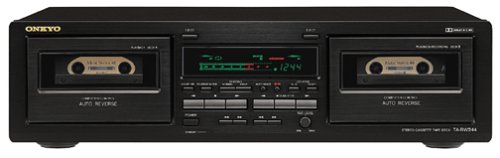
- Double auto-reverse cassette deck
- High-speed dubbing and CD synchro recording
- Dolby B/C and HxPro support
Best For: Buyers who want a traditional double deck with strong recording controls
Compact USB Converter
SEMIER Small Cassette Tape Player

- Cassette-to-MP3 conversion via SD or USB
- Includes 16GB SD card and USB reader
- Compact, USB-C or battery powered
Best For: People who want a portable converter for digitizing Type I tapes
Dual-Deck Tape Manager
Onkyo TA-RW313 Dual Cassette Deck

- Dual cassette deck format
- Original instruction manual included
- Traditional full-size stereo component
Best For: Shoppers who want a simple dual deck with the manual included
Portable Digitizer

- Direct cassette-to-MP3 conversion to USB or SD
- Plays cassettes, USB, and SD card files
- USB-C or AA battery powered for portability
Best For: Users who want a simple portable cassette-to-digital converter
Dual-Deck Recorder

- Dual-speed dubbing for cassette copying
- RCA inputs/outputs for deck-based setups
- 3-digit counter with CrO2 and auto selector
Best For: Users needing a traditional dual cassette deck for dubbing
USB Transfer Player

- USB cassette-to-MP3 conversion for PCs and laptops
- Includes software, guide, and USB power cord
- Also works as a standard portable cassette player
Best For: Users wanting an easy computer-based tape conversion kit
Archive-ready dual deck
TEAC W-1200B Dual Cassette Deck

- USB output for digital recording at up to 48kHz/16-bit PCM.
- Dual decks with one-touch dubbing and parallel recording.
- Includes pitch control, noise reduction, and repeat features.
Best For: Digitizing tape libraries on a PC or Mac with a full-size deck
Portable tape converter

- Converts cassettes to MP3 files and saves them on SD card.
- Portable with rechargeable battery, speaker, and earphones.
- Includes built-in microphone plus all needed accessories.
Best For: Travel-friendly cassette-to-MP3 conversion and casual playback
Affordable dubbing deck
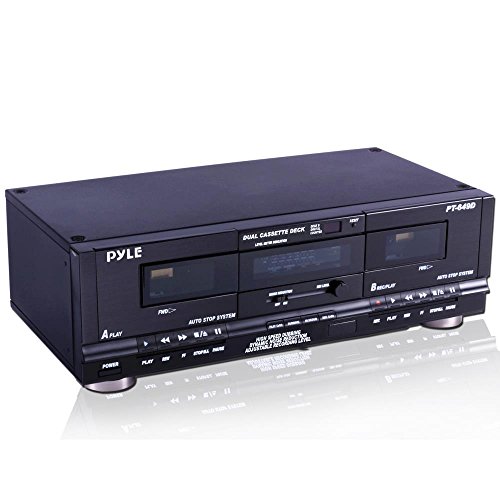
- Supports normal and high-speed dubbing.
- RCA line inputs/outputs plus digital link interface.
- Includes CrO2 selector, auto tape selector, and auto stop.
Best For: Basic dual-deck dubbing and cassette playback with analog connections
Dual-Deck Dubbing Pick – Pyle Home Digital Dual Cassette Deck
If you want a cassette deck for digitizing tapes with more hands-on control, this Pyle dual deck is built around recording, dubbing, and level management. It includes normal and high-speed dubbing, a 3-digit tape counter, CrO2 and auto tape selection, plus RCA line inputs and outputs for integration into a home audio setup.
Best For: Users who want a feature-rich dual cassette deck for copying tapes and managing playback/recording levels.
Pros:
- Dual cassette design supports normal and high-speed dubbing.
- Includes a 3-digit tape counter and auto stop for added control.
- RCA line inputs and outputs make it easier to hook into other gear.
- Dual-color fluorescent display helps with day-to-day operation.
Cons:
- Amplifier connection is listed, but the amplifier itself is not included.
- Best suited to users who want a full-size component rather than a compact converter.
This is a practical choice if your priority is tape duplication and cassette playback with more deck-style controls. It is less of a plug-and-go converter and more of a traditional dual cassette unit for a stereo rack or home audio setup.
Classic Auto-Reverse Editor – Onkyo TARW244 Double Cassette Deck
This cassette deck for digitizing tapes is geared toward users who want classic dual-deck recording features in a single component. The Onkyo TARW244 offers auto-reverse operation, high-speed dubbing, CD synchro recording, Dolby B/C noise reduction, Dolby HxPro, and record level control for more controlled transfers and dubbing tasks.
Best For: Tape owners who want a traditional double deck with recording and dubbing controls.
Pros:
- Double auto-reverse design adds flexibility for playback and recording.
- High-speed dubbing and CD synchro recording are built in.
- Dolby B/C and Dolby HxPro support help with noise management.
- Record level control, auto-space, and Rec mute add extra editing control.
Cons:
- No digital conversion features are listed in the supplied notes.
- Heavier, full-size component rather than a portable solution.
For buyers focused on traditional cassette handling, this Onkyo deck offers a useful set of recording and dubbing tools. It stands out more as a classic deck for tape management than as a modern one-button digitizer.
Compact USB Converter – SEMIER Small Cassette Tape Player
If your goal is a cassette deck for digitizing tapes in the simplest form, this SEMIER unit is built around conversion rather than a full-size deck. It can convert cassette audio to MP3 onto the included SD card or through USB using Audacity, and it also supports playback, recording, a built-in speaker, and headphone listening.
Best For: Anyone who wants a compact cassette-to-MP3 converter for Type I tapes.
Pros:
- Converts cassette audio to MP3 on SD card or via USB with included software.
- Includes a 16GB SD card and USB reader for easy storage transfer.
- Compact size and lightweight build make it easy to carry.
- USB-C or AA battery power offers flexible use.
Cons:
- Does not support Type IV or metal tapes.
- Built-in 2W speaker is useful, but this is not a full-size deck.
- Designed for small-scale conversion rather than advanced deck controls.
This is the most straightforward option here if your main job is turning old tapes into digital files. It trades the depth of a traditional deck for portability and a built-in conversion workflow.
Dual-Deck Tape Manager – Onkyo TA-RW313 Dual Cassette Deck
For shoppers looking for a cassette deck for digitizing tapes through a classic dual-deck setup, the Onkyo TA-RW313 is a straightforward option. The supplied notes only confirm that it is a dual cassette deck and include the original instruction manual, so it is best viewed as a traditional tape component rather than a feature-heavy conversion device.
Best For: Buyers who want a simple dual cassette deck and value having the original manual included.
Pros:
- Dual cassette deck format supports two-tape use.
- Original instruction manual is included.
- Full-size component for a traditional stereo setup.
Cons:
- Supplied notes do not list any digital conversion features.
- Few performance details are provided, so feature comparison is limited.
This Onkyo is the most minimal listing in the group, so it appeals mainly to buyers who want a straightforward dual deck and manual support. If digitizing is the main goal, you will need to rely on your wider setup rather than built-in conversion features.
Portable Digitizer – Cassette Tape Player Recorder
If you want a cassette deck for digitizing tapes without extra hardware or software, this compact cassette tape player makes the process straightforward. It records cassettes directly to USB or SD card, while still doubling as a portable player with speaker, headphone jack, and USB/AA battery power options.
Best For: Casual users who want a simple, portable way to convert cassettes to digital files.
Pros:
- Converts cassette tapes directly to MP3 files on USB or SD card
- Works as a cassette player, USB player, and SD card music player
- Includes built-in speaker, headphone jack, and microphone support
- Compact build with USB-C or 4 AA battery power options
Cons:
- Designed for simple direct conversion rather than advanced editing
- Smaller portable design may not suit users wanting a full-size deck
This is a practical pick if your priority is convenience: it focuses on direct cassette-to-digital conversion and adds playback features for everyday use. For a portable digitizing setup, it keeps things simple.
Dual-Deck Recorder – PyleUsa Dual Cassette Deck
If you’re looking for a cassette deck for digitizing tapes in a more traditional deck-style setup, this Pyle dual cassette unit is built around dubbing and recording control. It supports normal and high-speed dubbing, includes RCA line inputs and outputs, and adds tape management tools like a 3-digit counter and CrO2 selector.
Best For: Users who want a dual cassette deck for dubbing, recording control, and rack-style setups.
Pros:
- Dual cassette design with normal and high-speed dubbing
- Includes RCA line inputs and outputs for system connections
- Features a 3-digit tape counter, CrO2 selector, and auto tape selector
- Built-in fluorescent display and level meter controls
Cons:
- Requires 110V/220V power, so it is less portable than converter-style models
- Amplifier connection is supported, but the amplifier is not included
This model is better suited to users who want a deck with more traditional recording and dubbing controls than a simple tape-to-file converter. It’s the most practical choice here if your setup is centered on cassette handling rather than portability.
USB Transfer Player – Reshow Cassette Tape Player
For buyers seeking a cassette deck for digitizing tapes with computer-based transfer, this compact Reshow player focuses on turning old tapes into MP3 files over USB. It works with laptops and PCs, includes conversion software and a guide, and also functions as a standard cassette player with 3.5mm headphone and AUX-style compatibility.
Best For: Budget-conscious users who want a straightforward cassette-to-computer conversion kit.
Pros:
- Converts cassette tapes to MP3 format via USB
- Includes converter software, a guide, and a USB power cord
- Compatible with laptops and personal computers
- Compact and lightweight for simple everyday use
Cons:
- Conversion depends on a connected computer workflow
- Best transfer quality is noted for use in a quiet room
This is a practical entry-level option if you want to digitize tapes without a more complex deck. It is especially appealing when you value included software and a simple USB transfer process over advanced hardware features.
Archive-ready dual deck – TEAC W-1200B Dual Cassette Deck
TEAC W-1200B Dual Cassette Deck with Recorder with USB Pitch Control Karaoke-Mic-in and Remote
Check Price On AmazonIf you want a cassette deck for digitizing tapes, the TEAC W-1200B is built around that workflow while still behaving like a full-featured dual deck. It can output digital audio to a computer over USB at up to 48kHz/16-bit PCM, so you can archive tapes without adding a separate converter. It also keeps useful tape-deck features like dubbing, pitch control, and repeat playback.
Best For: Home users who want a serious dual cassette deck for archiving tapes to a computer while keeping recording and dubbing options.
Pros:
- USB digital output supports CD-quality archiving to PC or Mac.
- Dual one-way cassette mechanisms with one-touch dubbing and parallel recording.
- Noise reduction, A-B repeat, RTZ, and 12% pitch control add playback flexibility.
- Supports Normal, Chrome, and Metal tape playback, with tape type auto-detection for recording/playback modes.
Cons:
- Designed as a tabletop component, so it is not portable.
- More feature-rich than a basic tape converter, which may be more than some users need.
The W-1200B is the most complete option here if your goal is faithful tape archiving plus traditional deck functionality. Its USB output makes digitizing straightforward, while the dual-deck design adds dubbing and parallel recording for broader tape workflow use.
Portable tape converter – KLIM K7 Cassette Player
The KLIM K7 is a cassette deck for digitizing tapes if you want a simple portable converter rather than a full-size home deck. It turns cassettes into MP3 files and stores them on the included 16GB SD card, so you can move recordings without needing extra software or app downloads. It also doubles as a lightweight cassette player with speaker and earphone support.
Best For: Portable cassette-to-MP3 conversion for casual archiving and listening on the go.
Pros:
- Converts cassette tapes to MP3 files and saves them to the included SD card.
- Portable design with rechargeable battery and included earphones.
- Built-in microphone and speaker add extra recording and playback convenience.
- Includes SD card, SD card reader, Type-C cable, and user manual for an all-in-one package.
Cons:
- Does not support recording onto cassette tapes.
- More limited than a traditional deck for detailed tape handling or home hi-fi use.
This is the easiest option in the group for straightforward tape-to-MP3 conversion in a compact format. If your priority is portability and a simple workflow, the K7 gets the job done without requiring a PC-based capture setup.
Affordable dubbing deck – Pyle Home Dual Cassette Deck
If you need a cassette deck for digitizing tapes and also want a practical dubbing machine, the Pyle Home Dual Cassette Deck covers the basics well. It supports normal and high-speed dubbing, includes RCA line inputs and outputs, and offers a digital link interface for compatible amplification setups. For tape handling, it adds a tape counter, CrO2 selector, auto tape selector, and auto stop.
Best For: Users who want an affordable dual cassette deck for dubbing, playback control, and simple tape recording workflows.
Pros:
- Dual-speed dubbing gives you normal or high-speed transfer options.
- RCA line inputs and outputs provide straightforward analog connectivity.
- CrO2 selector, auto tape selector, and auto stop improve tape handling.
- 3-digit tape counter and fluorescent display make operation easier to follow.
Cons:
- No USB output is listed for direct computer digitizing.
- Best suited to basic deck duties rather than advanced archiving features.
The Pyle deck makes the most sense if you want a traditional dual-cassette setup with dubbing controls and standard analog connections. It is less focused on direct digital archiving than the TEAC model, but it remains a functional option for tape playback and copy tasks.
How We Picked the Best Cassette Deck for Digitizing Tapes
We prioritized dependable playback, clear analog output, and straightforward recording or transfer options. For a Cassette Deck for Digitizing Tapes, consistent tape handling matters more than flashy extras, so we looked for models with stable transport mechanisms, useful connectivity, and features that support archiving without adding unnecessary complexity.
We also considered compatibility with common setups, including USB, RCA, SD card, and computer-based capture workflows. Ease of use, repairability, and the ability to handle older tapes were important as well.
Quick Comparison: Which Type Fits Your Setup?
Dual cassette decks are best if you want to copy tapes, compare versions, or work through a collection efficiently. USB or computer-connected converters are usually better for simple home digitizing and faster file creation. Portable units suit users who value convenience over advanced deck controls. If your goal is the cleanest archival transfer, a stable full-size deck paired with an external recorder or audio interface is often the strongest route.
Key Buying Factors for a Cassette Deck for Digitizing Tapes
Playback Stability
Look for smooth tape transport, minimal wow and flutter, and reliable auto-reverse behavior if you need it. Stable playback has a bigger impact on digitizing quality than most extra features.
Output and Connectivity
RCA line outputs, USB digital transfer, and computer compatibility each support different workflows. Choose the connection that matches your recording method so you do not need extra adapters or complicated setup steps.
Recording and Transfer Features
Some decks can record to another tape, while others convert directly to MP3 or a computer. If your priority is archiving, direct digital output is usually more convenient, but analog decks can still deliver excellent results when paired with the right capture gear.
Condition and Maintenance Needs
For older full-size decks, belt condition, head wear, and cleaning access matter. A deck that is easy to service can save time and help maintain consistent sound quality over repeated transfers.
Who Should Buy Which Cassette Deck for Digitizing Tapes?
If you are digitizing a large personal archive, a full-size dual cassette deck is usually the most efficient choice. If you want the simplest path from tape to file, a USB cassette deck or cassette-to-MP3 converter may be better. Collectors and hobbyists who want better control over playback should lean toward traditional decks, while casual users may prefer portable models for one-off transfers.
In short, the best Cassette Deck for Digitizing Tapes is the one that matches your tape condition, your recording workflow, and how much time you want to spend on setup and maintenance.
