If your projector’s built-in audio sounds thin, quiet, or incompatible with your speakers, the right converter can make a big difference. A digital audio converter for projector helps bridge the gap between projector outputs and the sound system you actually want to use.
In this roundup, we focused on easy setup, solid format support, and practical compatibility with soundbars, receivers, and powered speakers.
Best 10 Digital Audio Converter for Projector Picks for 2026
Compact Analog-to-Optical Pick
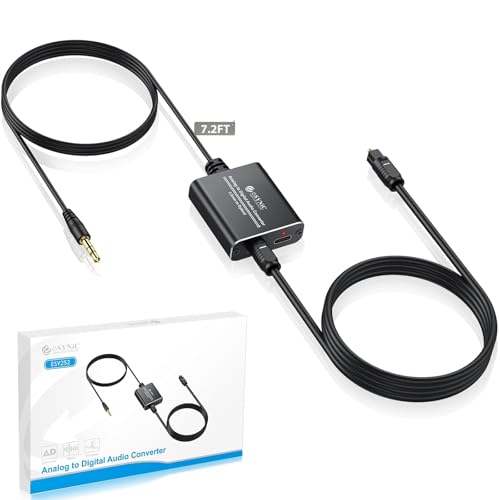
- Turns 3.5mm audio into Toslink optical
- Built-in cable and included optical lead
- Works with PCM/LPCM 2.0 stereo
Best For: Projectors or laptops connecting to optical-only soundbars
HDMI Audio Splitter Choice

- Extracts HDMI audio to optical or 3.5mm
- Supports 4K@30Hz and HDCP 1.4
- Offers 2.0CH, 5.1CH, and pass modes
Best For: HDMI projector setups needing separate audio output
ARC Soundbar Bridge

- Converts 3.5mm or RCA to HDMI ARC
- Switches easily between two analog inputs
- Built for older devices and projectors
Best For: Projectors and legacy gear feeding ARC soundbars
Simple RCA Digital Upgrade

- RCA analog in to optical and coaxial out
- Supports 2-channel LPCM at 48 kHz
- Simple install with included optical cable
Best For: RCA sources needing dual digital outputs
Flexible Dual-Output Pick
RCA and AUX to Optical Converter

- Converts RCA or 3.5 mm to optical and coaxial
- Built-in volume adjustment
- Compact aluminum body with LED indicator
Best For: Setups that need dual digital outputs from RCA or AUX sources
High-Resolution Output Option

- Converts optical SPDIF to RCA analog audio
- Built-in amplifier chip improves output volume
- Supports PCM audio up to 192kHz
Best For: Optical sources that need RCA output for speakers or amps
RCA to Optical Analog Converter

- Converts RCA or 3.5mm analog to optical and coax
- Supports 2-channel PCM at common sample rates
- Compact aluminum body with soft LED indicator
Best For: Analog source devices needing straightforward digital audio output
Analog to Digital HDMI Optical Converter

- Outputs optical SPDIF and HDMI from analog inputs
- Includes a built-in volume control knob
- USB-powered plug-and-play with broad device support
Best For: Users wanting extra output options and easy volume adjustment
Compact Analog-to-Optical Pick – 3.5mm to Toslink Converter
If you need a digital audio converter for projector use, this eSynic adapter is built for turning a projector’s 3.5mm headphone output into Toslink optical audio for a soundbar or home theater system. It’s a practical plug-and-play choice when you want cleaner digital transmission without replacing the source device.
Best For: Projectors, laptops, and other 3.5mm-output devices feeding an optical-only soundbar.
Pros:
- Converts analog 3.5mm audio to digital optical Toslink.
- Includes a built-in 3.5mm cable and optical cable for a cleaner setup.
- Supports uncompressed 2-channel PCM at 48 kHz.
- USB powered and compact enough to hide behind a desk or screen.
Cons:
- Not a digital-to-analog converter.
- Does not support Dolby Digital, DTS 5.1, or AC-3.
- Requires PCM/LPCM 2.0 output from the source device.
For simple projector audio upgrades, this model makes sense if your soundbar accepts optical input and your source is limited to a headphone jack. Just make sure the device is set to stereo PCM for the best results.
HDMI Audio Splitter Choice – 4K HDMI Audio Extractor
This HDMI audio extractor is a strong pick if your projector or source device sends audio over HDMI and you want to break it out to optical or 3.5mm. As a digital audio converter for projector setups, it’s aimed at users who need HDMI signal handling plus separate audio output for speakers or receivers.
Best For: HDMI-based projector setups that need optical or 3.5mm audio extraction.
Pros:
- Extracts audio from HDMI and outputs to optical or 3.5mm.
- Supports 4K@30Hz with HDMI 1.4 and HDCP 1.4.
- Includes 2.0CH, 5.1CH, and pass-through modes.
- USB-powered low-energy design.
Cons:
- Does not support ARC or eARC.
- TV is not supported as an input source.
- 3.5mm output is PCM 2.0 only.
If your projector chain relies on HDMI and you need a straightforward way to separate audio, this unit covers the basics well. Just match the output mode to your speaker connection and confirm your source device compatibility first.
ARC Soundbar Bridge – 3.5mm RCA to ARC Converter
For a digital audio converter for projector setups that need to feed a modern ARC soundbar, this CAMWAY adapter converts analog 3.5mm or RCA input into HDMI ARC output. It’s designed for older sources like projectors, computers, and MP3 players when the soundbar only accepts ARC audio.
Best For: Older analog sources that need to connect to an HDMI ARC soundbar.
Pros:
- Supports both 3.5mm and RCA analog inputs.
- Converts analog audio to HDMI ARC output.
- One-button input switching between 3.5mm and RCA.
- Dedicated power switch helps reduce unnecessary power use.
Cons:
- Requires an ARC-capable soundbar set to ARC mode.
- Does not support DTS 5.1 or Dolby AC3 signals.
- Cables are not included.
This is a niche but useful bridge if your projector audio needs to land on an ARC-only soundbar. It works best with simple stereo sources, so it’s worth checking your soundbar setup before buying.
Simple RCA Digital Upgrade – RCA to Optical Converter
Musou RCA Analog to Digital Optical Toslink Coaxial Audio Converter Adapter with Optical Cable
Check Price On AmazonIf your source has RCA stereo outputs and you need a digital audio converter for projector or PC audio, this Musou adapter converts analog RCA to both optical Toslink and coaxial digital at the same time. It’s a straightforward way to send stereo audio into a digital receiver without dealing with complicated settings.
Best For: RCA-output devices that need simultaneous optical and coaxial digital audio.
Pros:
- Converts RCA analog stereo to optical and coaxial outputs simultaneously.
- Supports uncompressed 2-channel LPCM at 48 kHz.
- Designed for simple installation and operation.
- Includes optical cable and a metal housing.
Cons:
- Only outputs 2-channel sound.
- Analog input does not support Dolby.
- Best suited to devices with RCA outputs.
For basic stereo audio conversion, this is a practical, no-frills option. It’s especially useful when you want both optical and coaxial digital outputs from a single analog source.
Projector-Ready Analog Upgrade – 3.5 mm to Optical Converter Cable
If you need a digital audio converter for projector use, this 3.5 mm to optical cable is a straightforward way to send analog audio from a projector, laptop, or computer to an optical soundbar. It powers by USB, needs no drivers, and is built for simple plug-and-play setup when you want cleaner digital output from a 3.5 mm source.
Best For: Projectors, laptops, and computers with 3.5 mm audio output that need an easy optical connection to a soundbar.
Pros:
- Converts 3.5 mm analog audio to Toslink optical digital output
- Plug-and-play design with USB power and no driver setup
- Supports uncompressed 2-channel PCM audio at 48KHz
- Integrated AUX and optical cables help reduce cable clutter
Cons:
- Works only as an analog-to-digital converter, not in reverse
- Limited to 2-channel PCM output, not surround sound formats
This is a practical pick if your projector only offers analog audio and your sound system relies on optical input. The built-in cables and compact design make it especially convenient for portable or low-clutter setups.
Flexible Dual-Output Pick – RCA and AUX to Optical Converter
This digital audio converter for projector setups is useful when you want to turn RCA or 3.5 mm analog audio into digital coaxial and optical output at the same time. It installs without software, supports multiple sampling rates, and adds volume control directly on the converter for easier day-to-day use.
Best For: Projector, TV, and media setups that need RCA or AUX input with both optical and coaxial output options.
Pros:
- Converts RCA or 3.5 mm analog audio to optical and coaxial simultaneously
- Includes adjustable volume control on the converter
- Supports 2-channel PCM output at 44.1K, 48K, and 96K
- Compact aluminum housing with soft LED indicator
Cons:
- Limited to stereo PCM audio, not multichannel formats
- Still requires compatible analog source output from the connected device
This model stands out if you want one adapter that can feed more than one digital audio device. The dual-output design and onboard volume adjustment make it more flexible than basic one-way converters.
High-Resolution Output Option – Optical to RCA DAC Cable
When your projector or TV sends optical audio and your speaker system uses RCA, this digital audio converter turns SPDIF into analog L/R output in a compact cable format. It supports PCM audio, includes a built-in amplifier chip, and is designed for straightforward installation with minimal extra wiring.
Best For: TVs, projectors, and media players that need optical audio converted to RCA analog output for amplifiers or speakers.
Pros:
- Converts SPDIF optical audio to analog RCA L/R output
- Built-in amplifier chip helps address low RCA output volume
- Supports sample rates up to 192kHz with 24-bit input
- Integrated 7ft RCA cable keeps setup simple
Cons:
- Only works with PCM/LPCM and not 5.1 channel formats
- Requires TV or source device to be set to PCM
- Needs USB power and a certified 5V 1A adapter for best results
This DAC is a good fit when you need optical audio from a source device converted to a basic analog connection. The amplifier chip and long built-in cable make it useful for simple home entertainment hookups.
RCA to Optical Analog Converter – RCA/AUX to Optical and Coax
If you need a digital audio converter for projector or other source gear with RCA or 3.5mm output, this model is built to turn that analog stereo signal into both Toslink optical and coaxial digital output. It is a straightforward plug-and-play choice for sending audio to a soundbar, receiver, or home theater system without software setup.
Best For: Users who want a simple RCA or 3.5mm analog-to-digital converter for TVs, projectors, and older media devices.
Pros:
- Converts RCA or 3.5mm AUX analog stereo to optical and coaxial outputs at the same time
- Supports uncompressed 2-channel PCM audio with 32kHz, 44.1kHz, and 48kHz sampling rates
- Compact aluminum housing with soft LED indicator for a low-profile setup
- Works with common sources like TV, DVD player, laptop, smartphone, and game consoles
Cons:
- Not a digital-to-analog converter, so it only works in one direction
- No volume control on the unit
- Requires unplugging power before connecting audio cables to avoid humming noise
This is a practical pick if your goal is to bridge analog output gear to modern digital audio inputs. Its simultaneous optical and coax output adds flexibility, though it is limited to stereo PCM and basic control features.
3.5mm AUX to Optical Cable – Projector Audio to Toslink
This digital audio converter for projector setups is a unidirectional 3.5mm AUX-to-SPDIF/Toslink adapter cable designed to move analog audio into an optical input. It is a practical option when you want cleaner digital transmission from a projector, laptop, or game console to a soundbar or amplifier.
Best For: People who need a 3.5mm AUX-to-optical solution for projectors, laptops, and gaming setups.
Pros:
- Unidirectional 3.5mm AUX to optical output for simple analog-to-digital conversion
- Supports 24-bit/96kHz audio plus 32kHz, 44.1kHz, 48kHz, and 96kHz rates
- Plug-and-play design with no drivers required
- Compatible with projectors, laptops, smart TVs, consoles, phones, and optical sound systems
Cons:
- Does not support reverse transmission from optical to AUX
- Optical output is stereo only, not 5.1 or 7.1
- For best use, it needs a 5V/1A USB power supply during operation
For projector owners especially, this cable keeps the setup simple while offering broad compatibility and high-resolution stereo support. Just note the directionality and stereo-only output before pairing it with your audio system.
Analog to Digital HDMI Optical Converter – AUX/RCA to HDMI + Toslink
If you want a digital audio converter for projector or home theater use with more output flexibility, this unit converts 3.5mm AUX or RCA analog audio into both optical SPDIF and HDMI audio. It also adds a built-in volume knob, which makes it easier to fine-tune playback without changing the source device.
Best For: Buyers who want analog-to-digital conversion with both HDMI and optical outputs plus onboard volume control.
Pros:
- Converts 3.5mm AUX or RCA L/R analog audio to optical SPDIF and HDMI simultaneously
- Built-in volume control knob for quick level adjustment
- USB-powered plug-and-play setup with no drivers needed
- Works with DVD players, PS4/PS5, Xbox, TVs, laptops, phones, and tablets
Cons:
- Supports 32kHz, 44.1kHz, and 48kHz sampling rates only
- Still limited to stereo audio output
- Requires a 5V power source to operate
This is the most feature-rich option in the group if you need both HDMI and optical output from an analog source. The added volume control makes it especially convenient for mixed home theater and gaming setups.
How We Picked the Best Digital Audio Converter for Projector
We prioritized models that are easy to integrate into common projector setups, especially when you need to convert optical, coaxial, HDMI ARC, RCA, or 3.5mm audio into a format your speakers can accept. We also looked for plug-and-play use, stable signal handling, and useful extras like included cables or volume control.
Quick Comparison
Not every Digital Audio Converter for Projector solves the same problem. Some are designed mainly for analog-to-digital conversion, while others handle digital output extraction from HDMI or optical sources. If your projector connects to a soundbar, choose the converter that matches the source output first, then confirm the destination input second.
Key Buying Factors for a Digital Audio Converter for Projector
Input and Output Match
Start with the projector’s available ports and the audio device you want to use. Common combinations include 3.5mm or RCA analog audio to optical, optical to RCA, or HDMI audio extraction to optical and AUX. A mismatch here is the most common buying mistake.
Supported Audio Formats
Check whether the converter supports PCM, Dolby-compatible passthrough, or stereo only. Many budget models work best with standard stereo PCM, while some HDMI extractors can handle more complex digital signals. If your projector setup is simple, stereo support is usually enough.
Power and Ease of Use
Most users want a converter that powers on reliably and works without drivers. USB-powered units and plug-and-play designs are typically best for home theater, classroom, or portable projector use.
Connection Distance and Cable Needs
Longer cable runs can introduce clutter or signal issues. If your projector is mounted far from speakers, look for a package with included cables or a design that supports the cleanest possible path between devices.
Volume and Level Control
Some converters include volume adjustment, which can be useful when balancing projector audio against a soundbar or external amplifier. This is especially helpful in mixed-brand systems where output levels vary.
Who Should Buy Which Digital Audio Converter for Projector?
If you mainly need to send projector audio to a soundbar or AV receiver, choose a model that matches the projector’s output format and offers the cleanest digital path. If you’re working with older speakers or a compact stereo setup, an analog-to-digital audio converter may be the simpler option. For home theater users who want the most flexibility, HDMI audio extractors are often the most versatile choice.
For most buyers, the best Digital Audio Converter for Projector is the one that solves the connection problem with the fewest adapters, the least setup, and the most reliable sound.
