If you need to connect modern digital gear to older speakers, receivers, or soundbars, a good converter can make the setup simple and reliable.
This roundup focuses on the best digital audio converter with coax input options for clean signal conversion, flexible inputs, and easy compatibility.
Best 10 Digital Audio Converter with Coax Input Picks for 2026
PCM Stereo Converter
OREI DA21 Coax/Optical to RCA Audio Converter

- Coaxial or optical input
- RCA L/R and 3.5mm output
- Supports up to 192kHz PCM
Best For: PCM-only sources needing simple analog stereo output
Built-In Cable Converter
LiNKFOR Coaxial to Optical Converter with Cables
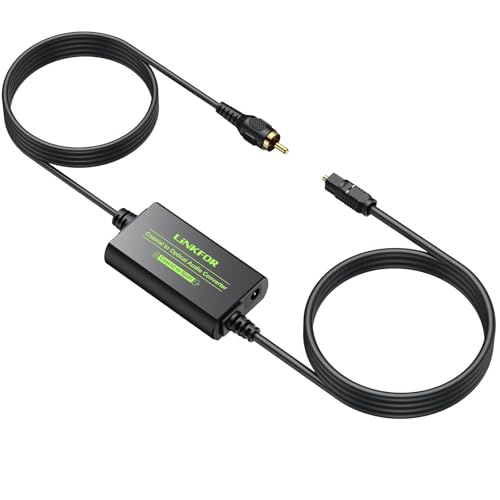
- Coaxial to optical SPDIF conversion
- Built-in 1m cables on both sides
- Supports DTS and Dolby AC3/5.1CH
Best For: Setups that need coax-to-optical conversion with built-in cables
Surround-Ready Converter
PROZOR 192K Bi-Directional Coax Optical Converter

- Bi-directional coax and optical conversion
- Supports DTS and Dolby AC3/5.1CH
- Up to 192kHz/24-bit sampling
Best For: Home theater setups needing broad digital format support
Compact Headphone-Ready DAC
Rockville RDAC5B DAC with Headphone Amp

- Coax, optical, and USB inputs
- Built-in headphone amp with volume control
- Compact aluminum design with RCA output
Best For: Home audio or gaming users who want coax input and headphone support
Bi-Directional Digital Audio Link

- Bidirectional coax and optical conversion
- Supports LPCM, AC3, DTS up to 192kHz
- Metal enclosure with included 5V power
Best For: Home theater users bridging optical and coax digital audio
Coax-to-Stereo Decoder
OREI DA34 Digital to Analog Audio Converter
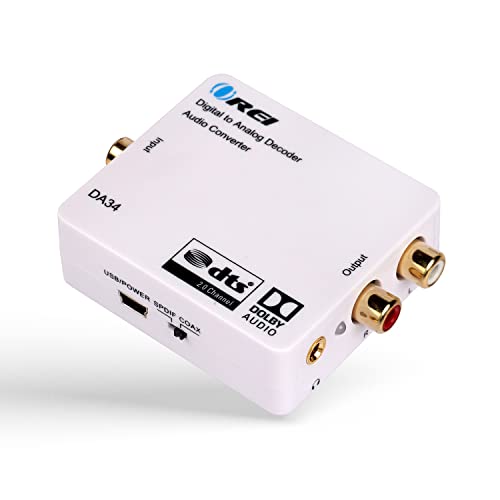
- Accepts coaxial or optical digital input
- Outputs RCA L/R and 3.5mm together
- Decodes Dolby Digital/DTS to stereo
Best For: People connecting a TV or media player to analog speakers or headphones
Compact PCM DAC
192KHz Optical/Coax to RCA Adapter

- Coax and optical input to RCA/3.5mm
- Supports up to 192KHz sample rates
- Includes cables and USB power lead
Best For: Users who need a small stereo DAC for consoles and home cinema systems
Versatile 192KHz DAC
Rybozen Optical/Coax Audio Converter

- Coax or optical input with RCA/3.5mm output
- Supports 32KHz to 192KHz sampling
- Includes optical cable and power adapter
Best For: People looking for an easy PCM-only converter for TV or player audio
PCM Stereo Converter – OREI DA21 Coax/Optical to RCA Audio Converter
If you need a digital audio converter with coax input that turns a TV or source device’s digital signal into simple stereo output, the OREI DA21 is built for that job. It accepts coaxial or optical input and outputs analog audio through RCA L/R or a 3.5mm jack, making it a practical fit for basic speakers, headphones, and older audio gear. Just note that it only supports PCM audio, not Dolby, DTS, or surround formats.
Best For: Users with PCM-only digital outputs who want RCA or headphone-style analog audio from coaxial or optical sources.
Pros:
- Converts coaxial or optical input to RCA L/R and 3.5mm analog output
- Supports sample rates up to 192kHz/24-bit
- Simple setup with plug-and-play use
- Compact cable-mount design
Cons:
- Does not convert Dolby, DTS, 5.1, or 7.1 signals
- Requires the source to be set to PCM
- Not a decoder, only a converter
For straightforward stereo conversion, the DA21 is a solid match as long as your source already outputs PCM. If you need surround decoding, this is not the right model, but for basic coax-to-analog conversion it stays focused and affordable.
Built-In Cable Converter – LiNKFOR Coaxial to Optical Converter with Cables
This digital audio converter with coax input is designed for sending a coaxial signal into an optical SPDIF/Toslink system. The LiNKFOR model is a handy plug-and-play option when you need to connect older TVs, DVD players, soundbars, or amplifiers and want a clean digital path with long built-in cables. It supports high sampling rates and is also specified for LPCM2.0, DTS, and Dolby AC3/5.1CH formats.
Best For: People who need a coaxial-to-optical digital conversion with extra cable length built in.
Pros:
- Converts coaxial digital audio to optical SPDIF
- Built-in 1m Toslink cable and 1m coaxial cable
- Supports up to 192kHz/24-bit sampling
- Works with LPCM2.0, DTS, and Dolby AC3/5.1CH
Cons:
- 5V 1A adapter is recommended but not included
- Only performs coaxial-to-optical conversion
The LiNKFOR unit stands out for convenience more than complexity: the built-in cables simplify placement, and the format support makes it suitable for many common digital audio setups. If your goal is a compact coax-to-optical link rather than analog output, it’s an easy candidate.
Two-Way Digital Bridge – Bi-Directional Coax Optical Audio Adapter
If you want a digital audio converter with coax input that can work in more than one direction, this bi-directional adapter is built for flexible S/PDIF routing. It handles coax to optical or optical to coaxial conversion, and the included cables make it easier to hook up common home theater devices without a complicated install. Because it is plug and play, it is aimed at users who want a straightforward digital bridge.
Best For: Buyers who need a simple two-way digital audio converter for coax and optical gear.
Pros:
- Supports bi-directional coax and optical conversion
- Plug-and-play setup with no software required
- Includes fiber optic, coaxial, and USB cables
- Compatible with many common AV devices
Cons:
- No detailed sampling-rate specs provided in the notes
- Designed for digital routing, not analog output
This model is a good fit when you need one compact unit to bridge coax and Toslink devices in either direction. The included accessories add value, but the product is best chosen for flexibility rather than advanced audio-format features.
Surround-Ready Converter – PROZOR 192K Bi-Directional Coax Optical Converter
For shoppers comparing a digital audio converter with coax input, the PROZOR 192K stands out as a bi-directional model that handles both coaxial and optical connections. It supports LPCM2.0, DTS, and Dolby AC3/5.1CH, and it is rated for up to 192kHz/24-bit sampling. That makes it a practical pick for home theater gear where you want digital signal conversion without losing format compatibility.
Best For: Home theater users who want a two-way coax/optical converter with broad format support.
Pros:
- Bi-directional coaxial and optical conversion
- Supports LPCM2.0, DTS, and Dolby AC3/5.1CH
- Rated up to 192kHz/24-bit sampling
- Includes optical and coaxial cables
Cons:
- Requires 5V power
- Only handles digital audio, not analog output
The PROZOR model is the most format-friendly option in this group if you need a digital bridge for surround-capable equipment. The metal shell and power indicator are useful touches, but its real appeal is broad compatibility across common AV devices.
Compact Headphone-Ready DAC – Rockville RDAC5B DAC with Headphone Amp
If you want a digital audio converter with coax input that also keeps your setup simple, the Rockville RDAC5B is built for flexible everyday use. It handles USB, optical, and coaxial sources, then sends analog audio to RCA outputs while adding a built-in headphone amp for private listening.
Best For: Home audio or gaming setups that need coax input plus headphone output and RCA playback.
Pros:
- Supports coaxial, optical, USB, and RCA inputs for broad source compatibility.
- Built-in headphone amplifier with dedicated volume control for private listening.
- Compact aluminum chassis fits easily into tight AV or desktop setups.
- Handles up to 24-bit/192kHz audio with 106dB SNR.
Cons:
- 16-bit only at the highest 176.4kHz and 192kHz rates.
- Single-channel listing may be less intuitive than standard stereo specs.
Overall, this is a practical choice if you want one small unit to cover coax input conversion, RCA output, and headphone listening without extra clutter.
Bi-Directional Digital Audio Link – SIIG Toslink/Coax Converter
For simple format switching, this digital audio converter with coax input works in either direction between coaxial RCA and Toslink optical. It supports LPCM, AC3, and DTS audio up to 192kHz, with a metal enclosure and included 5V power adapter for a straightforward install.
Best For: Users who need a bidirectional optical-to-coax or coax-to-optical bridge.
Pros:
- Converts coaxial RCA to optical or optical to coaxial.
- Supports LPCM, AC3, DTS, and up to 24-bit/192kHz audio.
- Built-in selection switches make direction changes easy.
- Metal enclosure helps reduce EMI/RF noise interference.
Cons:
- Does not convert digital audio to analog outputs.
- Requires external 5V power.
This is a good pick when your priority is bridging two digital connections rather than adding RCA analog playback. The bidirectional design makes it especially useful for mixed home theater gear.
Budget DAC With Dual Outputs – PROZOR Optical/Coax to RCA
If you need a digital audio converter with coax input that feeds older analog gear, the PROZOR DAC is a straightforward option. It converts coaxial or Toslink PCM audio to RCA and 3.5mm analog output at the same time, with support up to 192kHz/24-bit and an aluminum alloy housing.
Best For: TVs, game consoles, and home cinema setups that need coax or optical digital-to-analog conversion.
Pros:
- Converts coaxial or optical digital audio to RCA and 3.5mm analog output simultaneously.
- Supports up to 192kHz/24-bit PCM audio.
- Includes optical cable and USB power cable for easier setup.
- Aluminum alloy housing improves shielding and heat dissipation.
Cons:
- Works with uncompressed 2-channel LPCM/PCM only.
- Requires 5V USB power; adapter is not included.
For basic digital-to-analog conversion, this model covers the essentials well and adds a 3.5mm output for more flexible listening. It is best suited to simple stereo systems rather than surround-processing needs.
Coax-to-Stereo Decoder – OREI DA34 Digital to Analog Audio Converter
If you need a digital audio converter with coax input that turns TV or player sound into simple analog output, the OREI DA34 is built for that job. It decodes Dolby Digital/DTS sources to 2-channel stereo and gives you both RCA L/R and 3.5mm headphone outputs, so it works well with older speakers or headphones.
Best For: Users who need coax or optical digital audio converted to analog stereo for speakers or headphones.
Pros:
- Supports SPDIF optical and coaxial digital audio input.
- Outputs to RCA L/R and 3.5mm headphone at the same time.
- Converts Dolby Digital/DTS sources to 2-channel stereo.
- Compact build with a 1-year warranty.
Cons:
- Requires the source device to be set to PCM in some setups.
- Won’t pass through as multichannel analog; output is stereo only.
The DA34 is a practical choice when coax input compatibility matters and you want a straightforward way to feed analog listening gear. It is best suited for basic stereo playback rather than advanced surround decoding.
Compact PCM DAC – 192KHz Optical/Coax to RCA Adapter
This digital audio converter with coax input is designed for simple PCM conversion when you need to send digital sound to analog gear. It accepts coaxial or optical input and outputs RCA L/R plus a 3.5mm jack simultaneously, making it a handy pick for basic home theater or console setups.
Best For: Buyers who want a compact coax or optical DAC for 2-channel analog audio.
Pros:
- Converts coaxial or Toslink PCM to analog RCA and 3.5mm output.
- Supports sample rates up to 192KHz and 24-bit S/PDIF input.
- Includes optical cable and USB power cable in the box.
- Metal housing helps with shielding and heat dissipation.
Cons:
- Does not support 5.1-channel Dolby audio.
- Requires the source to be set to PCM for proper operation.
For a straightforward stereo DAC, this model keeps setup simple and covers a wide range of common devices. It is a better fit for PCM-based audio chains than for surround-sound extraction.
Versatile 192KHz DAC – Rybozen Optical/Coax Audio Converter
If you want a digital audio converter with coax input for easy stereo playback, this Rybozen model covers the essentials. It converts coaxial or optical PCM signals to RCA L/R and 3.5mm jack output, and it comes with an optical cable and power adapter for a simple plug-and-play setup.
Best For: Shoppers who want a basic coax or optical-to-analog converter with dual output.
Pros:
- Supports coaxial and optical digital audio input.
- Outputs to RCA L/R and 3.5mm jack at the same time.
- Supports sample rates from 32KHz to 192KHz.
- Includes an optical cable and power adapter.
Cons:
- Only supports uncompressed 2-channel PCM/LPCM audio.
- Not suitable for 5.1-channel output.
This is a practical choice if your source can output PCM and you want a no-fuss way to connect analog speakers or headphones. It focuses on compatibility and ease of use rather than surround sound support.
How We Picked the Best Digital Audio Converter with Coax Input
We prioritized models that accept coaxial digital audio and deliver dependable output to common analog or optical connections. Compatibility, supported sample rates, input flexibility, and ease of setup mattered most, along with build quality and practical features like headphone or RCA output.
Quick Comparison
Some units in this roundup are true DACs that convert digital coax to analog audio, while others are bidirectional converters that switch between coaxial and optical formats. If you need to feed speakers or an amp, look for RCA or 3.5mm output. If you are linking source devices and AV components, a bidirectional model may be the better fit.
Key Buying Factors for a Digital Audio Converter with Coax Input
Input and Output Match
Check that the converter supports your source device on one side and your playback device on the other. A Digital Audio Converter with Coax Input should clearly list coaxial compatibility, plus the exact output you need, such as RCA, 3.5mm, or optical.
Digital Format Support
Not all converters handle the same formats. Look for support for PCM where needed, and verify whether the unit handles stereo only or also decodes multichannel signals. If you are connecting a TV, console, or set-top box, format support can determine whether you get sound at all.
Resolution and Signal Quality
Higher advertised sample rates such as 192kHz can be useful, but they are not a guarantee of better real-world performance. Pay more attention to stable decoding, low noise, and consistent output level.
Power and Setup
Most converters need USB or wall power. Choose a model with simple cabling and clear indicator lights if you want a hassle-free install behind a TV cabinet or stereo rack.
Who Should Buy Which Digital Audio Converter with Coax Input?
If you want to connect a coaxial source to powered speakers or an older amplifier, choose a DAC with RCA or 3.5mm analog output. If you are bridging two digital devices, a bidirectional coax/optical converter makes more sense. For home theater users who need flexible decoding, pick a model that explicitly supports your audio format and output layout.
In short, the best choice depends on whether you need conversion from coax to analog, coax to optical, or both. Match the converter to your exact system first, then compare power, format support, and connection convenience.
