If you need to manage multiple sources without crawling behind your gear, an audio switcher with remote control makes the setup much easier. It lets you change inputs from the couch while keeping your system neat and flexible.
From optical and RCA models to HDMI options, the best picks for 2026 balance convenience, compatibility, and clean signal handling.
Best 10 Audio Switcher with Remote Control Picks for 2026
BlueRigger optical hub

- Three optical inputs to one output
- IR remote and manual button control
- Supports Dolby Digital and DTS 5.1
Best For: users with multiple optical sources and one display or sound system
FlyroadUp analog selector
4x1 RCA/3.5mm bi-directional switch
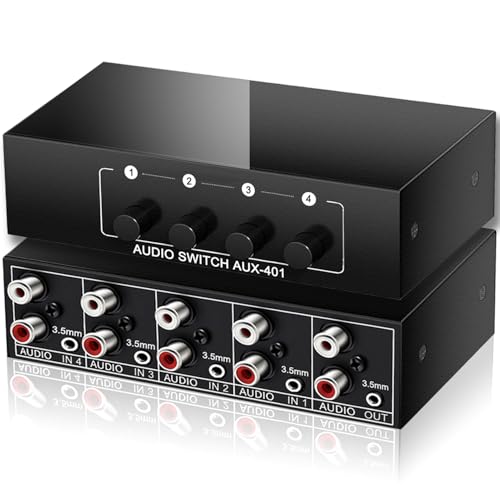
- Bi-directional 4-in-1 or 1-in-4 routing
- No power needed, push-button switching
- Works with RCA L/R and 3.5mm AUX
Best For: simple analog setups with mixed RCA and 3.5mm devices
cooidea auto switch
3x1 Toslink auto switch with remote

- Automatically detects active optical sources
- Remote plus manual button control
- Supports 192k/24-bit and 5.1 formats
Best For: optical setups where automatic source switching matters
ATNEDCVH RCA hub
4-way RCA switcher with remote

- 4-in-1 or 1-in-4 RCA routing
- Remote and manual switching supported
- Includes RCA-to-3.5mm adapter cables
Best For: analog home audio setups that need flexible RCA routing
Vintage Audiophile Choice
Fosi Audio LC30 VU Meter Switch Box

- Two inputs and two outputs with four configurations
- Remote and button control for quick switching
- Dual VU meters with adjustable brightness
Best For: Amp and speaker comparisons in a stereo setup
HDMI Multi-Input Pick

- Four HDMI inputs for one display
- Remote control with one-click switching
- Supports 4K@60Hz, HDR, Dolby, and DTS
Best For: One HDMI display shared by multiple devices
Optical 4x1 Pickup

- 4 optical inputs to 1 output
- IR remote and 3ft cable included
- Supports LPCM 2.0, DTS, Dolby-AC3
Best For: Optical setups that need simple remote source switching
RCA Mirror Switcher

- 4 RCA inputs to 3 mirrored outputs
- Manual and IR remote switching
- Plug-and-play with metal casing
Best For: Legacy AV setups that need one source duplicated to multiple screens
BlueRigger optical hub – 3×1 Toslink with IR remote
If you need an audio switcher with remote control for a Toslink-only setup, this BlueRigger 3×1 optical switch is built for simple source sharing. It connects three digital optical sources to one output and supports LPCM 2.0 plus common surround formats like Dolby Digital and DTS 5.1. Use the remote or the manual button for quick switching, but note that it does not auto-switch.
Best For: Home theater or gaming setups with multiple optical sources and one soundbar, amp, or speaker output.
Pros:
- 3-in-1 Toslink switching for three optical sources
- Includes IR remote plus manual switch button
- Supports LPCM 2.0, 192kHz/24-bit, DTS/Dolby-AC3, and Dolby Digital/DTS 5.1
- Metal housing and advanced IC chipset for stable transmission
Cons:
- Does not support auto-switching
- Requires a power cable for best performance and does not include a power adapter
- Toslink cables should be kept under 50 ft
For buyers who want a straightforward optical hub with remote-based control, this model covers the essentials without extra complexity. Its universal TOSLINK compatibility makes it a practical fit for common AV gear, as long as you are comfortable with manual source selection.
FlyroadUp analog selector – 4×1 RCA/3.5mm bi-directional switch
This audio switcher with remote control is a flexible analog option for mixing RCA and 3.5mm gear. It works both ways, letting you connect four sources to one speaker or route one source to four outputs, with only one output playing at a time. Because it is passive and plug-and-play, it is a simple choice for desks, media cabinets, and mixed-device setups.
Best For: Analog audio setups that need simple bidirectional switching without external power.
Pros:
- Bi-directional design supports 4-in-1 or 1-in-4 routing
- Works with both 3.5mm AUX and RCA L/R connections
- No power required and easy push-button operation
- Compact metal enclosure for durability
Cons:
- Only one output plays at a time
- Passive design is limited to analog audio sources
- No advanced features like auto-switching
If you mainly need reliable analog source management, this selector keeps the setup simple and tidy. It is especially useful for people who want fast manual switching and broad compatibility between phones, PCs, TVs, consoles, and home audio components.
Cooidea auto switch – 3×1 Toslink auto switch with remote
If you want an audio switcher with remote control that can also handle source changes on its own, this cooidea 3×1 optical switch is a strong fit. It automatically detects active Toslink channels and can switch when the current source mutes or powers off. It also supports manual button control and a remote, making it convenient for a living room or console stack.
Best For: Users who want automatic source detection plus remote control for optical audio gear.
Pros:
- Auto-detects active optical inputs and can switch when a source goes inactive
- Includes remote control and manual switch button
- Supports up to 192kHz/24-bit and LPCM2.0, DTS, Dolby-AC3 5.1
- Memory function and LED indicators help keep settings clear
Cons:
- Limited to digital optical/TOSLINK devices
- Only three input ports are available
- Small open design may not appeal to buyers wanting a more enclosed unit
This model stands out for convenience because it combines automatic switching with remote-based control. For users who frequently move between an HDTV, console, or Blu-ray player, that can reduce manual input changes without giving up hands-on control.
ATNEDCVH RCA hub – 4-way RCA switcher with remote
This audio switcher with remote control is aimed at people who want easy analog routing without constant cable swapping. It supports 1-in-4 or 4-in-1 RCA switching, and the 4-way path can output simultaneously. The unit also includes manual switching, a remote, and a Type-C 5V power input for stable operation.
Best For: RCA and 3.5mm audio systems that need flexible routing and remote operation.
Pros:
- Bi-directional 4-way RCA switching with simultaneous output support
- Remote control and manual switch button both included
- Includes two RCA-to-3.5mm adapter cables for broader compatibility
- Aluminum alloy case helps with interference resistance and heat dissipation
Cons:
- Remote does not include the coin cell battery
- Requires Type-C 5V power
- Primarily focused on RCA/3.5mm analog gear
For a compact analog switch box, this one offers a lot of flexibility in how you route audio. The included adapter cables make it easier to integrate with common home audio devices, and the remote adds convenience when the box is tucked away.
Optical Hub Pick – eSynic 3-in-1 Optical Audio Switcher
If you want an audio switcher with remote control for a single soundbar or optical input, this eSynic unit keeps things simple: connect up to three optical sources and switch between them without crawling behind your setup. It supports Dolby Digital, DTS, and LPCM 2.0, and the included IR remote makes couch-side source changes fast and convenient.
Best For: Homes with a TV, console, Blu-ray player, or streaming device sharing one optical sound system.
Pros:
- 3-in-1 optical switching with zero signal loss for one output.
- IR remote offers up to 10 m range plus manual button control.
- Aluminum housing is designed to improve shielding and heat dissipation.
- Plug-and-play design draws power from connected ports, with no drivers required.
Cons:
- Works with optical connections only, so it is not for HDMI setups.
- Audio format support is centered on Dolby Digital, DTS, and LPCM 2.0.
This is a practical pick if your main goal is to reduce cable swapping and keep one optical sound system organized. The combination of remote switching, LED source indicators, and compact build makes it a straightforward fit for everyday home theater use.
Vintage Audiophile Choice – Fosi Audio LC30 VU Meter Switch Box
The Fosi Audio LC30 is a standout audio switcher with remote control if you want A/B-style convenience and a little visual flair in a home stereo setup. Its two-input, two-output layout supports four configurations, while the dual large VU meters add adjustable brightness and a classic look that works especially well with high-power stereo and tube amps.
Best For: Audiophiles who want to compare amps or speakers with a remote and VU meter display.
Pros:
- Two inputs and two outputs support four switching configurations.
- Remote and button control make amp or speaker switching easy.
- Dual VU meters include five brightness levels and adjustable needle sensitivity.
- Built with aluminum alloy construction and premium components for minimal sound impact.
Cons:
- More specialized than a simple input switcher, so it suits stereo systems rather than TV setups.
- Designed around speaker and amplifier switching, not digital audio formats.
If you want a functional selector that also doubles as a visual centerpiece, the LC30 delivers a strong mix of style and utility. Its remote operation, solid build, and high-power support make it especially appealing for careful listening comparisons.
HDMI Multi-Input Pick – Anker 4-in-1 4K HDMI Switch
For anyone shopping for an audio switcher with remote control that also handles video, this Anker HDMI switch is built for simple source management across a 4K setup. It turns one HDMI output into four inputs, supports 4K at 60 Hz along with HDR, 3D, Dolby, and DTS, and includes remote control plus one-click switching for easy use.
Best For: People who need one HDMI display to share between several devices like a PC, console, laptop, or projector.
Pros:
- 4-in-1 HDMI switching expands a single output into four inputs.
- Supports 4K@60Hz plus HDR, 3D, Dolby, and DTS.
- Remote control and one-click switching simplify daily use.
- Includes a USB-A to USB-C charging cable for powered operation.
Cons:
- HDMI cables are not included.
- Does not support HDMI CEC.
- Charger and batteries are not included.
This is the most versatile option here if your setup revolves around HDMI sources rather than optical or speaker-level connections. It is a clean, modern pick for swapping between work and entertainment devices without sacrificing 4K signal quality.
Optical 4×1 Pickup – LiNKFOR 4×1 Toslink Switch
If you need an audio switcher with remote control for optical sources, the LiNKFOR 4×1 Toslink switch keeps setup simple. It lets you route four SPDIF/TosLink inputs to one output, works with common formats like LPCM 2.0, DTS, and Dolby-AC3, and includes an IR remote plus a 3ft optical cable.
Best For: Users who want a compact optical switch for a TV, receiver, or console setup with easy remote source selection.
Pros:
- 4-in-1-out optical switching for multiple sources
- Includes IR remote control and 3ft optical cable
- Supports LPCM 2.0, DTS, and Dolby-AC3
- Aluminum alloy casing and over-voltage protection
Cons:
- Does not support 7.1CH, Dolby Digital Plus, or Dolby TrueHD
- Optical-only design limits it to SPDIF/TosLink connections
This is a practical pick if your gear uses optical audio and you want a straightforward switch with remote convenience. The long-distance transmission claim and metal enclosure add appeal for tidier, more permanent installations.
RCA Mirror Switcher – Koopman 4 In 3 Out RCA Box
This RCA switcher with remote control is built for older AV gear that still relies on composite video and L/R audio. The Koopman box takes four RCA input sources and distributes the same signal to up to three displays, with manual switching or IR remote control for easier day-to-day use.
Best For: Homes, classrooms, or retro game setups that need one RCA source mirrored to multiple monitors or TVs.
Pros:
- 4-input to 3-output RCA distribution
- Remote control and manual switching options
- Supports up to 1080p resolution
- Metal casing with anti-skid feet and plug-and-play setup
Cons:
- Not a matrix switch; all outputs mirror the same source
- Requires DC 5V power
If you need to duplicate one AV source rather than route different signals independently, this box fits the job well. It is especially useful for connecting legacy consoles, DVD players, and projectors without adding complicated setup steps.
Dual-Output Optical Hub – PROZOR 3 In 2 Out Toslink Switch
For buyers looking for an audio switcher with remote control that can also feed two destinations, the PROZOR SPDIF/Toslink unit is a flexible option. It accepts three optical inputs, sends audio to two outputs, and supports both manual and IR remote switching while handling LPCM 2.0, DTS, and Dolby-AC3.
Best For: People who want to switch optical sources and split audio to a soundbar plus a second device.
Pros:
- 3 optical inputs and 2 outputs for added routing flexibility
- Remote control and manual switching included
- Supports LPCM 2.0, DTS, and Dolby-AC3
- Type-C power port and bonus 1m optical cable
Cons:
- Limited to optical/SPDIF connections
- Output distance tops out at 25 meters
This model stands out if you need both switching and two-way output in one compact box. The Type-C power input and included cable make it easier to integrate into a modern home theater or headphone-sharing setup.
How We Picked the Best Audio Switcher with Remote Control
We focused on practical features that matter in real setups: remote convenience, input/output flexibility, supported audio formats, build quality, and power requirements. For an Audio Switcher with Remote Control, reliability matters just as much as the number of ports, so we favored products that are easy to use and broadly compatible with common home audio and entertainment systems.
Quick Comparison
Optical switchers are best for TVs, soundbars, consoles, and AV receivers that use SPDIF/Toslink. RCA switchers fit older stereos, powered speakers, and analog gear. HDMI switchers are the better choice when you want to route both audio and video from multiple modern devices through one display.
Key Buying Factors for an Audio Switcher with Remote Control
Connection Type
Match the switcher to your equipment first. Optical models preserve digital audio for compatible devices, while RCA and 3.5mm options are more useful for analog sources. HDMI is ideal if you want one remote-controlled hub for streaming boxes, PCs, and game consoles.
Input and Output Layout
Check whether you need 3-in-1-out, 4-in-1-out, or a bi-directional design. Some units act as splitters as well as switchers, but not every setup supports both directions equally well. Choose the simplest layout that fits your system to reduce signal confusion.
Format Support
Make sure the unit supports the audio formats you actually use, such as PCM 2.0, Dolby Digital, DTS, or higher-bandwidth HDMI formats. If you use a soundbar or AVR, confirm compatibility before buying.
Power and Control
Some switchers are passive, while others need USB or external power for stable performance and remote operation. If you want dependable switching from a distance, powered models are often the safer choice.
Build and Placement
Aluminum housings, clear port labeling, and compact sizes make the device easier to integrate into tight entertainment centers. A good remote-controlled switch should feel simple enough to use daily, not just functional on paper.
Who Should Buy Which Audio Switcher with Remote Control?
If you mainly use a TV, console, and soundbar, look at optical or HDMI models with remote selection. For vintage receivers, powered speakers, or legacy audio gear, RCA switchers are the better match. If you want the easiest all-around convenience, choose the option with the best combination of remote control, supported formats, and the right number of ports for your current and future devices.
