Last updated on October 23rd, 2026
Good desktop audio shouldn’t take over your desk. Compact computer speakers can make calls, videos, and everyday listening easier to hear while leaving room for your monitor, keyboard, and work.
This roundup covers ten space-conscious options, including traditional stereo pairs, Bluetooth-capable speakers, and models that mount to a monitor. The best choice depends on your available space, connection ports, and how you plan to listen.
Best 10 Compact Computer Speakers Picks for 2026
Best Monitor-Mounted Option
Cyber Acoustics CA-2890 Speaker Bar

- Clips to monitors up to 1 inch thick
- One USB cable for audio and power
- Volume, mute, and playback controls
Best For: Clear desks and compatible monitor setups
Best Angled Desktop Pair
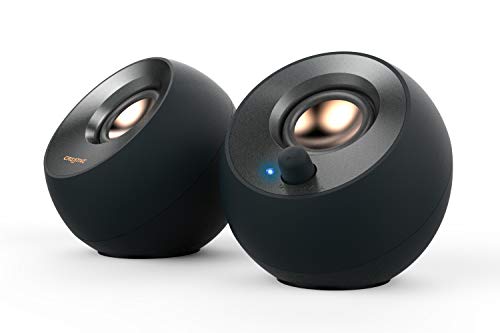
- 45-degree angled 2-inch drivers
- USB-C power with USB-A adapter
- 3.5mm audio input required
Best For: Minimalist desks needing a stereo pair
Best Basic USB Pair
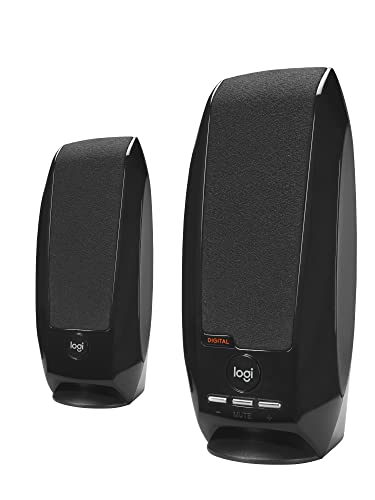
- One USB-A connection for audio and power
- Front-mounted volume and mute
- 1.2W RMS, 2W peak output
Best For: Simple desktop listening via USB-A
Best Slim AUX Speaker Bar

- 10.2-inch-wide low-profile bar
- Dual 3W stereo speakers
- Requires 3.5mm audio and USB-A power
Best For: Tight desks with an AUX-equipped device
Most Versatile

- USB-C audio and power
- Bluetooth 5.0 and 3.5 mm input
- Angled drivers and Clear Dialog
Best For: Tidy desks needing wired and wireless playback
Simple Wired Pair
Amazon Basics Stereo 2.0 Speakers

- USB-powered stereo pair
- In-line volume control
- 3.5 mm wired audio
Best For: Basic PC or laptop setups with a 3.5 mm output
Desk-Saving Clip-On

- Clips onto a monitor
- USB audio with USB-C adapter
- Touch controls and adaptive channels
Best For: Crowded desks with a compatible USB audio source
Best for Angled Desktop Audio

- 30° upward-facing design
- 14W stated total output
- USB power and 3.5mm audio
Best For: Desktop users who want small, angled stereo speakers
Best Monitor-Mount Option

- Clamps to a monitor or stands on a desk
- Adapts stereo channels to mounting position
- USB-C adapter included
Best For: Users who want to free up desktop space
Best Basic Plug-and-Play Pair
Amazon Basics USB-Powered Speakers

- No-driver setup
- Front power and volume control
- 3.5mm headphone jack
Best For: Basic desktop or laptop stereo audio
Best Monitor-Mounted Option – Cyber Acoustics CA-2890 Speaker Bar
The Cyber Acoustics CA-2890 is a practical choice for compact computer speakers when you would rather keep the desktop clear. Its 8.3-inch speaker bar clips beneath most monitors up to 1 inch thick, and one USB connection handles both power and audio.
Best For: Monitor setups that need easy-access sound without two separate desktop speakers.
Pros:
- Clip-on design saves desk space; it can also sit on a desktop.
- Single-cable USB setup includes a USB-A to USB-C adapter.
- On-speaker volume, mute, and play/pause controls are convenient.
Cons:
- Clip fits monitors only up to 1 inch thick.
- Wired USB connection limits placement relative to the computer.
Choose this one if freeing desk space matters most. The 10W rating and forward-facing placement make it a sensible all-in-one speaker bar, provided your monitor suits the clip.
Best Angled Desktop Pair – Creative Pebble V2
The Creative Pebble V2 brings a tidy two-speaker layout to a roundup of compact computer speakers. Its 45-degree angled drivers aim sound toward the listener, while rear passive radiators support fuller bass than the small enclosures might suggest.
Best For: Minimalist desks where you want a separate left and right speaker with a front-mounted volume knob.
Pros:
- Angled 2-inch drivers direct audio toward your seating position.
- USB-C power includes a USB-A adapter for older computers.
- High-gain mode can deliver up to 8W RMS when connected to a 10W USB port.
Cons:
- Requires both USB for power and a 3.5mm connection for audio.
- Two speakers occupy more desk surface than a single bar.
Pebble V2 is a strong fit if you value a stereo pair and straightforward knob control. Check that your device has a 3.5mm audio output, and use a suitable 10W USB port if you want its higher-gain output.
Best Basic USB Pair – Logitech S150 USB Speakers
The Logitech S150 keeps compact computer speakers simple: connect its USB-A cable to your computer for both power and digital audio. The slim, lightweight pair suits everyday desktop listening without a separate audio lead.
Best For: A straightforward USB-A speaker setup for a desktop computer.
Pros:
- Single USB-A connection makes setup quick.
- Volume and mute controls sit on the front of the right speaker.
- Slim, lightweight speakers are easy to reposition.
Cons:
- USB-A connection may require an adapter on computers without that port.
- Rated at 1.2W RMS and 2W peak, so it is a modest-power choice.
If your priority is clear, uncomplicated computer audio rather than high output, the S150 covers the essentials. Its front controls are especially handy for quick volume changes and muting.
Best Slim AUX Speaker Bar – 1Mii ST-18
The 1Mii ST-18 offers compact computer speakers in a narrow, 10.2-inch-wide bar that can fit beneath a monitor or into a tight desk space. It uses a 3.5mm jack for audio and USB-A for power, with a rotary volume knob on the front.
Best For: Desks with limited room and a device that has a 3.5mm audio output.
Pros:
- Low-profile 10.2-by-2.4-by-2.5-inch design saves desk space.
- Dual 3W speakers provide stereo output.
- Front volume knob and anti-slip silicone pads add everyday convenience.
Cons:
- Both the USB-A power cable and 3.5mm audio cable must be connected.
- Not suitable for devices without a compatible AUX output.
This is a sensible pick when you prefer a single bar and have the required ports. If you hear static, the product guidance recommends using a USB power adapter for power.
Most Versatile – Creative Pebble V3
The Creative Pebble V3 is a flexible pick among compact computer speakers, combining single-cable USB-C audio with Bluetooth 5.0 and a 3.5 mm input. Its angled drivers aim sound toward your ears while keeping the desktop footprint small.
Best For: Desks that need tidy computer audio and occasional wireless playback from a phone.
Pros:
- USB-C handles both audio and power; a USB-A adapter is included.
- Bluetooth 5.0 and 3.5 mm input offer additional connection options.
- Clear Dialog processing is designed to make speech easier to follow.
Cons:
- The 3.5 mm audio cable is not included.
- The amplified gain mode requires a 10W USB port.
Choose the Pebble V3 if connection flexibility matters as much as desk space. Check your USB port’s power output if you plan to use its amplified mode.
These Amazon Basics compact computer speakers offer a straightforward way to boost PC or laptop audio: they draw power from USB and take audio through a 3.5 mm connection. An in-line volume control keeps adjustments within easy reach.
Best For: A basic wired desktop setup with USB power and a 3.5 mm audio output.
Pros:
- USB power avoids a separate power adapter.
- In-line volume control is easy to access.
- Padded bases help protect the desk surface.
Cons:
- Requires both a USB port for power and a 3.5 mm audio connection.
- No wireless connectivity.
This pair makes sense when simplicity is the priority. Its bottom radiators are designed to add a springy bass character, but connectivity stays strictly wired.
For compact computer speakers that leave the desktop clear, this XKX soundbar clips to a monitor or sits on the desk. It connects through USB, includes a USB-C adapter, and uses a sensor to keep left and right channels correctly positioned when mounted above or below the screen.
Best For: Computer setups where monitor mounting saves valuable desk space.
Pros:
- Clip-on mount supports top, side, or bottom monitor placement.
- USB connection and included USB-C adapter suit a range of compatible devices.
- Front touch buttons control volume and mute.
Cons:
- Not compatible with monitors, TVs, or projectors as audio sources.
- No Bluetooth or 3.5 mm audio connection.
Its mounting options are the main draw if two separate speakers would crowd your desk. Confirm that your computer can output audio over USB before buying.
Best for Angled Desktop Audio – FUNLOGY 14W Stereo Speakers
These compact computer speakers pair a small desktop footprint with a 30° upward tilt that directs sound toward your ears. Dual 48mm drivers and passive radiators deliver 14W of stated total output, making them worth considering if you want more output without large speaker cabinets.
Best For: Desktop users who want compact, angled stereo speakers and have both USB power and a 3.5mm audio connection available.
Pros:
- 30° tilt aims sound toward the listener.
- 14W stated total output from dual 48mm drivers.
- Volume dial and plug-and-play wired setup.
Cons:
- Requires both USB power and a 3.5mm audio connection.
- No wireless connectivity.
The angled design is its practical advantage on a crowded desk. Check that your device has the connections this wired setup needs before buying.
Best Monitor-Mount Option – XKX Clip-On USB Soundbar
If desk space is scarce, these compact computer speakers can clamp to the top, bottom, or side of a monitor instead of sitting beside it. The small soundbar can also stand on a desk, and its front volume knob provides an easy-to-reach control.
Best For: Computer users who want a monitor-mounted speaker with a single USB connection.
Pros:
- Spring clamp supports several monitor mounting positions.
- G-sensor adjusts left and right channels when mounted above or below the screen.
- Includes a USB-C adapter for compatible devices.
- Front rotary knob can sync with computer system volume.
Cons:
- USB connection limits use to compatible devices.
- Its 5-foot cable may constrain placement.
The clamp and channel-switching feature make this a useful choice for clearing desk space. If you prefer a conventional two-piece speaker layout, this single soundbar is a different approach.
Best Basic Plug-and-Play Pair – Amazon Basics USB-Powered Speakers
For a straightforward set of compact computer speakers, this Amazon Basics pair uses USB for power and a 3.5mm connection for audio. Each speaker measures 2.76 by 3.55 by 5.3 inches, making the pair a practical fit for a basic desktop or laptop setup.
Best For: Desktop or laptop users who need simple stereo sound and front-panel volume control.
Pros:
- Plug-and-play setup requires no drivers.
- Front control combines power and volume adjustment.
- Includes a 3.5mm headphone jack.
Cons:
- 2.2W total RMS power is modest.
- Needs both a USB power connection and a 3.5mm audio connection.
This is a sensible pick when easy setup and accessible controls matter more than output power. Its stated 103Hz–20kHz frequency range and modest RMS rating set expectations for everyday listening.
How We Picked These Compact Computer Speakers
We focused on small speakers suited to a PC or laptop setup, with a mix of stereo pairs and monitor-mounted designs. The selection spans USB and USB-C connections, 3.5mm audio inputs, Bluetooth, built-in volume controls, and space-saving mounting options. Those differences matter more to most buyers than a wattage figure alone.
Product specifications can describe connections and controls, but they cannot establish how a speaker will sound on your desk. Check the current listing for port requirements and included cables, and use independent listening tests when audio quality is your deciding factor.
Quick Comparison: Which Layout Fits Your Desk?
- Two separate speakers: A practical choice when you have room on both sides of the monitor and want left-right stereo separation. The Creative Pebble models, Logitech S150, FUNLOGY speakers, and Amazon Basics pairs follow this familiar layout.
- Monitor-mounted audio: Consider the Cyber Acoustics CA-2890 or a clamp-style option if you want to keep the desktop clear. Confirm that the mount fits your monitor before ordering.
- Single soundbar: A wired computer soundbar can sit below a display where separate speakers would crowd the desk. Measure the space under your monitor stand first.
Key Buying Factors for Compact Computer Speakers
Check Both Power and Audio Connections
“USB-powered” does not always mean audio travels over USB. Some speakers draw power from a USB port but need a separate 3.5mm cable for sound; others accept audio through USB or USB-C. Match the speaker’s requirements to the ports on your computer, dock, or monitor. If you switch between a laptop and phone, the Creative Pebble V3’s Bluetooth capability may be useful, but check how you’ll change sources.
Measure the Usable Space
Look beyond a speaker’s footprint. Leave room for cables, a volume dial, and any forward tilt, and make sure a monitor-mounted unit will not block buttons or the screen. For a stereo pair, aim for placement on opposite sides of your display rather than squeezing both speakers together.
Prioritize Everyday Controls
An easy-to-reach volume knob is handy if your computer is docked or its keyboard controls are inconvenient. A headphone jack is useful for quick private listening; verify its location and behavior if that feature is important to you. Small desktop speakers are generally better suited to near-field listening than filling a large room or delivering deep bass.
Who Should Buy Which Compact Computer Speakers?
Choose a straightforward wired pair, such as the Logitech S150 or an Amazon Basics model, for a simple desk setup. Look at the Creative Pebble V2 or V3 if you prefer the Pebble design; choose the V3 when Bluetooth and USB-C connectivity fit your devices. The 1Mii 3.5mm option makes sense if an analog audio connection is your priority. For a cluttered desk, compare the clip-on Cyber Acoustics bar with the clamp-style and soundbar options, paying particular attention to monitor compatibility. If you want a tilted stereo design with a physical dial, consider the FUNLOGY pair.
