A great desktop DAC for Mac Mini can make everyday listening sound cleaner, fuller, and more detailed without adding much clutter to your desk.
Whether you need better headphone power, simpler speaker connections, or a compact upgrade for your Apple setup, this roundup focuses on practical picks that are easy to use and worth considering in 2026.
Best 10 Desktop Dac for Mac Mini Picks for 2026
Best for Gaming and Mic Use

- USB-C, optical, and coaxial inputs
- Up to 1000mW headphone output
- Includes mic input and bass/treble controls
Best For: Mac Mini users who want a budget-friendly DAC/amp for gaming headsets, headphones, and powered speakers.
Best for Clean USB Playback

- PCM up to 384kHz and native DSD256 support
- XMOS XU208 interface with Thesycon driver compatibility
- Compact design with clear sample-rate and format indicators
Best For: Mac Mini owners who want a compact, low-fuss USB DAC with high-res support.
Best for Easy Power Access
SMSL DAC MINI for Mac mini M4/M4 Pro

- Front power button extension for easier Mac mini access
- High-res DAC/headphone amp with ES9039Q2M and XU-316
- Multiple outputs including RCA, 3.5 mm, 4.4 mm, and S/PDIF
Best For: Mac mini M4 and M4 Pro owners who want easier power-button access plus a compact DAC/headphone amp.
Best for Smooth Sound

- AKM4493SEQ tuning for a warm, easy-listening sound
- USB-C, optical, coaxial, and RCA connections
- Compact aluminum body suits a Mac mini desk setup
Best For: Mac mini users who want a compact DAC with a smooth sound and flexible inputs.
Best Portable USB-C DAC

- Tiny all-aluminum DAC/amp for clean desk setups
- USB-C with 3.5mm and 4.4mm output options
- High-res playback up to 32-bit/384kHz
Best For: Mac Mini users who want a compact DAC/amp for IEMs and lightweight headphones.
Best Budget Desktop DAC
Fosi Audio Q4 DAC Headphone Amp

- Affordable plug-and-play DAC for desktop use
- USB, optical, and coaxial inputs
- RCA and 3.5mm outputs with bass/treble controls
Best For: Mac mini users seeking a low-cost, easy-to-use DAC for speakers and casual headphones.
Best for Headphone Outputs

- CS43131 DAC with low-distortion output
- 6.35mm and 4.4mm headphone jacks
- USB, optical, and coaxial input support
Best For: Mac mini users who want a versatile DAC/amp with multiple headphone connections.
Best for Headphone Power
AIYIMA DAC A7 Mini Bluetooth DAC
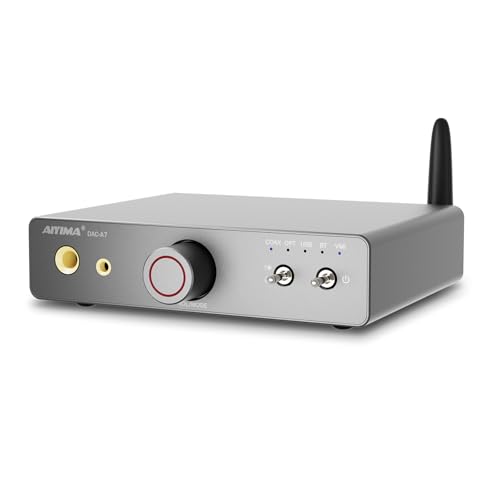
- ES9038Q2M DAC with low-distortion op-amp stage
- 1500mW headphone output for 16–600Ω cans
- USB-C, optical, coaxial, RCA, and LDAC Bluetooth
Best For: Mac mini users who want a compact DAC/amp with strong headphone drive and flexible connectivity.
Best for Gaming Features
Fosi Audio K7 DAC Headphone Amp

- 2100mW amp power for demanding headphones
- Balanced 4.4mm plus 3.5mm and RCA outputs
- USB-C, Bluetooth, optical, and coaxial inputs
Best For: Mac mini users who want a versatile DAC/amp with strong output and extra connectivity.
Best for High-Resolution Value
Fosi Audio Q6 Mini Desktop DAC

- USB-C works cleanly with a Mac mini
- Up to 32-bit/768kHz and DSD512 support
- Optical/coaxial inputs plus RCA and sub-out
Best For: Mac mini owners who want a compact, high-resolution DAC for simple stereo setups.
Best for Gaming and Mic Use – Fosi Audio K5 Pro DAC Amp
If you want a practical desktop dac for mac mini that can also double as an external sound card, the Fosi Audio K5 Pro is a strong value pick. It handles USB, optical, and coaxial inputs, adds a microphone input for gaming/chat, and gives you simple RCA and 3.5mm outputs for headphones or powered speakers.
Best For: Mac Mini users who want an affordable DAC/amp for gaming, headphones, and desktop speakers with mic support.
Pros:
- USB-C, optical, and coaxial inputs cover a wide range of desktop setups
- Headphone amp drives 16Ω to 300Ω headphones with up to 1000mW output
- Mic input makes it more useful than a basic DAC for gaming and calls
- Bass and treble controls add quick tuning for speakers or headphones
Cons:
- USB audio tops out at 24-bit/96kHz, which is lower than some higher-end DACs
- Best suited to compact desktop systems rather than audiophile reference rigs
For a desktop dac for mac mini, the K5 Pro stands out because it combines flexible inputs, headphone amplification, and mic support in one compact box. It is a sensible choice if you want an easy upgrade for gaming, calls, or everyday listening without spending much.
Best for Clean USB Playback – Topping D10s Mini DAC
If you want a simple desktop dac for mac mini use, the Topping D10s is a strong plug-and-play option for clean USB audio output. It supports high-resolution PCM and native DSD playback, uses the XMOS XU208 USB interface, and gives you a clear front-panel readout of the active format and sample rate.
Best For: Mac Mini owners who want a compact, low-fuss USB DAC with high-res support and easy status feedback.
Pros:
- Supports PCM up to 384kHz and DSD256 for high-resolution libraries
- XMOS XU208 interface with Thesycon driver support for better compatibility
- Compact desktop footprint with a soft orange LED and power sync behavior
- OP amp socket allows sound tuning for DIY users
Cons:
- No built-in headphone amp, so it needs separate powered speakers or an amp
- Feature set is focused on digital conversion rather than extra inputs or controls
This is a practical desktop dac for mac mini setups where reliability, format support, and a tiny footprint matter more than extra bells and whistles. If you mainly want a clean USB DAC that disappears on the desk and just works, the D10s fits that role well.
Best for Easy Power Access – SMSL DAC MINI for Mac mini M4/M4 Pro
If you want a desktop dac for mac mini that also solves the awkward rear-access power button problem, the SMSL DAC MINI is a neat all-in-one fit. It adds front-mounted power access, a compact dock-like footprint, and a capable DAC/headphone amp section, so your Mac mini setup feels cleaner and more practical.
Best For: Mac mini M4 and M4 Pro owners who want easier power-button access plus a compact DAC/headphone amp for a tidy desk setup.
Pros:
- Front power button extension makes turning on the Mac mini much easier
- ES9039Q2M and XMOS XU-316 support high-resolution audio up to PCM 32-bit/768 kHz and DSD256
- Multiple outputs cover RCA, 3.5 mm, 4.4 mm balanced, and combo optical/coaxial S/PDIF
- Aluminum finish and integrated stand help it blend into a Mac mini workspace
Cons:
- Primarily useful for Mac mini M4/M4 Pro buyers, not a universal DAC dock
- Combo optical/coaxial port uses one format at a time
- Combo cable is not included
As a desktop dac for mac mini, this model stands out less for raw audio extras and more for solving a real day-to-day usability issue while still delivering strong DAC and headphone-amp specs. If that combination matters more than a pure audio-first design, it is an easy pick to consider.
Best for Smooth Sound – AIYIMA D07 Mini Desktop DAC
If you want a desktop dac for mac mini that adds cleaner output without taking up much space, the AIYIMA D07 Mini is a strong fit. It combines an AKM4493SEQ DAC with XMOS USB decoding, giving you a compact way to connect a Mac mini, TV, or streamer to powered speakers or an amp.
Best For: Mac mini users who want a compact, warm-sounding DAC with broad digital input support and easy desktop integration.
Pros:
- AKM4493SEQ chip aims for a smooth, musical sound signature
- USB-C, optical, coaxial, and RCA connections make it easy to integrate
- Native DSD512 and PCM 768kHz/32bit support for hi-res playback
- Compact aluminum build fits neatly on a Mac mini desk setup
Cons:
- No balanced outputs for more advanced desktop systems
- UAC1.0 console mode limits USB playback to 96kHz/24bit
For buyers comparing a desktop dac for mac mini, the D07 stands out if you want simple plug-and-play use with a slightly warmer, less analytical presentation. It is a practical choice for small setups that value sound quality, flexibility, and a tidy footprint over extra audiophile extras.
Best Portable USB-C DAC – Kiwi Ears Allegro Mini DAC
If you want a compact desktop dac for mac mini use without adding clutter, the Kiwi Ears Allegro Mini is an easy plug-and-play option. It focuses on clean, high-resolution output, offers both 3.5mm and 4.4mm connections, and fits well on a minimalist desk where size and simplicity matter.
Best For: Mac Mini owners who want a small, easy-to-use DAC/amp for IEMs and efficient headphones.
Pros:
- Compact all-aluminum build that stays unobtrusive on a desk
- USB-C connection with broad modern device compatibility
- Supports 3.5mm and 4.4mm outputs for flexible headphone pairing
- High-res playback up to 32-bit/384kHz for detailed listening
Cons:
- Designed primarily for IEMs and portable headphones, not full-size power-hungry cans
- No dedicated desktop controls or input options beyond USB-C
As a desktop dac for mac mini, the Allegro Mini makes the most sense if you value small size, simple connectivity, and clean sound over extra features. It is not the most feature-rich desk DAC, but for a tidy Mac Mini setup it checks the right boxes.
Best Budget Desktop DAC – Fosi Audio Q4 DAC Headphone Amp
If you want a simple desktop dac for mac mini use without spending much, the Fosi Audio Q4 is an easy entry point. It adds USB, optical, and coaxial input options, plus headphone and RCA outputs, so you can route audio to speakers or a headset from one compact box.
Best For: Mac mini owners who want an affordable plug-and-play DAC for basic desktop audio, speaker output, and casual headphone listening.
Pros:
- Plug-and-play setup with no driver installation needed.
- USB, optical, and coaxial inputs cover common desktop sources.
- RCA and 3.5mm outputs make it flexible for speakers and headphones.
- Bass and treble knobs let you fine-tune sound quickly.
Cons:
- No microphone input.
- Entry-level tuning and features may not satisfy audiophiles.
- Compact controls and chassis feel basic compared with pricier DACs.
For a desktop dac for mac mini, the Q4 stands out mainly for simplicity, broad compatibility, and low cost. It is a practical pick if you want a tidy upgrade over built-in audio and do not need advanced software features or high-end output power.
Best for Headphone Outputs – S.M.S.L DS100 USB MQA DAC
If you want a desktop dac for mac mini that does more than basic output, the S.M.S.L DS100 is a strong all-in-one choice. It combines a CS43131 DAC, MQA support, and a built-in headphone amp with both 6.35mm and 4.4mm jacks, making it a flexible match for compact desktop setups.
Best For: Mac mini users who want a DAC/amp combo with balanced-style headphone connectivity and broad source support.
Pros:
- CS43131-based DAC with very low reported distortion for clean, detailed playback
- Dual headphone outputs: 6.35mm and 4.4mm for more flexible desktop use
- Supports USB, optical, and coaxial inputs plus MQA/MQA-CD decoding
- XMOS XU-316 USB stage supports up to 32-bit/768kHz PCM and DSD256
Cons:
- Windows users need to install a separate driver
- Not the simplest pick if you only want a basic plug-and-play DAC
- Size and feature set may be overkill for minimalist setups
For a desktop dac for mac mini, the DS100 stands out if you want headphone outputs, MQA support, and multiple digital inputs in one compact unit. It is a practical upgrade when you want a little more versatility than a plain USB DAC.
Best for Headphone Power – AIYIMA DAC A7 Mini Bluetooth DAC
If you want a desktop dac for mac mini that can do more than basic USB conversion, the AIYIMA DAC A7 Mini stands out with a high-end ES9038Q2M chip, LDAC Bluetooth, and serious headphone output. It’s a practical choice for a compact Mac mini desk setup where you may want to switch between wired headphones and powered speakers without extra boxes.
Best For: Mac mini users who want a compact DAC/amp combo with strong headphone drive and flexible input options.
Pros:
- ES9038Q2M DAC plus OPA1612 op-amps for detailed, low-distortion playback
- 1500mW@32Ω output and 16–600Ω support for easy headphone matching
- USB-C, optical, coaxial, RCA, and dual headphone jacks add setup flexibility
- Bluetooth 5.4 with LDAC for high-res wireless listening
Cons:
- Requires 5V/2A external power, so it is not fully bus-powered
- Feature-rich layout may be more than needed for simple speaker-only setups
For a desktop dac for mac mini, this is a strong all-in-one option if you value headphone power, multiple inputs, and quick switching between listening modes. It’s especially appealing when you want one compact unit to handle both your Mac audio and a wider range of headphones or speakers.
Best for Gaming Features – Fosi Audio K7 DAC Headphone Amp
If you want a desktop dac for mac mini that does more than just convert audio, the Fosi Audio K7 is a practical all-in-one pick. It pairs a high-resolution DAC with a powerful headphone amp, so it can handle both everyday listening and more demanding headphones while still giving you flexible wired and wireless input options.
Best For: Mac mini users who want a versatile DAC/amp with strong output power, balanced headphone support, and extra connectivity for a desktop setup.
Pros:
- Powerful 2100mW output for tougher headphones
- 4.4mm balanced, 3.5mm, and RCA outputs add flexibility
- USB-C, Bluetooth aptX HD/LL, optical, and coaxial inputs
- Mic input makes it useful for gaming and calls
Cons:
- More features than a basic desktop DAC, so it may be overkill for simple stereo setups
- Bluetooth is convenient, but wired USB will still be the better choice for pure desktop audio
For buyers who want one compact box to cover music, headphones, and desktop use, this is a strong desktop dac for mac mini option. Its mix of power, balanced output, and broad input support makes it especially appealing if you want more control than a simple plug-and-play dongle.
Best for High-Resolution Value – Fosi Audio Q6 Mini Desktop DAC
If you want a compact desktop dac for mac mini duties without overcomplicating your setup, the Fosi Audio Q6 Mini keeps things simple: USB-C input, optical/coaxial support, and RCA output for easy integration with a stereo amp or powered speakers. It’s a practical pick if you need clean digital-to-analog conversion in a small footprint.
Best For: Mac mini users who want a straightforward, high-resolution DAC for desktop listening or a basic home stereo setup.
Pros:
- USB-C input makes it easy to pair with a Mac mini
- Supports up to 32-bit/768kHz and DSD512 for high-res playback
- Optical and coaxial inputs add flexibility for other sources
- RCA output and sub-out suit simple stereo systems
Cons:
- No built-in headphone amp
- Feature set is focused more on conversion than advanced controls
- Small desktop DAC may be too basic for users wanting more connectivity
Overall, the Q6 Mini is a smart, no-fuss desktop dac for mac mini setups where compact size, broad input support, and high-resolution playback matter more than extras. It’s a strong fit if you mainly want reliable sound conversion into an existing amp or speaker chain.
How We Picked the Best Desktop Dac for Mac Mini
For this roundup, we prioritized DACs that make sense for a Mac Mini desk setup: reliable USB compatibility, clean output, useful headphone amplification when needed, and a footprint that stays manageable on a desktop. We also looked for models with the right mix of inputs and outputs so they can serve either headphones, powered speakers, or a small stereo system.
Quick Comparison
The right Desktop Dac for Mac Mini depends on how you listen. If you mainly use headphones, a DAC with a stronger amp section matters more than extra inputs. If you connect powered speakers, line-level output quality and volume control are more important. If you want a simple all-in-one unit, look for USB-C support and straightforward controls. For more flexible setups, optical and coaxial inputs can be valuable.
Key Buying Factors for Desktop Dac for Mac Mini
Connection Type
USB is the most common and simplest choice for Mac Mini users. USB-C is especially convenient, but many DACs still work well through standard USB ports or adapters. If your setup includes a TV, monitor, or console, optical and coaxial inputs add flexibility.
Headphone Output and Power
Check whether the DAC includes a headphone amp and whether it can drive your specific headphones well. Sensitive IEMs need a quiet noise floor, while full-size headphones often benefit from more output power and better control.
Speaker Compatibility
If you use powered speakers or a stereo amplifier, line output quality matters more than headphone features. A good Desktop Dac for Mac Mini should deliver a clean signal without hiss, distortion, or awkward gain jumps.
Size, Controls, and Desk Use
Compact models are easier to place beside a Mac Mini, especially if you want a tidy workspace. Simple volume knobs, input switches, and power controls improve daily usability.
Who Should Buy Which Desktop Dac for Mac Mini?
Choose a compact DAC/amp if you want one box for both headphones and desktop audio. Choose a pure DAC if you already have a separate amp or powered speakers and want the cleanest signal path. Choose a Bluetooth-capable model if you plan to switch between Mac Mini audio and mobile listening. If you use IEMs, prioritize low noise and fine volume control. If you use harder-to-drive headphones, focus on output power first.
For most buyers, the best Desktop Dac for Mac Mini is the one that matches your connection needs, your headphones or speakers, and how much space you want to give up on the desk.
