A well-labeled home studio is easier to maintain, faster to troubleshoot, and less likely to lose track of cables, storage media, instruments, or project supplies. The right label maker can make that organization practical without taking up valuable workspace.
We selected 10 portable options spanning Bluetooth mini printers, traditional handheld models, and embossing labelers. This guide explains which features matter most for studio workflows and which type best fits your setup.
Best 10 Media Label Makers for Home Studios Picks for 2026
Compact Starter Pick
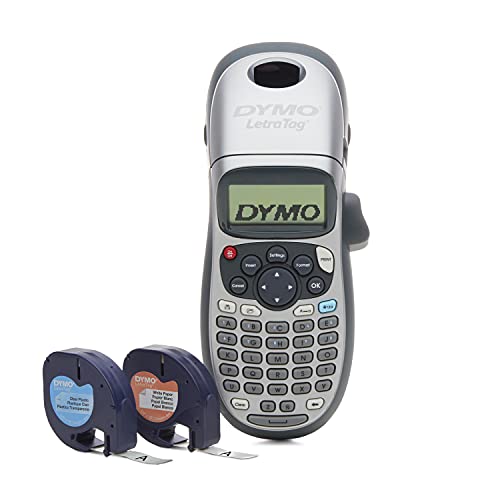
DYMO LetraTag 100H with 3 Tapes

- Lightweight handheld design
- Five fonts, seven styles, and eight box styles
- Includes three paper and plastic tapes
Best For: Simple portable labeling for home studios
App-Design Pick
Phomemo D30 Bluetooth Mini Label Printer

- Bluetooth and rechargeable battery
- App with templates, icons, barcodes, and QR codes
- Supports continuous and fixed-length tapes
Best For: Phone-based creative and equipment labeling
Keyboard Control Pick

- QWERTY keyboard and one-touch smart keys
- Over 20 formats and 200+ symbols
- Includes three D1 label cassettes
Best For: Direct, repeatable labeling without a phone
Durable Wireless Pick
SUPVAN E10 Bluetooth Label Maker

- Android and iOS Bluetooth app control
- 40 fonts, 30 frames, and 450+ icons
- Waterproof, oil-proof, scratch- and heat-resistant labels
Best For: Durable narrow labels for equipment and storage
Portable Everyday Pick
- Compact handheld design
- Five font sizes and seven print styles
- Includes paper and clear tapes
Best For: Simple labeling of studio gear, bins, and supplies
Smart Bluetooth Pick
ORGSTA S001 Portable Label Maker

- Bluetooth app control
- Supports QR codes, barcodes, and images
- Rechargeable battery with built-in cutter
Best For: Detailed portable labels designed from a smartphone
Tactile Vintage Pick

- Handheld embossing design
- 49-character wheel with symbols
- Includes three label cartridges
Best For: Raised tactile labels for shelves, cases, and craft areas
Flexible Bluetooth Organizer
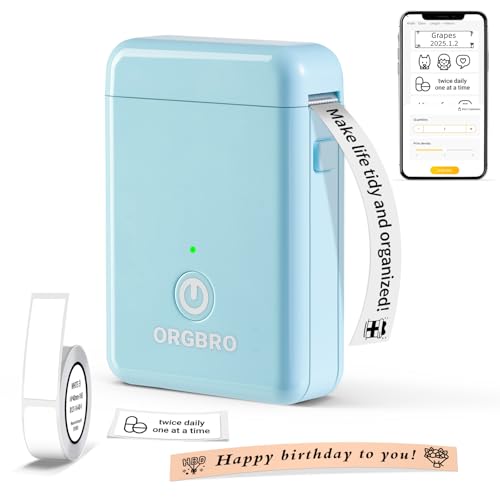
- Works with pre-cut and continuous labels
- 203 DPI inkless thermal printing
- Rechargeable, pocket-sized design
Best For: Home studios needing flexible labels for cables, media cases, and storage
Creative App Labeling

- Includes extensive fonts, symbols, frames, and templates
- Supports multiple tape widths
- Lightweight 203 DPI thermal printer
Best For: Phone-based labeling of studio supplies and small equipment accessories
Standalone Keyboard Labeler

- Built-in QWERTY keyboard for offline labeling
- Supports 9mm–12mm circular, square, and clear labels
- Backlit screen with preview and vertical-print modes
Best For: Studio users wanting direct keyboard control and compact equipment labels
Compact Starter Pick – DYMO LetraTag 100H with 3 Tapes
For shoppers comparing media label makers for home studios, the DYMO LetraTag 100H is a straightforward handheld option for organizing cables, storage bins, supplies, and equipment. Its compact design and included tape variety make it easy to start labeling without adding much bulk to a workspace.
Best For: Home-studio users who want a simple, portable label maker with paper and plastic tapes included.
Pros:
- Compact, lightweight handheld design for labeling around the studio.
- Offers five font sizes, seven print styles, and eight box styles.
- Graphical display lets you preview labels before printing.
- Includes paper, white plastic, and clear plastic LT tapes.
Cons:
- Uses batteries rather than a built-in rechargeable battery.
- Its feature set is more basic than app-connected models.
The LetraTag 100H is a practical fit when portability and included consumables matter more than advanced digital design tools. The clear tape can also be useful when you want labels that blend into equipment or storage surfaces.
App-Design Pick – Phomemo D30 Bluetooth Mini Label Printer
The Phomemo D30 is a strong choice among media label makers for home studios when you want to design labels from a phone. Its Bluetooth connection, rechargeable battery, and broad app toolkit support everything from cable identification to storage labels and small-batch product tags.
Best For: Creators who want flexible smartphone label design, icons, QR codes, and both continuous and fixed-length labels.
Pros:
- Bluetooth printing from a mobile device with a built-in rechargeable battery.
- Print Master app includes fonts, icons, borders, templates, barcodes, and QR codes.
- Supports continuous and fixed-length label tapes.
- Ink-free 203 DPI thermal printing requires no toner, ribbons, or ink.
Cons:
- Prints black text; color effects come from patterned label tape.
- Requires a mobile device and the companion app for label creation.
The D30 makes the most sense for a studio with varied labeling needs and a preference for visual customization. Its app-based workflow is more versatile than a traditional built-in keyboard, though it adds a phone-dependent step.
Keyboard Control Pick – DYMO LabelManager 160 Bundle
For home-studio buyers who prefer typing directly on the device, the DYMO LabelManager 160 combines a QWERTY keyboard with one-touch controls and a large display. It is suited to repeatable organization tasks such as labeling cases, drawers, cables, folders, and media supplies.
Best For: Users who want a familiar built-in keyboard, quick formatting controls, and three included D1 cassettes.
Pros:
- Built-in QWERTY keyboard supports quick text entry and editing.
- Offers more than 20 text formats and over 200 symbols.
- Includes three 1/2-inch D1 label cassettes.
- Portable design includes a display and automatic power-off function.
Cons:
- Less wireless and app-oriented than Bluetooth label printers.
- Best performance depends on using authentic DYMO D1 tapes.
The LabelManager 160 is a sensible middle ground for studios that want more control than a basic label maker but do not need smartphone editing. Its included cassettes also reduce the need to purchase starter media separately.
Durable Wireless Pick – SUPVAN E10 Bluetooth Label Maker
The SUPVAN E10 is a useful option among media label makers for home studios where labels may encounter handling, heat, moisture, or oils. Its smartphone app supports quick customization, while compatibility with continuous and die-cut tapes gives you flexibility for equipment tags and organized storage.
Best For: Studio users who want app-based labeling with durable, removable laminated labels.
Pros:
- Bluetooth connection works with Android and iOS devices.
- App provides 40 fonts, 30 frames, and more than 450 icons without fees or registration.
- Works with continuous and die-cut label tapes, including batch printing.
- Laminated labels are waterproof, oil-proof, scratch-resistant, and heat-resistant.
Cons:
- Maximum listed media width is 0.59 inch.
- Requires a smartphone and app rather than a built-in keyboard.
The E10 stands out when durability is a priority, especially for labels on containers, cables, and studio equipment that are frequently touched. Its narrow media format may be less suitable for wide, information-heavy labels.
Portable Everyday Pick – DYMO LetraTag 100H Plus
DYMO LetraTag 100H Plus Handheld Label Maker - for Office or Home Organization
Check Price On AmazonFor home studios that need straightforward media label makers for home studios, the DYMO LetraTag 100H Plus is a compact handheld option for labeling tapes, storage bins, cables, and other gear. Its LCD preview and multiple text settings make it practical for quick, customized organization.
Best For: Home-studio users who want a simple portable label maker for general organization.
Pros:
- Compact, lightweight handheld design for labeling around the studio.
- Offers five font sizes, seven print styles, and eight box styles.
- LCD display previews text effects before printing.
- Includes paper and clear plastic label cassettes plus a magnetic holder.
Cons:
- Prints monochrome labels only.
- Uses 1/2-inch LetraTag LT labels, limiting label width.
- Designed for personal labeling rather than high-volume production.
The LetraTag 100H Plus is a sensible choice when portability and basic customization matter more than app connectivity or advanced graphics. Its included tapes also make it easier to start organizing immediately.
Smart Bluetooth Pick – ORGSTA S001 Portable Label Maker
Among media label makers for home studios, the ORGSTA S001 stands out for phone-based design and flexible label creation. Its Bluetooth connection, Snap & Tag app, rechargeable battery, and support for QR codes, barcodes, images, and borders suit more detailed studio organization.
Best For: Home-studio users who want app-designed labels, graphics, and portable Bluetooth printing.
Pros:
- Connects to smartphones through Bluetooth and the Snap & Tag app.
- Supports text, QR codes, barcodes, images, time, borders, and templates.
- Prints on laminated labels described as waterproof, oil-proof, and scratch-resistant.
- Rechargeable 2000 mAh battery and built-in cutter support mobile use.
Cons:
- Requires a compatible smartphone for app-based control.
- Supports media up to 0.47 inches or 12 mm wide.
- Uses monochrome thermal printing rather than full-color output.
The S001 is the more versatile option for studios that want polished, information-rich labels without ink or toner. Its narrow media format is best suited to compact identifiers rather than large equipment cards.
Tactile Vintage Pick – DYMO Organizer Xpress Pro
For distinctive media label makers for home studios, the DYMO Organizer Xpress Pro uses physical embossing instead of thermal printing. Its turn-and-click operation and raised lettering create tactile labels that can add a classic, durable-looking touch to shelves, cases, drawers, and craft areas.
Best For: Studio owners who prefer tactile embossed labels and a simple hands-on labeling process.
Pros:
- Lightweight, portable handheld embossing design.
- Turn-and-click mechanism is simple to operate.
- 49-character wheel includes text, numbers, and symbols.
- Starter kit includes two black cartridges and one red cartridge.
Cons:
- Embossing is slower and less flexible than app-based printing.
- No listed wireless or USB connectivity for direct printing.
- Character-wheel format may be less suitable for long or graphic labels.
The Organizer Xpress Pro makes sense when label appearance and tactile feedback are priorities. It lacks the digital flexibility of the ORGSTA, but its mechanical simplicity can be appealing for small-batch studio organization and DIY projects.
Flexible Bluetooth Organizer – ORGBRO X1 Label Maker
For media label makers for home studios, the ORGBRO X1 is a compact Bluetooth option that handles both pre-cut and continuous labels. Its phone-based app supports detailed customization, while inkless thermal printing keeps routine labeling simple.
Best For: Home studios labeling cables, storage bins, file folders, media cases, and supplies that may need different label lengths.
Pros:
- Supports both pre-cut and continuous labels for flexible sizing.
- App offers more than 95 fonts, 15 languages, and over 1,200 symbols.
- 203 DPI thermal printing requires no ink, toner, or ribbon.
- Lightweight design, rechargeable 2,000mAh battery, and included roll of labels.
Cons:
- Requires an iOS or Android smartphone for app-based control.
- Prints monochrome labels only.
- Maximum listed media size is 0.6 x 1.57 inches.
The X1 stands out when a studio needs both narrow standard labels and longer custom strips. Its compact build and waterproof, oil-proof labels are useful around equipment and storage, though the small listed media size limits larger labeling projects.
Creative App Labeling – Phomemo D30 Bluetooth Printer
The Phomemo D30 is a lightweight choice among media label makers for home studios, combining Bluetooth control with a broad selection of design tools. It prints monochrome labels without ink and supports several tape widths for organizing studio supplies.
Best For: Studio users who want phone-designed labels for folders, containers, cables, equipment accessories, and other small items.
Pros:
- Offers over 1,000 symbols, 60 frames, 120 fonts, and 60 borders.
- Supports text, images, QR codes, barcodes, tables, and templates.
- 203 DPI thermal printing eliminates ink, toner, and ribbon purchases.
- Compatible with 6mm, 12mm, 14mm, and 15mm tape widths.
Cons:
- Requires the Print Master app rather than the Phomemo app.
- Uses Micro USB charging.
- Monochrome printing and a listed 0.5-inch paper size may not suit larger labels.
The D30 is a practical fit for creators who value templates and visual customization from a phone. Its varied tape-width support adds flexibility, but buyers should account for the required app and Micro USB connection.
Standalone Keyboard Labeler – Rongta TM95 Portable Machine
For media label makers for home studios, the Rongta TM95 offers a built-in QWERTY keyboard for offline editing and printing, plus optional app connectivity. Its 9mm-to-12mm label support and multiple print modes make it suitable for hands-on studio organization.
Best For: Users who prefer direct keyboard entry for labeling media cases, cables, drawers, shelves, and studio equipment without relying solely on a phone.
Pros:
- Built-in QWERTY keyboard supports offline editing and printing.
- Supports circular, square, and transparent labels from 9mm to 12mm.
- Includes preview, mirror, and vertical printing options.
- Offers 30 borders, 500+ icons, 23 languages, and a backlit screen.
Cons:
- AAA batteries are not included.
- Uses 12mm maximum media, limiting label width compared with larger printers.
- App connectivity is available, but the device is larger and heavier than mini Bluetooth models.
The TM95 is the most self-contained option in this group, with a screen and keyboard that can be useful at a studio workstation. Its dual-power design adds placement flexibility, while the narrower media range favors compact identification labels rather than large-format signs.
How We Picked These Media Label Makers for Home Studios
We focused on practical studio organization rather than general office labeling alone. The selection includes compact Bluetooth printers for phone-based workflows, handheld models with built-in QWERTY keyboards, and an embossing option for durable, tactile labels. We also considered portability, tape availability, ease of setup, label-width flexibility, power requirements, and suitability for marking cases, cables, shelves, memory cards, bins, and equipment.
Included tape or starter bundles can improve initial value, but ongoing tape cost and compatibility remain important. A low purchase price is less useful if replacement cartridges are difficult to find or limited to one label style.
Quick Comparison
| Type | Best For | Main Advantage | Watch For |
|---|---|---|---|
| Bluetooth mini printer | Phone-based studio organization | Compact design and customizable layouts | Requires a compatible app and mobile device |
| Handheld QWERTY labeler | Fast labels without a phone | Integrated keyboard and simple operation | Usually fewer design options |
| Embossing label maker | DIY, bins, and tactile identification | Distinctive raised labels with no app | Less suitable for dense or small text |
Key Buying Factors for Media Label Makers for Home Studios
Label Format and Tape Compatibility
Check the supported tape width, adhesive type, and replacement-cartridge availability before buying. Narrow tape works well for cables and small cases, while wider tape is easier to read on shelves and storage bins. Stronger adhesive can help on smooth equipment surfaces, but removable tape may be preferable for rented spaces or borrowed gear.
Keyboard, App, or Both
Bluetooth models are useful when you want icons, multiple fonts, barcodes, or saved templates. Handheld QWERTY models are often faster for a single short label and remain usable when your phone is busy, unavailable, or intentionally kept away from the workspace.
Power and Portability
A compact battery-powered labeler is easy to carry between recording rooms, rehearsal spaces, and storage areas. For frequent labeling sessions, consider battery life, charging convenience, automatic shutoff, and whether the device can be used while charging.
Readability and Durability
Prioritize clear contrast and an appropriate character size over decorative features. For cables and removable media, labels should stay legible when handled repeatedly. For studio furniture and bins, select tape designed for the surface and expected exposure to heat, moisture, or friction.
Who Should Buy Which Media Label Makers for Home Studios?
Choose a Bluetooth mini printer if your studio workflow is phone-centered and you want flexible formatting, icons, or stored templates. It is also a good fit for labeling many items in batches. Choose a handheld QWERTY model if speed, independence from an app, and straightforward text labels matter most. These are particularly convenient for shelves, cable ends, drawers, and equipment cases.
An embossing label maker suits creators who prefer a durable, tactile, craft-oriented look for bins and household studio storage. If you label a mix of tiny accessories and larger containers, prioritize a model with readily available tape sizes and keep separate label conventions for cables, media, and equipment. The best choice among these Media Label Makers for Home Studios is ultimately the one that matches your labeling volume, preferred input method, and long-term tape budget.
