A well-chosen patch panel makes a network rack easier to install, label, troubleshoot, and expand. The right model also helps match your cabling, rack space, and connection density without creating unnecessary service work.
We selected 10 professional network patch panels spanning Cat6 and Cat6A, standard punch-down and keystone designs, 24- and 48-port layouts, and shielded or unshielded configurations.
Best 10 Professional Network Patch Panels Picks for 2026
Best Overall
Cable Matters 24-Port Cat6 Patch Panel

- 24 unshielded Cat6 ports
- Supports 10Gb Ethernet and PoE
- UL listed with cable-management accessories
Best For: Versatile home and business rack installations
Best Customizable
TRENDnet 24-Port Blank Keystone Panel

- 24-port blank keystone layout
- Supports standard Cat6 keystone jacks
- NDAA compliant SPCC steel design
Best For: Flexible, modular rack installations
Best Shielded
Cable Matters 24-Port Cat6A Patch Panel

- Shielded Cat6A design for up to 10Gbps
- Individual EMI/RFI port protection
- Includes cable bar, ties, and rack hardware
Best For: High-speed networks exposed to interference
Best Gigabit Value

- 24 unshielded Cat6 ports
- 250MHz Gigabit-ready connection
- NDAA compliant with three-year protection
Best For: Conventional copper Gigabit network racks
Best Plug-and-Play Pick
Jadaol 24-Port Pass-Through Patch Panel

- Tool-free RJ45 pass-through installation
- 10Gbps Cat6 support
- Rack- or wall-mountable with cable management
Best For: Pre-terminated Ethernet cabling in offices, homes, and server racks
Best High-Density Modular Pick
Rapink 48-Port Cat6A Patch Panel

- 48 shielded inline coupler ports
- 10Gbps Cat6A support
- Removable modules and cable back bar
Best For: High-density networks needing easy expansion and repairs
Best Traditional Punch-Down Pick
Tripp Lite 24-Port Cat6 Patch Panel

- 110-type punch-down termination
- Cat5 through Cat6 cable support
- TAA-compliant 1U metal rack housing
Best For: Structured cabling, data centers, and government-oriented deployments
Best High-Density Choice

- 48 customizable keystone ports
- 2U standard 19-inch rack fit
- Rear cable support bar and labels
Best For: High-density multimedia and structured cabling installations
Best Complete 10Gbps Setup
24-Port Cat6 Ethernet Patch Panel
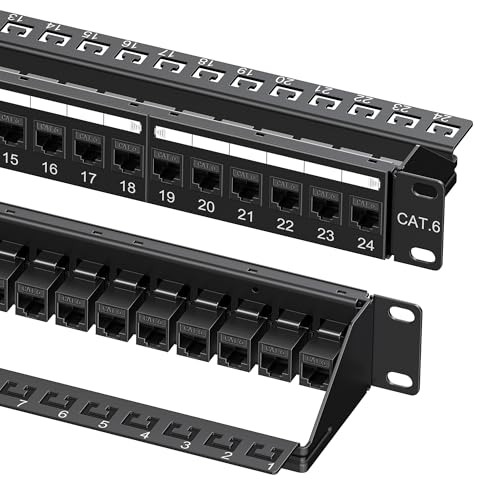
- Supports speeds up to 10Gbps
- Compatible with PoE through PoE++
- Includes mounting and cable-management accessories
Best For: Fast, organized Cat6 rack network installations
Best Tool-Free Installation
24-Port Cat6A Passthrough Panel

- Toolless inline coupler installation
- Supports Cat6A through Cat5 cabling
- Reusable smart cable management
Best For: Fast installations and easy future connector changes
Best Overall – Cable Matters 24-Port Cat6 Patch Panel
For professional network patch panels that balance capacity, speed, and straightforward installation, this Cable Matters model is a strong all-around choice. Its 24 unshielded Cat6 ports support Cat5 and Cat5e cabling, Gigabit Ethernet, 10-Gigabit networking, and PoE applications.
Best For: Home offices, business racks, and general-purpose Ethernet installations that need 24 organized ports with 10Gbps and PoE support.
Pros:
- Supports Cat6, Cat5e, and Cat5 cabling, plus Gigabit and 10-Gigabit Ethernet.
- Compatible with PoE, PoE+, and PoE++ devices such as cameras and wireless access points.
- UL listed, with numbered ports, T568A/T568B diagrams, D-rings, and cable ties.
- Fits standard 19-inch racks, cabinets, and wall-mount brackets.
Cons:
- Unshielded construction may be less suitable for areas with substantial electromagnetic interference.
- Listed data-transfer details include 1000 Mbps, so confirm requirements for a specific 10Gbps installation.
This panel is a practical pick when you want a rack-ready 24-port foundation with broad cable compatibility, PoE support, and useful installation aids.
Best Customizable – TRENDnet 24-Port Blank Keystone Panel
This TRENDnet option stands out among professional network patch panels for its blank keystone design. Rather than locking you into fixed ports, the 1U metal frame lets you build a solution around compatible Cat6 keystone jacks for data, audio, or video applications.
Best For: Installers who want flexible port selection and a reusable 24-port rackmount frame.
Pros:
- Accepts standard-sized Cat6 keystone jacks for customizable configurations.
- Sturdy SPCC steel construction supports rackmount use with connected cables and jacks.
- Pre-numbered ports and supplementary labels simplify cable identification.
- NDAA compliant and backed by two years of manufacturer protection.
Cons:
- Keystone jacks are sold separately, so it is not a complete terminated patch panel out of the box.
- Performance depends on the keystone modules selected and installed.
Choose this model when adaptability matters more than an immediately populated panel. It is especially useful for installations that may need different jack types over time.
Best Shielded – Cable Matters 24-Port Cat6A Patch Panel
For professional network patch panels in electrically noisy environments, this Cable Matters Cat6A model adds shielding to the rack-mounted design. Its 24 shielded ports are rated for up to 10Gbps and include individual EMI/RFI protection, while the keystone-style layout allows future module changes.
Best For: High-speed rack deployments that need interference protection, PoE support, and more structured cable management.
Pros:
- Cat6A STP design supports data rates up to 10Gbps.
- Individual port shielding helps protect against electromagnetic and radio-frequency interference.
- Supports PoE, PoE+, and PoE++ applications.
- Includes a cable-management bar, ties, rack hardware, and sequential port labels.
Cons:
- Shielded construction and included features may be more than a basic low-interference installation requires.
- Alternative keystone jacks are not included; the supplied STP RJ45 couplers can be replaced separately.
This is the most feature-rich choice in the group for demanding 10Gbps installations. Its shielding and accessories make it a strong fit where clean routing and interference control are priorities.
Best Gigabit Value – TRENDnet 24-Port Cat6 Panel
This TRENDnet panel is a straightforward option for professional network patch panels serving Ethernet, Fast Ethernet, and copper Gigabit networks. Its 24-port unshielded Cat6 design provides a 250MHz connection and follows recognized ANSI, EIA/TIA, and ISO/IEC cabling standards.
Best For: Standard Gigabit Ethernet installations that need a durable, rack-mountable 24-port panel without extra shielding features.
Pros:
- 24-port Cat6 panel designed for Ethernet through copper Gigabit applications.
- Provides a steady 250MHz connection to copper Gigabit switches.
- Metal rack-mount construction and 110D IDC terminal blocks support structured wiring work.
- NDAA compliant with three years of manufacturer protection.
Cons:
- Unshielded design may be less appropriate for high-interference environments.
- Focused on Gigabit applications rather than the more advanced Cat6A feature set.
- A compatible punch-down tool is needed for termination.
For conventional structured cabling, this panel keeps the setup focused and standards-oriented. It is a sensible choice when reliable Gigabit connectivity is the main requirement.
Best Plug-and-Play Pick – Jadaol 24-Port Pass-Through Patch Panel
For professional network patch panels where quick installation matters, the Jadaol 24-port model uses preloaded RJ45 couplers instead of punch-down terminals. It is a practical choice when your Ethernet runs already have RJ45 connectors and you want a clean rack or wall-mounted setup without specialized tools.
Best For: Offices, home networks, and server racks using pre-terminated Cat5, Cat5e, or Cat6 Ethernet cables.
Pros:
- Tool-free pass-through design with RJ45 couplers on both sides.
- Supports up to 10Gbps with Cat6 cabling.
- Fits standard 19-inch racks and can also be wall mounted.
- Includes a spare removable coupler and rear cable-management bar.
Cons:
- Not compatible with bare-wire punch-down installations.
- Requires Ethernet cables with pre-installed RJ45 connectors.
This Jadaol panel is best when speed and simplicity outweigh traditional termination flexibility. Its modular couplers also make individual port replacement straightforward.
Best High-Density Modular Pick – Rapink 48-Port Cat6A Patch Panel
The Rapink 48-port panel is designed for professional network patch panels that need high port density and easy expansion. Its shielded inline couplers provide a tool-free pass-through layout, while the removable modules can be replaced or adapted as your installation changes.
Best For: Dense indoor network installations requiring 48 ports, 10Gbps support, and modular repair or expansion options.
Pros:
- Provides 48 Cat6A-compatible RJ45 coupler ports in a 19-inch rack format.
- Supports Ethernet speeds up to 10Gbps.
- Toolless installation avoids punch-down work and can reduce setup time.
- Removable couplers and back bar simplify repairs and cable management.
Cons:
- Pass-through design is not intended for punching down bare wires.
- Its 48-port capacity may be more than smaller installations require.
Choose the Rapink when maximum port count and future flexibility are priorities. The modular construction is particularly useful for replacing a failed port or changing connector types later.
Best Traditional Punch-Down Pick – Tripp Lite 24-Port Cat6 Patch Panel
For professional network patch panels built around structured cabling, the Tripp Lite N252-024 uses 110-type punch-down termination rather than pass-through couplers. Its 1U metal housing supports standard rack installations and is suited to Cat5, Cat5e, and Cat6 solid Ethernet cable.
Best For: Data centers, structured cabling systems, and installations requiring traditional 110-style termination.
Pros:
- Uses 110-type RJ45 punch-down termination.
- Supports Cat5, Cat5e, and Cat6 Ethernet cable.
- Color coding supports both EIA/TIA 568A and 568B wiring schemes.
- Metal 1U housing fits standard 19-inch racks and is TAA compliant.
Cons:
- Requires punch-down installation rather than tool-free pass-through cabling.
- Designed for rack mounting, with no wall-mount option listed in the supplied details.
This Tripp Lite panel is the strongest fit for permanent structured wiring and specification-driven deployments. Its TAA compliance and lifetime warranty support are useful for qualifying government and professional installations.
Best High-Density Choice – 48-Port Keystone Patch Panel
For professional network patch panels that need to handle more than standard Ethernet connections, this 2U Cable Matters model provides 48 customizable keystone ports. It fits standard 19-inch racks and supports voice, video, audio, data, and multimedia installations.
Best For: High-density structured cabling projects that require flexible keystone compatibility and integrated cable organization.
Pros:
- Supports RJ45, HDMI, coaxial, USB, fiber, audio, and other standard keystone inserts.
- Offers 48 ports in a 2U design for space-efficient rack installations.
- Includes a removable rear support bar, labeled ports, and writable identification slots.
- Uses heavy-duty 1.5mm steel with a flame-retardant black powder coating.
Cons:
- Mounting screws are not included.
- Keystone jacks or inserts must be purchased separately.
This is a strong choice when port density and media flexibility matter more than a ready-to-connect Ethernet setup. Its rear support bar and labeling features also suit organized server rooms and network closets.
Best Complete 10Gbps Setup – 24-Port Cat6 Ethernet Patch Panel
For professional network patch panels focused on fast Ethernet deployments, this 1U Cable Matters model supports data rates up to 10Gbps across 24 ports. Its standard keystone sockets, rack compatibility, and included installation accessories make it practical for organized network builds.
Best For: 10Gbps Cat6 networks using PoE, PoE+, or PoE++ in a standard rack or wall-mount installation.
Pros:
- Supports data transfer rates up to 10Gbps and PoE, PoE+, and PoE++.
- Includes a cable management bar with C-shaped tie points and sequential labels.
- Works with shielded and unshielded twisted-pair cabling.
- Includes cable ties, hook-and-loop straps, rack screws, and cage nuts.
Cons:
- Provides 24 ports rather than the higher density of a 48-port panel.
- The default RJ45 couplers may need replacement for other connection types.
With 10Gbps support and a useful installation kit, this panel is well suited to buyers who want a straightforward, tidy deployment without sourcing basic mounting and cable-management hardware separately.
Best Tool-Free Installation – 24-Port Cat6A Passthrough Panel
Among professional network patch panels, this 1U Cat6A passthrough design stands out for quick installation. It includes 24 inline couplers, avoids punch-down termination, and fits standard 19-inch racks while allowing individual couplers to be replaced or changed later.
Best For: Installers who prioritize tool-free setup, fast repairs, and future connector flexibility.
Pros:
- Includes 24 Cat6A keystone inline couplers with no punch-down tool required.
- Compatible with Cat6A, Cat6, Cat5e, and Cat5 cables.
- Smart cable management is reusable and does not require cable ties.
- Individual couplers can be replaced with fiber, coaxial, HDMI, VGA, or other adapters.
Cons:
- Uses an unshielded design, which may not suit every installation environment.
- Has an 18-month warranty rather than the lifetime warranty listed for the Cable Matters 10Gbps panel.
This panel is a practical fit for projects where installation speed and serviceability are priorities. Its replaceable coupler approach can also simplify repairs or future changes without replacing the entire panel.
How We Picked the Best Professional Network Patch Panels
We evaluated these panels by port count, supported cabling category, installation style, rack compatibility, termination method, cable management, and suitability for business or structured-wiring environments. Models with clear standards support, practical 19-inch rack fitment, and useful installation features received priority.
Because network layouts vary, this list includes both traditional 110 punch-down panels and modular keystone panels. It also covers compact 24-port options alongside higher-density 48-port designs, plus shielded models for installations that require additional protection against electromagnetic interference.
Quick Comparison
| Type | Best For | Main Advantage |
|---|---|---|
| 24-port Cat6 | Standard office networks | Balanced capacity and cost |
| 24-port Cat6A | 10Gbps-ready installations | Higher bandwidth headroom |
| Blank keystone | Mixed connector types | Flexible module selection |
| 48-port | Dense wiring closets | More connections per rack unit |
| Shielded | High-interference environments | Better grounding and noise control |
Key Buying Factors for Professional Network Patch Panels
Port Count and Rack Space
A 24-port, 1U panel suits many small and midsize installations. Choose a 48-port model when rack space is limited or a single panel must serve a dense wiring run. Confirm that the panel includes enough room for bend radius and patch-cord routing.
Cat6 Versus Cat6A
Cat6 panels are appropriate for many Gigabit Ethernet networks and can support higher speeds over suitable distances and installations. Cat6A is the safer choice when 10Gbps operation, future upgrades, or longer high-performance links are priorities. The panel should match the cable category and termination hardware used throughout the permanent link.
Termination and Cable Management
Punch-down panels provide a fixed, structured termination and are common in permanent installations. Keystone panels allow modules to be replaced or mixed, which is useful for varied connectors and easier changes. Look for rear cable bars, strain relief, labeling space, and a design that keeps cables from sharply bending.
Shielding and Compatibility
Use shielded equipment only when the cabling system, connectors, rack, and grounding plan support it. For ordinary unshielded twisted-pair networks, an unshielded panel is generally simpler and more economical. Also verify rack width, mounting depth, included hardware, and whether the panel is intended for rack or wall installation.
Who Should Buy Which Professional Network Patch Panels?
Choose a 24-port Cat6 panel for a conventional office, home lab, or small wiring closet with standard Ethernet requirements. Select Cat6A when building for 10Gbps, replacing older infrastructure, or planning a longer service life. A blank keystone panel is best when connector flexibility matters more than a fixed termination layout.
For dense commercial racks, a 48-port panel can reduce occupied rack space, provided cable routing remains manageable. Choose a shielded model for electrically noisy sites only when proper grounding is available. Before ordering, count active and planned runs, reserve expansion capacity, and confirm that your cable type and termination method match the panel.
