Routers, modems, AV receivers, and network cabinets can build up significant heat during sustained use. The right cooling fan helps improve airflow without adding unnecessary noise or complicated installation.
We compared 10 professional router cooling fans across fan size, speed control, power options, noise, and placement flexibility to help you choose a practical match for your equipment.
Best 10 Professional Router Cooling Fans Picks for 2026
Best Quiet USB Pick

- 18 dBA operation with speed control
- USB-powered 120mm fan
- 67,000-hour dual-ball bearings
Best For: Quiet, adjustable cooling from a USB port
Best High-Airflow Array

- Four 120mm fans
- Up to 264 CFM stated airflow
- AC power and speed control
Best For: Large equipment areas needing strong airflow
Best Temperature-Controlled System

- 140 CFM top-exhaust airflow
- Two thermal trigger modes
- Four speed settings with PWM motors
Best For: Automated cooling in AV cabinets and equipment spaces
Best Simple USB Value

- USB-powered 120mm design
- 56.7 CFM stated airflow
- Includes mounting hardware and three speeds
Best For: Straightforward router and electronics cooling
Best Dual-Fan USB Cooling

- Dual connected 80mm fans
- Three adjustable speed settings
- USB plug-and-play power
Best For: Adjustable cooling for routers and AV electronics
Best High-Output DIY Cooling

- Four 120mm cooling fans
- 3V-to-12V variable speed control
- AC outlet operation
Best For: Large DIY cooling setups and equipment cabinets
Best Quiet Single-Fan Cooling

- 21dB low-speed noise rating
- Three speed settings
- Flat or upright placement
Best For: Quiet cooling in compact router and AV setups
Best Dual-Fan Value
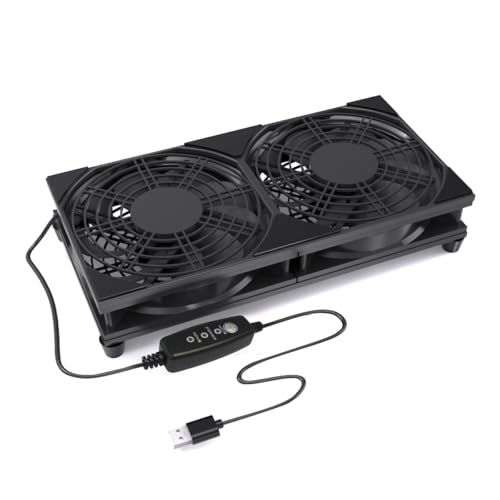
- Dual 120mm design for broad airflow coverage
- Three adjustable speeds with USB plug-and-play power
- Raised base and protective grills support stable daily use
Best For: Routers, AV cabinets, consoles, and small electronics needing wide-area cooling
Best Large-Cabinet Option

- 56.7 CFM listed airflow for larger equipment setups
- USB-powered with a removable switch cable
- Rubber feet help limit vibration and desktop resonance
Best For: Network cabinets, AV equipment, workstations, and DIY cooling projects
Best Quiet Adjustable Fan

- Low, medium, high, and off settings
- Silicone feet help reduce vibration and noise
- Dual ball bearings support flat or upright use
Best For: USB-equipped routers and media devices in noise-sensitive areas
Best Quiet USB Pick – AC Infinity MULTIFAN S3
For a low-noise setup, the AC Infinity MULTIFAN S3 is a practical choice among professional router cooling fans. Its USB power, adjustable speed controller, and compact 120mm design make it easy to position near a router or other electronics.
Best For: Quiet, adjustable cooling powered directly from a nearby USB port.
Pros:
- Ultra-quiet 18 dBA operation with adjustable multi-speed control.
- USB connection works with many electronics and game-console ports.
- Dual-ball bearings are rated for a 67,000-hour lifespan.
- Can stand upright or lie flat, with noise-absorption pads included.
Cons:
- Its 52 CFM airflow is lower than larger multi-fan cooling systems.
- USB power may be less suitable when no nearby USB port is available.
This is a strong fit when quiet operation and flexible placement matter more than maximum airflow. The speed controller also makes it easier to balance cooling performance against noise.
Best High-Airflow Array – GDSTIME Router Cooling Fan
The GDSTIME cooling system is built for shoppers who prioritize airflow in a larger equipment area. With four 120mm fans, AC-adapter power, and speed control, it offers a high-output approach to professional router cooling fans.
Best For: High-airflow cooling for larger routers, electronics, and enclosed equipment spaces.
Pros:
- Four 120mm fans provide a combined stated airflow of up to 264 CFM.
- AC power enables higher-speed operation from a wall outlet.
- Speed control helps adjust performance for different cooling needs.
- Includes a one-year warranty with free replacement.
Cons:
- Its 38 dBA noise rating is higher than the quieter single-fan options.
- The roughly 9.65-by-9.65-inch footprint needs substantial space.
- Sleeve bearings have a shorter stated life than dual-ball-bearing designs.
This model makes the most sense when broad, forceful airflow is the priority. Its larger footprint and higher noise level are trade-offs for the four-fan layout and AC-powered performance.
Best Temperature-Controlled System – AC Infinity AIRCOM S7
The AC Infinity AIRCOM S7 is a more integrated option for routers, modems, and AV equipment. Its top-exhaust design, thermal trigger modes, and four speed settings give it the kind of automated control useful in professional router cooling fans.
Best For: Top-exhaust cooling where automatic temperature response and scheduled control are useful.
Pros:
- Two fans deliver a stated 140 CFM of top-exhaust airflow.
- Two thermal trigger modes can respond to equipment temperature.
- Four speed settings and PWM-controlled motors support quieter operation.
- Power-outage memory preserves configured settings.
Cons:
- Its 11.6-by-6.3-inch housing requires more dedicated space than a basic fan.
- The system is designed for top exhaust, limiting placement flexibility.
- It uses a 12V, 4-pin connection rather than a simple USB plug.
Choose the AIRCOM S7 when hands-off temperature management is more important than the simplest installation. It is especially suited to equipment racks, cabinets, and other setups where top exhaust is practical.
Best Simple USB Value – Wathai 120mm Cooling Fan
The Wathai 120mm fan keeps installation straightforward with USB power and a compact format. For shoppers comparing professional router cooling fans, it offers useful airflow, three speed settings, and included mounting hardware without requiring a dedicated AC outlet.
Best For: Simple USB cooling for routers, modems, mini PCs, and entertainment equipment.
Pros:
- USB connection supports quick installation in tight spaces.
- Three speed settings allow basic airflow adjustment.
- Stated airflow reaches 56.7 CFM at a 23 dBA noise rating.
- Includes a protective net, feet, mounting screws, and nuts.
Cons:
- Sleeve bearings have a stated 35,000-hour life, shorter than some alternatives.
- It is a single fan without automatic thermal triggering.
- USB power limits the setup to locations with a compatible port or adapter.
This fan is a sensible choice for straightforward spot cooling and flexible placement. Its included hardware helps with mounting, while the three-speed control provides more adjustability than a fixed-speed USB fan.
Best Dual-Fan USB Cooling – ELUTENG 80mm Router Fan
For buyers seeking professional router cooling fans with flexible placement, the ELUTENG uses two connected 80mm fans to deliver stronger airflow from a USB connection. Three speed settings and a compact horizontal-or-vertical design make it practical for routers, AV equipment, consoles, and other heat-producing electronics.
Best For: USB-powered cooling when you want adjustable airflow and a dual-fan setup.
Pros:
- Dual 80mm fans provide stronger combined airflow.
- Three speeds allow adjustment from quieter to higher-airflow operation.
- USB plug-and-play power works with routers, consoles, PCs, and AV equipment.
- Protective metal grills and removable rubber shock absorbers improve practical safety and stability.
Cons:
- It requires an available USB power source.
- The dual-fan unit is less compact than a single 80mm fan.
With reported noise from 25.6dB to 32.5dB and airflow up to 31.98 CFM per fan, this is a versatile choice for continuous, adjustable cooling in a home-office or entertainment setup.
Best High-Output DIY Cooling – 4X 120mm Variable-Speed Fan
This four-fan 120mm system suits professional router cooling fans buyers who need broad airflow and fine speed control. Its adjustable 3V-to-12V range, AC input, and metal construction make it a flexible option for router cabinets, gateways, DVRs, receivers, and other equipment that runs hot.
Best For: DIY electronics cabinets and setups needing four large fans with variable-speed control.
Pros:
- Four 120mm fans can move air across a larger equipment area.
- Speed is adjustable from off to full blast through the controller.
- AC 100–240V input supports direct outlet operation.
- Dual ball bearings are rated for a 65,000-hour service life.
Cons:
- Its four-fan layout is less compact than a single-fan solution.
- The AC-powered design may be more setup than a USB fan requires.
- The supplied notes do not specify a noise rating.
This is the most adaptable pick for larger or custom cooling projects, especially where you want to tune airflow precisely rather than rely on fixed speed settings.
Best Quiet Single-Fan Cooling – 80mm USB Router Fan
For a straightforward professional router cooling fans setup, this quiet 80mm USB fan combines low-power operation with three speed levels. Its compact footprint, upright-or-flat placement, and USB plug make it easy to position behind a router, receiver, DVR, console, or computer cabinet.
Best For: Quiet, space-conscious cooling for a single router or other compact electronic device.
Pros:
- Low-speed operation is rated at just 21dB.
- Three speed settings balance noise and airflow.
- USB power works with compatible equipment USB ports.
- Shockproof feet support flat or upright placement, while iron grills protect the blades and cable.
Cons:
- It uses one 80mm fan rather than a dual-fan arrangement.
- USB power limits it to setups with a suitable USB port or adapter.
With up to 33 CFM of airflow and a listed 65,000-hour double-ball-bearing service life, this model is a sensible low-noise choice when a simple single-fan solution is enough.
Best Dual-Fan Value – 240mm USB Router Cooling Fan
For shoppers comparing professional router cooling fans, this 240mm USB model stands out for its dual 120mm layout and broad coverage. Three adjustable speeds, USB plug-and-play power, protective grills, and a raised base make it practical for routers, modems, consoles, TV boxes, and other compact electronics.
Best For: Wide-area cooling for routers, AV cabinets, entertainment centers, and small electronics.
Pros:
- Dual 120mm fans move air across a wider surface area.
- Three-speed controller helps balance airflow and noise.
- USB power works with adapters, power banks, computers, TVs, and monitors.
- Protective grills and raised feet support safer, stable placement.
Cons:
- The 240mm footprint may be too large for compact setups.
- Only the fan body is listed as included, so a USB power adapter may be needed separately.
This is a flexible choice when you want broader cooling coverage and simple USB operation rather than a compact single-fan design.
Best Large-Cabinet Option – VTRETU 360mm USB Cooling Fan
Among professional router cooling fans, the VTRETU is aimed at larger network, audio-video, and workstation setups. Its 360mm fan format delivers listed airflow of 56.7 CFM, while the 5V USB connection, switch cable, rubber feet, and 55cm cable support straightforward installation and stable placement.
Best For: Network cabinets, routers, modems, DVRs, receivers, streaming boxes, and DIY electronics cooling.
Pros:
- Listed 56.7 CFM airflow suits devices that need additional ventilation.
- USB-powered 5V design is simple to connect.
- Rubber feet help reduce desktop resonance and improve grip.
- Includes a removable switch cable and one-year quality assurance.
Cons:
- The 360mm length requires substantial placement space.
- The supplied notes do not identify a multi-speed controller.
- Its sleeve bearing may be less durable than a dual-ball-bearing design.
This model makes the most sense when cabinet or equipment width is available and stronger listed airflow matters more than compact size.
Best Quiet Adjustable Fan – 120mm USB Router Cooler
This 120mm model is a practical pick for professional router cooling fans when adjustable operation and flexible positioning are priorities. It offers low, medium, and high settings plus off, silicone feet for vibration absorption, USB power, and dual ball bearings rated for a 50,000-hour lifespan.
Best For: Routers, modems, receivers, DVRs, TV boxes, and other USB-equipped devices in noise-sensitive spaces.
Pros:
- Three speed settings plus an off mode allow easy adjustment.
- Silicone feet help absorb airflow shock and vibration.
- Dual ball bearings support flat or upright placement.
- Listed airflow reaches 53.35 CFM at up to 1,500 RPM.
Cons:
- Its 120mm format covers less area than larger dual-fan models.
- The supplied details list noise figures inconsistently, so real-world sound may vary by setting.
Choose this fan for a compact, position-flexible setup where speed control and vibration reduction are more important than maximum coverage.
How We Picked the Best Professional Router Cooling Fans
We focused on the factors that matter most for continuous electronics cooling: airflow potential, fan diameter, speed adjustment, power compatibility, noise control, and ease of placement. The selection includes compact 80mm models, larger 120mm and 240mm fans, dual-fan systems, and multi-fan cooling pads for cabinets or equipment shelves.
USB-powered options are useful for routers, modems, game consoles, and TV boxes with nearby USB ports. AC-powered models can provide a more convenient dedicated setup, particularly for networking cabinets or equipment that runs continuously. We also considered whether each design is suitable for direct placement, exhaust cooling, or DIY cabinet installations.
Quick Comparison
| Best For | Recommended Design | What to Look For |
|---|---|---|
| Small routers and modems | 80mm or compact 120mm fan | Low noise and adjustable speed |
| AV cabinets and shelves | 120mm fan or top-exhaust system | Strong airflow and easy positioning |
| Large enclosures | 240mm or multi-fan system | Broad coverage and stable power |
| DIY electronics projects | USB fan or multi-fan cooling pad | Flexible mounting and speed control |
Key Buying Factors
Fan Size and Airflow
Larger fans can move air effectively at lower speeds, often producing less noise than smaller fans under comparable conditions. An 80mm fan suits tight spaces, while 120mm models offer a useful balance of airflow, size, and quiet operation. Choose a 240mm or multi-fan design when cooling a broad cabinet area rather than one device.
Speed Control and Noise
Adjustable speed lets you balance cooling against sound. Use a lower setting for lightly loaded equipment or quiet rooms, and increase airflow when the router operates continuously or sits in a warm enclosure. Look for speed controllers or multiple selectable settings rather than a fixed-speed fan when conditions vary.
Power and Installation
Check whether the fan uses USB, DC power, or an AC plug, and confirm that the cable can reach the intended outlet or device. USB models are generally easy to relocate, while AC-powered units may be better for permanent installations. Also verify available clearance, airflow direction, and whether the fan can sit securely without blocking vents.
Who Should Buy Which Professional Router Cooling Fans?
Choose a compact 80mm USB model for a small router, modem, DVR, or game console with limited space. A 120mm fan is the most versatile choice for typical home networking and AV equipment. Select a top-exhaust system for an equipment shelf or cabinet where warm air naturally collects. For DIY cabinets, server spaces, or several heat-producing components, a dual-fan, 240mm, or four-fan cooling design can provide wider coverage. If the equipment runs around the clock, prioritize quiet operation, speed control, and dependable power over maximum airflow alone.
