Renter-friendly smart door locks can add convenience without forcing a permanent hardware commitment. The best options install cleanly, work with existing deadbolts or handle sets, and give you flexible access control from your phone or keypad.
In this roundup, we focused on locks that balance easy installation, reliable entry methods, and features renters actually need, like app control, auto-locking, fingerprints, and temporary codes.
Best 10 Renter-Friendly Smart Door Locks Picks for 2026
Editor’s Pick
ULTRALOQ Bolt SE Wi‑Fi Smart Lock

- Fingerprint, passcode, app, web, and key access
- Built-in Wi‑Fi plus Matter over Thread
- Installs in about 10 minutes
Best For: Renters who want maximum flexibility and smart-home support
Most Discreet
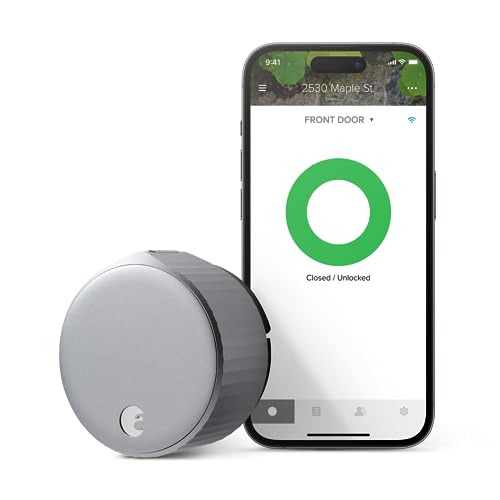
- Inside-only installation preserves curb appeal
- Works with your existing deadbolt
- App sharing and auto-lock features
Best For: Renters who want a low-profile upgrade without changing exterior hardware
Top Security Upgrade
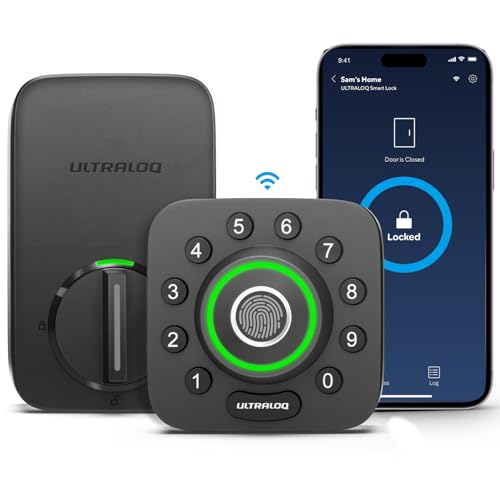
- Fingerprint, passcode, app, and auto-unlock access
- Built-in Wi‑Fi and door sensor
- ANSI Grade 1 with IP65 weather resistance
Best For: Renters who want stronger security and door-status alerts
Best Budget Alternative

- No app, Wi‑Fi, or Bluetooth needed
- Up to 20 codes plus one-time access
- Installs in about 15 minutes
Best For: Renters who want a simple code-based lock with easy setup
Fast Fingerprint Everyday Lock

- No-drill install in about 15 minutes
- Built-in Wi-Fi with app control
- 6 unlock methods including fingerprint
Best For: Renters who want easy install and fast biometric entry
Damage-Free Adhesive Entry
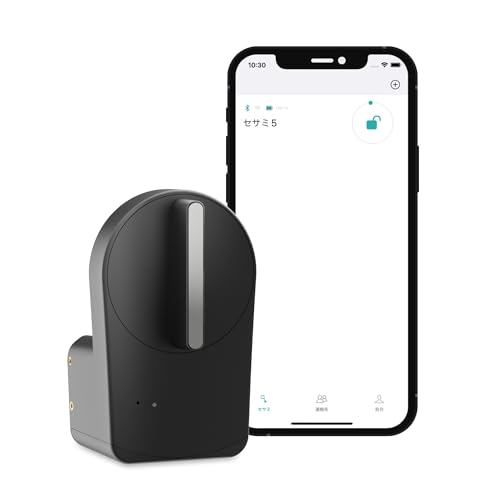
- Mounts with 3M adhesive tape
- Works with your existing deadbolt
- Auto-lock timer from 3 seconds to 1 hour
Best For: Renters and Airbnb hosts who want a no-drill setup
WiFi Keypad Front-Door Set
Philips WiFi Keypad Deadbolt with Handle

- Built-in Wi-Fi with no hub required
- Fingerprint, app, and flexible PIN options
- Includes matching handle set
Best For: Buyers who want a full front-door smart lock set
Fast Fingerprint Access

- 0.5-second fingerprint unlock
- Wi-Fi app control plus keypad
- Backup keys and auto-lock included
Best For: Fast biometric entry with multiple backup options
Flexible Family Access
Philips Wi-Fi Smart Deadbolt Lock

- App, fingerprint, code, key, and voice unlock
- Up to 100 custom passcodes
- Built-in Wi-Fi with auto-lock
Best For: Flexible entry and easy guest-code sharing
Editor’s Pick – ULTRALOQ Bolt SE Wi‑Fi Smart Lock
For renters-friendly smart door locks, the ULTRALOQ Bolt SE stands out if you want broad access options without giving up modern smart-home features. It supports fingerprint entry, passcodes, app control, web access, eKey sharing, voice control, and both built-in Wi‑Fi and Matter over Thread remote access.
Best For: Renters who want a feature-rich smart lock with multiple unlock methods and Matter compatibility.
Pros:
- 7-in-1 access options including fingerprint, passcode, app, web portal, and keys
- Built-in Wi‑Fi plus Matter over Thread remote access support
- Easy DIY install in about 10 minutes
- Auto-lock, activity history, and real-time notifications
Cons:
- Matter remote access requires a compatible Thread Border Router
- Wi‑Fi support is 2.4 GHz only
- Door sensor is not included
This is a strong all-around choice if you want flexible access control and smart-home integration in one lock. The long battery life and renter-friendly use cases like apartments and rentals make it practical for everyday use.
Most Discreet – August Wi‑Fi Smart Lock
If you’re comparing renter-friendly smart door locks and want to keep the outside of the door looking the same, the August Wi‑Fi Smart Lock is a smart fit. It mounts on the inside of your existing deadbolt, so you get app-based access, auto-lock features, and smart-home support without changing your front-door curb appeal.
Best For: Renters who want a low-profile smart lock that upgrades an existing deadbolt.
Pros:
- Fits over most single-cylinder deadbolts
- Installs in about 10 minutes
- Built-in Wi‑Fi with Alexa, Google Assistant, HomeKit, and SmartThings support
- Share permanent, scheduled, or temporary access through the app
Cons:
- Designed to work with your existing deadbolt rather than replacing it
- Smart Keypad is sold separately for code entry
- Auto-Unlock is optional, not standard
This is one of the easiest ways to add smart features without altering the exterior hardware. It makes the most sense if you want convenience and a cleaner look over a full replacement deadbolt.
Top Security Upgrade – ULTRALOQ U-Bolt Pro WiFi
Among renter-friendly smart door locks, the ULTRALOQ U-Bolt Pro WiFi is aimed at users who want strong security features along with easy remote management. It combines fingerprint access, passcodes, app control, auto-unlock, and a door sensor, all with built-in Wi‑Fi and no hub required.
Best For: Renters who want a security-focused smart lock with door status monitoring.
Pros:
- 8-in-1 entry options including fingerprint, passcode, app, and keys
- Built-in Wi‑Fi with remote control and sharing, no hub needed
- Door sensor adds status alerts for an open door
- ANSI Grade 1 and IP65-rated for durability and weather resistance
Cons:
- Not recommended for metal doors
- Wi‑Fi is limited to 2.4 GHz
- Requires a standard US door for best fit
This model is a good choice if security and monitoring matter more than keeping the hardware minimal. The door sensor and Grade 1 rating add peace of mind for apartments, rentals, and shared homes.
Best Budget Alternative – Keypad Door Lock with Handle
If you want renter-friendly smart door locks without relying on apps, Wi‑Fi, or Bluetooth, this keypad lock with handle keeps things simple. It focuses on code-based access, easy sharing, and a fast DIY install, making it a practical pick for apartments, bedrooms, and rental properties.
Best For: Renters who want a straightforward keypad lock with no app dependency.
Pros:
- No app, Wi‑Fi, or Bluetooth required
- Up to 20 personalized codes plus temporary one-time codes
- Auto-lock and passage mode for flexible access
- Installs in about 15 minutes with a screwdriver
Cons:
- Does not offer smartphone remote control
- Requires 4 AA batteries, not included
- Best suited to standard wooden doors
This is the simplest option in the group if you mainly want keypad convenience. It’s especially useful when you need temporary access codes and a low-friction installation.
Fast Fingerprint Everyday Lock – eufy Security Smart Lock C220
If you want renter-friendly smart door locks that still feel modern and secure, the eufy Security Smart Lock C220 is a strong pick. It installs in about 15 minutes without drilling, fits most standard deadbolts, and gives you multiple ways to get in without relying on a traditional key.
Best For: Renters or homeowners who want a quick-install smart lock with fingerprint access and built-in Wi-Fi.
Pros:
- 15-minute installation with no drilling, and it fits most standard deadbolts.
- Built-in Wi-Fi means no bridge is required for remote control through the app.
- Offers 6 ways to unlock, including fingerprint, keypad, app, key, Apple Watch, and voice assistants.
- BHMA Grade 3 certified and includes an unusual-attempt alarm.
Cons:
- Uses 8 AA batteries, so battery replacement is part of ownership.
- Fits bores under 54mm only after removing the spacer.
- Best results depend on fingerprint recognition improving over time with self-learning AI.
Overall, this is a practical renter-friendly option if you want fast access, easy installation, and app control without extra hardware. Its mix of fingerprint convenience and built-in Wi-Fi makes it especially appealing for everyday front-door use.
Damage-Free Adhesive Entry – CANDY HOUSE Sesame 5
Among renter-friendly smart door locks, the CANDY HOUSE Sesame 5 stands out because it mounts with 3M adhesive tape instead of tools or drilling. It is designed to work with your existing deadbolt, which makes it a smart option for temporary setups, shared spaces, and rental properties.
Best For: Renters, Airbnb hosts, and shared households that want a no-drill smart lock solution.
Pros:
- No-drill installation with strong 3M adhesive tape.
- Works with 99% of keys and can use a custom 3D-printed adapter for unusual keys.
- Supports auto-lock from 3 seconds to 1 hour.
- Flexible control through Bluetooth, Wi-Fi via Hub3, and support for Apple Watch, NFC tags, and voice assistants.
Cons:
- Remote control depends on Hub3.
- It is a Bluetooth-based lock at the core, so setup and feature access may depend on the connected ecosystem.
- It is aimed more at retrofitting an existing deadbolt than replacing the full front-door hardware.
For renters who want the least invasive install possible, this is one of the most straightforward choices. The adhesive mounting and existing-deadbolt design make it especially appealing when you need a smart upgrade without leaving marks behind.
WiFi Keypad Front-Door Set – Philips WiFi Keypad Deadbolt with Handle
If you want renter-friendly smart door locks with a more complete front-door package, the Philips WiFi Keypad Deadbolt with Handle is worth a look. It connects directly to 2.4GHz Wi-Fi with no hub needed, and the included handle set means you do not need to buy extra hardware.
Best For: Buyers who want a Wi-Fi smart deadbolt with keypad, fingerprint access, and a matching handle set.
Pros:
- No hub required thanks to built-in Wi-Fi connection.
- Supports app control, fingerprint access, and multiple PIN types including one-time, periodic, and recurring codes.
- Includes a matching handle set for a cleaner all-in-one front-door upgrade.
- Easy DIY installation with screwdriver-only setup for compatible door sizes.
Cons:
- Must stay within 33 ft of the router for the best Wi-Fi connection.
- Auto-lock is off by default and must be enabled in the app.
- Batteries are not included.
This model makes sense if you want a more complete smart lock package rather than just a deadbolt. The built-in Wi-Fi, flexible code options, and included handle set make it a practical upgrade for everyday access and guest management.
Fast Fingerprint Access – Wyze Lock Bolt v2
If you want renter-friendly smart door locks that prioritize quick entry and simple daily use, the Wyze Auto-Lock Bolt v2 is built around speed and flexibility. Its fingerprint scanner unlocks in about 0.5 seconds, and the lock also supports app control, keypad codes, and backup keys for low-friction access.
Best For: Renters or homeowners who want fast fingerprint entry with multiple backup unlock options.
Pros:
- Unlocks in about 0.5 seconds with a fingerprint scanner.
- Includes auto-lock, keypad access, app control, and physical backup keys.
- Built-in Wi-Fi lets you manage the lock remotely in the Wyze app.
- AI learning scanner is designed to improve recognition over time.
Cons:
- Battery life is listed at up to 8 months, so battery swaps will still be part of ownership.
- Remote features depend on Wi-Fi connectivity.
- Some features work best when paired with other Wyze devices like the video doorbell.
Overall, this is a practical choice if you want a renter-friendly upgrade that does not force you into one method of entry. The mix of biometric access, keypad use, and backup keys makes it easy to share the door with family while keeping everyday access fast.
Easy Install with Alerts – Anona Holo Wi-Fi Smart Lock
The Anona Holo is a strong fit if you are comparing renter-friendly smart door locks and want an easy inside-only installation. It installs with just a screwdriver on compatible single-cylinder deadbolts, then adds Wi-Fi app control, auto-lock, temporary codes, and security alerts.
Best For: Renters who want a non-destructive smart lock with remote control and guest code management.
Pros:
- Non-destructive installation on the inside of the door with just a screwdriver.
- Auto-lock plus anomaly detection for jammed or left-open situations.
- Supports temporary and one-time passcodes in the app.
- Works with Alexa and Apple HomeKit ecosystems.
Cons:
- Uses 4 AA batteries, with 4-6 months of life in standard Wi-Fi mode.
- Designed for compatible single-cylinder deadbolts, so fit matters.
- Battery life can vary if you rely heavily on remote features and alerts.
This lock stands out for renters because it aims to add smart features without a major hardware overhaul. If you need flexible guest access and the reassurance of auto-lock notifications, it covers the basics well while staying relatively simple to install.
Flexible Family Access – Philips Wi-Fi Smart Deadbolt Lock
For shoppers looking at renter-friendly smart door locks with lots of ways to get in, the Philips Wi-Fi Smart Deadbolt Lock offers broad access options and detailed code management. You can unlock with the app, passcode, fingerprint, physical key, or voice, while built-in Wi-Fi supports remote control without an extra hub.
Best For: Families, renters, and hosts who want flexible entry methods and easy code sharing.
Pros:
- Multiple unlock methods: app, passcode, fingerprint, key, and voice.
- Built-in Wi-Fi for remote lock and unlock control.
- Can create up to 100 custom passcodes and share one-time or scheduled codes.
- Auto-lock, real-time notifications, and access history add convenience and oversight.
Cons:
- Batteries are not included.
- Only supports 2.4GHz Wi-Fi.
- It does not have a door sensor, which may matter if you want door-position detection.
This is a strong all-around option if your priority is flexibility rather than a single standout feature. The code-sharing tools are especially useful for renters, guests, and delivery access, while the mix of fingerprint and voice options makes everyday use easier for a busy household.
How We Picked the Best Renter-Friendly Smart Door Locks
We prioritized models that are easier to install, less invasive to remove, and practical for apartments, condos, and leased homes. That means checking for retrofit-friendly designs, straightforward setup, remote access options, and dependable backup entry methods.
We also looked for the features that matter most in Renter-Friendly Smart Door Locks: auto-lock, app management, keypad access, voice or Wi-Fi support where useful, and solid compatibility with standard front-door hardware.
Quick Comparison
If you want the simplest path, retrofit locks are usually the easiest option because they work with your existing deadbolt. If you want the most complete upgrade, full deadbolt replacements and keypad-handle combinations may offer more convenience, but they can require more installation and landlord approval.
Key Buying Factors for Renter-Friendly Smart Door Locks
Installation and Reversibility
Look for locks that install with basic tools and can be removed without leaving noticeable changes. That’s especially important if you need to restore the original hardware before moving out.
Entry Methods
The best Renter-Friendly Smart Door Locks offer more than one way in. App access, keypad codes, fingerprint readers, and physical key backup can all reduce lockout risk.
Connectivity and Control
Wi-Fi is convenient for remote unlocks and status checks, while Bluetooth-only designs may be simpler and more private but limited in range. Matter support can also help if you plan to build a broader smart home setup.
Security and Access Management
Choose features like auto-lock, tamper alerts, door sensors, and temporary guest codes if you share access with roommates, family, or occasional visitors. Those tools make daily use easier without sacrificing control.
Who Should Buy Which Renter-Friendly Smart Door Locks?
Renters who want the easiest install should lean toward retrofit-style models that work with an existing deadbolt. If you care most about convenience, a Wi-Fi smart lock with app control and auto-lock is a strong fit. If you want the fastest everyday entry, fingerprint-enabled locks are often the most practical choice. For shared homes or short-term guests, keypad-focused models are especially useful because codes are easy to add, change, and revoke.
In short, the best choice depends on how much you can modify your door, how often you need remote access, and whether you value speed, simplicity, or shared access management most.
