If your laptop or desktop has a damaged audio jack, a noisy onboard sound chip, or no headset port at all, a USB adapter can be the simplest fix.
Below, we focus on the best USB audio adapter for headphones options for everyday listening, voice chat, and gaming across PC, Mac, PS4, and PS5.
Best 10 USB Audio Adapter for Headphones Picks for 2026
Simple USB Stereo Fix
Sabrent USB Audio Adapter for Headphones

- Plug-and-play USB sound card with no drivers needed
- Separate headphone and microphone jacks
- Compatible with Windows, Mac, and Linux
Best For: Users who need a basic USB audio port replacement with separate mic support
Gaming-Friendly TRRS Adapter
- Single TRRS port for listening and speaking
- Plug-and-play setup with no external power
- Works with PC, Mac, Linux, PS4, and PS5
Best For: Gamers and headset users who need a single USB audio jack for both mic and sound
Reliable DAC Upgrade
UGREEN USB Audio Adapter for Headphones

- Built-in DAC chip with noise reduction
- Plug-and-play with broad device support
- Compact and portable ABS design
Best For: Shoppers who want a small, widely compatible USB sound card with a cleaner DAC
Dual-Pack TRRS Option
STSAUX USB Audio Adapter for Headphones

- Includes two plug-and-play USB adapters
- Supports TRRS audio and microphone on one jack
- 24-bit/96kHz DAC with noise reduction
Best For: People who want a two-pack for TRRS headset audio and mic use
UGREEN 24-bit DAC Pick
UGREEN USB to 3.5mm Audio Adapter

- Supports headphone and microphone use
- Up to 24-bit/96kHz audio output
- Durable aluminum and braided build
Best For: People wanting a durable plug-and-play headset adapter with higher-resolution sound
Value 2-Pack Option
JXMOX USB to 3.5mm TRRS Adapter

- Includes two adapters in one package
- Plug-and-play with no drivers required
- Supports CTIA standard headsets
Best For: Shoppers who want a simple 2-pack adapter for common PC and console setups
Broken Port Fix

- Restores broken headphone or mic ports
- Supports headset output and mic input
- Driver-free and compact for travel
Best For: Anyone needing a quick replacement for a failed laptop or desktop audio jack
Durable plug-and-play option
MOSWAG USB to 3.5mm Jack Audio Adapter

- Adds a TRRS aux port for listening and speaking
- No driver required for quick setup
- Nylon braided cable with aluminum shell
Best For: Users who want a durable, easy-to-use adapter for TRRS headsets
Compact console-friendly option
USB to 3.5mm Jack Audio Adapter

- Adds a TRRS headset port for audio and mic
- Plug and play with no driver installation
- Works with PS4, PS5, Windows, Mac, and Linux
Best For: Gamers and mobile users who need a compact adapter for supported devices
Best value two-pack
JSAUX 2 Pack USB to 3.5mm Jack Audio Adapter

- Two adapters included in the box
- Supports CTIA headset audio and mic
- Bus-powered plug-and-play setup
Best For: People who want a spare or need adapters for more than one device
Simple USB Stereo Fix – Sabrent USB Audio Adapter for Headphones
If you need a straightforward USB audio adapter for headphones, this Sabrent model is a clean plug-and-play option for restoring basic sound on a laptop, desktop, or mini PC. It adds separate 3.5mm headphone and microphone jacks without drivers, software, or external power, making it a practical fix when an onboard audio port has failed.
Best For: Basic headphone output and mic input on Windows, Mac, or Linux systems that need a simple USB audio port replacement.
Pros:
- Driverless plug-and-play setup with USB bus power
- Separate headphone out and microphone in jacks
- Works across Windows, Mac, and Linux class-compliant systems
- Compact option for replacing a broken audio port
Cons:
- Does not support 4-pole combo headsets on one plug
- No surround sound support
- Will not power passive speakers
This is a sensible choice if your goal is reliable stereo audio and basic mic support rather than advanced headset features. It keeps the setup simple, but you should verify that your headset uses separate plugs.
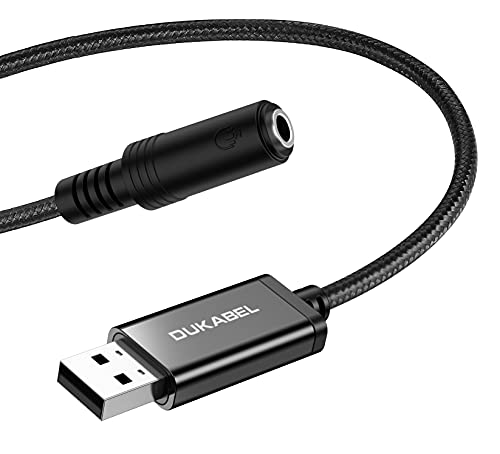
Gaming-Friendly TRRS Adapter – DuKabel USB Headphone Adapter
This USB audio adapter for headphones is aimed at people who want a simple way to add a single TRRS headset jack to a PC or console. DuKabel combines listening and speaking in one compact external sound card, with plug-and-play setup and broad compatibility for Windows, Mac, Linux, Chromebook, Raspberry Pi, PS4, and PS5.
Best For: Gamers and PC users who want one headset connection for both audio and mic on supported devices.
Pros:
- Supports TRRS headsets with integrated microphone input/output
- Plug-and-play with no driver or external power required
- Compatible with PC, Mac, Linux, Chromebook, PS4, and PS5
- Metal casing and braided cord for added durability
Cons:
- Not intended for TVs, cars, PS3, or trucks
- Limited to a 16-bit/48kHz DAC spec
- Works best with CTIA standard headsets
If you need a dependable one-jack headset solution for gaming or calls, this adapter keeps things simple and sturdy. It is especially appealing when you want quick setup and wide device support without extra software.
Reliable DAC Upgrade – UGREEN USB Audio Adapter for Headphones
The UGREEN USB audio adapter for headphones is built for users who want a simple external sound card with a stronger focus on audio quality. It uses a built-in DAC chip and supports plug-and-play operation, making it a practical upgrade for laptops and desktops that need cleaner stereo output and basic headset support.
Best For: Buyers looking for a compact USB sound adapter with broad compatibility and a cleaner DAC-based audio path.
Pros:
- Built-in DAC chip with noise reduction up to 16-bit/48kHz
- Plug-and-play with no drivers or external power
- Wide compatibility including Windows, Mac, Linux, PS4, PS5, and Chromebook
- Compact ABS design for easy portability
Cons:
- Not compatible with PS3
- Audio output is stereo, not surround-focused
- Uses a basic compact form factor rather than desktop controls
For a simple headphone adapter, this is a good all-around choice when compatibility matters as much as sound quality. It is easy to carry, easy to use, and backed by a longer warranty than many budget alternatives.
Dual-Pack TRRS Option – STSAUX USB Audio Adapter for Headphones
If you want a USB audio adapter for headphones that supports both listening and speaking through one TRRS connection, this STSAUX two-pack is built for that job. It adds a 3.5mm 4-pole interface with plug-and-play setup and a higher-resolution DAC spec, which makes it useful for gaming chats, Zoom calls, and home office backups.
Best For: Users who want two USB headset adapters on hand for single-jack TRRS audio and microphone setups.
Pros:
- Two adapters included in the box
- TRRS 4-pole support for audio and microphone through one port
- 24-bit/96kHz DAC with noise reduction
- Plug-and-play compatibility with Windows, Mac, Linux, and Chrome OS
Cons:
- Not compatible with TVs or cars
- iOS microphone functionality is not supported
- Some limitations are noted for certain USB audio output use cases
This package makes sense if you want a spare adapter or need to equip more than one setup at once. It is especially practical for people who rely on a single headset connection for everyday communication.
UGREEN 24-bit DAC Pick – UGREEN USB to 3.5mm Audio Adapter
If you need a usb audio adapter for headphones that also handles mic chat, this UGREEN model is a practical plug-and-play option. It adds a 3.5mm connection through USB-A and supports both listening and talking, making it useful for gaming, calls, and everyday desktop audio.
Best For: Users who want a USB-A headset adapter with mic support, higher-res audio, and broad device compatibility.
Pros:
- Supports both headphone output and microphone input for chat and calls.
- Built-in DAC supports up to 24-bit/96kHz output for higher-quality playback.
- Aluminum shell and nylon-braided cable add durability for daily use.
- Plug-and-play design with no driver installation required.
Cons:
- Does not support high-resistance headphones.
- Microphone does not support 24-bit/96kHz playback.
- Apple headphone line control is not supported.
Overall, this is a strong pick if you want a straightforward USB audio adapter for headphones with reliable mic support and better-than-basic sound output. Its compatibility list is wide, but the impedance and mic limitations are worth checking before buying.
Value 2-Pack Option – JXMOX USB to 3.5mm TRRS Adapter
This usb audio adapter for headphones is aimed at users who want a simple way to add a 3.5mm TRRS audio port over USB. The JXMOX 2-pack is plug-and-play, supports CTIA standard headsets, and is built for devices like PCs, Macs, laptops, PS4, and PS5.
Best For: Buyers who want a basic, no-fuss headset adapter in a 2-pack for multiple devices or backups.
Pros:
- Comes as a 2-pack, which is useful for extra setups or spares.
- Plug-and-play design needs no software or driver installation.
- Built-in DAC smart chip is designed for stable Hi-Fi stereo sound.
- Relief strain design is tested for 12000+ bends for added durability.
Cons:
- USB port is output only, not input.
- Does not work with TV, car, PS3, or truck systems.
- Requires CTIA standard jacks for compatibility.
For shoppers who care more about convenience than extras, this JXMOX adapter keeps things simple and affordable-looking by bundling two units. It is best suited to standard headset use rather than special audio setups or unsupported devices.
Broken Port Fix – Biaze USB Audio Adapter
If your goal is a usb audio adapter for headphones that can also restore a damaged audio jack, this Biaze option is built for that job. It adds headphone output and microphone input through USB, with plug-and-play setup for Windows, Mac, Linux, Chromebook, Raspberry Pi, and PS4/PS5 use.
Best For: Users replacing a broken headphone or microphone port on a laptop or desktop.
Pros:
- Designed to replace faulty sound cards or damaged audio ports.
- Supports both headphone audio output and microphone input.
- Driver-free setup with no external power required.
- Compact ABS body makes it easy to carry.
Cons:
- Audio output is listed at up to 16-bit/48kHz, not higher-resolution levels.
- It uses a 3.5mm TRS jack setup, so matching your headset type matters.
- Compatibility troubleshooting may be needed on older Windows versions.
This is the most repair-focused choice in the group, especially if you need a fast workaround for a broken port. It emphasizes practical recovery and everyday headset use over premium audio features.
Durable plug-and-play option – MOSWAG USB to 3.5mm Jack Audio Adapter
If you need a straightforward USB audio adapter for headphones, the MOSWAG model is built for plug-and-play use on a wide range of devices. It adds a 3.5mm TRRS port for listening and speaking, supports CTIA and OMIP standard headphones, and is designed to work without driver installation.
Best For: People who want a compact, durable USB-to-3.5mm adapter for everyday headset use on PCs, laptops, Macs, Linux systems, and supported game consoles.
Pros:
- Supports both audio output and microphone input through a 3.5mm TRRS connection
- Advanced built-in DAC chip with stable 16-bit/48kHz output and noise reduction
- Plug and play with no driver required
- Nylon braided cable and aluminum shell for added durability
Cons:
- The 3.5mm microphone jack does not support TS or TRS connectors
- Designed specifically for TRRS headsets, so compatibility is more limited than generic audio adapters
Overall, this is a practical USB audio adapter for headphones if you want a simple external sound card with broad system support and a more durable build. Its strengths are easy setup and reliable everyday use rather than advanced features.
Compact console-friendly option – USB to 3.5mm Jack Audio Adapter
This USB audio adapter for headphones is aimed at users who want a compact external sound card for gaming consoles, laptops, and desktops. It adds a 3.5mm TRRS headset port for listening and speaking, and it is designed for plug-and-play use without drivers.
Best For: Buyers who want a lightweight USB-to-3.5mm adapter for supported consoles and computers, especially when portability matters.
Pros:
- Supports listening and speaking through a single TRRS port
- Plug and play with automatic recognition in seconds
- Compact design with an aluminum shell and nylon braided cable
- Wide support for Windows, Mac, Linux, Chromebook, Raspberry Pi, PS4, and PS5
Cons:
- Only supports mono microphone TRRS, not TS or TRS
- Not compatible with PS3
- Apple EarPods microphone functionality is not supported
In practical terms, this adapter is a solid choice if you want a small USB audio adapter for headphones that can move easily between devices. Just be aware that its headset compatibility is more specific than a broader-purpose sound card.
Best value two-pack – JSAUX 2 Pack USB to 3.5mm Jack Audio Adapter
The JSAUX 2-pack is a practical USB audio adapter for headphones if you want backups or need to outfit more than one device. It supports CTIA 3.5mm headsets with stereo listening and speaking, and it works as a replacement for a failed USB sound card adapter.
Best For: Shoppers who want two compact TRRS adapters for multiple devices or a spare to keep on hand.
Pros:
- Includes two adapters in one package
- Supports stereo sound plus microphone use with CTIA headsets
- Plug and play with bus-powered operation
- High signal-to-noise ratio and low-noise sound chip
Cons:
- Supports CTIA standards jack, so compatibility is not universal
- Does not support Apple EarPods microphone functionality
- PS3 is not supported
For buyers comparing USB audio adapters for headphones, this 2-pack stands out for convenience and value. It is best suited to anyone who wants a simple, portable solution for everyday headset use across common systems.
How We Picked the Best USB Audio Adapter for Headphones
We prioritized adapters that are truly plug-and-play, broadly compatible, and practical for real headset use. For a USB Audio Adapter for Headphones, that means reliable stereo output, mic support where needed, and a compact design that is easy to carry or leave connected.
We also looked for clear compatibility with common platforms such as Windows, macOS, PlayStation, and USB-A ports, plus features like braided cables, 3.5mm TRRS support, and DACs that may help improve basic audio quality.
Quick Comparison
If you want the simplest fix, choose a basic single-adapter model with no drivers. If you need headset chat, make sure the adapter explicitly supports a microphone through a TRRS 4-pole connection. For gaming or remote work, multi-pack options can be better value if you want spares for a second device or travel bag.
Key Buying Factors for a USB Audio Adapter for Headphones
Headphone-Only Vs. Headset Support
Some adapters are built for headphones only, while others support both audio output and mic input. If you plan to use it for calls, streaming, or online gaming, look for TRRS and microphone compatibility.
Compatibility and Port Type
Most models in this roundup use USB-A, which is ideal for older laptops, desktops, and consoles. Check whether the adapter works with Windows, Mac, PS4, or PS5 before buying, especially if you need console chat support.
Audio Quality and DAC Features
Basic adapters are fine for casual use, but a model with a better DAC or higher sample-rate support may deliver cleaner sound and less hiss. That said, most buyers will notice reliability and fit more than technical specs.
Cable Design and Build
Braided cables, shorter leads, and compact housings can make everyday use easier. If you plan to travel with your adapter or use it on a laptop, durability matters more than fancy extras.
Who Should Buy Which USB Audio Adapter for Headphones?
Choose a basic plug-and-play adapter if you need a quick replacement for a broken jack or an extra audio port. Pick a mic-capable model if you use a headset for meetings or gaming chat. If you want the most flexible setup, look for a two-pack or a model with stronger compatibility across PC, Mac, and consoles.
For most shoppers, the best USB Audio Adapter for Headphones is the one that matches your headset type, supports your microphone needs, and works without driver headaches.
