Choosing among video editing keyboards for audiophiles means balancing fast timeline control with the tactile precision, quiet operation, and connectivity needed in a studio environment.
This roundup includes dedicated DaVinci Resolve and Pro Tools keyboards, programmable macro controllers, customizable consoles, and MIDI-focused options for editing setups that also handle serious audio work.
Best 10 Video Editing Keyboards for Audiophiles Picks for 2026
Best Portable Resolve Controller

- Compact design with built-in battery
- Search dial and dedicated editing controls
- Bluetooth or USB connectivity; Studio card included
Best For: Portable DaVinci Resolve editing setups
Best Customizable Creative Console

- Nine programmable keypad buttons with LCD displays
- Control dial and roller for precise adjustments
- Works with Resolve, Premiere Pro, Final Cut Pro, and Spotify
Best For: Cross-app creative workflows and media control
Best Full-Size Resolve Keyboard
DaVinci Resolve Editor Keyboard

- Full-size QWERTY layout with mechanical switches
- Integrated metal search dial and editing controls
- Heavy-duty full-metal construction
Best For: Dedicated wired DaVinci Resolve workstations
Best Quiet General-Purpose Keyboard
ATM 98 Wireless Mechanical Keyboard

- Silent switches with eight-layer dampening
- 98-key layout and programmable knob
- Tri-mode wireless and USB-C connectivity
Best For: Quiet editing desks and customizable media control
Resolve Editing Control

- Dedicated Resolve function keys
- Search dial for timeline control
- Compact Bluetooth and USB-C design
Best For: DaVinci Resolve editors wanting tactile, specialized controls
Avid Shortcut Workflow
Backlit Avid Media Composer Keyboard

- Color-coded Avid shortcuts
- Slim backlit aluminum body
- USB-A wired connection
Best For: Avid Media Composer editors needing quick shortcut access
Custom Macro Control

- Six LCD keys and three knobs
- Programmable macros and switchable pages
- Hot-swappable, sound-dampened design
Best For: Editors wanting customizable shortcuts and media controls
Pro Tools Shortcut Keyboard

- 150+ color-coded Pro Tools shortcuts
- Full 104-key Mac QWERTY layout
- Backlit aluminum, wired USB-C design
Best For: Mac Pro Tools users who want visible shortcuts
Weighted MIDI Controller
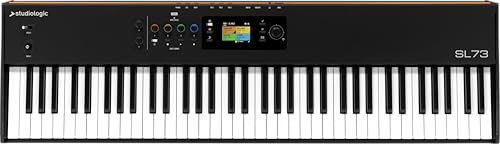
- 73 weighted hammer-action keys with aftertouch
- Dedicated DAW transport controls
- USB-C audio, MIDI, and Numa Player integration
Best For: Music producers prioritizing expressive keyboard performance
Macro Editing Deck

- 18 programmable keys with LCD visuals
- Supports multi-step shortcuts and OBS actions
- USB-C compatibility with Windows and macOS
Best For: Editors and streamers needing compact custom controls
Best Portable Resolve Controller – DaVinci Resolve Speed Editor
For shoppers comparing video editing keyboards for audiophiles, the Blackmagic Design DaVinci Resolve Speed Editor is a compact control surface focused on fast Resolve workflows. Its built-in search dial, tactile editing controls, and Bluetooth or USB connectivity make it practical for editors who value precise timeline navigation without a large desk footprint.
Best For: DaVinci Resolve users who want a portable, dial-equipped editing controller.
Pros:
- Compact, portable design with a built-in battery
- Built-in search dial for timeline navigation and editing
- Bluetooth and USB connectivity support flexible setups
- Includes a DaVinci Resolve Studio 17 activation card
Cons:
- Its 17-key layout is specialized rather than a full typing keyboard
- Designed around DaVinci Resolve workflows
- Not water resistant
The Speed Editor is a strong choice when portability and dedicated Resolve controls matter more than a conventional keyboard layout. The included Studio activation card adds value for users building a Resolve-based editing setup.
Best Customizable Creative Console – Logitech MX Creative Console
Among video editing keyboards for audiophiles, the Logitech MX Creative Console stands out as a customizable command center for creative software. Its programmable keypad, control dial, roller, and LCD display keys can provide quick access to editing actions while also supporting apps such as Premiere Pro, Final Cut Pro, DaVinci Resolve, and Spotify.
Best For: Creative users who want customizable controls across editing, music, design, and productivity apps.
Pros:
- Programmable keypad with customizable LCD display keys
- Dial and roller support precise adjustments and navigation
- Supports profiles with up to 15 keypad pages
- Includes a stand, USB-C cable, and three-month Adobe Creative Cloud offer
Cons:
- Only nine physical keypad buttons
- Uses two AAA batteries
- USB-C is the listed connectivity option
The MX Creative Console is more of a flexible creative controller than a traditional keyboard. Its broad app integration and customizable display keys make it particularly useful for users who want one compact control system for editing and audio-related desktop tasks.
Best Full-Size Resolve Keyboard – DaVinci Resolve Editor Keyboard
For video editing keyboards for audiophiles who prefer dedicated hardware, the Blackmagic Design DaVinci Resolve Editor Keyboard combines a full-size QWERTY layout with professional editing controls. Its metal construction and integrated search dial are designed to keep trimming, time-code entry, and timeline navigation close at hand.
Best For: DaVinci Resolve editors who want a full-size keyboard with dedicated timeline controls.
Pros:
- Full-size QWERTY layout for familiar typing
- Integrated metal search dial with clutch and key
- Premium full-metal design with wrist rest
- Allows simultaneous two-handed editing instead of relying on a mouse
Cons:
- Large and heavy at approximately 3 kg
- USB connectivity only
- Specialized control layout may be excessive for casual editors
This keyboard makes the most sense for dedicated Resolve users who have room for a substantial wired workstation keyboard. Its full-size layout and physical dial favor hands-on editing speed over portability.
Best Quiet General-Purpose Keyboard – ATM 98 Wireless Mechanical Keyboard
For audiophiles seeking video editing keyboards that keep desk noise under control, the ATM 98 uses silent linear switches and an eight-layer dampening structure for a quieter typing experience. It is not a dedicated editing controller, but its full 98-key layout, programmable knob, QMK support, and tri-mode connectivity offer flexibility for editing, media control, and everyday work.
Best For: Users who want a quiet, customizable keyboard for editing and general computer use.
Pros:
- Silent linear switches and layered acoustic dampening
- Full 98-key layout with programmable smart knob
- Bluetooth, 2.4GHz wireless, and USB-C connectivity
- QMK support enables custom keymaps and RGB effects
Cons:
- Does not provide dedicated video-editing controls or a search dial
- Listed compatibility is centered on Windows 11 and PC
- Customization may require additional setup through QMK or the web-based device center
The ATM 98 is best viewed as a quiet, premium mechanical keyboard rather than a purpose-built editing deck. Its silent switches and flexible connectivity make it appealing in audio-sensitive spaces, while QMK and the knob can be configured for frequently used editing or media commands.
Resolve Editing Control – DaVinci Resolve Speed Editor
BLACKMAGIC Design Davinci Resolve Speed Editor (DV/RES/BBPNLMLEKA) Editor Only
Check Price On AmazonFor editors seeking video editing keyboards for audiophiles, the Blackmagic Design DaVinci Resolve Speed Editor emphasizes tactile, dedicated control rather than conventional typing. Its search dial, Resolve function keys, Bluetooth, and USB-C connectivity are geared toward faster timeline navigation and editing workflows.
Best For: DaVinci Resolve users who want a compact, tactile editing controller with a dedicated search dial.
Pros:
- Dedicated DaVinci Resolve function keys support editing shortcuts.
- Built-in search dial provides hands-on timeline control.
- Compact portable design with Bluetooth and USB-C connectivity.
- Stainless steel enclosure and tactile switches provide a substantial feel.
Cons:
- Its specialized layout is less suitable for general typing than a full conventional keyboard.
- The feature set is particularly focused on DaVinci Resolve workflows.
This is a focused choice for Resolve editors who prioritize tactile timeline control and quick-access editing functions. Its compact format can complement a separate typing keyboard in a dedicated editing setup.
Avid Shortcut Workflow – Backlit Avid Media Composer Keyboard
Among video editing keyboards for audiophiles, this KB Covers model stands out for its application-specific layout. It combines color-coded Avid Media Composer shortcuts with a slim aluminum body, single-color backlighting, and USB-A wired connectivity.
Best For: Avid Media Composer editors who want visible, color-coded shortcuts in a professional wired keyboard.
Pros:
- Designed specifically for Avid Media Composer workflows.
- Color-coded shortcut groups make commands easier to locate.
- Backlit aluminum construction suits low-light editing environments.
- Printed shortcut legends are designed for long-term readability.
Cons:
- Uses USB-A wired connectivity rather than a wireless connection.
- Its shortcut layout is specialized for Avid Media Composer.
This keyboard is a practical productivity upgrade for Avid editors who rely on visible shortcuts. The aluminum build and backlighting also make it a polished fit for a dedicated editing desk.
Custom Macro Control – VSD K1 Pro Macro Keyboard
For flexible video editing keyboards for audiophiles setups, the VSD K1 Pro offers programmable controls rather than a fixed editing layout. Six LCD keys, three knobs, switchable pages, and macro recording can be configured for shortcuts, media control, volume, or multi-step workflows.
Best For: Editors who want customizable shortcut, media, and knob controls that can adapt across applications.
Pros:
- Six LCD keys and three knobs support customizable workflows.
- Web software and VSD Craf software enable macro recording and reassignment.
- Switchable pages allow multiple control layouts.
- Hot-swappable switches and five-layer dampening support personalization and quieter operation.
Cons:
- Display and GIF features require software installation and a wired connection.
- A USB-C to USB-C cable is not included.
- Customization requires setup through the web interface or software.
The K1 Pro is the most adaptable option here for editors building personalized shortcut and audio-control pages. Its knobs and LCD keys are especially useful when you want controls for volume, media, or repeated editing commands without relying on a fixed application layout.
Pro Tools Shortcut Keyboard – Mac Audio Editing
For audiophiles seeking video editing keyboards for audiophiles, the KB Covers Pro Tools Keyboard is a practical choice when audio work centers on Avid Pro Tools. Its color-coded shortcut legends keep editing, recording, and mixing commands visible while preserving a standard typing layout.
Best For: Mac-based audio engineers, music producers, podcasters, and post-production editors using Pro Tools.
Pros:
- Displays more than 150 color-coded Pro Tools shortcuts directly on the keys.
- Maintains a full 104-key QWERTY layout for normal typing and shortcut use.
- Backlit aluminum construction and a wired connection suit dim, focused studio sessions.
- Plug-and-play operation requires no drivers, software, batteries, or Bluetooth pairing.
Cons:
- Designed primarily for Pro Tools users rather than general video-editing software.
- Mac-focused layout may be less convenient for users on other platforms.
- The membrane switch design may not appeal to buyers seeking a mechanical keyboard feel.
This keyboard makes the most sense when shortcut visibility and dependable wired operation matter more than broad DAW or editing-software customization. Check the compatibility information carefully before ordering.
Weighted MIDI Controller – SL73 MK2 Music Production
Among video editing keyboards for audiophiles, the Studiologic SL73 MK2 is best understood as a full-size music-production controller rather than a shortcut keyboard. Its weighted hammer-action keys, aftertouch, DAW transport controls, and integrated audio interface make it suited to composing and controlling compatible software.
Best For: Musicians and audio-focused creators who want piano-style expression, DAW transport controls, and USB-C connectivity.
Pros:
- Provides 73 weighted keys with TP/110 hammer action and aftertouch.
- Includes dedicated Play, Stop, Record, and Cycle transport controls.
- Offers USB-C power, MIDI connectivity, Numa Player integration, and an integrated audio interface.
- Supports MIDI 2.0 and major software including Ableton Live, Logic Pro, and Cubase.
Cons:
- Its 11.2 kg weight and full-size design reduce portability.
- Weighted piano keys are excessive if the main need is simple editing shortcuts.
- The supplied details identify Windows as the platform, despite PC/Mac hardware compatibility being listed.
The SL73 MK2 is a strong fit for audiophiles who value expressive performance and hands-on DAW control. It is less appropriate as a compact keyboard for rapid timeline commands or general video-editing shortcuts.
Macro Editing Deck – VSD M18 Programmable Keypad
For video editing keyboards for audiophiles, the VSD M18 offers a compact way to assign repeated commands without replacing a full keyboard. Its LCD keys can show custom icons, while programmable macros can launch applications, control media, trigger text, or run multi-step workflows.
Best For: Video editors, streamers, and music producers who want customizable one-touch commands for OBS and desktop workflows.
Pros:
- Combines 15 customizable LCD keys with three physical buttons.
- Supports single actions, multi-step macros, app launches, media controls, and OBS scene switching.
- Accepts JPG, PNG, and GIF visuals to identify functions at a glance.
- Works with Windows 11 and newer and macOS 11.0 and newer through USB-C.
Cons:
- It is an 18-key macro pad, not a complete typing keyboard.
- Native Linux plug-and-play support is not available.
- Some customization features may require firmware updates or configuration.
The M18 is a useful companion deck for editors who repeat commands across video, audio, streaming, or office applications. Pair it with a conventional keyboard when you need full typing and broad shortcut coverage.
How We Picked These Video Editing Keyboards for Audiophiles
We selected products based on how effectively they can accelerate editing, audio production, or both. The lineup covers dedicated shortcut keyboards, macro pads, customizable control surfaces, and MIDI keyboards rather than treating every “editing keyboard” as a standard typing accessory.
Our evaluation priorities include programmable controls, software compatibility, connection options, build quality, noise characteristics, layout efficiency, and the learning curve involved in customizing a workflow. Products with clearly defined editing or DAW functions were weighed alongside flexible devices that can be configured for multiple applications.
Quick Comparison
| Type | Best For | Key Advantage |
|---|---|---|
| Dedicated Resolve keyboard | DaVinci Resolve editors | Purpose-built timeline controls |
| Shortcut keyboard cover | Avid or Pro Tools users | Familiar keyboard layout with color-coded commands |
| Macro console or pad | Custom workflows | Programmable keys, knobs, and displays |
| Mechanical keyboard | Typing and general editing | Customizable feel and connectivity |
| MIDI master keyboard | Music-focused studios | Playable keys, aftertouch, and DAW control |
Key Buying Factors for Video Editing Keyboards for Audiophiles
Software and Shortcut Compatibility
Start with the applications you use most. A dedicated DaVinci Resolve keyboard can offer immediate benefits through jog controls and labeled transport functions, while a programmable controller may be better if you switch between Premiere Pro, Final Cut Pro, Resolve, Pro Tools, or other software.
Control Layout and Customization
Knobs, wheels, LCD keys, and dedicated transport buttons can reduce mouse movement and make repetitive tasks faster. Look for enough programmable controls to match your editing habits without creating a confusing interface. Displays are particularly useful when multiple profiles or commands are involved.
Noise, Feel, and Studio Ergonomics
For recording, voice-over, or critical listening, loud switches can be distracting. Consider silent or damped mechanical designs, key travel, wrist position, and whether the controller fits beside your audio interface and monitoring equipment.
Connectivity and System Fit
Check whether the device uses USB-A, USB-C, Bluetooth, or multiple connection modes. Wired models generally provide dependable studio operation, while wireless keyboards offer cleaner desk layouts. Confirm operating-system support and available configuration software before buying.
Who Should Buy Which Video Editing Keyboards for Audiophiles?
DaVinci Resolve specialists: Choose a dedicated Resolve keyboard or Speed Editor for tactile timeline navigation and purpose-labeled controls.
Avid and Pro Tools users: A color-coded shortcut keyboard can preserve a familiar typing layout while making common commands easier to locate.
Custom workflow builders: Macro consoles and LCD-equipped pads are the strongest choice for editors who want profiles, knobs, and application-specific commands.
Audio-first creators: A MIDI master keyboard is more appropriate when playable keys, aftertouch, and DAW interaction matter as much as video shortcuts.
Mixed-use creators: A customizable mechanical keyboard offers the most conventional typing experience, while a compact macro pad can add dedicated controls without replacing the main keyboard.
