A smart control panel can replace scattered apps and remotes with one convenient interface for lights, sensors, thermostats, cameras, and scenes. The right model can also make a smart home easier for guests and family members to use.
These 10 options range from Alexa-powered displays and touchscreen wall switches to dedicated security hubs. We compare their installation requirements, device compatibility, control methods, and best-use scenarios so you can choose confidently.
Best 10 Smart Home Control Panels for Easy Installation Picks for 2026
Best Overall

- Customizable 8-inch dashboard
- Supports major smart-home protocols
- Wall-mountable with Alexa control
Best For: Alexa households wanting flexible whole-home control
Best Built-In Switches
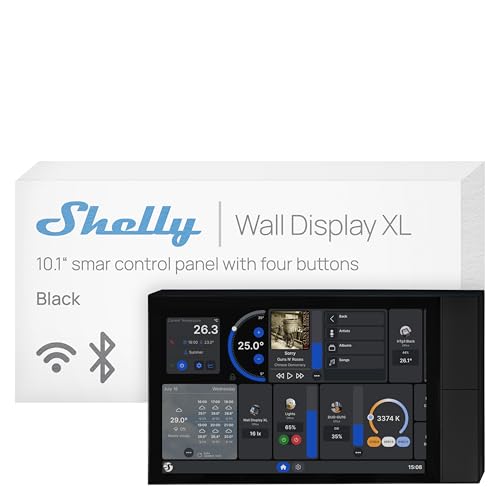
- 10.1-inch touchscreen
- Built-in 5A relay and four buttons
- Installs in a standard wall box
Best For: Permanent Shelly or Home Assistant installations
Best Refurbished Value
- Certified refurbished and tested
- 8-inch Alexa control display
- Supports multiple smart-home protocols
Best For: Alexa users seeking a lower-cost wall panel
Best for Monitoring

- 4.7-inch touchscreen control
- Live camera and energy monitoring
- Custom security modes and alerts
Best For: Homes focused on monitoring and security
Security-Focused Hub

- 7-inch all-in-one touchscreen
- PowerG and 345MHz support
- Bluetooth and Wi-Fi connectivity
Best For: Security and home automation control in one panel
Alexa-Ready Hub

- Built-in Alexa voice control
- Integrated Zigbee gateway
- Wired and wireless installation options
Best For: Smart Life homes needing voice control and a Zigbee hub
Scene-Control Wall Switch

- Dual-switch touchscreen panel
- Built-in thermostat function
- Alexa and Google Home compatible
Best For: Wall-mounted lighting, scenes, and temperature automation
Best All-in-One Value
Compact IR Smart Control Panel

- 3.5-inch touchscreen with physical, voice, and app control
- Built-in IR supports 12 device categories
- Supports 200+ devices and scenes
Best For: Centralizing varied smart and infrared devices in a compact panel
Best Premium Ecosystem Hub

- In-wall touchscreen for lights, music, and more
- Alexa built in for voice control
- Works with several major smart-home ecosystems
Best For: Multi-brand homes wanting a dedicated in-wall interface
Best for Temperature Automation
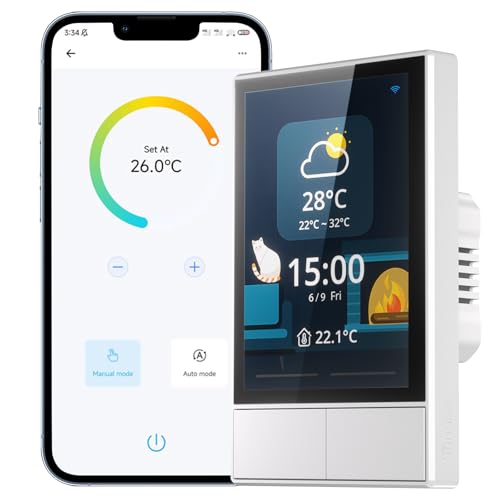
- Dual-channel wall switching with touchscreen control
- Built-in thermostat and temperature scheduling
- Supports SONOFF scenes, Alexa, and Google Home
Best For: SONOFF households combining lighting and temperature control
Best Overall – Amazon Echo Hub
The Amazon Echo Hub is a strong choice among smart home control panels for easy installation, especially if your home already uses Alexa-compatible devices. Its customizable dashboard brings device controls, camera views, routines, and security functions into one wall-mountable interface.
Best For: Alexa households that want broad device compatibility and a customizable central dashboard.
Pros:
- Built-in support for Wi-Fi, Bluetooth, Zigbee, Matter, Sidewalk, and Thread devices.
- Customizable dashboard with adjustable sections and widget sizes.
- Can control cameras, routines, media, and compatible security systems.
- Wall-mountable anywhere there is an outlet, with optional cable-management accessories.
Cons:
- In-wall cable pass-through, power-over-Ethernet adapter, and tabletop stand are sold separately.
- Some Ring features require Alexa+ and a compatible Ring subscription.
Choose this model if flexibility and Alexa ecosystem support matter more than having a built-in relay or electrical-box installation. The privacy controls, including a microphone-off button, are also useful for a shared household panel.
Best Built-In Switches – Shelly Wall Display XL
The Shelly Wall Display XL is designed for permanent installation, making it a practical option among smart home control panels for easy installation in a standard electrical wall box. Its 10.1-inch touchscreen, built-in relay, and customizable buttons can combine display-based control with direct appliance switching.
Best For: Homes and commercial spaces that want a hardwired wall panel with relay and button controls.
Pros:
- Large 10.1-inch touchscreen with four customizable buttons.
- Built-in relay can control lights, fans, heaters, coffee makers, and other appliances.
- Works with the Shelly Smart Control App and Home Assistant without requiring an extra hub or app.
- Can control Bluetooth or Sonos audio and supports schedules and automations.
Cons:
- Installation requires a standard electrical wall box rather than simply placing the unit near an outlet.
- Its strongest integration is with Shelly devices, the Shelly app, and Home Assistant.
This is the most installation-focused choice in the group for replacing or adding a wall-mounted control point. The relay and physical buttons make it especially practical for quick appliance control, while app support adds remote management and automation.
Best Refurbished Value – Like-New Amazon Echo Hub
The like-new Amazon Echo Hub offers the same core approach to smart home control panels for easy installation at a refurbished price point. It provides tap or voice control for compatible devices, customizable widgets, camera viewing, routines, and security management from an 8-inch display.
Best For: Alexa users who want a certified refurbished wall-mounted control panel and broad device compatibility.
Pros:
- Refurbished, tested, and certified to look and work like new.
- Supports Wi-Fi, Bluetooth, Zigbee, Matter, Sidewalk, and Thread devices.
- Customizable controls and widgets help prioritize frequently used devices.
- Can be wall mounted near an outlet or used with an optional tabletop stand.
Cons:
- Refurbished units may arrive in generic Amazon-branded packaging.
- Power-over-Ethernet, in-wall cable pass-through, and tabletop stand accessories are sold separately.
- It may be less appealing if you specifically want a new device.
This model is worth considering when you want Echo Hub functionality while keeping the purchase cost in check. Its easy installation and built-in smart home hub make it a convenient entry point for Alexa-based homes.
Best for Monitoring – SONOFF NSPanel Pro 120
The SONOFF NSPanel Pro 120 combines everyday device control with monitoring features, giving it a useful role among smart home control panels for easy installation. Its 4.7-inch display can show camera feeds, energy statistics, thermostat settings, lighting controls, and security status from one compact panel.
Best For: Users who prioritize camera viewing, energy tracking, and basic home security controls.
Pros:
- Controls lighting, thermostats, cameras, and other supported functions from the touchscreen.
- Supports live monitoring from four types of cameras.
- Tracks daily energy consumption over a week for selected devices with energy statistics.
- Offers customizable security modes with alarms and phone notifications.
Cons:
- The 4.7-inch screen is smaller than the displays on the Echo Hub and Shelly panel.
- Camera support is described by compatible camera types rather than broad device compatibility.
- Webpage and media features may be secondary for shoppers seeking simple controls only.
Pick the NSPanel Pro 120 when a compact interface for cameras, energy information, and security is more important than a large dashboard. Its monitoring-focused feature set can make it useful in a high-traffic area such as an entryway or kitchen.
Security-Focused Hub – Qolsys IQ Panel 4
The Qolsys IQ Panel 4 is a practical option for shoppers seeking smart home control panels for easy installation alongside security and home automation functions. Its 7-inch touchscreen combines PowerG and 345MHz connectivity in an all-in-one white control panel, with Bluetooth and Wi-Fi also listed among its connection options.
Best For: Homes wanting a touchscreen security and automation panel with broad wireless connectivity.
Pros:
- Combines security and home automation control in one 7-inch touchscreen panel.
- Supports PowerG and 345MHz connectivity.
- Also includes Bluetooth and Wi-Fi connectivity.
Cons:
- The supplied details do not identify supported software-update dates.
- Its security-focused feature set may be more than needed for simple device control.
The IQ Panel 4 stands out when a home needs a dedicated security-oriented interface rather than a basic smart switch. Confirm compatibility with your existing devices and preferred Verizon setup before buying.
Alexa-Ready Hub – MOES Smart Home Control Panel
The MOES Smart Home Control Panel is designed for shoppers comparing smart home control panels for easy installation. It combines a 5-inch touchscreen, built-in Alexa, and a Zigbee gateway, while supporting wired or wireless networking and either Type-C or circuit-connected power.
Best For: Smart Life users who want Alexa voice control and an integrated Zigbee hub.
Pros:
- Built-in Alexa enables hands-free control.
- Integrated Zigbee gateway eliminates the need for a separate gateway.
- Supports Smart Life devices such as lights, switches, sockets, cameras, and door locks.
- Offers wired or wireless networking and Type-C or circuit power options.
Cons:
- The listed compatibility is centered on Smart Life devices.
- The supplied dimensions are shown as 1 x 1 x 1 inches, so installation clearances should be verified.
With Alexa and Zigbee built in, the MOES panel can simplify a compatible Smart Life setup by consolidating voice, touchscreen, and hub functions. Check your device ecosystem and preferred power connection before installation.
Scene-Control Wall Switch – SONOFF NSPanel Smart Switch
The SONOFF NSPanel is a wall-mounted choice for shoppers seeking smart home control panels for easy installation with built-in switching. It combines two switch channels, a touchscreen, thermostat functions, and eWeLink app control, with compatibility listed for Alexa, Google Home, and Siri Shortcuts.
Best For: Rooms that need wall-mounted light control, scenes, and temperature-based automation.
Pros:
- Combines dual-channel switching, touchscreen control, and smart temperature management.
- Supports scene modes and centralized control for compatible SONOFF devices.
- Works with eWeLink, Alexa, Google Home, and Siri Shortcuts.
- Displays weather, indoor and outdoor temperature, time, and date.
Cons:
- Setup requires pairing through a 2.4GHz Wi-Fi connection and the eWeLink app.
- The supplied voltage and switch specifications should be checked against the intended installation.
- Its functions are especially centered on SONOFF and compatible smart-home ecosystems.
The NSPanel is a strong fit when a wall switch should do more than turn lights on and off. Its thermostat and scene features add useful room-level automation, but buyers should confirm wiring, electrical ratings, and ecosystem compatibility first.
Best All-in-One Value – Compact IR Smart Control Panel
For shoppers seeking smart home control panels for easy installation, this compact 3.5-inch touchscreen offers a broad control hub in a small wall-mounted design. It supports more than 200 devices and scenes, with touchscreen, physical-button, voice-assistant, and app control.
Best For: Homes, offices, apartments, and other spaces needing centralized control for varied smart devices and infrared equipment.
Pros:
- Supports lights, switches, sockets, cameras, air conditioners, thermostats, and door locks.
- Built-in IR supports 12 categories of infrared devices.
- Combines device, group, and scene control with a BT Mesh gateway and security-alarm functions.
- Compact touchscreen interface allows customizable home-page layouts.
Cons:
- The 3.5-inch display is smaller than the screens on many wall-mounted control panels.
- Its broad feature set may require setup time to customize fully.
This model is a practical choice when flexibility and compact installation matter most. Its built-in IR and wide device support make it especially useful for coordinating different types of equipment from one panel.
Best Premium Ecosystem Hub – Brilliant One-Switch Control
This Brilliant panel is designed for shoppers who want smart home control panels for easy installation with familiar voice and connected-home platforms. Its in-wall touchscreen provides control for lights, music, and more while working with Alexa, Apple HomeKit, Ring, Sonos, Hue, Google Nest, Wemo, and SmartThings.
Best For: Users building a compatible multi-brand smart home around a single in-wall touchscreen and voice-control interface.
Pros:
- Built-in Alexa supports voice control.
- Compatible with a wide range of platforms and devices, including Ring, Sonos, Hue, Google Nest, Wemo, SmartThings, and Apple HomeKit.
- In-wall touchscreen is designed to control lights, music, and other connected functions.
- Uses screw terminals and quick-connect terminals for installation.
Cons:
- This is a one-switch panel, so it offers less direct switch capacity than multi-switch models.
- Compatibility and functionality depend on the devices and platforms in your existing setup.
The Brilliant panel stands out for ecosystem compatibility rather than a long list of built-in functions. It is a strong fit for households that want a dedicated in-wall interface alongside voice control.
Best for Temperature Automation – SONOFF NSPanel Two-Switch
For buyers comparing smart home control panels for easy installation, the SONOFF NSPanel combines two-channel switching with touchscreen scenes and temperature functions. It connects through 2.4GHz Wi-Fi and can be managed from the panel, the eWeLink app, or supported voice platforms.
Best For: SONOFF users who want centralized scene control, two-channel lighting control, and scheduled temperature management.
Pros:
- Combines dual-channel switching, touchscreen control, and an integrated thermostat.
- Supports one-tap scenes and grouped control for compatible SONOFF devices.
- Works with Alexa and Google Home, with additional Siri Shortcuts support noted.
- Displays weather, indoor and outdoor temperatures, time, and date.
Cons:
- SmartThings devices are not compatible.
- Initial pairing requires a 2.4GHz Wi-Fi network and the eWeLink app.
- Its strongest integration is within the SONOFF ecosystem.
The NSPanel is a good choice when temperature automation is as important as lighting control. Its scene features and sensor information add convenience, but shoppers invested in SmartThings should choose another option.
How We Picked the Best Smart Home Control Panels for Easy Installation
We evaluated these panels by looking at the factors that matter most in real homes: installation complexity, wiring requirements, wireless protocols, ecosystem compatibility, screen usability, voice control, and the range of devices each panel can manage. We also considered whether a product is best suited to renters, retrofit projects, single-room control, or larger security-focused installations.
Because “easy installation” means different things to different buyers, the list includes plug-in or tabletop displays as well as in-wall panels. Always verify electrical requirements and local regulations before replacing a wall switch.
Quick Comparison
| Panel Type | Best For | Installation Consideration |
|---|---|---|
| Tabletop smart display | Flexible room-to-room control | Usually requires only power and Wi-Fi |
| In-wall touchscreen | Permanent, tidy whole-room control | May require a neutral wire and electrical work |
| Smart wall switch | Lighting and scene control | Must match existing wiring and switch-box depth |
| Security automation panel | Alarms, sensors, and connected-home functions | May require professional setup or monitoring service |
Key Buying Factors for Smart Home Control Panels for Easy Installation
Wiring and Mounting
For the simplest setup, choose a tabletop display or a panel that clearly supports your existing box and wiring. In-wall products can look cleaner, but confirm voltage, neutral-wire, load, and box-depth requirements first. Turn off power at the breaker and use a qualified electrician when needed.
Compatibility and Connectivity
Check whether the panel works with your preferred ecosystem, such as Alexa, Google Home, Apple Home, SmartThings, or a manufacturer-specific app. Zigbee, Z-Wave, Matter, Wi-Fi, Bluetooth, and proprietary security protocols are not interchangeable, so confirm support for every important device before buying.
Controls and Daily Usability
A bright, responsive screen is useful for scenes, cameras, thermostats, and multiple rooms. Physical switches can be faster for lights, while voice control helps when your hands are full. Look for customizable dashboards, reliable local controls, temperature displays, and sensible privacy settings.
Expansion and Reliability
Think beyond your first room. A panel that supports only a narrow device family may become limiting as your system grows. Also consider Wi-Fi strength, cloud dependence, software support, firmware updates, and whether essential lighting controls continue working if the internet is unavailable.
Who Should Buy Which Smart Home Control Panels for Easy Installation?
Choose an Echo Hub or another tabletop-style display if you want a low-commitment setup with broad Alexa compatibility and no wall rewiring. An in-wall panel from Shelly, MOES, Brilliant, or SONOFF is better for a permanent central station, provided its electrical requirements fit your home.
Security-first households should prioritize the Qolsys panel and verify cellular service, sensor compatibility, and monitoring requirements. Buyers focused mainly on lighting can save money with a touchscreen smart switch, while users wanting infrared control should look for a model that specifically includes IR hardware.
