The best video editing keyboards for gaming rooms combine fast timeline control, customizable shortcuts, comfortable gaming performance, and practical desk-friendly design. The right choice can reduce repetitive clicks without forcing you to sacrifice lighting, responsiveness, or everyday usability.
This roundup includes dedicated editing keyboards, programmable macro pads, stream-style controllers, and versatile gaming keyboards. Whether you use DaVinci Resolve, Adobe Premiere Pro, or a mixed gaming-and-creative setup, these options cover different workflows and budgets.
Best 10 Video Editing Keyboards for Gaming Rooms Picks for 2026
Flexible Macro Control

- 18 programmable keys with LCD visuals
- Runs single and multi-step shortcuts
- USB-C for Windows and macOS
Best For: Gaming, streaming, and editing shortcut control
Resolve Editing Focus
KB Covers DaVinci Resolve Keyboard

- Color-coded DaVinci Resolve shortcuts
- Full-size 104-key typing layout
- Backlit aluminum Windows keyboard
Best For: Windows DaVinci Resolve editing
Live Workflow Control
Elgato Stream Deck Scissor Keys

- 15 tactile programmable scissor keys
- Shows icons and system statistics
- Supports OBS, games, Discord, and mute controls
Best For: Gaming and streaming command access
White RGB Shortcut Deck

- 15 customizable display macro buttons
- RGB lighting and multi-scene switching
- Designed for gaming, streaming, and workflows
Best For: White gaming-room streaming setups
Premiere Pro Shortcut Pick
KB Covers Adobe Premiere Pro Keyboard

- 150+ printed, color-coded Premiere Pro shortcuts
- Backlit aluminum full-size Windows layout
- Wired USB-C with USB-A adapter included
Best For: Windows Premiere Pro editors and content creators
Quiet Mechanical Gaming Pick

- Fast, quiet Yellow linear mechanical switches
- Six programmable macro keys and media controls
- Per-key Chroma RGB lighting
Best For: Gaming rooms needing macros and customizable RGB
Macro Control Center
VSD K1 Pro Programmable Keyboard

- Six LCD keys and three multifunction knobs
- Programmable macros with switchable software pages
- Hot-swappable switches and RGB lighting
Best For: Streamers, editors, and gamers wanting visual macro controls
Screen-Smart Customizer

- Built-in color multimedia display
- Hot-swappable 75% gasket-mounted design
- Customizable RGB, macros, and GIFs
Best For: Creators wanting a customizable wired keyboard with visual status features
Wireless Workflow Hub
AULA F75 Pro Mechanical Keyboard

- Tri-mode connectivity with 4000mAh battery
- Hot-swappable 75% layout with knob
- Programmable macros and RGB lighting
Best For: Multi-device setups needing wireless flexibility and media controls
Quiet Full-Size Essential
SteelSeries Apex 3 Gaming Keyboard
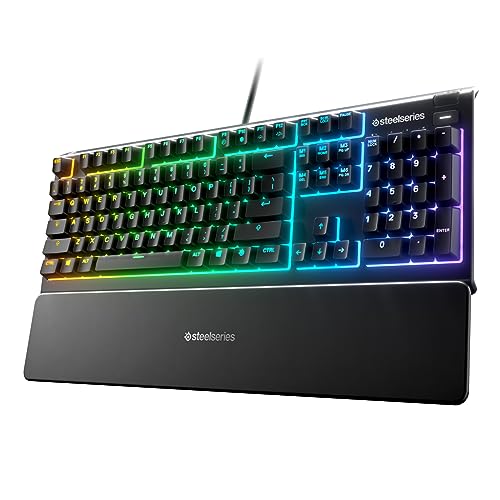
- Whisper-quiet switches with 20 million keypresses
- Dedicated multimedia controls and wrist rest
- IP32 water resistance and 10-zone RGB
Best For: Users wanting a quiet, comfortable full-size wired keyboard
Flexible Macro Control – VSD M18 Macro Pad
For video editing keyboards for gaming rooms, the VSD M18 is a compact macro pad focused on customizable shortcuts rather than full-size typing. Its 18 programmable keys, LCD visuals, and multi-step actions can put editing commands, app launches, media controls, and streaming functions within one tap.
Best For: Gamers and creators who want a customizable shortcut pad for editing, streaming, and everyday desktop workflows.
Pros:
- 18 programmable controls, including 15 LCD visual keys and three physical buttons.
- Supports single actions, multi-step sequences, text input, file launches, media controls, and OBS scene switching.
- LCD keys accept JPG, PNG, and GIF images, while the surrounding RGB ring adds visual customization.
- Works with Windows 11 and newer and macOS 11.0 and newer through USB-C.
Cons:
- It is a macro pad, not a full typing keyboard.
- Native Linux plug-and-play support is unavailable.
- Some RGB customization requires a device firmware upgrade.
The M18 is a versatile choice when quick, visible controls matter more than conventional keys. Its broader software compatibility makes it useful for a gaming room that also serves as a streaming or editing workspace.
Resolve Editing Focus – KB Covers DaVinci Resolve Keyboard
Among video editing keyboards for gaming rooms, the KB Covers DaVinci Resolve Keyboard is the most traditional option. It combines a full-size 104-key layout with printed, color-coded DaVinci Resolve shortcuts, helping editors keep familiar typing functionality while making common commands easier to find.
Best For: Windows-based DaVinci Resolve editors, colorists, filmmakers, and students who prefer a full keyboard.
Pros:
- Full-size 104-key US layout supports regular typing as well as editing shortcuts.
- Keys are printed with DaVinci Resolve defaults and color-coded by function.
- Aluminum construction and single-color backlighting suit dark editing or grading rooms.
- USB-C wired connection is plug and play, with a USB-C-to-USB-A adapter included.
Cons:
- Designed for Windows PC rather than Mac or Linux systems.
- Shortcut labeling is specific to DaVinci Resolve.
- It offers backlighting but not described RGB lighting.
This keyboard is a practical fit for Resolve users who do not want a separate control panel. The labeled keys can reduce shortcut memorization, while the standard layout remains suitable for notes, titles, and file names.
Live Workflow Control – Elgato Stream Deck Scissor Keys
The Elgato Stream Deck Scissor Keys offers a focused shortcut surface for video editing keyboards for gaming rooms. Its 15 tactile, LED-lit keys can launch applications, switch OBS scenes, mute audio, and display gaming or system information without requiring frequent alt-tab actions.
Best For: Gamers and streamers who want tactile macro controls, visible icons, and real-time system monitoring.
Pros:
- 15 responsive scissor keys provide tactile feedback for fast macro commands.
- Keys can launch Discord, games, OBS scenes, and mute controls with one tap.
- LED-lit icons help identify functions, while keys can display CPU, GPU, ping, and FPS data.
- Includes an integrated stand and USB-C connection, with regular plugin updates.
Cons:
- It provides 15 shortcut keys rather than a full keyboard.
- The listed minimum operating system is Windows 10, so setup requirements should be checked for other systems.
- Its strengths center on streaming and gaming workflows rather than dedicated Resolve shortcut labeling.
The Stream Deck Scissor Keys is a strong room-side controller when responsiveness and at-a-glance information are priorities. It complements a regular keyboard by handling repeated commands and monitoring tasks from a compact footprint.
White RGB Shortcut Deck – fifine D6W Macro Keyboard
The fifine D6W is a compact choice for video editing keyboards for gaming rooms, especially where a white setup and customizable lighting are priorities. Its 15 display buttons can be assigned to gaming, streaming, OBS, chat, and workflow actions through the included software.
Best For: PC and laptop users seeking a white macro controller for gaming, streaming, and adaptable desktop tasks.
Pros:
- Provides 15 customizable LCD macro keys for shortcuts and scene controls.
- Supports gaming, OBS, Twitch, Streamlabs, YouTube Live, and general workflows.
- Controllable RGB lighting can match a room or gaming setup.
- Multi-scene switching helps separate gaming, streaming, and office configurations.
Cons:
- It is a controller with 15 buttons, not a full-size typing keyboard.
- The product platform is listed as Windows, despite notes also mentioning PC/Mac.
- Optimal performance is recommended through a USB 3.0 interface.
The D6W stands out for users building a coordinated white gaming room and wanting quick access to multiple profiles. Its display buttons and scene switching make it more adaptable than a basic shortcut pad for mixed gaming and streaming use.
Premiere Pro Shortcut Pick – KB Covers Adobe Premiere Pro Keyboard
For video editing keyboards for gaming rooms that prioritize editing workflow, this full-size Windows keyboard puts more than 150 color-coded Adobe Premiere Pro shortcuts directly on the keys. Its backlit aluminum design also suits dim studios and late-night creator setups.
Best For: Windows editors, YouTubers, filmmakers, and students who work primarily in Adobe Premiere Pro.
Pros:
- Displays 150+ Premiere Pro shortcuts with color-coded functions.
- Retains a standard QWERTY keyboard for normal typing.
- Backlit aluminum construction and wired USB-C connectivity.
- Includes a USB-C-to-USB-A adapter for broader Windows compatibility.
Cons:
- Designed for Windows and lists Windows 11 as the minimum required operating system.
- Uses membrane switches rather than mechanical switches.
- Single-color backlighting offers less customization than RGB models.
This is a focused choice for Premiere Pro users who want shortcuts visible without sacrificing a conventional keyboard. It is less suitable if your gaming room needs broad multi-platform support or highly customizable lighting.
Quiet Mechanical Gaming Pick – Razer BlackWidow V4 X
Among video editing keyboards for gaming rooms, the Razer BlackWidow V4 X favors fast gaming inputs while still offering useful controls for media and custom commands. Its linear Yellow switches, six macro keys, per-key RGB, and sound-dampening features make it a versatile wired desk keyboard.
Best For: Gamers and creators who want a mechanical keyboard with dedicated macros, quiet linear switches, and extensive RGB customization.
Pros:
- Yellow linear switches actuate at 1.2 mm with 45 g of force.
- Six dedicated macro keys support customized commands.
- Per-key Chroma RGB supports millions of colors and game-linked effects.
- Includes a multifunction roller, media keys, doubleshot keycaps, and sound dampening.
Cons:
- Wired PC keyboard with no stated wireless connectivity.
- Its gaming-focused layout does not provide printed video-editing shortcuts.
- Not water resistant.
The BlackWidow V4 X is a strong all-purpose option when gaming performance, macros, and room aesthetics matter more than dedicated editing labels. Its quiet linear switches and media controls also fit shared or creator-focused spaces.
Macro Control Center – VSD K1 Pro Programmable Keyboard
For video editing keyboards for gaming rooms that need dedicated workflow controls, the VSD K1 Pro combines six customizable LCD keys, three knobs, onboard macro programming, and a color display. It can handle shortcut sequences, app launches, media controls, and gaming commands through switchable software pages.
Best For: Streamers, editors, and gamers who want a programmable control surface with visual key labels, knobs, and customizable macros.
Pros:
- Provides six LCD keys and three multifunction knobs per software page.
- Supports programmable shortcuts, recorded macros, and multi-step actions.
- Hot-swappable PCB accepts 3-pin or 5-pin switches without soldering.
- Offers RGB lighting, a TFT display, gasket mounting, and five-layer dampening.
Cons:
- Advanced display and GIF features require software and a wired connection.
- Standard package includes USB-A-to-USB-C, but not USB-C-to-USB-C.
- Requires software setup for deeper customization and display functions.
The K1 Pro is the most control-oriented option here, especially for users who want visible, expandable shortcuts rather than a conventional keyboard alone. Its software and hardware customization add flexibility, though they also make setup more involved.
Screen-Smart Customizer – Womier SK80 75% Keyboard
For video editing keyboards for gaming rooms, the Womier SK80 stands out with a built-in color multimedia display for quick visual status checks and customization. Its compact 75% layout, gasket-mounted construction, and programmable RGB features suit a setup that balances gaming, editing, and desk space.
Best For: Creators who want a customizable wired keyboard with an animated display, hot-swappable switches, and a compact layout.
Pros:
- Color display can show GIFs, connection mode, system details, lighting settings, volume, and more.
- Hot-swappable PCB supports 3-pin and 5-pin switches.
- Gasket mount, EVA plate, bottom filling, and pre-lubed linear switches provide a softer, quieter typing feel.
- Driver supports RGB, macros, GIF settings, and music-synced lighting.
Cons:
- Wired USB-C connectivity may be less flexible than a wireless keyboard.
- Its 82-key layout omits the dedicated number pad.
- It is not water resistant.
The SK80 is a strong choice when visual customization is part of the gaming-room aesthetic. Its display adds a useful status panel, while the compact hot-swappable design leaves room for other desk equipment.
Wireless Workflow Hub – AULA F75 Pro Mechanical Keyboard
The AULA F75 Pro is a practical option among video editing keyboards for gaming rooms when flexible connectivity and desktop control matter. Its 75% layout preserves arrow keys, while tri-mode wireless support, a control knob, and programmable functions help it move between editing and gaming tasks.
Best For: Users who need one compact keyboard for multiple devices, wireless gaming, media control, and customizable lighting.
Pros:
- Supports Bluetooth 5.0, 2.4GHz wireless, and USB-C wired connections.
- 4000mAh battery and the ability to connect with up to five devices support flexible use.
- Hot-swappable base accepts 3-pin and 5-pin switches without soldering.
- Multi-function knob controls lighting in gaming mode and volume or playback in office mode.
Cons:
- The compact 81-key layout does not include a dedicated number pad.
- Advanced lighting and macro customization requires the driver.
- Its many modes and controls may require setup before they become convenient.
With its tri-mode connectivity and multifunction knob, the F75 Pro is particularly adaptable for a mixed gaming-and-editing room. The layered dampening and pre-lubed switches also emphasize a softer, quieter typing experience.
Quiet Full-Size Essential – SteelSeries Apex 3 Gaming Keyboard
For video editing keyboards for gaming rooms, the SteelSeries Apex 3 focuses on comfortable, quiet everyday use rather than mechanical customization. Its full-size layout, dedicated multimedia controls, wrist rest, and 10-zone RGB lighting make it a straightforward choice for desks that need familiar functionality.
Best For: Gamers and editors who prefer a quiet full-size wired keyboard with dedicated media controls and spill protection.
Pros:
- Whisper-quiet switches are rated for 20 million low-friction keypresses.
- Dedicated multimedia controls allow quick volume and settings adjustments.
- Magnetic wrist rest provides full palm support.
- IP32 water resistance helps protect against accidental liquid spills.
Cons:
- It is wired rather than wireless.
- The full-size 104-key design takes more desk space than a 75% keyboard.
- It does not offer hot-swappable switches or the deeper customization described for the other options.
The Apex 3 is best suited to users who value a familiar full-size arrangement and quiet operation. Its wrist rest, spill resistance, and dedicated controls make it a practical low-maintenance option for a busy gaming or editing desk.
How We Picked the Best Video Editing Keyboards for Gaming Rooms
We focused on keyboards and controllers that can make editing workflows faster while still fitting naturally into a gaming room. The selection considers shortcut customization, software or profile support, key visibility, control layout, connectivity, switch feel, desk footprint, and compatibility with common editing applications.
Dedicated DaVinci Resolve and Premiere Pro keyboards are useful for editors who want labeled shortcuts and a purpose-built layout. Macro pads and stream controllers suit users who prefer assigning their own commands, while full-size and compact mechanical keyboards offer a better balance for gaming, typing, and editing.
Quick Comparison
| Type | Best For | Main Advantage |
|---|---|---|
| Editing keyboard | Dedicated video editors | Labeled, application-focused shortcuts |
| Macro pad | Custom workflows | Programmable keys and controls |
| Stream controller | One-touch actions | Visual command organization |
| Mechanical gaming keyboard | Mixed gaming and editing | Responsive typing and gaming feel |
| Membrane gaming keyboard | Budget-conscious users | Quiet operation and simple setup |
Key Buying Factors for Video Editing Keyboards for Gaming Rooms
Shortcut Customization
Look for programmable keys, profiles, layers, or application-specific mappings. LCD keys and knobs can make frequently used commands easier to identify, while labeled editing keyboards reduce setup time.
Layout and Desk Space
A full-size board provides familiar navigation and number-pad access, but a 75% keyboard or separate macro pad may leave more room for a mouse, drawing tablet, or audio equipment. Measure your desk before buying.
Controls and Feedback
Rotary knobs are useful for timeline scrubbing, zoom, volume, and parameter adjustments. Mechanical switches generally provide clearer tactile feedback, while quieter designs may be preferable in shared rooms or during voice recording.
Software and Compatibility
Confirm that the keyboard’s configuration software works with your operating system and preferred editor. Check whether profiles can be switched quickly between gaming, editing, streaming, and general use.
Lighting and Connectivity
Backlighting improves visibility in a gaming room, but it should not replace clear legends or practical controls. USB-C is convenient for wired setups, while wireless models can reduce cable clutter if they maintain reliable connections.
Who Should Buy Which Video Editing Keyboards for Gaming Rooms?
Choose a dedicated editing keyboard if you spend most of your time in DaVinci Resolve or Premiere Pro and want clearly labeled shortcuts. Choose a macro pad or stream controller if you already own a preferred gaming keyboard and want extra one-touch commands, knobs, or visual buttons.
Choose a mechanical gaming keyboard if gaming, typing, and editing share the same desk. Compact 75% models are especially useful when space matters. Choose a membrane gaming keyboard if you want a quieter, straightforward option at a lower cost. Before purchasing, prioritize the software ecosystem and layout you will use every day over lighting effects alone.
