Choosing a podcast equipment bundle for video podcast can save time, reduce setup headaches, and help you build a cleaner on-camera workflow from day one.
Whether you’re recording interviews, live streaming, or producing a polished YouTube show, the right bundle should match your room size, host count, and camera needs.
Best 10 Podcast Equipment Bundle for Video Podcast Picks for 2026
Complete 2-Person Video Podcast Studio

- Two 4K UHD cameras included
- Two XLR dynamic microphones for cleaner voice pickup
- USB-C audio interface with 48V phantom power
Best For: Co-hosted video podcasts and interview setups
Effects-Driven Starter Kit

- Two condenser mics with boom arms included
- V8S sound card adds voice effects and controls
- Plug-and-play setup with bundled accessories
Best For: Creators who want voice effects and simple audio control
Desktop-Friendly 2-Person Video Kit
Movo 2-Camera Desk Stand Bundle
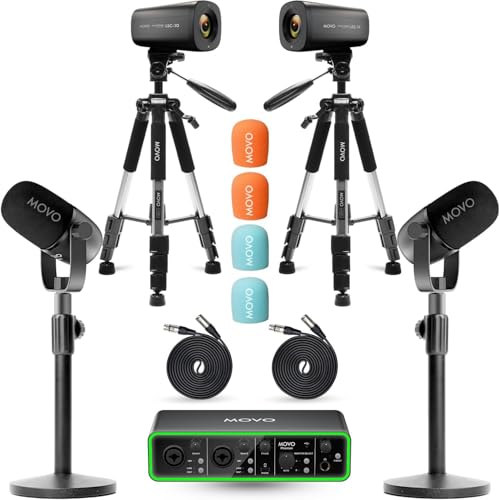
- Two 4K UHD cameras included
- CastMic dynamic mics for broadcast-style audio
- Desk stands save space versus boom arms
Best For: Two-host desktop podcasts in tighter spaces
Quad-Host Pro Studio

- Four 4K cameras and four microphones included
- Two mixers with 48V phantom power
- Built for group podcasting and livestreaming
Best For: Panel podcasts and 4-person streaming setups
4-Host Studio Kit
Movo 4-Person USB Podcast Equipment Bundle
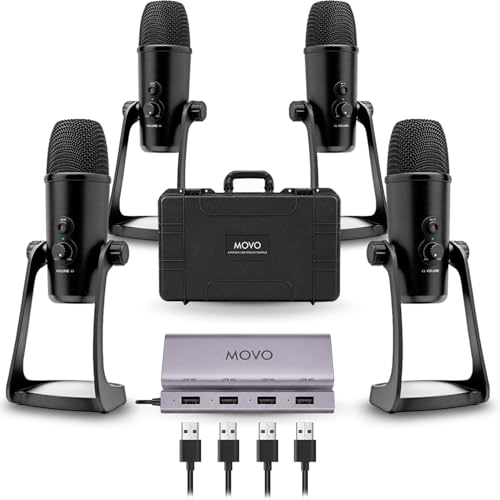
- Four USB condenser mics with a 4-port hub
- Live headphone monitoring for recording checks
- Includes a hard shell case for travel
Best For: Group podcasts, interviews, and multi-host streams
Hybrid Duo Creator Kit
MAONO PD200W Wireless Podcast Bundle for 2

- Wireless, USB, and XLR connection modes
- Two mics can record to separate tracks
- Includes stands and app-based sound control
Best For: Two-person podcasts and flexible creator setups
Portable Mobile Interview Kit
Movo Podcast Equipment Bundle for iPhone/Android
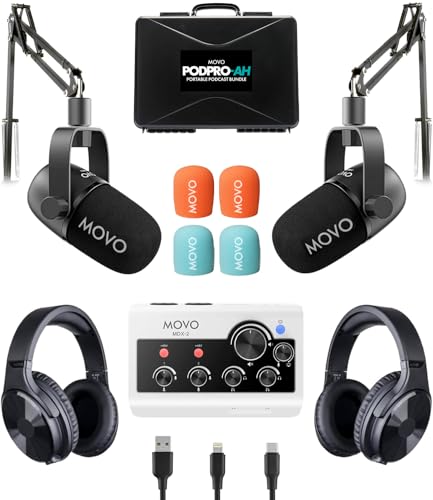
- Dual-channel interface with phone and computer cables
- Two dynamic XLR mics plus two headphones
- Battery-powered with a travel case included
Best For: Mobile interviews and phone-to-computer recording
2-Person USB/XLR Starter Set
Podcast Equipment Bundle for 2 Dynamic Mic Mixer

- Cardioid dynamic mic reduces desk and room noise.
- USB plug-and-play plus XLR upgrade path.
- Includes monitoring jack, gain control, and weighted stand.
Best For: Two-person podcasts and video creators who want an easy USB start with XLR flexibility.
4-Person Creator Mixer Kit
Podcast Equipment Bundle for 4 with Dynamic Mics

- Four mics and four stands support group podcasts.
- Mixer adds sound effects, voice change, and monitoring.
- Includes instrument input and dual USB interface support.
Best For: Four-host shows, group streaming, and creators who want mixer-driven features in one bundle.
2-Host RGB Mixer Kit
Podcast Equipment Bundle for 2 with Headphones

- Two mics, two headphones, and two stands included.
- USB/XLR flexibility plus live monitoring and mute.
- Mixer adds voice change, sound effects, and tuning.
Best For: Two-host podcasts and livestreams that need monitoring headphones and creative mixer controls.
Complete 2-Person Video Podcast Studio – Movo 2-Camera Bundle
If you want a podcast equipment bundle for video podcast production that covers both sight and sound, this Movo kit is built for two-person shows. It combines two 4K cameras, two XLR dynamic microphones, two boom arms, and a USB audio interface, so you can set up a polished multi-camera podcast without piecing everything together separately.
Best For: Co-hosted video podcasts, interviews, and panel-style recordings that need a turnkey 2-person setup.
Pros:
- Includes two 4K UHD cameras for multi-angle video capture
- Two cardioid XLR dynamic mics help reject background noise
- USB-C audio interface with 48V phantom power and dual monitor outputs
- Everything needed for a 2-person studio is included in one box
Cons:
- Designed specifically for two hosts rather than larger groups
- Uses boom arms, which may take more desk space than compact stands
This is the strongest pick if your priority is a clean, professional starter studio for two people and you want the cameras, mics, and interface to work together right away.
Effects-Driven Starter Kit – sktome V8S Bundle for 2
This podcast equipment bundle for video podcast creators is geared more toward creative voice control than camera-based production. The sktome kit includes two condenser microphones, a V8S sound card, and a pair of boom arms, making it a practical plug-and-play choice for podcasting, streaming, singing, or gaming when you want built-in effects and simple setup.
Best For: Two-person creators who want voice effects, easy controls, and an all-in-one audio-focused starter kit.
Pros:
- Includes 2 microphones, 2 boom arms, and a V8S sound card
- Offers reverberation, treble-bass, noise reduction, accompaniment, and voice change
- Plug-and-play design with integrated audio controls
- Comes with multiple accessories, including shock holders and earphones
Cons:
- Does not include cameras for a full video podcast setup
- Built around condenser mics and sound effects rather than a studio broadcast workflow
If you care most about vocal customization and quick setup, this bundle is a flexible option. It is less suited to a polished video-first studio, but it does deliver a lot of audio features for the price point.
Desktop-Friendly 2-Person Video Kit – Movo 2-Camera Desk Stand Bundle
For creators shopping for a podcast equipment bundle for video podcast recording, this Movo package follows the same all-in-one formula as the brand’s other 2-person kits, but swaps in desk stands instead of boom arms. It still includes two 4K cameras, two XLR dynamic microphones, and a USB audio interface, making it a strong fit for desktop-based shows and tighter recording spaces.
Best For: Two-host podcast setups that need a compact, desk-mounted layout.
Pros:
- Includes two 4K UHD cameras for a professional multi-angle look
- Two CastMic dynamic microphones are built for broadcast-style voice capture
- Desk stands can be easier to place in smaller studios than boom arms
- USB-C interface with 48V phantom power and dual monitor outputs
Cons:
- Desk stands may offer less positioning flexibility than boom arms
- Still designed for two people, so it is not a group podcast solution
This version makes the most sense if you want a cleaner desktop footprint while keeping the full camera-and-audio package. It is a practical alternative for hosts who prefer stable stands over suspended arms.
Quad-Host Pro Studio – NearStream PodKit Quad
If you need a podcast equipment bundle for video podcast production on a larger scale, the NearStream PodKit Quad is built for four-person shows. It includes four 4K cameras, four microphones, four boom arms, two audio mixers, four tripods, and four XLR cables, giving you a full group recording setup for streaming and recording.
Best For: Panel podcasts, roundtables, and group livestreams that need a complete 4-person kit.
Pros:
- Supports four hosts with four cameras, four microphones, and four boom arms
- Includes two AMIX40U audio mixers with 48V phantom power and LCD monitoring
- 4K VM20 cameras offer HDMI, USB, and RJ45 connectivity
- Built-in AI noise suppression and supercardioid pickup help improve voice clarity
Cons:
- Much larger and more complex than a standard 2-person bundle
- The amount of included gear may be overkill for simple solo or duo podcasts
This is the most complete option in the group if you are building a serious multi-person podcast studio. It gives you the most flexibility for camera angles and input routing, but it also demands more space and setup time.
4-Host Studio Kit – Movo 4-Person USB Podcast Equipment Bundle
If you need a podcast equipment bundle for video podcast recording with four on-mic participants, this Movo kit keeps the setup straightforward. It includes four USB condenser mics, a 4-port hub, and a hard shell case, so it is built for group podcasts, panel interviews, and multi-host streams without piecing together separate gear.
Best For: Group shows, panel interviews, classrooms, and remote multi-host recording setups.
Pros:
- Includes four condenser microphones plus the UMX-1 4-port USB hub in one box.
- Powers all four mics at once with dedicated 5V USB-C input for stable recording.
- Built-in 3.5mm headphone monitoring lets you hear levels live while recording.
- Plug-and-play USB connection works with Zoom, OBS, Audacity, GarageBand, and more on Mac or Windows.
Cons:
- Uses USB condenser mics, so it is less flexible than an XLR-based studio rig.
- Best suited to desk-based group recording rather than highly mobile solo use.
This is a practical all-in-one option when your main priority is getting four voices into a single session quickly. The included case and driver-free workflow make it especially appealing for creators who want a portable, ready-to-record group setup.
Hybrid Duo Creator Kit – MAONO PD200W Wireless Podcast Bundle for 2
This podcast equipment bundle for video podcast creators is designed for two-person shows that need flexibility. The MAONO PD200W supports wireless, USB, and XLR use, so you can keep things simple for fast setup or move into a more traditional rig when your workflow grows.
Best For: Duo podcasts, interviews, and creators who want wireless freedom with pro-style options.
Pros:
- Three connection modes: wireless, USB, and XLR.
- Two wireless desktop mics can connect to one receiver for duo recording.
- Each mic can record to its own track for easier editing.
- Noise cancellation, cardioid pickup, and app-based EQ/reverb control support polished vocal capture.
Cons:
- Camera and Lightning accessories are sold separately for camera or mobile syncing.
- Single-channel design may be limiting if you want a larger multi-mic setup.
For two-host productions, this bundle stands out because it combines wireless convenience with wired stability. The included stands, software support, and long battery life make it a strong fit for creators who want more control without adding complexity.
Portable Mobile Interview Kit – Movo Podcast Equipment Bundle for iPhone/Android
If you want a podcast equipment bundle for video podcast production on the move, this Movo kit is built around portability and phone-friendly connection options. It combines a dual-channel USB audio interface, two XLR dynamic mics, two headphones, and cables for PC, Mac, iPhone, iPad, and Android use.
Best For: Mobile interviews, travel recording, and creators who switch between phones and computers.
Pros:
- Includes a dual-channel MDX-2 audio interface with USB-A, USB-C, and Lightning cables.
- Works with iPhone, Android, iPad, PC, and Mac for flexible recording setups.
- Comes with two CastMic dynamic XLR microphones and two studio headphones.
- Portable design includes a travel case and battery-powered operation for on-the-go sessions.
Cons:
- Battery life is limited to about 8 hours, or roughly 3 hours with phantom power on.
- It is built for two people, so it is not a fit for larger panel recordings.
This bundle makes sense when your content moves between locations and devices. The included interface, headphones, and cable set reduce extra purchases, while the dynamic mics help keep recordings focused in less controlled environments.
2-Person USB/XLR Starter Set – Podcast Equipment Bundle for 2 Dynamic Mic Mixer
If you want a podcast equipment bundle for video podcast recording that can also handle live streaming, this 2-person kit is built around flexibility. The included dynamic mic uses a cardioid pickup pattern to focus on speech and reduce keyboard noise, fan hum, and room echo, while the USB mode makes it easy to start on a PC, Mac, phone, or console without extra setup. It is a practical choice for creators who want a simple path in now and room to move into XLR-based setups later.
Best For: Two-person podcasts, solo video narration, and beginner-to-intermediate creators who want USB convenience with an upgrade path to XLR.
Pros:
- Cardioid dynamic mic helps capture clear vocals while rejecting common desk and room noise.
- Dual USB and XLR design gives beginners plug-and-play access and later pro-audio flexibility.
- Built-in noise reduction, touch mute, and headphone monitoring support cleaner recording sessions.
- Weighted desktop stand and gain control help keep the setup stable and easy to manage.
Cons:
- Only one microphone is included, so it is not a full multi-host bundle.
- RGB, mute, and gain controls do not work in XLR mode.
- XLR cable is not included.
Overall, this bundle is strongest as a straightforward starter rig for creators who prioritize clear voice capture and simple USB use. If your video podcast setup may later expand into external mixer or interface workflows, the dual-mode design gives you that flexibility.
4-Person Creator Mixer Kit – Podcast Equipment Bundle for 4 with Dynamic Mics
This podcast equipment bundle for video podcast production is aimed at larger panels and more active streaming setups. It includes four dynamic microphones, four desktop stands, and a mixer with multiple podcast features, so you can record a group conversation, add sound effects, and manage voices without building a system piece by piece. The built-in battery and plug-and-play USB design make it a strong fit for mobile-minded creators who want a compact all-in-one workstation.
Best For: Four-host podcasts, group streaming, and creators who want built-in effects and instrument support in one bundle.
Pros:
- Comes with four dynamic mics and four desktop stands for multi-person recording right away.
- Includes 6.35mm instrument input and individual INST volume control for music and voice sessions.
- Offers noise reduction, loopback, side chain, tuning controls, and real-time monitoring.
- Eight custom sound effects, voice change options, Bluetooth accompaniment, and RGB lighting add creative flexibility.
Cons:
- Feature-rich layout may be more complex than a simple starter bundle.
- The microphones are listed as dynamic, but the package is clearly built around the mixer’s processing features rather than minimalist portability.
- Some mic controls are inactive in XLR mode and must be managed through the interface.
As a complete group-focused package, this kit makes sense if your show needs multiple microphones plus mixer controls in one box. It is less about simplicity and more about giving a small team the tools to sound organized and entertaining from day one.
2-Host RGB Mixer Kit – Podcast Equipment Bundle for 2 with Headphones
If you need a podcast equipment bundle for video podcast work with monitoring built in, this two-person kit is a strong all-in-one option. It pairs two dynamic XLR/USB microphones with two headphones, two stands, and an audio mixer that offers voice effects, sound effects, and real-time control. The setup is aimed at creators who want a flexible entry point for PC, phone, or streaming platforms without needing specialized software.
Best For: Two-host podcasts, livestreams, and creators who want included headphones plus mixer controls for quick setup.
Pros:
- Includes two dynamic microphones, two headphones, and two desktop stands for a ready-to-use setup.
- USB and XLR mic options give beginners and more advanced users flexible connection choices.
- Audio mixer adds noise reduction, loopback, side chain, voice change, and tuning controls.
- Two monitor jacks and one-click mute make it easier to manage live sessions.
Cons:
- Mic RGB and physical controls are inactive when using XLR connection mode.
- Best suited to two-person setups rather than larger panels.
- The kit is feature-dense, so first-time users may need time to learn the control layout.
This bundle stands out for combining microphones, headphones, and an effects-heavy mixer in a compact two-person format. It is a good fit if you want to hear what is being recorded while still having room to experiment with voice shaping and streaming effects.
How We Picked the Best Podcast Equipment Bundle for Video Podcast
We focused on bundles that make sense for video-first creators: dependable audio, practical camera support, easy connectivity, and enough included hardware to avoid buying essentials separately. We also weighed setup simplicity, monitoring options, and whether the bundle fits solo, two-person, or multi-host production.
Quick Comparison
At a high level, the best Podcast Equipment Bundle for Video Podcasting depends on your format. Two-host kits usually offer the best balance of price and flexibility, while 4-person bundles are better for panel shows, classrooms, and roundtables. Portable phone-friendly bundles are the most convenient for creators who record on the go.
Key Buying Factors for a Podcast Equipment Bundle for Video Podcast
Audio Inputs and Mic Type
Check whether the kit uses XLR, USB, or dual-use mics. XLR usually gives you more room to grow and tends to be preferred in more serious studio setups, while USB can simplify plug-and-play recording. Dynamic microphones are often the safer choice for untreated rooms because they reject more background noise.
Camera and Video Workflow
If your show is visual, look for bundles that include cameras or clear support for them. Confirm whether the kit supports your preferred recording software, capture method, and multi-angle layout.
Monitoring and Control
Headphone monitoring, gain control, mute buttons, and mix controls matter more than many buyers expect. These features help you catch clipping, balance voices, and avoid fixing problems later in editing.
Expansion and Portability
Think about whether you need a permanent desk setup or a portable kit. A compact Podcast Equipment Bundle for Video Podcast use should travel easily without sacrificing basic audio quality or stability.
Who Should Buy Which Podcast Equipment Bundle for Video Podcast?
Solo creators should prioritize simplicity, monitoring, and compact gear. Two-host shows should look for balanced mic packages with stable stands and flexible interface options. Larger teams should focus on bundles with enough channels, reliable mic isolation, and a workflow that won’t slow down guests or co-hosts. If you record mainly on a phone, choose a bundle built for mobile compatibility rather than a studio-centric kit.
In short, the best choice is the one that matches your content format today while leaving a little room to grow tomorrow.
