Ultrawide gaming monitors can make racing, sim, and open-world games feel more immersive while giving you extra screen space for multitasking. The best models balance refresh rate, response time, resolution, and panel quality without overspending.
Below, we focus on the most useful specs and real-world buying factors so you can quickly narrow down the right ultrawide for your desk, GPU, and play style.
Best 10 Ultrawide Gaming Monitors Picks for 2026
Speed-Focused 34-Inch Ultrawide
SANSUI 34-Inch Curved Gaming Monitor

- 200Hz refresh rate with 1ms response time
- 3440 x 1440 UWQHD on a 34-inch 1500R curve
- VRR support plus DP 1.4 and dual HDMI 2.1
Best For: Competitive gamers who want a fast 34-inch ultrawide
Premium Curve With Creator-Friendly Color
Alienware 34 Curved Gaming Monitor

- 180Hz refresh rate with 1ms response time
- DCI-P3 95% color coverage and DisplayHDR 400
- FreeSync Premium and VESA AdaptiveSync support
Best For: Gamers who want premium color and a polished 34-inch ultrawide
Super-Ultrawide Productivity Pick
INNOCN 45C1R 45-Inch Curved Monitor

- 45-inch 32:9 panel with 5120 x 1440 resolution
- Up to 120Hz with Adaptive-Sync
- USB-C, HDMI 2.1, DP 1.4, PIP/PBP
Best For: Multitaskers who want a giant super-ultrawide for work and gaming
High-Refresh Value Curve
Sceptre 34-Inch Prime Gaming Monitor

- Up to 240Hz refresh rate with 1ms response time
- 3440 x 1440 34-inch curved ultrawide panel
- 100% sRGB plus built-in speakers
Best For: Gamers who want a fast, feature-rich 34-inch ultrawide
Elite Speed Pick
ASUS TUF VG34WQML5A 34" 250Hz Ultrawide HDR

- 250Hz overclocked refresh rate
- 0.5ms response time and ELMB SYNC
- 95% DCI-P3 with DisplayHDR 400
Best For: Competitive gamers wanting a fast ultrawide with HDR
Feature-Packed Value Pick
SANSUI 34" 240Hz UWQHD Curved Gaming Monitor

- 240Hz refresh rate with 1ms MRPT
- AI Crosshair, AI Bluelight, HDR400
- HDMI 2.1 and DP 1.4 connectivity
Best For: Gamers who want lots of features and fast ultrawide play
Clean Ultrawide Pick
Sceptre 34" Curved WQHD 180Hz Gaming Monitor

- 3440 x 1440 WQHD ultrawide panel
- Up to 180Hz/165Hz with 1ms MPRT
- 99% sRGB and built-in speakers
Best For: Gamers and multitaskers wanting a straightforward curved ultrawide
Budget-leaning Ultrawide Pick
KTC 34-Inch 180Hz Curved UWQHD Monitor

- 34-inch 3440 x 1440 curved display
- 180Hz with adaptive sync and 1ms MPRT
- Ergonomic stand with VESA support
Best For: gamers wanting strong value and everyday ultrawide versatility
Midrange Value Option
Gawfolk 34-Inch 165Hz Curved Ultrawide
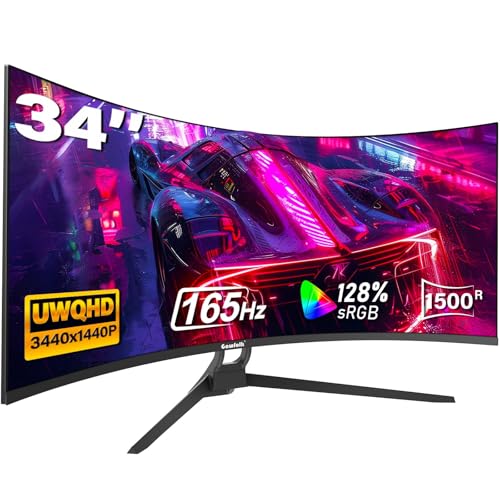
- 3440 x 1440 curved 34-inch ultrawide
- 165Hz with FreeSync support
- 2 HDMI and 2 DisplayPort inputs
Best For: buyers who want a balanced everyday ultrawide for gaming and multitasking
Speed-Focused 34-Inch Ultrawide – SANSUI 34-Inch Curved Gaming Monitor
If you want ultrawide gaming monitors that prioritize raw speed, this SANSUI 34-inch curved model is built around a 3440 x 1440 UWQHD panel and a claimed 200Hz refresh rate. The 1500R curve, Fast VA panel, and 1ms response time make it a straightforward pick for players who want smooth motion, while the AI built-in features add some extra gaming convenience.
Best For: Competitive and immersive gaming on a 34-inch ultrawide with a strong focus on refresh rate.
Pros:
- 200Hz refresh rate with 1ms response time
- 3440 x 1440 UWQHD resolution on a 34-inch 1500R curved screen
- VRR support over HDMI 2.1 plus DP 1.4 and dual HDMI 2.1 ports
- AI extras like blue light reduction, crosshair, PQ, and sniper scope
Cons:
- No built-in speakers listed
- Ergonomic adjustment is limited to tilt
- Best if you specifically want a gaming-first feature set rather than creator-focused extras
Overall, this SANSUI monitor stands out for buyers who want a fast ultrawide with modern connectivity and gaming aids. It is less about premium creator features and more about delivering high-refresh gameplay in a classic 34-inch format.
Premium Curve With Creator-Friendly Color – Alienware 34 Curved Gaming Monitor
Among ultrawide gaming monitors, the Alienware AW3425DWM is positioned as a polished 34-inch WQHD option with a 1500R curve and 180Hz refresh rate. It pairs fast gameplay with DCI-P3 95% color coverage and DisplayHDR 400, so it fits buyers who want gaming performance without giving up more vivid image quality.
Best For: Gamers who want a refined ultrawide with strong color coverage and a premium design.
Pros:
- 180Hz refresh rate with 1ms gray-to-gray response time
- WQHD 3440 x 1440 panel with a 34-inch 1500R curve
- DCI-P3 95% color coverage and VESA DisplayHDR 400
- FreeSync Premium and VESA AdaptiveSync support
Cons:
- Refresh rate is lower than some speed-first ultrawide rivals
- Uses a standard 34-inch size rather than larger super-ultrawide formats
- Premium positioning may make it more than casual gamers need
This Alienware model makes sense if you want a balanced ultrawide that handles games smoothly and still looks sharp for photo/video editing. It is a strong all-around choice when display quality matters as much as motion performance.
Super-Ultrawide Productivity Pick – INNOCN 45C1R 45-Inch Curved Monitor
If your ultrawide gaming monitors shortlist includes productivity as well as play, the INNOCN 45C1R brings a huge 45-inch 32:9 curved panel and 5120 x 1440 resolution. It is aimed at people who want a wide workspace, flexible USB-C connectivity, and enough gaming features to keep motion smooth at up to 120Hz.
Best For: Multitaskers and gamers who want a massive super-ultrawide with USB-C convenience.
Pros:
- 45-inch 32:9 screen with 5120 x 1440 resolution
- Up to 120Hz refresh rate with Adaptive-Sync
- USB-C with power delivery plus DP 1.4 and dual HDMI 2.1
- PIP/PBP support, height adjustment, and built-in speakers
Cons:
- 120Hz is lower than the fastest gaming-focused ultrawides
- Large 45-inch 32:9 format needs significant desk space
- USB-C power delivery is listed at 65W in the notes, not 90W
This INNOCN is best viewed as a do-everything ultrawide for users who want a giant display first and a gaming monitor second. The extra screen real estate, PIP/PBP tools, and broad port selection make it especially practical for mixed work and play.
High-Refresh Value Curve – Sceptre 34-Inch Prime Gaming Monitor
For shoppers comparing ultrawide gaming monitors on refresh rate and price-friendly features, the Sceptre C345B-QU240T stands out with a 34-inch 3440 x 1440 curved panel and up to 240Hz support. It combines that speed with 1ms response time, 100% sRGB color, and built-in speakers, making it a practical all-rounder for gaming and everyday use.
Best For: Players who want a fast 34-inch ultrawide with built-in speakers and solid color coverage.
Pros:
- Up to 240Hz refresh rate with 1ms response time
- 3440 x 1440 34-inch curved ultrawide panel
- 100% sRGB color gamut for accurate visuals
- Built-in speakers plus two HDMI and two DisplayPort inputs
Cons:
- No height adjustment mentioned in the supplied notes
- One-year warranty is shorter than some premium rivals
- Built-in speakers may not replace a dedicated audio setup for many gamers
This Sceptre monitor is a strong pick if you want very high refresh performance without giving up everyday usability. It balances fast gameplay, broad connectivity, and useful extras in a straightforward 34-inch ultrawide format.
Elite Speed Pick – ASUS TUF VG34WQML5A 34" 250Hz Ultrawide HDR
If you want ultrawide gaming monitors built around speed and responsiveness, the ASUS TUF Gaming VG34WQML5A is aimed squarely at fast-paced play. It combines a 34-inch 3440 x 1440 curved panel with an overclocked 250Hz refresh rate, plus 0.5ms response time, FreeSync Premium Pro, and ELMB SYNC for cleaner motion.
Best For: Competitive gamers who want a fast ultrawide with strong motion handling and HDR support.
Pros:
- Overclocked 250Hz refresh rate with 0.5ms response time for very fluid gameplay
- FreeSync Premium Pro and ELMB SYNC help reduce tearing and ghosting
- 95% DCI-P3 coverage supports vibrant color for gaming and content creation
- DisplayHDR 400 compliance adds HDR support for brighter highlights and deeper shadows
Cons:
- HDR is limited to DisplayHDR 400-class performance
- High-end speed focus may be more than casual players need
- Curved 34-inch format requires plenty of desk space
This ASUS model stands out if your priority is response time and refresh rate in an ultrawide format. It looks like a strong all-around pick for gamers who want motion clarity first, with useful color and HDR features as added value.
Feature-Packed Value Pick – SANSUI 34" 240Hz UWQHD Curved Gaming Monitor
Among ultrawide gaming monitors, the SANSUI 34-inch curved model packs a lot of gaming-specific features into a 3440 x 1440 21:9 panel. It delivers a 240Hz refresh rate, MRPT 1ms response time, FreeSync, HDR400, and extras like AI Crosshair, AI Bluelight, and visual enhancement modes.
Best For: Gamers who want a loaded feature set, high refresh rate, and a curved ultrawide for play across PC and console setups.
Pros:
- 240Hz refresh rate and 1ms MRPT support fast gaming performance
- AI Crosshair, AI Bluelight, Game Mode, and Ultra Vivid settings add useful gaming tools
- HDMI 2.1 and DP 1.4 inputs support broad connectivity
- Ergonomic stand, VESA support, and PIP/PBP increase setup flexibility
Cons:
- Maximum 2K 240Hz over HDMI 2.1 is noted, so connection setup matters
- No built-in speakers
- Feature-heavy menus may be more than some users want
This SANSUI is a practical option if you want a spec-heavy ultrawide with gaming extras built in. It is especially appealing for users who value high refresh performance plus added tools like crosshair and blue-light modes.
Clean Ultrawide Pick – Sceptre 34" Curved WQHD 180Hz Gaming Monitor
If you want ultrawide gaming monitors that also make sense for everyday use, the Sceptre 34-inch curved WQHD model is a straightforward choice. It offers 3440 x 1440 resolution, up to 180Hz/165Hz refresh performance, 1ms MPRT, and a 21:9 aspect ratio that gives you more screen space than a standard monitor.
Best For: Gamers and multitaskers who want a simple curved ultrawide with strong resolution, quick response, and built-in audio.
Pros:
- 3440 x 1440 WQHD resolution provides a sharp ultrawide image
- Up to 180Hz/165Hz refresh rate and 1ms MPRT help with smoother motion
- 99% sRGB coverage supports solid color reproduction
- Built-in speakers and dual DisplayPort inputs add convenience
Cons:
- Refresh rate is lower than the 240Hz and 250Hz models in this roundup
- Built-in speakers are convenient but typically not a substitute for dedicated audio
- No HDR spec is listed in the supplied notes
The Sceptre is a balanced ultrawide for users who want a practical mix of resolution, speed, and convenience features. It is less aggressive than the highest-refresh options, but it still covers the essentials well for gaming and general productivity.
Budget-leaning Ultrawide Pick – KTC 34-Inch 180Hz Curved UWQHD Monitor
If you want ultrawide gaming monitors that balance immersion and value, the KTC H34S5 is built around a 34-inch 3440 x 1440 curved panel with a 180Hz refresh rate. It focuses on smooth gameplay, strong multitasking space, and practical ergonomics without pushing into premium-price territory.
Best For: gamers who want a roomy ultrawide display with fast refresh and flexible stand adjustments
Pros:
- 34-inch 21:9 UWQHD panel with 1500R curvature for an immersive field of view
- 180Hz refresh rate, 1ms MPRT, and adaptive sync for smoother play
- 125% sRGB, 1.07 billion colors, HDR, and 4000:1 contrast for vibrant image quality
- Ergonomic stand with tilt, swivel, pivot, height adjustment, plus VESA mounting
Cons:
- HDMI tops out at 100Hz at native resolution; 180Hz requires DisplayPort
- Brightness is listed at 300 cd/m², which is solid but not especially high
- Less feature-rich than higher-end premium ultrawide options
This is a sensible pick if your priority is a responsive 34-inch ultrawide with useful productivity features and a well-rounded spec sheet. It gives you the essentials for gaming and daily use in a straightforward package.
Premium Speed Choice – LG UltraGear 34-Inch 240Hz Curved Monitor
Among ultrawide gaming monitors, the LG 34G630A-B is aimed at buyers who care most about speed, responsiveness, and a polished gaming feature set. Its 3440 x 1440 panel pairs a 240Hz refresh rate with 1ms response time, making it a strong fit for fast-paced play.
Best For: competitive gamers who want a fast 34-inch ultrawide with modern connectivity
Pros:
- 240Hz refresh rate and 1ms response time for quick, fluid gameplay
- 21:9 WQHD screen with virtually borderless design for immersive viewing
- FreeSync Premium plus gaming tools like Dynamic Action Sync, Black Stabilizer, FPS Counter, and Crosshair
- USB Type-C, DisplayPort, HDMI, built-in speaker, and adjustable stand
Cons:
- USB-C power delivery is limited to 15W
- Brightness is listed at 300 cd/m², which may not stand out against brighter premium panels
- It is more feature-packed than budget models, so it will usually cost more
If you want one of the faster ultrawide gaming monitors in this group, the LG stands out for its 240Hz performance and useful extras. It is a particularly good match for players who want a clean desk setup and responsive controls in one display.
Midrange Value Option – Gawfolk 34-Inch 165Hz Curved Ultrawide
The Gawfolk 34-inch model is a straightforward choice for ultrawide gaming monitors if you want strong resolution and a decent refresh rate without overcomplicating the setup. Its 3440 x 1440 curved panel, 165Hz refresh rate, and FreeSync support make it a practical all-around option for gaming and multitasking.
Best For: users who want a balanced ultrawide for gaming, work, and multi-device use
Pros:
- 34-inch 3440 x 1440 ultrawide with 1500R curvature for extra immersion
- 165Hz refresh rate with AMD FreeSync for smoother gameplay
- 128% sRGB and HDR for richer color and better detail
- 2 HDMI and 2 DisplayPort inputs with support for PCs, laptops, and consoles
Cons:
- HDMI is limited to up to 120Hz, while the full 165Hz needs DisplayPort
- No standout premium extras like USB-C or built-in speakers are listed
- Warranty is 12 months, shorter than some competitors
This model makes sense if you want a clear step up from basic ultrawides without paying for flagship-level speed. It covers the core needs well: big screen space, smooth motion, and broad connectivity.
How We Picked These Ultrawide Gaming Monitors
We prioritized the features that matter most for gaming: high refresh rates, low response times, sharp 3440 x 1440-class resolution, strong adaptive sync support, and practical extras like USB-C, built-in speakers, and VESA compatibility. We also considered curve depth, screen size, and value so the list covers both premium and budget-friendly options.
Quick Comparison: What Stands Out
Most Ultrawide Gaming Monitors in this roundup sit in the 34-inch class, which is the sweet spot for a wide field of view without overwhelming most desks. Higher-refresh models are better for fast shooters and competitive play, while 1440p ultrawides offer a strong balance of sharpness and performance. If you want the most screen real estate for work and play, the larger 45-inch 5K2K option is the standout.
Key Buying Factors for Ultrawide Gaming Monitors
Resolution and GPU Load
At 3440 x 1440, Ultrawide Gaming Monitors deliver a noticeable upgrade in immersion and workspace, but they demand more graphics power than standard 1440p. Make sure your GPU can handle the refresh rate you want, especially if you plan to push 180Hz, 240Hz, or higher.
Refresh Rate and Response Time
For competitive players, refresh rate matters as much as resolution. A 165Hz display is already fast, but 180Hz to 240Hz can feel smoother in fast-paced games if your system can keep up. Pair that with a low response time to reduce blur and improve motion clarity.
Curve, Size, and Panel Features
A gentler curve can feel more natural for mixed use, while a deeper curve can boost immersion in racing and simulation games. Also look for HDR support, FreeSync or AdaptiveSync, wide color coverage, and useful connectivity like HDMI, DisplayPort, and USB-C if you plan to connect multiple devices.
Who Should Buy Which Ultrawide Gaming Monitors?
Choose a high-refresh 34-inch model if you play competitive titles and want a clean balance of speed and desk-friendly size. Pick a premium feature-rich monitor if you also use your setup for content creation, productivity, or console and PC switching. If you want maximum immersion and workspace, a larger ultrawide is the better fit. Budget shoppers should focus on the best combination of resolution, refresh rate, and adaptive sync rather than chasing the highest number on the box.
