A hot router can suffer from reduced reliability, unexpected restarts, and a shorter service life—especially in a busy home office with limited ventilation. The right cooling fan can improve airflow without adding distracting noise.
We’ve gathered 10 router cooling fans for home offices, ranging from compact single-fan USB models to adjustable multi-fan systems for routers, modems, AV cabinets, and other electronics.
Best 10 Router Cooling Fans for Home Offices Picks for 2026
Quiet Desk Cooling

- 18 dBA noise rating
- 52 CFM airflow with speed control
- Flat or upright placement
Best For: Quiet cooling for routers and small electronics
Wide-Coverage USB Cooling
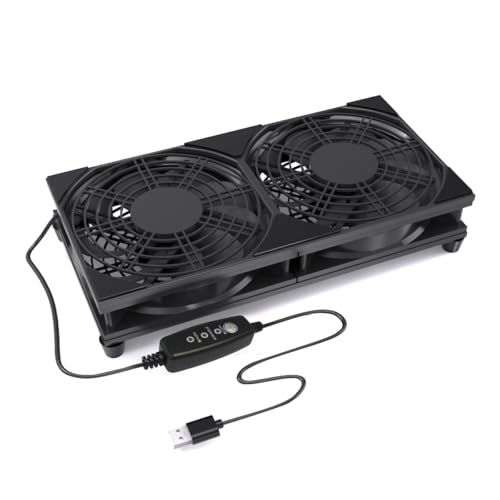
- Dual 120mm fan design
- Three adjustable speeds
- Raised base and protective grills
Best For: Broad cooling across routers and nearby electronics
Smart Cabinet Exhaust

- 140 CFM top exhaust
- Two thermal trigger modes
- Four speed controls and outage memory
Best For: Automatic cooling for enclosed AV or networking cabinets
Flexible Budget Cooling

- 56.7 CFM airflow
- Three speed settings
- Includes feet and mounting hardware
Best For: Simple USB cooling for routers and compact electronics
Best Dual-Fan Value

- Dual connected 80mm fans
- Three adjustable speed settings
- USB-powered, quiet operation
Best For: Home offices needing adjustable cooling for routers and compact electronics
Best for High-Airflow Setups
4X 120mm Variable-Speed Cooling Fan

- Four 120mm fans for broad airflow
- Adjustable from off to full speed
- AC-powered with dual ball bearings
Best For: DIY cabinets, equipment shelves, and multiple warm devices
Best Quiet Single-Fan Pick

- 120mm fan with 53.35 CFM airflow
- Low, medium, and high settings
- Rubber feet for quieter placement
Best For: Quiet, simple cooling for routers, modems, and media equipment
Best Adjustable Pick

- Three-speed control for flexible airflow
- Dual ball bearings rated over 50,000 hours
- USB-powered design with included support feet
Best For: Adjustable cooling for routers and compact home-office electronics
Best Heavy-Duty Pick
X1 Ultra-Quiet USB Cooling Fan

- 18 dB rated operation for quiet workspaces
- 55.8 CFM airflow from a 120mm fan
- Built-in USB cable and protective shock pads
Best For: Quiet cooling for routers, modems, and streaming devices
Quiet Desk Cooling – AC Infinity MULTIFAN S3
For home offices that need router cooling fans without adding much noise, the AC Infinity MULTIFAN S3 is a compact USB-powered option. Its 120mm fan offers 52 CFM of airflow, a multi-speed controller, and flexible upright or flat placement.
Best For: Quietly cooling a router, modem, AV component, or other electronics on or near a desk.
Pros:
- Low 18 dBA noise rating for quieter workspaces.
- Three? The supplied notes specify a multi-speed controller for adjustable airflow.
- Dual-ball bearings are rated for a 67,000-hour lifespan.
- USB power works with many electronics, consoles, and other USB sources.
Cons:
- It is a single 120mm fan, so coverage is more limited than a dual-fan system.
- Airflow is designed for individual components rather than large cabinets.
The MULTIFAN S3 is a practical pick when low noise, simple USB power, and flexible placement matter more than automated temperature control.
Wide-Coverage USB Cooling – 240mm Router Cooling Fan
This 240mm USB router cooling fan uses two 120mm fans to move air across a broader surface area. Three adjustable speeds, a raised base, and plug-and-play USB power make it suitable for home offices, shelves, and entertainment centers.
Best For: Cooling wider routers, modems, TV boxes, mini PCs, or multiple nearby electronics with one fan assembly.
Pros:
- Dual 120mm fans provide broad cooling coverage.
- Three-speed control helps balance airflow and noise.
- USB power connects to adapters, power banks, computers, TVs, or monitors.
- Protective grills and raised feet support stable desk or shelf placement.
Cons:
- The dual-fan design takes up more space than a single 120mm fan.
- Its supplied compatibility details identify desktop devices rather than a specific router model.
With a stated 13.6 dB noise level and 1,800 rpm maximum speed, this model is a useful choice for broad, adjustable cooling where desk or shelf space is available.
Smart Cabinet Exhaust – AC Infinity AIRCOM S7
The AC Infinity AIRCOM S7 is a top-exhaust cooling system for routers, modems, and AV equipment housed in cabinets. It combines 140 CFM airflow with temperature-triggered operation, four speed controls, and PWM-controlled dual fans.
Best For: Home offices or media setups that need cabinet-level exhaust and automatic cooling control.
Pros:
- Top-exhaust design helps move warm air out of an AV cabinet.
- Two fans provide a stated 140 CFM airflow capacity.
- Two thermal trigger modes can automate fan operation.
- Power-outage memory and four speed options add control convenience.
Cons:
- At 11.6 inches long, it requires more installation space than a compact USB fan.
- It uses a 12-volt, 4-pin connection rather than simple USB power.
- The supplied specifications list noise figures of both 19 dBA and 26 dB.
The AIRCOM S7 is the most feature-rich option here for enclosed equipment spaces, especially when automatic temperature response matters more than portability.
Flexible Budget Cooling – Wathai 120mm USB Fan
The Wathai 120mm USB fan is a straightforward choice for home offices seeking router cooling fans with simple installation. It connects through USB, includes three speed settings, and comes with a protective net, feet, and mounting hardware for flexible placement.
Best For: Cooling routers, modems, switches, mini PCs, and other electronics in tight spaces or home entertainment setups.
Pros:
- USB connection makes setup quick and convenient.
- Three speed settings allow adjustable cooling.
- Rated airflow is 56.7 CFM at 1,500 rpm.
- Includes protective net, foot columns, mounting screws, and nuts.
Cons:
- Its 23 dBA rating is higher than the quietest option in this roundup.
- Sleeve bearings have a stated 35,000-hour life, shorter than the dual-ball-bearing alternative.
- It is a single fan with a 120mm footprint.
The Wathai offers useful airflow and mounting flexibility at a compact size, making it a sensible pick when easy USB installation and included hardware are priorities.
Best Dual-Fan Value – ELUTENG 80mm USB Cooling Fan
If you need router cooling fans for home offices, this dual-fan USB model offers stronger airflow in a compact, flexible design. Its three speed settings, quiet operation, and horizontal or vertical placement make it practical for routers, network equipment, and other warm electronics near a desk.
Best For: Home-office users who want adjustable cooling for a router or several compact electronics.
Pros:
- Dual 80mm fans provide more airflow than a single-fan setup.
- Three speed settings let you balance cooling and noise.
- USB plug-and-play power works with many USB ports.
- Rubber shock absorbers and protective metal grills improve stability and safety.
Cons:
- The dual-fan assembly takes more space than a single 120mm fan.
- It requires a USB power source rather than a standard AC outlet.
With rated noise from 25.6dB to 32.5dB and support for continuous operation, the ELUTENG is a sensible choice when you want noticeable airflow without adding much distraction to a home-office workspace.
Best for High-Airflow Setups – 4X 120mm Variable-Speed Cooling Fan
For larger equipment or a DIY ventilation project, these router cooling fans for home offices provide a four-fan, 120mm setup with continuously adjustable speed. The included controller can tune airflow from off to full power, while the AC plug supports direct connection to a household outlet.
Best For: Users cooling a cabinet, equipment shelf, or multiple heat-producing devices with one larger fan assembly.
Pros:
- Four 120mm fans can move substantial air across a broad area.
- Variable control from off to full speed supports fine airflow adjustment.
- AC outlet operation is convenient for a stationary home-office setup.
- Dual ball bearings are rated for a 65,000-hour lifespan.
Cons:
- The four-fan design is less compact than a single router cooler.
- It is better suited to DIY installations than simple plug-in placement.
- Higher airflow and a 24-watt rating may be unnecessary for a small router.
This is the most expansive option in the group, especially when you need to cool a cabinet, networking area, or several devices at once. Its variable controller also makes it easier to reduce airflow when maximum output is not needed.
Best Quiet Single-Fan Pick – 120mm USB Router Fan Cooler
This 120mm USB fan is a straightforward choice among router cooling fans for home offices. It offers low, medium, and high settings, rubber feet for vibration control, and a flat or upright installation option for routers, modems, receivers, and TV boxes.
Best For: Home-office users who want a quiet, single-fan cooler with simple USB connectivity.
Pros:
- Three speed modes make it easy to match cooling to your noise preference.
- Silicone rubber feet help reduce vibration and operating noise.
- USB power supports convenient plug-in use with compatible equipment.
- Dual ball bearings are rated for a 50,000-hour lifespan.
Cons:
- It provides less total airflow than the four-fan setup.
- USB power may be less convenient if no nearby USB port is available.
With a listed airflow capacity of 53.35 CFM and a compact 120mm format, this model balances cooling capability and simplicity. It is a strong fit when quiet operation and easy placement matter more than maximum coverage.
Best Adjustable Pick – Dual 120mm USB Cooling Fan
For shoppers comparing router cooling fans for home offices, this dual-120mm model offers straightforward, adjustable airflow in a compact floor-mounted design. Its three-speed controller, USB power, and included support feet make it practical for routers, TV boxes, mini computers, and similar electronics.
Best For: Home-office users who want adjustable cooling for a router or other compact electronics.
Pros:
- Dual 120mm fans provide active airflow for heat dissipation.
- Three-speed button control allows adjustment for different conditions.
- USB power works with many compatible electronic devices.
- Dual ball bearings are rated for a service life of more than 50,000 hours.
Cons:
- The four support feet require user installation, although no tools are needed.
- Its 31 dB noise rating is higher than the quieter alternatives in this roundup.
- The 39-inch cable may limit placement farther from a USB power source.
This is a sensible choice when speed control matters more than minimum noise. It is especially useful if your home-office router sits on a shelf or cabinet where extra airflow can help reduce heat buildup.
Best Heavy-Duty Pick – X1 Ultra-Quiet USB Cooling Fan
This X1 is a strong option among router cooling fans for home offices when quiet operation and simple placement are priorities. The 120mm, nine-blade fan delivers 55.8 CFM of airflow while its built-in USB cable supports a tidy setup near a router, modem, streaming device, or computer.
Best For: Quiet home offices, living rooms, and compact setups where a single fan is sufficient.
Pros:
- 18 dB rated operation is designed for distraction-free cooling.
- 55.8 CFM airflow and up to 935 RPM provide active heat removal.
- Four shock-absorbing pads help reduce vibration and protect surfaces from scratches.
- Built-in 530mm USB cable can connect to a charger, power bank, or laptop.
Cons:
- It is a single-fan design, so it may provide less coverage than dual-fan options.
- The cable is integrated rather than detachable for replacement or routing flexibility.
- It does not list a speed controller for fine airflow adjustment.
Choose the X1 when low noise and a tidy footprint are more important than maximum fan coverage. Its upright-or-flat placement and broad device compatibility suit typical home-office electronics.
Best High-Airflow Pick – X4 Dual 140mm USB Cooling Fan
For larger devices or heavier heat loads, the X4 stands out among router cooling fans for home offices with two 140mm fans and 65.8 CFM airflow. Its one-touch switch, raised feet, and stackable design make it useful for routers, laptops, receivers, consoles, and computer cabinets.
Best For: Users who need higher airflow and a sturdy, elevated cooling platform for larger electronics.
Pros:
- Dual 140mm fans provide the highest listed airflow in this roundup at 65.8 CFM.
- 18 dB rated operation is suitable for offices, bedrooms, and gaming areas.
- Raised feet support stackable cooling and leave space for small accessories.
- Dual USB ports allow the fan to run while charging another device.
Cons:
- The larger dual-fan frame may require more desk or shelf space.
- It has a one-touch switch rather than a listed multi-speed controller.
- The 31.5-inch cable is shorter than the X1’s integrated cable.
The X4 is the most substantial option here for users who want broad airflow and a stable platform. Its larger footprint is a worthwhile tradeoff when cooling performance and device support matter more than compactness.
How We Picked the Best Router Cooling Fans for Home Offices
We focused on practical cooling solutions that suit desks, shelves, media cabinets, and compact networking setups. The selection includes single and dual-fan designs, larger multi-fan systems, USB-powered models, AC-powered options, and products with manual speed control.
We also considered airflow potential, noise claims, installation flexibility, power convenience, controller design, cable usability, and compatibility with common home-office equipment. Because fan performance depends on placement and enclosure ventilation, specifications should be treated as a starting point rather than a guarantee of a particular temperature reduction.
Quick Comparison
| Type | Best For | What to Look For |
|---|---|---|
| Single 80mm or 120mm fan | Small desks and individual routers | Low noise, compact size, speed control |
| Dual-fan system | Modems, routers, receivers, and cabinets | Balanced airflow, stable placement, USB power |
| Top-exhaust system | AV components and enclosed shelves | Correct dimensions, exhaust direction, thermostat or controller |
| Four-fan or large system | Wide equipment shelves and DIY cooling | Coverage, AC or USB power, variable speed |
Key Buying Factors for Router Cooling Fans for Home Offices
Size and Placement
Measure the available shelf or cabinet space before buying. A 120mm fan is a common compromise between airflow and noise, while 80mm models fit tighter areas. Multi-fan units need enough room for their full footprint and cables.
Power and Controls
USB models are convenient for routers, computers, power banks, and USB adapters, but check the required voltage and connector. AC-powered systems may provide more consistent power. Adjustable speed lets you reduce noise during light workloads and increase airflow when equipment runs hot.
Noise and Airflow
Look beyond advertised decibel figures. Fan speed, mounting surface, dust buildup, and cabinet resonance all affect perceived noise. Larger fans can often move useful air at lower speeds, while dual or four-fan designs may cool a broader area.
Air Direction and Ventilation
Decide whether you need air directed across the router or hot air exhausted from a cabinet. A fan cannot compensate for a sealed enclosure, so leave room around vents and provide an intake path when possible.
Who Should Buy Which Router Cooling Fans for Home Offices?
Choose a compact single 80mm or 120mm USB fan if one router or modem is running warm on an open desk. A dual 120mm model is a practical choice for wider devices, stacked networking hardware, or an AV shelf. For enclosed media cabinets, a top-exhaust system is better suited to removing rising heat. If you are cooling several components or building a custom setup, consider a four-fan or larger variable-speed system.
For most home offices, prioritize quiet operation, easy USB power, and adjustable control over maximum airflow alone. The best Router Cooling Fans for Home Offices are the ones that fit your equipment, improve ventilation, and can run continuously without becoming a new source of distraction.
