Excess heat can affect router stability, especially during long gaming sessions, streaming, or when networking equipment is installed in a confined cabinet. The best router cooling fans for gaming improve airflow without adding distracting noise or complicated installation.
We selected 10 USB-powered cooling options with different fan sizes, speed controls, layouts, and power requirements so you can match cooling performance to your setup.
Best 10 Router Cooling Fans for Gaming Picks for 2026
Quiet USB Pick

- 18 dBA rated noise
- Adjustable multi-speed controller
- USB-powered 120mm fan
Best For: Quiet cooling for routers, consoles, and AV equipment
Wide-Coverage Choice
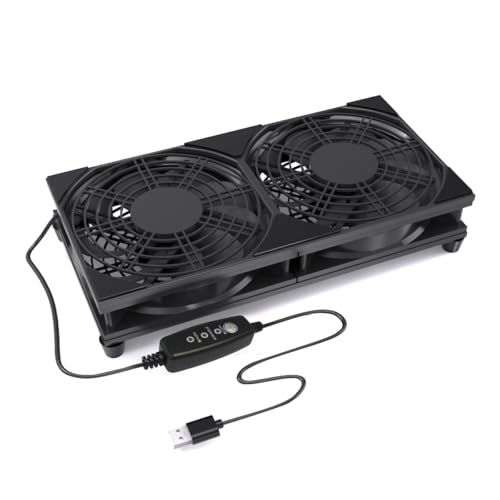
- Dual 120mm fan design
- Three adjustable speed settings
- Raised stable base with protective grills
Best For: Broad cooling across routers, consoles, and AV cabinets
Maximum Airflow Setup

- Four 120mm fans included
- Variable 3V–12V speed control
- AC-powered for direct outlet use
Best For: DIY cabinets and high-coverage electronics cooling
Compact Everyday Option

- 56.7 CFM rated airflow
- Three speed settings
- Protective net and mounting hardware included
Best For: Simple USB cooling for routers and compact gaming setups
Dual-Bearing Cooling Platform

- Dual 120mm airflow coverage
- Three-speed USB controller
- Raised, tool-free support feet
Best For: Raised cooling for routers, consoles, and TV boxes
Compact Aluminum Airflow Pick
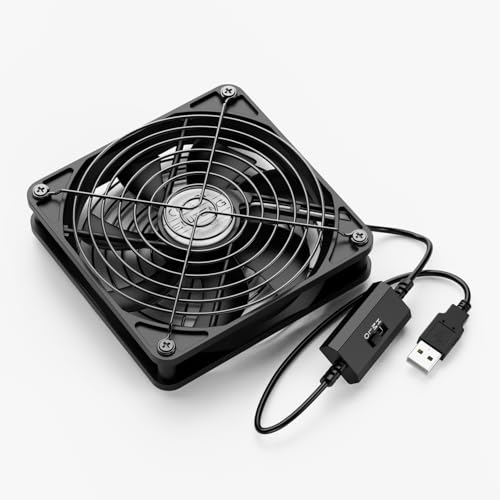
- Flat or upright placement
- Three adjustable speeds
- Protective aluminum grills
Best For: Narrow gaming and entertainment setups
Quiet Anti-Slip Cooling Stand

- 23 dB listed noise level
- Three adjustable speed modes
- Eight anti-vibration rubber pads
Best For: Quiet, stable cooling under gaming and media devices
Quiet Airflow Pick

- Three-speed controller with off mode
- Up to 53.35 CFM listed airflow
- USB-powered with vibration-reducing feet
Best For: Larger routers, consoles, and entertainment devices needing adjustable cooling
Compact Console Pick

- Compact 3.64-inch square footprint
- Three adjustable speed settings
- Protective grills and shockproof feet
Best For: Smaller gaming consoles, routers, and AV equipment
Maximum Coverage Pick

- Two 120mm fans for wider coverage
- Three speeds plus off mode
- Long 74.8-inch cable and non-slip feet
Best For: Larger gaming and networking setups needing broader cooling
Quiet USB Pick – AC Infinity MULTIFAN S3
The AC Infinity MULTIFAN S3 is a practical choice among router cooling fans for gaming when you want adjustable airflow without adding much noise. Its single 120mm fan connects through USB and can be positioned flat or upright beside a router, console, receiver, or other electronics.
Best For: Gamers who need quiet, adjustable cooling for a router, console, or AV setup.
Pros:
- Runs at a stated 18 dBA for quiet operation.
- Multi-speed controller lets you balance airflow and noise.
- USB power works with many consoles and AV devices.
- Dual-ball bearings and noise-absorption pads support long-term use.
Cons:
- Its single-fan design covers less area than dual- or four-fan options.
- It provides 52 CFM, so larger equipment may need more airflow.
Choose this model when low noise, flexible placement, and simple USB power matter more than maximum coverage. The compact 120mm format makes it easy to add to an existing gaming or entertainment setup.
Wide-Coverage Choice – 240mm USB Router Cooling Fan
This dual-120mm model is a useful option among router cooling fans for gaming when you want broader airflow across a router, modem, TV box, or entertainment cabinet. It uses USB power, offers three speed settings, and has a raised base for improved intake and stability.
Best For: Gaming and media setups needing wide, adjustable airflow over larger or multiple surfaces.
Pros:
- Dual 120mm fans cover a wider area than a single fan.
- Three adjustable speeds help match cooling to the device and placement.
- USB plug-and-play operation works with common USB power sources.
- Protective grills and raised feet improve everyday usability.
Cons:
- Its larger 240mm footprint may be less suitable for tight spaces.
- The supplied notes do not specify airflow capacity.
This is a sensible pick when coverage is the priority and you have room beside or beneath your equipment. The simple controller and USB connection keep installation straightforward.
Maximum Airflow Setup – 4X 120mm Variable-Speed Fan
This four-fan system stands out among router cooling fans for gaming when you need substantial, finely adjustable airflow for a cabinet, router, modem, console, or other electronics. Its variable controller ranges from off to full blast, while the included AC plug supports direct outlet power.
Best For: DIY cooling setups and larger gaming or electronics cabinets that need extensive airflow control.
Pros:
- Includes four 120mm fans for broad cooling coverage.
- Variable speed control supports fine adjustment from 3V to 12V.
- AC plug enables direct power from a 100–240V outlet.
- Dual-ball bearings are rated for a 65,000-hour lifespan.
Cons:
- The four-fan arrangement requires more space than single- or dual-fan designs.
- AC-powered installation may be less convenient for portable setups.
- The supplied notes do not provide a specific noise rating.
Consider this model for demanding or customized cooling projects where coverage and control are more important than compactness. It offers the most extensive fan layout in this group, but placement and cable management deserve planning.
Compact Everyday Option – Wathai 120mm USB Fan
The Wathai 120mm fan is a straightforward choice among router cooling fans for gaming, with a compact USB design that fits routers, modems, consoles, TV boxes, and other enclosed electronics areas. It includes a protective net, mounting hardware, and a 21-inch cable for flexible placement.
Best For: Simple USB cooling in tight spaces around routers, consoles, and home-theater equipment.
Pros:
- USB connection makes installation quick and convenient.
- Rated airflow reaches 56.7 CFM at 1,500 RPM.
- Three speed settings support basic airflow adjustment.
- Includes a protective net, feet, screws, and nuts.
Cons:
- Its stated 23 dBA noise level is higher than the AC Infinity option.
- Sleeve bearings have a lower stated life of 35,000 hours.
- It is a single 120mm fan rather than a wider multi-fan setup.
This fan makes sense when you want an affordable-feeling, uncomplicated cooling addition with useful mounting accessories. Its airflow rating is strong for a single 120mm unit, though quieter or larger setups may suit more demanding environments.
Dual-Bearing Cooling Platform – Dual 120mm USB Fan
For shoppers comparing router cooling fans for gaming, this dual-120mm USB model offers broad airflow coverage, a three-speed controller, and a raised platform design. Its 5V USB connection works with many nearby electronics, while the included feet help create space for intake and exhaust.
Best For: Gamers who want a raised, adjustable cooling platform for routers, game consoles, TV boxes, or mini computers.
Pros:
- Dual 120mm fans provide wide-area airflow for compact electronics.
- Three-speed control lets you balance cooling and noise.
- Dual ball bearings are rated for more than 50,000 hours of service.
- Tool-free feet create clearance beneath the device.
Cons:
- The support feet require user installation.
- Its 9.45-inch length may be large for smaller shelves.
- It uses USB power rather than including a dedicated wall adapter.
This is a practical choice when you want extra clearance and adjustable airflow in a gaming or media setup. Its larger footprint favors devices with enough shelf space.
Compact Aluminum Airflow Pick – ELUTENG 120mm USB Fan
This ELUTENG model is a compact option among router cooling fans for gaming, with a 120mm fan, three speed settings, and a USB power connection. Its flat or upright placement makes it suitable for crowded entertainment centers, desks, and narrow spaces around gaming equipment.
Best For: Gamers needing a portable, space-conscious cooler for routers, consoles, receivers, tablets, or other USB-powered electronics.
Pros:
- Three-speed control supports quieter or stronger airflow settings.
- Dual ball bearings are rated for a 45,000-hour lifespan.
- Aluminum grills protect the fan and help guard against contact with the blades.
- Can be placed flat or stood upright.
Cons:
- It has a single 120mm fan rather than a dual-fan layout.
- The listed maximum speed is 1,500 rpm, which may not suit every high-heat setup.
- USB power requires a compatible USB source.
Choose this fan when flexible placement matters more than maximum platform coverage. Its compact shape and low-speed noise rating make it a convenient fit for shared living spaces.
Quiet Anti-Slip Cooling Stand – Quie Router Cooling Fan
The Quie router fan is designed for shoppers seeking router cooling fans for gaming that can also support a console, modem, TV box, or receiver. Its 120mm fan offers three speed modes, while rubber feet and a protective grille help keep supported electronics stable during operation.
Best For: Quiet home or office gaming setups that need adjustable cooling beneath a router, console, or media device.
Pros:
- Three modes let you choose low-noise or higher-airflow operation.
- Rated at 23 dB with a listed airflow capacity of 55 CFM.
- Eight rubber shock-absorbing pads help reduce vibration and sliding.
- USB-A power works with power banks, computers, smart TVs, and USB chargers.
Cons:
- The 4.7-inch square platform may not support larger devices across their full base.
- It relies on an available USB power source instead of a dedicated adapter.
- The plastic housing may feel less substantial than a metal enclosure.
This model stands out as a quiet, stable cooling platform for everyday streaming and longer gaming sessions. Its anti-vibration feet and broad USB compatibility make placement straightforward.
Quiet Airflow Pick – 120mm USB Router Fan Cooler
If you need router cooling fans for gaming setups, this 120mm USB model offers adjustable airflow for routers, consoles, DVRs, and other electronics. Its three-speed controller lets you balance cooling performance and noise, while the USB connection makes setup simple.
Best For: Gamers and home users who want a larger, adjustable fan for a router, PlayStation, TV box, or similar device.
Pros:
- Three speed settings plus an off mode for flexible noise and airflow control.
- 120mm fan provides up to 53.35 CFM of listed airflow.
- USB-powered design works with compatible USB-equipped devices.
- Silicone feet help reduce vibration, with a listed noise range of 9.3–16.8 dBA in the product notes.
Cons:
- The 4.72-by-4.13-inch footprint may be too large for compact spaces.
- It is a single-fan unit, so coverage is more limited than a dual-fan design.
This is a practical choice when you want broad 120mm airflow and manual speed control without a complicated installation. Check the available space and USB connection on your gaming setup before buying.
Compact Console Pick – 80mm USB Cooling Fan
For smaller gaming areas, this 80mm option is one of the more compact router cooling fans for gaming consoles, routers, DVRs, and AV equipment. It uses a USB connection and a three-speed controller, making it easy to position and adjust for your preferred noise level.
Best For: Users who need a compact cooling fan for a router, Xbox, PlayStation, flat-panel equipment, or computer cabinet.
Pros:
- Compact 3.64-by-3.64-inch design fits more easily beside smaller devices.
- Three speed settings allow airflow and noise adjustment.
- Low-speed operation is listed at 21 dB.
- Double ball bearings are rated for a 65,000-hour service life, and protective iron grills cover both sides.
Cons:
- Listed airflow is 33 CFM, lower than the larger 120mm models in this roundup.
- The fan uses a 2-pin connection rather than a standard USB power-connector specification.
This model prioritizes a small footprint and straightforward USB-powered operation. It makes the most sense when space is tight and moderate airflow is sufficient for your device.
Maximum Coverage Pick – Dual 120mm Router Fan
This dual-fan model is designed for setups where broader cooling coverage is useful. As router cooling fans for gaming, its two 120mm fans can sit beneath or beside compatible equipment, while the three-speed controller and long 74.8-inch cable provide flexible placement.
Best For: Gaming and networking setups with enough space for a dual 120mm cooling unit and a need for extended cable reach.
Pros:
- Dual 120mm fan arrangement provides broader coverage than a single-fan design.
- Three speed settings plus off mode support customized airflow and noise control.
- Included 190cm cable offers flexible positioning around a console or router.
- Eight non-slip feet help stabilize the unit and raise it for added ventilation.
Cons:
- The 9.45-by-4.72-inch dimensions require substantially more space than an 80mm fan.
- At 26 dB, the listed noise level may be more noticeable than the compact model’s low-speed rating.
- It requires a compatible USB-equipped device for power.
Choose this option when coverage and placement flexibility matter more than a small footprint. Its dual-fan layout is better suited to larger equipment areas, provided your setup can accommodate the width.
How We Picked the Best Router Cooling Fans for Gaming
We focused on practical features that matter in gaming and home-networking setups: fan size, airflow potential, noise control, power compatibility, speed adjustment, mounting flexibility, and whether the design suits a single router or several heat-producing devices. The selection includes compact 80mm fans, standard 120mm models, dual-fan systems, and a four-fan cooling pad for larger cabinets or equipment areas.
USB power was prioritized because it is convenient for routers, power banks, consoles, televisions, and USB wall adapters. We also considered adjustable-speed controls useful for balancing cooling performance with noise.
Quick Comparison
| Type | Best For | Main Advantage |
|---|---|---|
| 80mm single fan | Small spaces | Compact footprint |
| 120mm single fan | Most routers and modem setups | Good airflow-to-noise balance |
| Dual 120mm fan | Hot equipment or cabinets | Greater airflow coverage |
| Four-fan cooling pad | Multiple devices or DIY projects | Broad cooling area and variable control |
| Fan stand | Devices needing supported airflow | Easy positioning and organization |
Key Buying Factors for Router Cooling Fans for Gaming
Fan Size and Airflow
Larger 120mm fans generally move useful air more quietly than smaller fans at comparable cooling levels. An 80mm model may be better when space is limited, while dual or four-fan designs make more sense for enclosed cabinets or several nearby components.
Noise and Speed Control
Look for low, medium, and high settings if the fan will sit near a desk, television, or gaming setup. A speed controller lets you use gentle airflow during normal operation and increase cooling during long gaming sessions or warm weather.
Power and Placement
Confirm that the fan uses a compatible 5V USB connection and that your router, console, or USB adapter can supply power. Check cable length, available clearance, and whether the fan can sit flat, attach to a vent, or stand beside the equipment without blocking existing airflow.
Single Versus Multiple Fans
A single fan is usually sufficient for a warm router with open ventilation. Choose a dual-fan or four-fan arrangement when equipment is stacked, airflow is restricted, or the cabinet contains a modem, router, console, and other heat sources.
Who Should Buy Which Router Cooling Fans for Gaming?
Choose a compact 80mm USB fan for a small desk or tight media cabinet. For most users, a quiet 120mm fan with adjustable speeds offers the best balance of simplicity, airflow, and noise. Select a dual 120mm model for larger routers, enclosed shelves, or multiple devices. A fan stand is useful when you want stable positioning around a modem, receiver, or game console, while a four-fan cooling pad is best for broad DIY cooling coverage.
Before buying, measure the available space and verify the power source. The right cooling fan should improve airflow without covering router vents, creating excessive noise, or making cable management difficult.
