Reliable audio routing can make the difference between a polished livestream and a distracting mix of hum, clipping, or uneven levels. The best audio press boxes for live streaming help distribute a speaker’s feed to multiple cameras, recorders, and broadcast systems without complicating the production.
This roundup includes dedicated press boxes alongside DI boxes, mixers, and AV switchers that may fit different live-production setups. Use the buying guide below to match your input and output needs, connection types, isolation requirements, and streaming workflow.
Best 10 Audio Press Boxes for Live Streaming Picks for 2026
Best Dedicated Press Box

- One XLR female input
- Eight isolated XLR male outputs
- Compact 3.5-pound design
Best For: Distributing one live audio feed to multiple destinations
Best All-in-One Production Hub
Roland VR-400UHD 4K Streaming AV Mixer

- Dual touchscreens for production control
- Seven HDMI inputs with 4K/60p support
- 14-channel digital audio mixer
Best For: Complex livestreams combining video switching and audio mixing
Best Signal-Conditioning DI Box

- Balanced XLR output
- Ground lift and pad switches
- Selectable low cut and phase controls
Best For: Cleaning up and adapting a single live audio source
Best HDMI Production Switcher
Roland V-8HD HD Video Switcher

- Eight HDMI inputs in a compact unit
- Built-in preview monitor and AUX output
- 18-channel digital audio mixer
Best For: Video-led live events with integrated audio mixing
Best Gaming Mixer
FIFINE SC8 Live Streaming Mixer

- XLR input with 48V phantom power
- Game/chat balancing and virtual 7.1 surround
- Voice changer, EQ presets, and RGB lighting
Best For: Gaming streamers using XLR or 6.35mm microphones
Best for Hum Reduction
Pyle-Pro PDC22 Dual Passive Direct Box
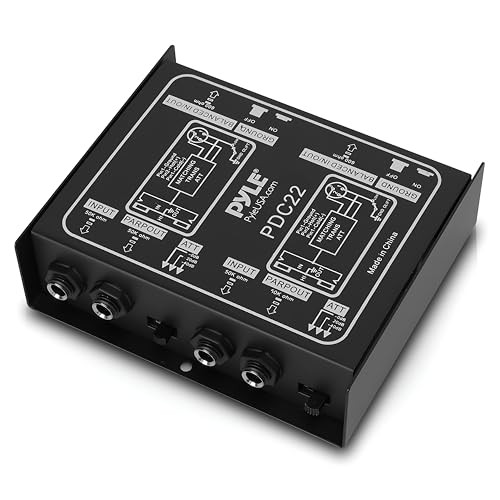
- Dual-channel passive signal routing
- Helps reduce buzz and hum
- Steel chassis for live-use durability
Best For: Connecting unbalanced instruments and line sources to a mixer
Best All-in-One Kit
BM-800 Podcast Streaming Bundle

- Includes microphone, arm, pop filter, and sound card
- Cardioid condenser microphone for voice capture
- Supports computers, mobile devices, and game platforms
Best For: Beginners building a complete voice-streaming setup
Best Budget Hum Eliminator

- Converts 1/4-inch sources to balanced XLR
- Ground-lift design helps reduce buzz and hum
- Steel chassis supports demanding live use
Best For: Musicians needing basic instrument-to-mixer connections
Best All-in-One Streaming Mixer
Neculogy G9 Podcast Audio Mixer

- Mixes microphones and external device audio
- Includes voice controls and volume management
- USB connection with 48-volt microphone support
Best For: Podcasters and creators managing a compact live stream
Best Dual-Channel USB DI
StudioMan MOB-2 Active USB DI Box

- Combines stereo DI and USB audio interface
- Adds Bluetooth and USB-C device connectivity
- Balanced XLR outputs include ground lift
Best For: Creators and musicians bridging instruments with streaming devices
Best Dedicated Press Box – PB-8 1-In/8-Out Press Box
For straightforward audio press boxes for live streaming, the PB-8 provides one XLR female input and eight isolated XLR male outputs. Its compact 3.5-pound design suits interview feeds and other situations where multiple destinations need a clean, separate signal.
Best For: Live interview and media setups that need one input distributed to eight isolated outputs.
Pros:
- Eight isolated XLR male outputs provide separate feeds.
- XLR female input fits common professional audio connections.
- Compact 8 x 4 x 8-inch form factor.
- Made in the United States.
Cons:
- Provides one input, so it is not a mixer or multi-source processor.
- The supplied notes do not identify onboard gain, filtering, or metering controls.
The PB-8 is the most purpose-built option here for distributing a press signal. Choose it when dependable isolated outputs matter more than mixing, video switching, or signal-shaping features.
Best All-in-One Production Hub – Roland VR-400UHD 4K Streaming AV Mixer
The Roland VR-400UHD is a full production command center rather than a dedicated press box, but it can anchor complex audio press boxes for live streaming workflows. Dual touchscreens, seven HDMI inputs, USB streaming, scene recall, and a 14-channel digital audio mixer combine video and audio control in one unit.
Best For: Production teams managing multi-source livestreams, video switching, routing, and audio mixing from a single console.
Pros:
- Seven HDMI inputs support rates up to 4K/60p, with four usable simultaneously.
- Dual touchscreens provide direct access to scene, routing, and audio controls.
- 14-channel digital audio mixer includes advanced effects and processing.
- Stores up to 64 scenes for repeatable production setups.
Cons:
- Much larger in scope than a dedicated audio press box.
- Only four of the seven HDMI inputs can be used simultaneously, according to the supplied notes.
- The supplied notes do not specify the software update status.
Choose the VR-400UHD when your live stream involves substantial video production alongside press audio. It offers extensive control, but a simpler press-box distribution task may not require this level of equipment.
Best Signal-Conditioning DI Box – MFL Pro DI Passive Direct Box
MFL. Pro DI Passive Direct Box for Studio & Live - Multi-Freq Low Cut,Phase & Ground Lift
Check Price On AmazonThe MFL Pro DI is a passive direct box for adapting and conditioning an instrument or line-level source in live audio press boxes for live streaming setups. Its balanced XLR output, ground lift, pad, low-cut selection, and phase switch address common connection, noise, and signal-alignment issues.
Best For: Live rigs that need balanced output plus practical control over hum, low-frequency noise, level, and phase.
Pros:
- Balanced XLR output supports professional audio connections.
- Ground lift can help reduce buzz from grounding issues.
- Pad switch helps reduce input level and prevent distortion.
- Selectable low cut and phase controls provide useful signal shaping.
Cons:
- It is a passive direct box, not a multi-output press box.
- Supplied notes do not specify the available low-cut frequencies.
- The 1/4-inch input and through jacks may require additional adapters for some sources.
The MFL Pro DI is best used as a source-interface and troubleshooting tool within a streaming audio chain. It complements, rather than replaces, a dedicated press box when multiple isolated feeds are required.
Best HDMI Production Switcher – Roland V-8HD HD Video Switcher
The Roland V-8HD is a video-focused option for live production systems that also need substantial audio handling. It combines eight HDMI inputs, a built-in multiviewer, automated switching, AUX output, and an 18-channel digital audio mixer, making it useful alongside audio press boxes for live streaming when video control is central.
Best For: Live events and broadcasts requiring multiple HDMI sources, preview monitoring, flexible routing, and integrated audio mixing.
Pros:
- Mixes up to eight HDMI sources in a compact unit.
- Built-in preview monitor supports source monitoring without requiring an external display.
- 18-channel digital audio mixer includes effects and sync delay on every channel.
- AUX output enables a separate video destination.
Cons:
- It is primarily an HDMI video switcher, not a dedicated audio press box.
- The supplied notes list a one-year manufacturer warranty.
- Its audio capabilities may be more than needed for simple press-feed distribution.
The V-8HD makes sense when press streaming is part of a broader video production. For audio-only distribution, a dedicated press box is more direct; for mixed video events, the V-8HD adds useful routing and monitoring capabilities.
Best Gaming Mixer – FIFINE SC8 Live Streaming Mixer
The FIFINE SC8 is a feature-rich option among audio press boxes for live streaming, especially for creators who need separate control over microphone, game, chat, and background audio. Its XLR input, 48V phantom power, optical input, USB-C connectivity, game/chat balance dial, and voice effects make it suited to interactive gaming broadcasts.
Best For: Gaming streamers using XLR or 6.35mm microphones who want hands-on audio control and voice effects.
Pros:
- Supports high-sensitivity microphones with XLR input and 48V phantom power.
- Provides USB-C plug-and-play connectivity plus optical and 3.5mm audio inputs.
- Includes game/chat balance control, virtual 7.1 surround, EQ presets, RGB lighting, and voice changing.
- Offers customizable buttons for saving audio clips or streaming profiles.
Cons:
- Not compatible with USB microphones.
- XLR cable is not included, and cable quality can affect audio performance.
- Its gaming-focused feature set may be more than needed for simple voice streaming.
The SC8 stands out when a live stream depends on quick, physical adjustments and gaming-oriented audio features. Confirm that your microphone uses XLR or 6.35mm connectivity before buying.
Best for Hum Reduction – Pyle-Pro PDC22 Dual Passive Direct Box
The Pyle-Pro PDC22 is a straightforward dual passive direct box for routing unbalanced instrument or line-level sources into a PA or recording mixer. For live streaming setups that use audio press boxes for live streaming, it can help connect guitars, keyboards, submixers, and other devices while reducing buzz and hum.
Best For: Musicians and streamers connecting unbalanced instruments or consumer audio sources to a mixer.
Pros:
- Provides two channels for flexible live sound and recording applications.
- Connects guitars, keyboards, outboard processors, submixers, and consumer stereo sources.
- Helps provide clean audio through impedance transformation and buzz or hum cancellation.
- Uses a durable all-steel chassis.
Cons:
- It is a passive direct box rather than a complete streaming mixer or audio interface.
- Its listed device connection is a ¼-inch connector, so additional adapters or cables may be needed for some setups.
The PDC22 is best viewed as a signal-connection and hum-reduction tool, not an all-in-one broadcast controller. It makes sense when your streaming chain includes unbalanced instruments or line outputs that need to feed a main mixer.
Best All-in-One Kit – BM-800 Podcast Streaming Bundle
The BM-800 AM100-V8 bundle combines a condenser microphone, adjustable arm, shock mount, pop filter, cables, and a live sound card in one package. While not a standalone mixer, it is a convenient entry point for creators comparing audio press boxes for live streaming and wanting a ready-to-use voice setup for podcasts, broadcasts, and short-form video.
Best For: New podcasters, vloggers, and live creators who need a complete microphone and sound-card starter kit.
Pros:
- Includes the microphone, arm stand, shock mount, pop filter, wind cover, cables, and live sound card.
- Cardioid pickup is designed to capture sound from in front of the microphone.
- Works with Windows, Mac OS, smartphones, tablets, PS4, Xbox, Switch, and other listed platforms.
- Offers multiple sound effects and voice-changing functions for live content.
Cons:
- The package has one audio channel, limiting more complex multi-source setups.
- The condenser microphone bundle requires charging before use.
- It uses a 3.5mm audio input rather than an XLR microphone connection.
This bundle prioritizes convenience over advanced routing. It is a practical starter choice for voice-led streaming, provided you want the included microphone and do not need a multi-channel XLR mixer.
Best Budget Hum Eliminator – Pyle PDC21 Passive DI Box
For simple audio press boxes for live streaming setups, the Pyle PDC21 is a compact passive DI option for connecting instruments and other unbalanced sources to a balanced XLR mixer or PA input. Its ground-lift function and steel chassis make it useful when you need straightforward signal conversion and help with buzz or hum.
Best For: Musicians and small live-streaming rigs connecting guitars, basses, keyboards, effects processors, or consumer audio devices to a mixer or PA.
Pros:
- Connects 1/4-inch unbalanced sources to balanced or unbalanced XLR equipment.
- Ground-lift design helps address buzz and hum.
- Steel construction and support for up to 10 effects pedals.
- Works with instruments, submixers, effects processors, and consumer stereo outputs.
Cons:
- Passive design does not provide the mixing, USB, or streaming controls of a full audio interface.
- Best suited to line and instrument connections rather than a complete live-streaming control surface.
The PDC21 is a practical choice when your primary need is clean, properly connected audio rather than extensive routing features. It can complement a streaming mixer or interface by handling impedance conversion and ground-noise issues.
Best All-in-One Streaming Mixer – Neculogy G9 Podcast Audio Mixer
The Neculogy G9 takes a more complete approach to audio press boxes for live streaming by combining microphone input, mixing, voice effects, and external audio connectivity in one unit. It is designed for creators who want to manage microphones, phones, PCs, and overall volume without complicated setup.
Best For: Podcasters, TikTok creators, gamers, and live streamers who need an all-in-one mixer with XLR microphone input and external-device audio.
Pros:
- Combines recording and mixing functions in a single podcast-oriented unit.
- Supports microphone mixing, voice changes, and individual audio-volume control.
- Accepts external audio from a phone or PC.
- Provides USB connectivity and 48-volt support for compatible condenser microphones.
Cons:
- Only two channels are listed, limiting larger multi-source setups.
- Battery-powered operation may require attention during extended streams.
- Its feature set is aimed at creators and podcasting rather than dedicated stage DI use.
The G9 is the strongest fit here for creators who want hands-on control over a live broadcast. Its integrated workflow reduces the need for separate voice-processing and routing hardware, though larger productions may need more channels.
Best Dual-Channel USB DI – StudioMan MOB-2 Active USB DI Box
The StudioMan MOB-2 is a flexible option for audio press boxes for live streaming when you need both direct injection and computer or mobile connectivity. It combines a stereo active DI box with a USB audio interface, Bluetooth input, balanced XLR outputs, and a ground-lift switch in a compact enclosure.
Best For: Musicians, content creators, and live performers routing stereo instrument or device audio to computers, phones, studio monitors, or PA systems.
Pros:
- Plug-and-play USB-C connection requires no driver installation.
- Supports smartphones, tablets, PCs, and Bluetooth audio sources.
- Provides balanced left and right XLR outputs with a ground-lift switch.
- Offers volume control, mono/stereo switching, and a 20Hz–20kHz frequency response.
Cons:
- Its 1.54-pound size and active electronics may be more than needed for a basic passive DI task.
- The supplied notes do not specify onboard microphone preamp or condenser-microphone support.
The MOB-2 is the most connectivity-focused choice of the three. Its stereo outputs, USB interface, and wireless phone connection make it especially useful when a live setup must bridge instruments, mobile audio, and streaming devices without installing drivers.
How We Picked the Best Audio Press Boxes for Live Streaming
We evaluated these products by how well they support real-world live audio workflows, including press conferences, interviews, podcasts, gaming streams, small events, and multi-camera productions. Key considerations included the number and type of inputs and outputs, passive or active signal handling, impedance compatibility, ground-lift or isolation features, monitoring controls, USB connectivity, and ease of setup.
Because “press box” can describe several types of equipment, this selection includes dedicated distribution hardware as well as adjacent tools that solve related problems. A true press box is best for sending one microphone or mixer feed to multiple destinations, while a DI box, audio interface, or mixer may be more suitable for instrument inputs, computer streaming, or hands-on level control.
Quick Comparison
| Need | Best Equipment Type | What to Look For |
|---|---|---|
| Multiple media outputs | Dedicated press box | Enough balanced outputs and clean signal distribution |
| Hum reduction | Passive or isolated DI box | Ground lift, transformer isolation, and attenuation |
| Computer streaming | USB audio interface or mixer | USB compatibility, level controls, and monitoring |
| Complex video production | AV mixer or video switcher | Audio routing plus scene and source management |
Key Buying Factors for Audio Press Boxes for Live Streaming
Inputs and Outputs
Count every destination before buying. A press conference with several cameras and recorders may need eight or more outputs, while a solo stream may need only one USB or line-level connection. Confirm whether the connections are XLR, 1/4-inch, RCA, USB, or a combination.
Balanced Signal Handling and Isolation
Balanced outputs are preferable for longer cable runs because they help reject interference. If you hear buzz caused by separate power sources or connected equipment, a ground-lift switch or transformer-isolated DI box can be useful. Passive models are generally simple and durable; active models may better accommodate weaker sources but can require power.
Level Control and Compatibility
Check whether the device accepts microphone, line, or instrument-level signals. Gain, attenuation, phase, and low-cut controls can help prevent clipping and improve clarity, but unnecessary controls can make a simple setup harder to manage. Also verify phantom-power requirements before connecting microphones or other powered equipment.
Streaming Workflow
For computer-based production, make sure the interface works with your operating system and streaming software. USB monitoring, headphone outputs, separate volume controls, and low-latency monitoring are valuable when the operator must hear the broadcast mix while managing guests or sources.
Who Should Buy Which Audio Press Boxes for Live Streaming?
Choose a dedicated multi-output press box if you regularly provide the same feed to several reporters, cameras, or recorders. Choose a passive DI box if your priority is connecting instruments or line-level sources while reducing hum. An active USB DI box or compact mixer is a better fit for musicians, podcasters, and streamers who need direct computer connectivity and quick level adjustments.
For productions involving multiple video sources, transitions, and display management, an AV mixer or video switcher may be more useful than a standalone audio distributor. Finally, bundled podcast kits can suit beginners who need an inexpensive starting point, but verify microphone quality, connector compatibility, and upgrade options before relying on one for professional events.
