In today’s remote work environment, enhancing your virtual meetings is essential for effective communication. The right audio bundle can elevate your Zoom Rooms experience, ensuring everyone hears and is heard clearly. Whether you’re in a small space or a large conference room, there are several options tailored to your needs. Let’s explore the top audio bundles that can transform your meetings and keep your team engaged.
Logitech Group Video Conferencing Bundle

If you’re looking to elevate your large group meetings, the Logitech Group Video Conferencing Bundle is an excellent choice. This powerful setup accommodates up to 20 participants, ensuring everyone can be heard and seen clearly. With its 28 ft. audio range and 90-degree field of view, you won’t miss a moment. Enjoy razor-sharp HD 1080p video, thanks to autofocus and premium Zeiss-certified optics. Plus, the business-grade speakerphone and expansion mics deliver plug-and-play audio, perfect for seamless communication. Compatible with major platforms like Microsoft Lync and Skype for Business, this bundle truly enhances your virtual meeting experience.
Best For: Teams and organizations that conduct large group meetings and require high-quality video and audio communication.
Pros:
- High-quality video with HD 1080p resolution and premium optics ensures clear visuals for all participants.
- Extended audio range of 28 ft. and multiple expansion mics provide excellent sound coverage for larger rooms.
- Wide compatibility with various platforms, including Microsoft Lync and Skype for Business, enhances versatility for different meeting setups.
Cons:
- Limited to large meeting rooms; may be overkill for smaller teams or individual use.
- Installation may require setup time to optimize audio and video settings for specific conference rooms.
- Higher price point compared to basic video conferencing solutions may not fit all budgets.
TONGVEO All-in-One Conference Room Video Camera System
The TONGVEO All-in-One Conference Room Video Camera System is perfect for small-to-medium conference rooms, seamlessly blending high-definition video and professional audio to elevate your virtual meetings. With full HD 1080p resolution at 60fps and a 3x optical zoom, you’ll enjoy crystal-clear visuals. Its AI auto-tracking guarantees you’re always in focus, while the Bluetooth conference speakerphone captures sound from up to 16.4ft away. Setup is a breeze with plug-and-play connectivity, and it works with major platforms like Zoom and Teams. This system is designed for 8-12 participants, making it an ideal choice for your next meeting.
Best For: Teams and organizations looking for a professional video conferencing solution for small-to-medium conference rooms.
Pros:
- High-definition 1080p video and AI auto-tracking for seamless presentations.
- Easy plug-and-play setup compatible with major video conferencing applications.
- Bluetooth speakerphone with impressive sound pickup range and a long-lasting battery.
Cons:
- Limited to wired PTZ camera; the speaker is wireless, which may require careful placement.
- Best suited for rooms up to 40 square meters, limiting use in larger spaces.
- May require technical support for setup or troubleshooting, despite plug-and-play features.
Anker PowerConf Speakerphone for Conference Calls

For those seeking a high-quality audio solution in conference settings, the Anker PowerConf Speakerphone stands out with its 360° voice pickup capability, thanks to its six strategically placed microphones. This Zoom Certified speaker offers AI-driven noise reduction and echo cancellation through Voice Radar 3.0 technology, ensuring crystal-clear communication. With a robust battery lasting up to 24 hours and Bluetooth 5.3 connectivity, you can set up your calls effortlessly. Its sleek design fits perfectly in any workspace, while the touch panel makes controlling audio simple. Enjoy the versatility of USB-C or Bluetooth connections without the hassle of driver installation.
Best For: The Anker PowerConf Speakerphone is best for professionals working in personal workspaces, home offices, or conference rooms who require high-quality audio for conference calls.
Pros:
- 360° voice pickup with six microphones for clear audio capture from any direction.
- AI-driven technology provides noise reduction and echo cancellation for enhanced communication.
- Long battery life of 24 hours and versatile connectivity options (Bluetooth and USB-C) for convenience.
Cons:
- Limited to a plastic enclosure, which may not appeal to all users seeking premium materials.
- Weight of 0.75 pounds might be cumbersome for portable use compared to lighter alternatives.
- Color options are limited to black, which may not suit all personal or office aesthetics.
Poly Sync 40 Teams Speakerphone
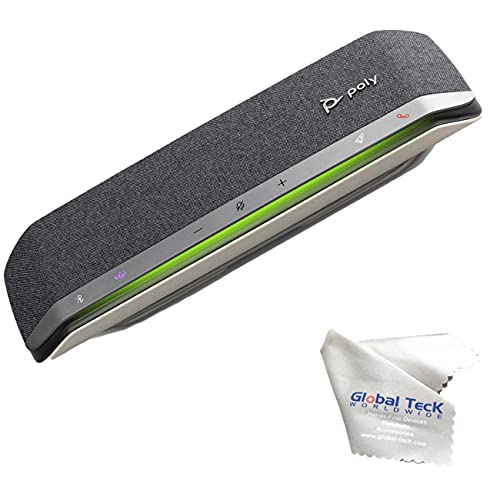
Ideal for small to medium-sized meeting rooms, the Poly Sync 40 Teams Speakerphone provides a smart solution for seamless voice and video conferencing. With its multi-microphone steerable array, you’ll enjoy crystal-clear sound, thanks to effective echo and noise reduction. It covers room sizes up to 5m x 5m and has an impressive microphone pickup range of up to 8 feet. You can easily connect to your PC using the combined USB-A and USB-C cable or link your smartphone via Bluetooth. Plus, with up to 30 hours of talk time and a USB-A port for charging, it’s perfect for extended meetings.
Best For: Small to medium-sized meeting rooms needing a reliable and high-quality conferencing solution.
Pros:
- Multi-microphone steerable array ensures crystal-clear sound with effective echo and noise reduction.
- Versatile connectivity options allow for easy connection to PCs via USB-A/USB-C and smartphones via Bluetooth.
- Long battery life of up to 30 hours, making it ideal for extended meetings.
Cons:
- Limited coverage may not be suitable for larger meeting spaces beyond 5m x 5m.
- Dependence on charging through USB-A port may limit functionality during long meetings if not plugged in.
- Bluetooth connectivity may introduce latency issues depending on the smartphone being used.
EMEET Conference Speakerphone M0 Plus with 4 AI Mics

Looking for a conference speakerphone that guarantees everyone in the room is heard clearly? The EMEET Conference Speakerphone M0 Plus might be just what you need. With four AI microphones and 360° voice pickup, it captures every voice while reducing background noise. Its 3W high-quality speaker guarantees everyone hears clearly, making conversations feel natural. You can easily connect via USB-C or Bluetooth, and it works seamlessly with platforms like Zoom and Teams. Plus, it’s lightweight and offers over 10 hours of battery life, perfect for all-day meetings. With a 2-year warranty, you’re covered for any issues.
Best For: Teams and organizations seeking a reliable conference speakerphone for clear communication in meetings.
Pros:
- 4 AI microphones with 360° voice pickup ensure all participants are heard clearly.
- Easy connectivity through USB-C and Bluetooth, compatible with major conferencing platforms.
- Long battery life of over 10 hours, making it suitable for extended meetings.
Cons:
- Limited to supporting up to 8 people (16 with Daisy Chain), which may not suffice for larger gatherings.
- Lightweight design may make it prone to knocking over in busy environments.
- No built-in display for easy access to settings or connection status.
Anker PowerConf S500 Speakerphone for Conference Rooms

The Anker PowerConf S500 Speakerphone stands out as the perfect solution for teams needing seamless communication in small to medium conference rooms. With Zoom Rooms and Google Meet certifications, it easily connects via Bluetooth or USB-C. Equipped with four microphones and VoiceRadar Technology, it guarantees crystal-clear audio, even when participants speak simultaneously. The Hi-Fi sound and 16-hour battery life mean you can rely on it for extended meetings. Plus, you can pair two units for larger groups. Its compact design and user-friendly controls make it a must-have for effective virtual meetings. You won’t be disappointed with this powerful tool!
Best For: Teams looking for an efficient and high-quality audio solution for small to medium conference rooms.
Pros:
- Excellent Audio Quality: VoiceRadar Technology and four microphones provide clear communication, even during simultaneous speaking.
- Versatile Connectivity: Supports Bluetooth and USB-C connections, making it compatible with a wide range of devices.
- Extended Battery Life: With an average battery life of 16 hours, it’s perfect for long meetings without the need for frequent recharging.
Cons:
- Limited Battery Charging Time: Takes 24 hours to fully charge, which may be inconvenient for quick setups.
- Size Limitations for Larger Groups: While it can pair two units for up to 20 people, it may still feel constrained for larger meetings.
- Corded Power Requirement: Requires a power source, which may restrict placement options in some conference room setups.
EMEET Conference Speaker and Microphone (2025 Version)

For teams of up to 14 people that need clear audio during virtual meetings, the EMEET Conference Speaker and Microphone (2025 Version) stands out with its impressive 360° voice pickup. It features an 8-mic array and a dedicated satellite mic, ensuring everyone’s voice is heard. With advanced noise reduction technology, background distractions like air conditioning become a thing of the past. You can even daisy chain two units for up to 25 participants. Its 2600mAh battery offers 10 hours of call time, and it connects seamlessly via USB or Bluetooth, making it compatible with all major meeting platforms.
Best For: Teams of up to 14 people looking for high-quality audio in virtual meetings with the ability to expand capacity for larger groups.
Pros:
- Advanced 360° voice pickup with an 8-mic array and dedicated satellite mic for clear audio capture.
- Intelligent noise reduction technology effectively eliminates background distractions.
- Daisy chaining capability allows for expansion to accommodate up to 25 participants.
Cons:
- Requires a wired connection for daisy chaining, which may limit placement flexibility.
- Battery life of 10 hours may not suffice for extended meetings without recharging.
- Potential compatibility issues with less common meeting platforms not explicitly mentioned.
Logitech MeetUp HD Video and Audio Conferencing System

Designed specifically for small meeting and huddle rooms, the Logitech MeetUp HD Video and Audio Conferencing System stands out with its compact all-in-one design that eliminates cable clutter. With a super-wide 120-degree field of view and motorized pan/tilt capabilities, you can easily capture everyone in the room. Enjoy exceptional video quality, supporting resolutions up to Ultra 4K. The integrated audio system features beamforming microphones and a custom-tuned speaker, ensuring clear sound. Plus, its USB plug-and-play functionality simplifies setup with any video conferencing software. Backed by a 2-year warranty and high user satisfaction, it’s a reliable choice for your virtual meetings.
Best For: Small meeting rooms and huddle spaces that require high-quality video and audio conferencing solutions.
Pros:
- Compact all-in-one design minimizes cable clutter, saving space.
- Exceptional video quality with support for Ultra 4K resolution and a 120-degree field of view.
- Integrated audio system with beamforming microphones ensures clear sound across the room.
Cons:
- Limited to small meeting spaces, may not be suitable for larger rooms.
- The expansion mic is an additional purchase to extend audio range.
- Some users may find the 2-year warranty shorter compared to competitors.
4K Conference Room Camera System with AI Auto Framing

Experience seamless collaboration with the K Conference Room Camera System, perfect for medium to large conference spaces. With its 4K resolution and 120° wide-angle lens, everyone in the room is clearly seen. The AI Auto Framing feature intelligently adjusts to highlight active speakers, making presentations smooth and engaging. Plus, its 5X zoom lets you focus on key details effortlessly. The advanced 4-mic array guarantees crystal-clear audio, minimizing background noise, while dual speakers provide a rich sound experience. Simply plug it into your favorite platform like Zoom or Teams, and you’re ready to elevate your virtual meetings.
Best For: Teams and organizations conducting hybrid meetings or presentations in medium to large conference rooms.
Pros:
- AI Auto Framing feature enhances engagement by automatically focusing on active speakers.
- 120° wide-angle lens ensures comprehensive coverage of the entire conference room.
- Plug & Play compatibility with major platforms like Zoom and Microsoft Teams makes setup effortless.
Cons:
- The high-end features may come at a premium price point.
- Limited to medium and large spaces; may not be necessary for smaller rooms.
- Requires a stable internet connection for optimal performance during virtual meetings.
Tenveo 4K PTZ Conference Room Camera System

The Tenveo 4K PTZ Conference Room Camera System stands out as an ideal solution for businesses seeking high-quality video conferencing capabilities. With its 12x optical zoom and 78° viewing angle, it captures every detail. The AI auto-tracking feature keeps you in focus, even if you move. Plus, the DSP audio processor guarantees crystal-clear sound across a 33ft range, perfect for larger rooms. You’ll appreciate its plug-and-play design for easy setup and compatibility with popular platforms like Zoom and Teams. Backed by a 30-day money-back guarantee and lifetime support, it’s a cost-effective choice for any professional environment.
Best For: Businesses and organizations looking for a high-quality, cost-effective video conferencing solution for larger meeting spaces.
Pros:
- High-quality visuals with 4K resolution and 12x optical zoom for clear video capture.
- Easy setup with plug-and-play design and compatibility with major conferencing platforms.
- Comprehensive audio capabilities with DSP processing and omnidirectional microphones for effective sound pickup.
Cons:
- Requires connection to a Hub for functionality, which may limit installation options.
- May be overkill for smaller rooms or teams, making it less cost-effective in such scenarios.
- Dependence on technical support for updates and maintenance could be a concern for some users.
Factors to Consider When Choosing a Conference Room Audio Bundle for Zoom Rooms
When choosing a conference room audio bundle for Zoom Rooms, you’ll want to take into account several key factors. Room size compatibility, audio quality, and microphone range coverage can make a big difference in your meeting experience. Plus, don’t forget about video resolution options and connectivity flexibility to guarantee everything runs smoothly.
Room Size Compatibility
Choosing the right audio bundle for your Zoom Rooms hinges on understanding room size compatibility. You need to match the system’s capacity with the number of participants, as audio bundles are tailored for small, medium, or large rooms. Consider the audio pickup range; systems for larger spaces often have microphones that capture voices from all corners. The room’s layout and dimensions matter too—irregularly shaped spaces might require extra microphones or speakers for even sound distribution. Smaller room solutions focus on portability and easy setup, while larger options integrate advanced technology for better audio quality. Don’t forget to evaluate the room’s acoustic characteristics, as wall materials and furniture can impact sound effectiveness, possibly requiring additional soundproofing.
Audio Quality Assurance
To guarantee a seamless communication experience in your Zoom Rooms, it’s crucial to focus on audio quality assurance. First, verify your audio system features a multi-microphone array to capture sound from all directions, allowing clear voice pickup from every participant. Look for devices with noise reduction technology to minimize background noise and echo, enhancing conversation clarity. Opt for systems that support full duplex audio, enabling simultaneous speaking for a more natural flow. Additionally, consider the microphone pickup range—aim for at least 8-10 feet to accommodate larger spaces. Finally, evaluate frequency response and signal-to-noise ratio, targeting a range that covers the human voice (300 Hz to 3 kHz) while minimizing background interference.
Video Resolution Options
Selecting the right video resolution is essential for enhancing your Zoom Room experience. You’ll want to evaluate options like HD (1080p) for clear visuals in most meetings, while Ultra HD (4K) offers high-definition clarity, perfect for larger rooms and detail-oriented presentations. Full HD (1920×1080) is a standard choice that balances sharp image quality with lower bandwidth needs, making it suitable for typical corporate environments. If you opt for Ultra HD (3840×2160), be aware that it requires more bandwidth and processing power. Look for systems that support multiple resolutions for flexibility and compatibility with various network conditions. Additionally, assess the field of view and zoom capabilities, as these factors can greatly enhance your video conferencing experience.
Connectivity Flexibility
When considering a conference room audio bundle for your Zoom Rooms, connectivity flexibility plays an essential role in guaranteeing smooth collaboration. Look for bundles that allow connections through various methods like USB, HDMI, and Bluetooth, so you can easily integrate different devices. Many options support both wired and wireless connections, including USB-C and Bluetooth 5.0, making it simple to connect laptops, tablets, and smartphones. Plug-and-play functionality is important too; it lets you set up quickly without needing extra drivers. Confirm compatibility with major video conferencing platforms like Zoom, Microsoft Teams, and WebEx for versatile usage. This flexibility will enhance your meetings, allowing everyone to participate effortlessly, regardless of their device or setup.
Microphone Range Coverage
Microphone range coverage is essential for ensuring everyone in your conference room can be heard clearly during Zoom meetings. When choosing an audio bundle, consider a range of 8 to 28 feet, depending on your room size. Systems with 360-degree microphones can capture voices from all angles, reducing dead spots and enhancing audio quality. Look for options that include noise reduction technology and echo cancellation to eliminate background distractions and improve clarity. Additionally, the number of microphones in the bundle matters; more microphones mean better coverage and consistent sound pickup throughout the space. Make sure the microphone capabilities match the expected number of participants, so larger groups in bigger rooms don’t compromise audio quality.
Ease of Setup
Achieving great audio quality in your conference room is just the beginning; ease of setup is equally important for a smooth Zoom meeting experience. Look for systems that offer plug-and-play functionality, allowing you to get started without complicated drivers or configurations. Choose audio bundles with both USB and Bluetooth connectivity, giving you flexible options for connecting various devices. Make certain the system supports major video conferencing applications, like Zoom, for seamless integration. It’s also wise to select equipment tailored for your specific room size, simplifying setup and optimizing functionality. Finally, evaluate the availability of technical support and warranty options, as they can greatly assist you with troubleshooting and setup challenges during installation.
Brand Reliability
Choosing the right conference room audio bundle hinges on brand reliability. Established brands usually have a proven track record of producing durable and effective products, which can greatly enhance your virtual meetings. Look for companies with a history of positive customer feedback and high ratings; they often indicate a commitment to quality. Brands that offer reliable customer support and warranty options can boost your confidence in their products, ensuring you’re covered if issues arise. Researching product reviews will give you valuable insights into a brand’s reliability, as users frequently share their experiences regarding durability and ease of use. Investing in well-known brands that prioritize research and development often leads to innovative features that improve audio performance.
