The right speaker stands can improve your gaming audio more than most people expect. They help position sound closer to ear level, reduce desk vibration, and keep your setup cleaner.
Below, we’ve rounded up the best options for different desk sizes, speaker weights, and mounting styles so you can choose with confidence.
Best 10 Desktop Speaker Stands for Gaming Setup Picks for 2026
Clamp-Mounted Space Saver
Height Adjustable Desk Clamp Stands

- Clamp base saves valuable desktop space
- Height adjusts from 9" to 14"
- Supports up to 50 lbs per pair
Best For: Setups that need clamp-on elevation and a sturdier mount
Low-Profile Angle Choice
5° Incline Metal Speaker Stands

- 5° incline aims speakers toward ears
- All-steel design with anti-vibration pads
- Holds up to 30 lbs per pair
Best For: Gamers wanting a short, sturdy stand with a mild angle
Clamp-Rise Desktop Pick
Pair of Desktop Speaker Stands 9"-14" Clamp Studio Monitor Stands
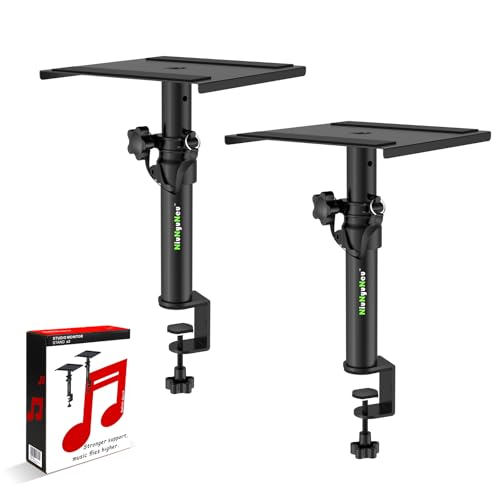
- 4 locking heights from 9" to 14"
- Clamp mount supports up to 50 lbs per stand
- EVA padding helps protect your desk
Best For: Gamers who want adjustable clamp-mounted stands with a small footprint
Angled Soundstage Pick
Audioengine DS1 Angled Desktop Speaker Stands
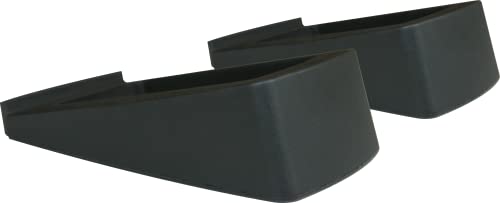
- 15-degree tilt for better speaker aim
- Vibration dampening for cleaner sound
- Compact base suits small desktop setups
Best For: Small gaming and computer speakers that need a low-profile angled lift
Clean Cable Pick
2-4 Inch Desktop Speaker Stands with Cable Management

- Steel build supports up to 33 lbs
- Built-in cable routing for a cleaner desk
- Fits many 2-4 inch speakers and monitors
Best For: Gamers who want sturdy stands with integrated cable management
Reduced Resonance Pick
Kanto SE4 Elevated Desktop Speaker Stands

- 2.0 mm silicone padding helps reduce cabinet resonance
- 5.6" height supports more accurate on-axis listening
- Open design helps reclaim usable desk space
Best For: Gamers and desk users wanting a minimalist, resonance-reducing stand
Low-Profile Tilt Pick
VIVO Medium Desktop Speaker Wedges
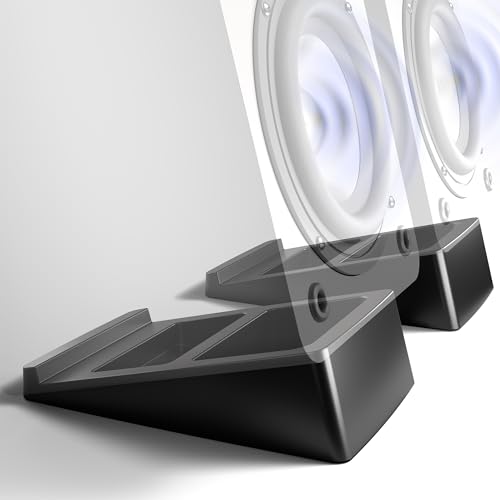
- 15° tilt angles speakers toward your ears
- TPR base helps isolate desk vibration
- No assembly required for instant setup
Best For: People who want an easy, space-saving wedge stand with upward tilt
Heavy-Duty Height Pick
suptek 6.1" Desktop Speaker Stands

- 6.1" height helps raise speakers toward ear level
- Large top plate offers stable support for bigger speakers
- Each stand supports up to 44 lbs
Best For: Anyone wanting a sturdy elevated stand with a spacious platform
Adjustable Tilt Desk Pick – 6° Tilt Speaker Stands for Ears
If you want desktop speaker stands for gaming setup use that help aim sound toward your ears, this PUTORSEN pair is built around a 6° tilt and a raised cantilevered profile. It also includes anti-vibration pads to cut down resonance, plus a C-shaped design that frees up space under the speakers for a tidier desk.
Best For: Gamers who want a compact desktop stand with a slight angle, vibration control, and extra desk space.
Pros:
- 6° tilt helps align speakers toward ear level
- Anti-vibration pads help reduce unwanted resonance
- Adjustable depth range fits different speaker sizes
- C-shaped design leaves room under the speakers
Cons:
- Load capacity is limited to 12 lbs per stand
- Best suited to small and medium bookshelf speakers
Overall, this is a practical choice if your setup prioritizes cleaner desk layout and a mild angle for better listening. The preset slot design and EVA pads add stability, but the weight limit means it is not the best match for heavier audio gear.
Clamp-Mounted Space Saver – Height Adjustable Desk Clamp Stands
Vondynote Set of 2 Desktop Clamp Speaker Stands Short Studio Monitor Stands Height Adjustable
Check Price On AmazonFor desktop speaker stands for gaming setup builds that need maximum surface space, these clamp-mounted stands keep the speaker platform off the desk. The height adjusts from 9″ to 14″, and the 9″ x 9″ top plate uses EVA padding to help limit vibration and protect your gear.
Best For: Users who want a clamp-on stand with height adjustment and a sturdy, space-saving footprint.
Pros:
- Height adjusts from 9″ to 14″ in fixed positions
- Clamp base saves desk surface area
- Thick clamps and reinforced screws add stability
- Fits speakers and other gear up to 50 lbs
Cons:
- Requires a desk edge for mounting
- Higher than 14″ is not available in this model
This is a strong option if you want your audio gear elevated without crowding the desk. The clamp design and higher weight capacity make it versatile, though it only works where a secure desk clamp can be installed.
Low-Profile Angle Choice – 5° Incline Metal Speaker Stands
If you’re comparing desktop speaker stands for gaming setup use and want a simple low-profile option, this metal pair adds a 5° upward tilt to help aim audio toward your ears. The C-shaped design also creates extra room underneath, while rubber feet and anti-vibration pads are included to help keep the stands steady.
Best For: Buyers who want a low stand with a slight tilt, solid metal construction, and basic vibration control.
Pros:
- 5° tilt helps position speakers toward listening height
- All-steel build adds stability and durability
- Rubber feet and top pads help reduce vibration
- Supports up to 30 lbs and fits many monitors
Cons:
- Very short 4.12″ height may not suit everyone
- No adjustment options beyond the fixed angle
This model makes sense if you want a clean, compact stand rather than a taller monitor-style riser. It is sturdy and practical, but the fixed low height means it works best when only a modest lift is needed.
Height-and-Tilt Utility Pick – Adjustable Free-Standing Speaker Stands
For desktop speaker stands for gaming setup layouts that need flexibility, these free-standing stands combine height adjustment with a tilting tray. The 9.6″ x 8.8″ platform, four locking height levels, and +12° to -12° tilt make it easier to position speakers and other devices around your desk.
Best For: People who want a free-standing stand with more adjustment range and a broad platform.
Pros:
- Four height settings reach up to 14.2″
- Tray tilts from +12° to -12° for positioning
- Wide platform fits speakers and other gear
- Steel construction and stable base support up to 33 lbs each
Cons:
- Takes more desk area than a clamp-style design
- Best for users who can accommodate a larger footprint
This is the most flexible option in the group if you want to tune both height and angle. The tradeoff is footprint, but the adjustable tray and sturdy build make it a strong all-around pick for multi-device desks.
Clamp-Rise Desktop Pick – Pair of Desktop Speaker Stands 9"-14" Clamp Studio Monitor Stands
If you want desktop speaker stands for gaming setup that free up desk space and let you fine-tune speaker height, this clamp-on pair is built for a tidy, adjustable layout. The four locking height settings and steel clamp design make it a practical fit when you want your speakers positioned comfortably without crowding your desktop.
Best For: Gamers and desk setups that need adjustable height, clamp-mounted stability, and a cleaner desktop.
Pros:
- Four locking height options: 9″, 10.6″, 12.3″, and 14″.
- 5mm thick C-clamp with steel screws for stable mounting.
- 3mm EVA pad helps protect the desk from scratches.
- Compact clamp footprint helps save desktop space.
Cons:
- Requires at least 120mm/4.7″ of wall clearance near the clamp.
- Fits desks up to 2.6″/6.6cm thick, so very thick desks are out.
For users who want a strong, space-saving clamp solution, this model stands out for its adjustability and load capacity. It is a sensible pick if your gaming setup needs speaker positioning flexibility more than a simple fixed riser.
Angled Soundstage Pick – Audioengine DS1 Angled Desktop Speaker Stands
For desktop speaker stands for gaming setup, angled stands can help point your speakers toward your ears and keep the sound focused. The Audioengine DS1 uses a 15-degree tilt and vibration-dampening design to improve placement on a desk without adding a bulky footprint.
Best For: Small gaming speakers and bookshelf speakers that benefit from an angled, low-profile lift.
Pros:
- 15-degree tilt is designed to improve soundstage and high-frequency performance.
- Vibration dampening helps reduce bass-degrading resonance.
- Low-profile base keeps the stands compact on the desk.
- Includes two stands and comes with a 3-year warranty.
Cons:
- 8 lb maximum load limit is lower than heavier-duty options.
- Fixed angle means less flexibility than height-adjustable stands.
If you prioritize sound direction and a clean, understated look, the DS1 is a straightforward desktop choice. It is especially appealing for smaller speakers where a slight tilt can make placement feel more precise.
Clean Cable Pick – 2-4 Inch Desktop Speaker Stands with Cable Management
These desktop speaker stands for gaming setup focus on stability and cable control, which is useful when you want your desk to look organized as well as sound better. The steel construction, built-in cable routing, and spacious top platform make them a solid match for compact speakers and studio monitors.
Best For: Gaming desks that need a sturdy, minimalist stand with built-in cable management.
Pros:
- Reinforced steel column and solid base support up to 33 lbs.
- Built-in cable management hole helps keep wiring neat.
- 6.9 x 5.7 inch top platform fits many small speakers and monitors.
- Minimal black design blends into modern gaming setups.
Cons:
- Max height is 5.2 inches, so adjustment range is limited.
- Speakers are not included.
This pair is a good option if you value a clean desk and stable speaker placement over extensive adjustability. It is a simple, practical stand set for smaller audio gear on a gaming or home office desk.
Reduced Resonance Pick – Kanto SE4 Elevated Desktop Speaker Stands
If you want desktop speaker stands for gaming setup use that aim for cleaner sound and a tidier desk, the Kanto SE4 is built to elevate medium bookshelf speakers or 3″-4″ studio monitors while helping cut cabinet resonance. Its 5.6″ height and silicone padding make it a practical choice when you want more accurate, on-axis listening without adding clutter.
Best For: Gamers and desk users who want a minimalist stand that reduces resonance and frees up desk space.
Pros:
- 2.0 mm silicone padding helps absorb resonance for cleaner sound
- 5.6″ elevated design aligns speakers more closely with ear level
- Open layout leaves space under the speakers to reclaim desk area
- Includes mounting screws for compatible speakers
Cons:
- Supports up to 9 lbs, so it is not for heavier speakers
- Best suited to medium bookshelf speakers and 3″-4″ monitors
The SE4 is a good fit if your priority is sound cleanliness and a streamlined setup. It balances a compact footprint with secure damping, making it a strong option for a polished gaming desk.
Low-Profile Tilt Pick – VIVO Medium Desktop Speaker Wedges
For desktop speaker stands for gaming setup that keep things simple, the VIVO medium wedge uses a 15° tilt to angle speakers toward your ears and improve clarity. The low-profile design is easy to place on a crowded desk, and the TPR material helps isolate the speaker from the surface to reduce unwanted vibration.
Best For: Users who want a simple, no-assembly wedge stand with an angled listening position.
Pros:
- 15° tilt aims speakers upward for better listening alignment
- TPR material helps isolate vibration from the desk
- No assembly required, so setup is immediate
- Compact footprint suits gaming rigs and office desks
Cons:
- Low-profile wedge style does not provide tall elevation
- Best fit is limited by the 4.8″ x 7.8″ top surface size
This is a straightforward option if you mainly want tilt and stability rather than maximum height. It works especially well for setups where desk space is tight and quick setup matters.
Heavy-Duty Height Pick – suptek 6.1" Desktop Speaker Stands
If you are comparing desktop speaker stands for gaming setup use and want a sturdier elevated option, the suptek pair delivers 6.1″ of height with a large 7.9″ x 6.5″ top plate. That makes it a practical choice for bookshelf and desktop speakers when you want balanced stereo placement, stable support, and a little more clearance on the desk.
Best For: Users who want a sturdy, higher stand with a spacious platform for desktop or bookshelf speakers.
Pros:
- 6.1″ elevation helps place speakers closer to ear level
- Large 7.9″ x 6.5″ top plate provides a stable surface
- Supports up to 44 lbs per stand for heavy-duty use
- Anti-slip mat helps keep speakers in place
Cons:
- Requires assembly, even though instructions are included
- Bulkier footprint may take up more desk space than low-profile wedges
Overall, the suptek stands are the most traditional all-around option in this group. They are a good match when you want height, stability, and a platform that can handle larger speakers.
How We Picked the Best Desktop Speaker Stands for Gaming Setup
For Desktop Speaker Stands for Gaming Setup use, we focused on the factors that matter most in real-world desks: stable construction, the right height range, useful tilt, and compatibility with common bookshelf speakers and desktop monitors. We also considered whether each design helps reduce vibration and frees up valuable desk space.
Quick Comparison
The best stand for you depends on your desk layout and speaker size. Clamp-on models are ideal if you want to keep the base off the desktop, free-standing risers work well for flexible placement, and angled isolation stands are great when you want a simple plug-and-play upgrade with minimal adjustment.
Key Buying Factors for Desktop Speaker Stands for Gaming Setup
Height and Ear Alignment
Speaker tweeters should sit close to ear level when you are in your normal gaming position. If your desk is tall, your chair is low, or your speakers are compact, adjustable-height stands may be the safest choice.
Tilt and Angling
A modest upward tilt can improve imaging and make dialogue, effects, and music feel more focused. If your speakers sit lower than ear height, look for a wedge or angled top plate.
Stability and Weight Capacity
Stands should stay planted during heavy bass hits and rapid desk movement. Heavier bases, steel construction, and vibration pads can all help keep sound tight and reduce rattling.
Desk Space and Mounting Style
If your gaming desk is crowded, clamp-on stands can reclaim surface area. If you move your layout often, free-standing stands are easier to reposition. Make sure the footprint fits your monitor, keyboard, and mouse setup.
Speaker Size and Fit
Check tray width, depth, and weight limits before buying. Many Desktop Speaker Stands for Gaming Setup use are designed for small-to-mid bookshelf speakers, but not all can handle deeper cabinets or larger monitors.
Who Should Buy Which Desktop Speaker Stands for Gaming Setup?
Choose clamp-on stands if you want maximum desk space and a more elevated, studio-like layout. Choose angled or wedge-style stands if you want a simple improvement in sound direction and isolation. Choose adjustable-height stands if you are still dialing in your desk ergonomics or use speakers of different sizes. If your priority is the cleanest setup with the least vibration, a solid metal or isolation-focused stand is usually the best fit.
