The PS5 sends video and audio over HDMI, which can complicate connecting an optical-input soundbar, older receiver, or powered speakers. An HDMI audio extractor can add the output you need while passing video to your display.
The important catch: not every extractor preserves 4K at 120 Hz, VRR, HDR, or the audio format your setup needs. These 10 options cover everything from basic stereo connections to higher-bandwidth gaming setups.
Best 10 Hdmi Audio Extractor for Ps5 Picks for 2026
Most Versatile
8K HDMI 2.1 Extractor with Four Audio Outputs

- 4K@120Hz and VRR pass-through
- HDMI, optical, coaxial, and stereo outputs
- Four modes with IR remote
Best For: High-refresh PS5 setups with multiple audio devices
Best for Receiver Routing
4K60 Extractor with Dedicated HDMI Audio

- Separate HDMI audio output
- TV, 2.0, 5.1, and 7.1 modes
- 4K@60Hz video limit
Best For: 4K60 PS5 setups with an AV receiver
Best for Analog Speakers
8K Extractor with RCA and Optical

- RCA, 3.5mm, and optical outputs
- 4K@120Hz and VRR support
- Stereo downmix mode for analog speakers
Best For: High-refresh PS5 gaming with analog speakers
Best for Astro Headsets
Compact 4K60 HDMI-to-Optical Adapter

- Optical output for Astro base stations
- 4K@60Hz HDR10 pass-through
- Compact metal enclosure
Best For: PS5 headset setups needing optical audio
Most Versatile Outputs
8K Extractor with eARC, Optical and RCA

- 4K/120Hz or 8K/60Hz pass-through
- Optical, RCA, and 3.5mm audio
- R/L mode downmixes to stereo
Best For: Flexible PS5 audio connections and TV ARC/eARC setups
Best 48Gbps Option

- 48Gbps FRL; up to 4K/120Hz
- Optical and stereo outputs
- ARC supported; eARC not supported
Best For: 4K/120Hz PS5 setups using optical audio
Best for 4K/60Hz Setups
OREI HDA-912 Optical Extractor

- Up to 4K/60Hz with HDR
- Optical Dolby Digital 5.1 and DTS
- No 4K/120Hz or ARC
Best For: 4K/60Hz PS5 displays with optical-input audio gear
Most Output Options

- Optical, coaxial, 3.5mm, and L/R outputs
- Eight EDID modes
- PS5 resolution caveat: may be limited to 1080p
Best For: Flexible audio connections in a 1080p PS5 setup
High-Refresh Option
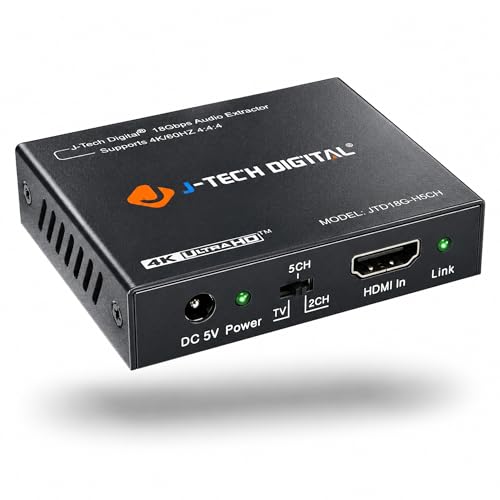
- Lists 4K/60Hz and 1080p high-refresh support
- SPDIF and 3.5mm outputs
- Analog audio requires a PCM source setting
Best For: High-refresh setups needing SPDIF or stereo analog audio
ARC-Ready Pick

- ARC audio extraction; no eARC
- RCA stereo or optical 5.1-channel output
- 4K/60Hz requires 4:2:0 output
Best For: HDMI and TV ARC setups using RCA or optical audio
Most Versatile – 8K HDMI 2.1 Extractor with Four Audio Outputs
If you need an hdmi audio extractor for ps5 that accommodates several audio connections without giving up 4K at 120Hz, this model is a flexible choice. It offers HDMI audio, optical, coaxial, and 3.5mm outputs, plus VRR and HDR pass-through.
Best For: PS5 setups that switch between a receiver, digital surround system, and stereo headphones.
Pros:
- Supports up to 4K@120Hz or 8K@60Hz with VRR.
- Dedicated HDMI audio output supports LPCM 7.1 and premium audio formats; optical and coax support 5.1.
- Four audio modes can be selected on the unit or with the included IR remote.
Cons:
- 3.5mm output is stereo only and must be disconnected for 5.1 mode.
- A 5V/1A USB power adapter is not included.
Choose this if connection flexibility and high-refresh video matter most. Check which audio mode your equipment needs before wiring everything up.
Best for Receiver Routing – 4K60 Extractor with Dedicated HDMI Audio
This hdmi audio extractor for ps5 is geared toward a 4K@60Hz setup that needs audio sent separately to a receiver or sound system. Alongside optical, coaxial, and 3.5mm outputs, it provides a dedicated HDMI audio output and an eARC/ARC mode for compatible TVs.
Best For: PS5 owners with a 4K60 display who want a separate HDMI connection to an AV receiver.
Pros:
- Dedicated HDMI audio output handles LPCM 7.1 and supported premium formats.
- Four-way switch offers TV, stereo, 5.1, and 7.1 modes.
- Optical and coaxial outputs support Dolby Digital 5.1 and DTS 5.1.
Cons:
- Video pass-through tops out at 4K@60Hz, not 4K@120Hz.
- In 7.1 mode, audio plays only through the HDMI audio output; the other audio ports are disabled.
This is a practical fit when clean receiver routing takes priority over high-refresh gaming. For Atmos from an HDMI source, the supplied instructions specify Standard Mode with eARC switched off.
Best for Analog Speakers – 8K Extractor with RCA and Optical
If your hdmi audio extractor for ps5 needs to feed RCA speakers or a 3.5mm stereo device, this model provides both alongside an optical output. It supports up to 4K@120Hz or 8K@60Hz pass-through and includes an eARC/ARC operating mode.
Best For: PS5 owners connecting analog stereo speakers or an optical audio system to a high-refresh display.
Pros:
- Offers RCA left/right, 3.5mm, and optical audio connections.
- Supports 4K@120Hz, VRR, and HDR formats listed by the manufacturer.
- Stereo downmix mode sends PCM audio to the analog and optical outputs.
Cons:
- Analog outputs require stereo PCM; non-PCM input can produce noise in other modes.
- Requires a connected 5V USB-C power cable.
Its analog connections set it apart, but mode selection matters: use the stereo downmix setting when feeding RCA or AUX speakers from a multichannel source. The TV’s ARC/eARC port connects to HDMI OUT, not HDMI IN.
Best for Astro Headsets – Compact 4K60 HDMI-to-Optical Adapter
This compact hdmi audio extractor for ps5 focuses on one job: passing video to your display while creating an optical signal for a compatible Astro base station or audio setup. Its HDMI 2.0 connection supports up to 4K@60Hz, HDR10, and HDCP 2.2.
Best For: PS5 players who need an optical connection for an Astro gaming headset base station.
Pros:
- Designed to provide an optical signal for headset Game Voice Balance.
- Supports 4K@60Hz and 1080p@120Hz or 144Hz video modes.
- Compact metal enclosure and plug-and-play setup.
Cons:
- Does not support 4K@120Hz pass-through.
- Offers HDMI and optical connections rather than the analog or coaxial outputs found on more flexible models.
Pick this for a straightforward PS5-to-Astro optical connection. If you need 4K@120Hz gaming or several types of audio output, another model in the roundup is a better match.
Most Versatile Outputs – 8K Extractor with eARC, Optical and RCA
If you need an hdmi audio extractor for ps5 that can feed both a display and older audio gear, this model offers optical, RCA stereo, and 3.5mm outputs alongside up to 4K at 120Hz video pass-through. It also supports 8K at 60Hz when the rest of your setup does.
Best For: PS5 setups needing multiple audio connections or a TV ARC/eARC audio option.
Pros:
- Optical, RCA L/R, and 3.5mm outputs provide connection choices.
- Supports 4K at 120Hz and 8K at 60Hz pass-through.
- R/L mode downmixes supported audio formats to stereo across the audio outputs.
Cons:
- Requires a connected 5V USB-C power cable.
- Analog outputs need stereo PCM outside R/L downmix mode; non-PCM audio can cause noise.
Choose this for output flexibility, but set its audio mode to match your speakers. For TV ARC/eARC audio, connect the TV to HDMI OUT and follow the specified CEC and switch settings.
Best 48Gbps Option – OREI 8K Extractor with ARC
This hdmi audio extractor for ps5 is a fit when you want to retain a 4K at 120Hz video connection while sending audio to an optical or stereo output. The OREI unit supports 48Gbps FRL, 8K at 60Hz pass-through, and ARC, but not eARC.
Best For: PS5 owners with a 4K/120Hz display and an optical-input sound system.
Pros:
- Supports up to 4K at 120Hz and 8K at 60Hz video pass-through.
- Offers optical S/PDIF and stereo audio outputs.
- Supports ARC, CEC bypass, and listed HDMI 2.1 video features including ALLM.
Cons:
- Does not support eARC.
- TV remote volume control is not supported.
Its 48Gbps capability makes it the stronger OREI choice here for high-refresh PS5 video. Plan on an HDMI 2.1 cable and check whether ARC, rather than eARC, meets your audio needs.
Best for 4K/60Hz Setups – OREI HDA-912 Optical Extractor
If your display tops out at 4K at 60Hz, this OREI hdmi audio extractor for ps5 lets you split audio to optical or stereo while passing video through. Its 18Gbps HDMI 2.0b connection supports HDR pass-through, but it is not a 4K/120Hz option.
Best For: PS5 setups with a 4K/60Hz display and an optical-input sound system.
Pros:
- Supports up to 4K at 60Hz video pass-through with HDR.
- Provides optical audio for Dolby Digital 5.1 and DTS alongside stereo output.
- Metal housing and HDCP 2.2 support suit straightforward AV setups.
Cons:
- Does not support 4K at 120Hz or 1440p at 120Hz.
- Does not support ARC.
This is a practical match for an existing 4K/60Hz screen and optical audio system. If high-refresh 4K gaming or ARC is on your checklist, choose a different extractor.
Most Output Options – VPFET HDMI Audio Extractor
If you need an hdmi audio extractor for ps5 with several ways to connect older audio gear, the VPFET offers optical, coaxial, 3.5mm, and left/right analog outputs. Its eight EDID modes let you adjust how the source and display negotiate audio.
Best For: PS5 setups that need flexible audio outputs and can use a 1080p video signal through the extractor.
Pros:
- Optical and coaxial outputs support DTS 5.1; analog outputs support PCM 2.0.
- Eight EDID settings offer more configuration choices.
- May run without external power with many sources; USB power is an option if needed.
Cons:
- The listing cautions that PS5 use may be limited to 1080p, despite the unit’s stated 4K/30Hz capability.
- No ARC, eARC, or 7.1-channel support.
This is the flexible-output pick, but check its stated PS5 resolution caveat before choosing it for a 4K gaming display.
High-Refresh Option – J-Tech Digital JTD18G-H5CH
For shoppers comparing an hdmi audio extractor for ps5, this J-Tech Digital model stands out for its stated 4K/60Hz, 1080p/120Hz, and 1080p/144Hz signal support. It provides SPDIF and 3.5mm audio outputs, though those format claims should not be read as a guarantee of every PS5 display mode.
Best For: Gaming setups that need SPDIF or stereo analog audio while prioritizing the extractor’s listed high-refresh video formats.
Pros:
- Lists HDMI 2.0, HDCP 2.2, HDR10, and 4K/60Hz support.
- Lists 1080p/120Hz and 1080p/144Hz support.
- Passes Dolby Digital and DTS audio through its digital output.
Cons:
- Does not decode Dolby Digital or DTS for the 3.5mm analog output; set the source to PCM for analog audio.
- Not compatible with HDMI 1.2 sources or monitors made before 2005.
Choose this one for its listed video-format flexibility, but plan your audio settings around the output you intend to use.
ARC-Ready Pick – J-Tech Digital JTECH-AE4KA
If your search for an hdmi audio extractor for ps5 also involves sending audio from a TV to a sound system, the JTECH-AE4KA adds an ARC function alongside HDMI audio extraction. It sends stereo audio over RCA or up to 5.1-channel audio over optical, provided the source is set to the appropriate format.
Best For: Setups that need RCA or optical audio from HDMI and also want TV ARC audio extraction.
Pros:
- ARC function can route audio from a compatible smart display to an external sound system.
- RCA stereo and optical 5.1-channel outputs cover two common audio connections.
- Three EDID modes—TV, 2CH, and 5CH—help configure audio output.
Cons:
- Does not support eARC or downmix 5.1-channel audio to RCA.
- 4K/60Hz is limited to 4:2:0; 4K/30Hz is supported at 4:4:4, and incompatible source output may require a lower resolution.
Its ARC feature makes it the most TV-oriented choice here, while its HDMI 1.4 and video-format limits deserve attention for a PS5 display chain.
How We Picked the Best Hdmi Audio Extractor for Ps5
We prioritized the specifications that affect a PS5 setup: advertised HDMI video bandwidth, supported resolution and refresh rate, audio-output types, and features such as HDCP, HDR, VRR, ARC, and eARC. The selection includes simpler 4K/60 Hz models alongside options advertised for 4K/120 Hz. These are manufacturer-listed capabilities, not a guarantee that every combination of console, display, cable, and audio device will work.
Quick Comparison: Match the Extractor to Your Setup
Start with the video signal you want to keep, then choose the audio connection your equipment accepts. A 4K/60 Hz extractor is a practical fit if you do not use 120 Hz gaming. For a 4K/120 Hz TV or monitor, look for an HDMI 2.1 model that explicitly supports 4K/120 Hz; check VRR support separately. Choose optical or coaxial for compatible digital-audio gear, a 3.5 mm or RCA output for compatible analog gear, and ARC/eARC features only if your wiring plan needs audio returning from the TV.
Key Buying Factors for an Hdmi Audio Extractor for Ps5
Video Passthrough Comes First
The extractor sits between the PS5 and display, so it can limit the signal even if both endpoints support more. Check the exact resolution, refresh rate, HDR, and VRR combination you plan to use. An “8K” label alone does not confirm 4K/120 Hz with VRR. Use cables rated for the signal and verify the supported HDMI ports on your display.
Audio Output and Format Must Match
Optical and coaxial S/PDIF are useful for older receivers and soundbars, but their bandwidth is limited: do not expect multichannel PCM or lossless surround through S/PDIF. Analog 3.5 mm and RCA connections are generally for stereo. Some listings advertise 7.1-channel support; confirm which output carries it rather than assuming every connector does. Match the PS5 audio-output settings to what your extractor and sound system can decode.
Check ARC, EARC, and Connection Direction
Standard extraction takes audio from the PS5’s incoming HDMI signal. ARC and eARC instead concern audio sent back from a compatible TV connection, and their presence does not automatically mean an extractor will convert every TV audio format to every output. Check the product’s connection diagram, especially if you want audio from the TV’s built-in apps as well as the PS5.
Consider Setup Controls and Compatibility
EDID controls can help negotiate a usable audio format, while CEC and HDCP compatibility may matter for remote-control behavior and protected content. Read the port labels and power requirements before buying; similar-looking extractors can have very different signal paths.
Who Should Buy Which Hdmi Audio Extractor for Ps5?
Choose a clearly specified 4K/120 Hz, VRR-compatible extractor if preserving high-refresh PS5 gaming is your priority. If your display tops out at 4K/60 Hz, a compatible HDMI 2.0 model may cover your needs without paying for unused bandwidth. Pick optical or coaxial for an existing digital-input sound system, or an analog-output model for stereo speakers. If you also need sound from TV apps, prioritize a model whose ARC/eARC routing explicitly matches your TV and audio equipment.
