If you want to pull better sound from a TV, console, or streaming box without replacing your display, an HDMI audio extractor with volume control can be a simple fix.
The right model can split audio to speakers, soundbars, or a stereo system while giving you more flexible volume management and format support.
Best 10 Hdmi Audio Extractor with Volume Control Picks for 2026
Top Pick
4K HDMI Audio Extractor with Analog Volume Control

- 4K@60Hz pass-through with HDR and HDCP 2.2
- Optical, 3.5mm, and RCA audio outputs
- Analog volume knob for stereo outputs
Best For: People who want a flexible all-in-one extractor for TV, speakers, or headphones
TV ARC Choice
ARC/eARC to 3.5mm and RCA Converter

- Converts ARC/eARC to RCA and 3.5mm analog
- Stereo PCM/LPCM 2.0 only
- Plug-and-play with power switch and LED
Best For: TV setups that only need simple 2-channel analog audio
Budget-Friendly Pick
HDMI to Optical and 3.5mm Extractor with Knob
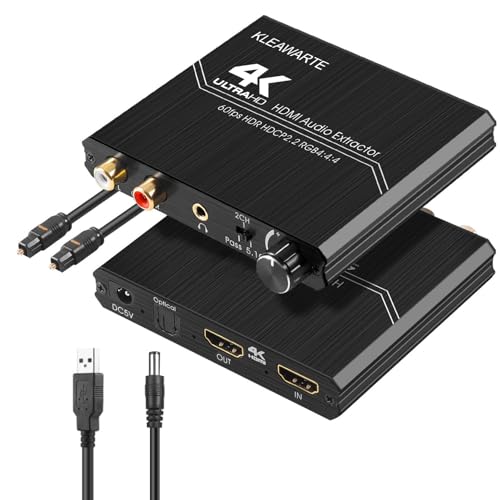
- 4K@60Hz HDMI passthrough
- Optical, 3.5mm, and RCA outputs
- Volume knob plus multi-format support
Best For: Shoppers who want a simple extractor with analog volume adjustment
Home Theater Upgrade
4K60 HDMI Audio Converter with Optical Out

- 4K@50/60Hz passthrough with HDR
- Supports Dolby Atmos, DTS:X, and more
- Optical and stereo output in metal housing
Best For: Home theater setups that need strong video passthrough and surround audio support
Flexible 4K audio breakout
J-Tech Digital 4K HDMI Audio Extractor
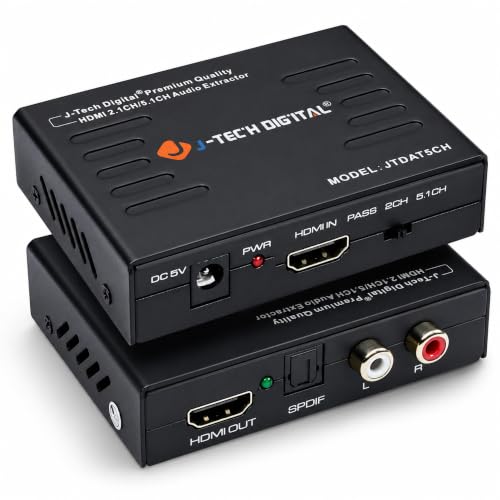
- 2CH stereo or 5.1CH audio output
- Supports 4K@30Hz, HDCP, and 3D
- Pass, 2CH, and 5.1 EDID modes
Best For: People who need flexible HDMI audio extraction for stereo or surround sound
TV remote volume control
LiNKFOR eARC/ARC Audio Extractor with CEC

- RCA and 3.5mm outputs at the same time
- CEC lets TV remote control volume
- Made for TVs with eARC/ARC ports
Best For: Smart TV users who want analog audio output and remote volume control
Low-cost optical/AUX extractor

- Optical and 3.5mm audio outputs
- 2.0CH, 5.1CH, and PASS modes
- USB-powered, plug-and-play design
Best For: Budget buyers who need simple HDMI audio extraction to optical or AUX
Simple 4K Stereo Extractor
Amazon Basics HDMI to HDMI Audio Extractor
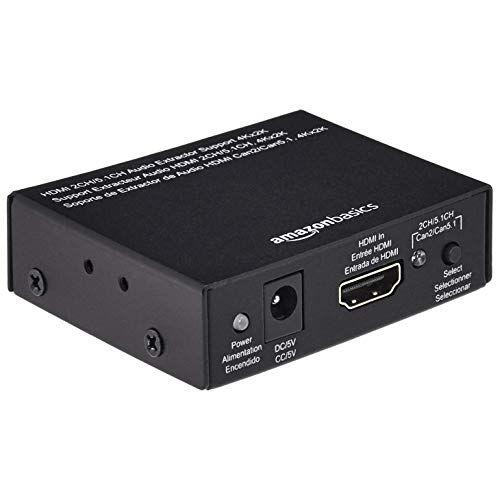
- 4K video passthrough at 30Hz
- SPDIF optical and stereo outputs
- Works with common TV and console sources
Best For: Simple 4K/30Hz setups needing optical or stereo audio output
Flexible High-Refresh Extractor
J-Tech Digital 4K HDMI Audio Extractor

- 4K/60Hz plus high-refresh 1080p support
- 2CH, 5.1CH, and pass-through EDID modes
- Optical and 3.5mm audio outputs
Best For: High-refresh gaming or media setups that need configurable audio output modes
Reliable 4K Passthrough Extractor
J-Tech Digital 4K 60Hz HDMI Audio Extractor
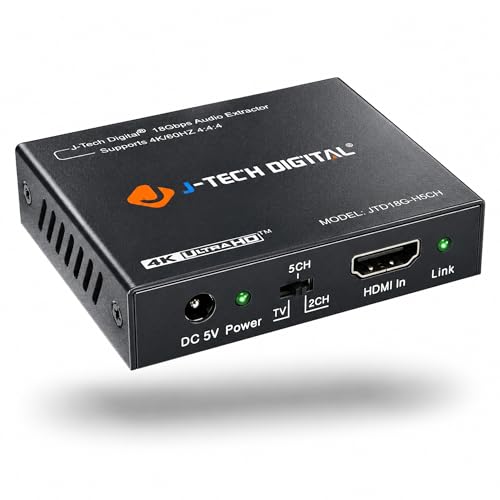
- 4K/60Hz HDMI 2.0 and HDCP 2.2 support
- SPDIF optical plus 3.5mm output
- Passes Dolby Digital and DTS formats
Best For: 4K/60Hz systems that need straightforward optical and analog audio breakout
Top Pick – 4K HDMI Audio Extractor with Analog Volume Control
If you need an hdmi audio extractor with volume control that can also keep 4K video moving cleanly, this Tendak model is a strong all-around choice. It pulls audio from HDMI and sends it to optical SPDIF, 3.5mm stereo, or RCA L/R, making it useful for soundbars, speakers, or headphones when your display setup needs separate audio output.
Best For: Users who want a versatile 4K@60Hz extractor with both digital and analog outputs plus analog volume adjustment.
Pros:
- Supports up to 4K@60Hz with HDR, HDCP 2.2, and 4:4:4 formats.
- Offers optical SPDIF, 3.5mm stereo, and RCA L/R outputs.
- Volume knob controls the analog outputs.
- Supports common formats including AC-3, DTS, Dolby-TrueHD, and LPCM7.1.
Cons:
- Volume control applies only to analog output paths.
- Needs USB power for operation.
- Not the simplest choice if you only need one basic audio output.
This is a practical pick if you want broad compatibility and multiple ways to route audio from a 4K source. The mix of HDMI pass-through, optical output, and analog volume control makes it especially flexible for mixed home theater setups.
TV ARC Choice – ARC/eARC to 3.5mm and RCA Converter
This hdmi audio extractor with volume control category option is really aimed at TV-based setups, but this OREI model takes a different approach by converting HDMI ARC/eARC audio to analog outputs. It is best suited for users who want simple stereo sound from a TV into speakers or headphones through 3.5mm or RCA connections.
Best For: TV owners who only need PCM/LPCM 2-channel analog output from ARC/eARC.
Pros:
- Converts HDMI ARC/eARC audio to RCA L/R and 3.5mm outputs.
- Simultaneous analog outputs for speakers or headphones.
- Plug-and-play design with power switch and LED indicator.
- Supports PCM/LPCM 2.0 up to 192kHz/24-bit.
Cons:
- No volume control support.
- Does not support Dolby, DTS, or multi-channel audio.
- Not a full eARC extractor.
If your setup is strictly stereo and centered on a TV’s ARC/eARC output, this converter keeps things straightforward. Just note that it is not designed for surround formats or volume adjustment, so it fits a narrower use case than some other extractors.
Budget-Friendly Pick – HDMI to Optical and 3.5mm Extractor with Knob
If you want an hdmi audio extractor with volume control for a straightforward home or gaming setup, this KLEAWARTE adapter covers the basics well. It extracts audio from HDMI sources and sends it to optical SPDIF, 3.5mm headphones, or RCA stereo, while keeping video up to 4K@60Hz.
Best For: Users who want a simple, multi-output extractor for speakers, headsets, or a small theater setup.
Pros:
- Supports up to 4K@60Hz video passthrough.
- Outputs audio through optical SPDIF, 3.5mm, and RCA stereo.
- Volume knob adjusts the output sound system.
- Supports AC-3, DTS, DTS-HD, Dolby-TrueHD, DSD, and LPCM7.1.
Cons:
- Detailed channel behavior differs by output type.
- No premium extras beyond core extraction and control.
- Requires USB power.
This model is a good fit when you want useful output options without overcomplicating the setup. Its volume knob and broad format support make it a practical match for everyday TV, gaming, or speaker use.
Home Theater Upgrade – 4K60 HDMI Audio Converter with Optical Out
For a more theater-focused hdmi audio extractor with volume control search, this OREI unit is built around strong 4K video passthrough and optical audio output. It separates audio from HDMI sources while preserving up to 4K@50/60Hz video, making it a solid fit for TVs, projectors, and surround-capable home AV systems.
Best For: Home theater users who want 4K passthrough and optical surround support from HDMI sources.
Pros:
- Supports up to 4K@50/60Hz with YUV4:4:4 and HDR pass-through.
- Handles LPCM, Dolby Digital, DTS, Dolby TrueHD, Dolby Atmos, and DTS:X.
- Includes optical and stereo output support in a compact metal housing.
- Compatible with Blu-ray players, PS5, Xbox, PCs, and streaming devices.
Cons:
- No ARC support.
- No volume control feature is listed.
- Does not support several higher-refresh or 3D modes.
This is a better match for users prioritizing clean 4K video and broad audio format support over analog control features. If your setup leans toward optical surround sound, it offers a dependable way to split HDMI audio without sacrificing picture quality.
Flexible 4K audio breakout – J-Tech Digital 4K HDMI Audio Extractor
If you need an HDMI audio extractor with volume control in a broader home-theater setup, this J-Tech Digital model is built for clean audio breakout from HDMI sources. It converts HDMI audio to either 2-channel analog stereo or 5.1-channel audio, while keeping support for 4K@30Hz video pass-through and plug-and-play operation.
Best For: Users who want flexible HDMI audio extraction with both stereo and 5.1 output options for TVs, Blu-ray players, Apple TV, and satellite receivers.
Pros:
- Extracts HDMI audio to 2CH stereo or 5.1CH surround output.
- Supports 4K@30Hz video, HDCP, and 3D pass-through.
- Offers EDID settings for Pass, 2CH, and 5.1CH modes.
- Works with LPCM, Dolby Digital, and DTS Digital sources.
Cons:
- ARC functionality is not supported.
- No dedicated volume control feature is listed.
- Requires compatible source and display settings for best results.
This is a practical pick if you care more about format flexibility and HDMI audio extraction than built-in volume adjustment. It’s best suited to setups where you want stereo or surround output from an HDMI source without adding a more complex AV component.
TV remote volume control – LiNKFOR eARC/ARC Audio Extractor with CEC
This HDMI audio extractor with volume control is aimed at TV-based setups that use an eARC/ARC port. It pulls audio from the TV and sends it out simultaneously over RCA and 3.5mm, while also letting you adjust external speaker or headphone volume with the TV remote through CEC.
Best For: Smart TV owners who want easy analog audio output plus remote-based volume control for speakers or headphones.
Pros:
- Supports simultaneous RCA and 3.5mm analog output.
- TV remote volume control works through CEC, if supported.
- Designed specifically for TVs with eARC/ARC ports.
- Supports 192kHz PCM stereo audio.
Cons:
- Requires the TV HDMI port to be labeled eARC/ARC.
- PCM/LPCM stereo only; it does not support Dolby or DTS.
- CEC compatibility depends on the TV.
If your priority is simple TV audio breakout with convenient volume control, this is the most targeted option in the group. It makes the most sense for compact living-room or bedroom setups where you want to run speakers and headphones from the same TV.
Low-cost optical/AUX extractor – VPFET 4K HDMI Audio Extractor
The VPFET HDMI audio extractor is a straightforward way to pull audio from HDMI and send it to optical or 3.5mm outputs. It supports 4K@30Hz video over HDMI 1.4, offers 2.0CH, 5.1CH, and PASS modes, and keeps setup simple with USB power and plug-and-play use.
Best For: Budget-minded users who need basic HDMI audio extraction to optical or AUX for receivers, speakers, or older audio gear.
Pros:
- Provides optical and 3.5mm output options.
- Offers 2.0CH, 5.1CH, and PASS operating modes.
- Supports 4K@30Hz with HDCP 1.4 and 10.2Gbps bandwidth.
- Runs from USB power for easy setup.
Cons:
- Does not support ARC or eARC.
- 3.5mm output is limited to PCM 2.0.
- Notes indicate some streaming/game devices are limited to 1080p signals.
This is a practical no-frills extractor for users who mainly need audio output conversion, not advanced TV integration. It works best when you want a compact, low-power solution for legacy speakers or an optical connection.
Simple 4K Stereo Extractor – Amazon Basics HDMI to HDMI Audio Extractor
Amazon Basics 4K@30Hz HDMI to HDMI and Audio (RCA Stereo or Spdif) Extractor Converter, Black
Check Price On AmazonIf you need a straightforward HDMI audio extractor with volume control-like flexibility for routing sound to external speakers or a stereo setup, this Amazon Basics unit keeps things simple. It passes video through at up to 4K/30Hz while splitting audio to either Toslink optical or stereo output, making it a practical fit for basic TV, Blu-ray, and console setups.
Best For: Users who want an easy HDMI-to-audio splitter for 4K/30Hz sources and simple stereo or optical output.
Pros:
- Supports up to 4K at 30Hz with pass-through video
- Offers both SPDIF optical and stereo audio output
- Works with many common sources like Fire TV, Blu-ray players, consoles, and PCs
- Durable metal housing and compact size
Cons:
- Limited to 4K/30Hz rather than 4K/60Hz
- Only provides two-channel left-right or SPDIF stereo output
- No listed warranty
Overall, this is a no-frills extractor for users who mainly want reliable audio breakout from HDMI without advanced format handling. It makes the most sense for mixed home entertainment gear where 4K/30Hz is acceptable and optical or stereo output covers the audio side.
Flexible High-Refresh Extractor – J-Tech Digital 4K HDMI Audio Extractor
This HDMI audio extractor with volume control-style audio mode switching is built for users who want more flexibility from modern sources. It supports 4K/60Hz video, high-refresh 1080p modes, and lets you choose between 2-channel stereo, 5.1-channel optical, or pass-through EDID settings depending on how you want to route audio.
Best For: Buyers who need 4K/60Hz support plus configurable stereo, optical, or pass-through audio modes.
Pros:
- Supports 4K at 60Hz, 1080p at 120Hz, and 1080p at 144Hz
- Offers 2CH, 5.1CH, and pass-through EDID audio settings
- Includes optical and 3.5mm outputs for flexible audio routing
- Passes Dolby Digital and DTS over SPDIF
Cons:
- Does not downmix 5.1 audio to the 3.5mm analog output
- Requires PCM output for analog use
- Has compatibility limits with some Apple TV and Xfinity models
For shoppers who need a more capable HDMI audio extractor with volume control-like audio configuration options, this model is the most feature-rich of the group. Just be sure your source device and audio format match the unit’s specific compatibility and output requirements.
Reliable 4K Passthrough Extractor – J-Tech Digital 4K 60Hz HDMI Audio Extractor
If you want a practical HDMI audio extractor with volume control-like routing for a clean stereo or surround sound setup, this J-Tech Digital model focuses on core compatibility. It supports 4K/60Hz HDMI 2.0 passthrough, includes SPDIF and 3.5mm output, and is designed to pass Dolby Digital and DTS when used with compatible digital audio sources.
Best For: Users who want 4K/60Hz passthrough with both optical and analog audio output options.
Pros:
- Supports 4K at 60Hz with HDMI 2.0 and HDCP 2.2
- Provides both SPDIF optical and 3.5mm audio outputs
- Passes Dolby Digital and DTS audio formats
- Works with game consoles and PCs
Cons:
- Does not decode Dolby Digital or DTS for analog output
- Requires PCM audio for the analog output path
- Has compatibility limits with some older HDMI sources and certain devices
This is a solid choice when you need 4K/60Hz video passthrough and simple audio breakout without extra complexity. It is best suited to users who can match the source audio format to the output path and do not need advanced decoding.
How We Picked the Best Hdmi Audio Extractor with Volume Control
We focused on HDMI audio extractors with practical volume control options, broad device compatibility, and the outputs most buyers actually need: optical, 3.5mm, RCA, or HDMI passthrough. We also favored models that support common resolutions and protected content standards, since HDMI 2.0 and HDCP 2.2 matter for 4K streaming devices and modern TVs.
Quick Comparison
For simple TV-to-speaker use, a compact Hdmi Audio Extractor with Volume Control and analog output is often enough. If you need a cleaner digital connection, choose a model with optical SPDIF. For newer TV setups, ARC/eARC extractors are the better fit because they can work with the TV’s built-in apps and remote volume behavior. If you want to keep video going to a display while sending audio to a separate device, look for HDMI passthrough.
Key Buying Factors for an Hdmi Audio Extractor with Volume Control
Output Type
Match the extractor to your audio gear. RCA and 3.5mm work well for older speakers and desktop amps, while optical is better for cleaner digital audio and longer cable runs.
Resolution and Refresh Rate
Check whether you need 4K@60Hz, 4K@30Hz, or higher-refresh 1080p support. Gamers and fast-motion viewers should pay close attention to this spec.
ARC/eARC Support
If you plan to connect from a TV’s audio return channel, choose an ARC/eARC-capable model. That’s especially useful when extracting sound from streaming apps built into the TV.
Audio Format Compatibility
Make sure the unit supports the formats your source sends, such as PCM, Dolby Digital, or DTS. Some analog outputs downmix to 2-channel audio, which is fine for basic stereo but not ideal for surround systems.
Control Convenience
Volume control can come from a built-in knob, remote, TV CEC, or the source device. Pick the method that fits your setup so you are not constantly reaching behind a cabinet.
Who Should Buy Which Hdmi Audio Extractor with Volume Control?
Buy a basic analog model if you want affordable volume control for powered speakers or small stereo systems. Choose an optical-capable extractor if sound quality and compatibility matter more. Go with an ARC/eARC model if your TV is the hub of the system. If you need passthrough for a monitor or capture setup, choose a 4K HDMI extractor that preserves video while routing audio separately.
In short, the best Hdmi Audio Extractor with Volume Control is the one that matches your audio gear, video resolution, and preferred way to adjust loudness. Focus on the connection type first, then narrow down by format support and convenience features.
