Last updated on October 1st, 2026
A new TV’s HDMI eARC port and an older soundbar’s optical input do not connect directly. The right adapter can bridge them, but only if it accepts audio from the TV and outputs a format your soundbar can decode.
These 10 options include straightforward eARC-to-optical converters and broader HDMI audio extractors. The distinction matters: some connect to a TV’s eARC port, while others extract audio from a source device’s HDMI signal.
Best 10 Hdmi Earc Adapter with Optical Output Picks for 2026
Best Simple Setup
eSynic Single-Optical eARC Extractor

- One Toslink output for optical-only audio gear
- Supports PCM 2.0, Dolby 5.1, and DTS 5.1
- Includes HDMI, optical, and USB power cables
Best For: A straightforward TV-to-one-soundbar connection
Best Basic Converter
AUTOUTLET eARC-to-Optical Adapter

- Converts TV eARC/ARC audio to optical
- Supports PCM stereo, Dolby 5.1, and DTS 5.1
- No software or drivers required
Best For: Basic optical audio conversion from a TV
Best for Two Optical Devices
eSynic Dual-Optical eARC Extractor

- Two Toslink ports output the same TV audio
- Supports PCM 2.0, Dolby 5.1, and DTS 5.1
- Audio-format status LEDs aid setup
Best For: A soundbar and another optical device on one TV
Best Optical-and-Coaxial Option
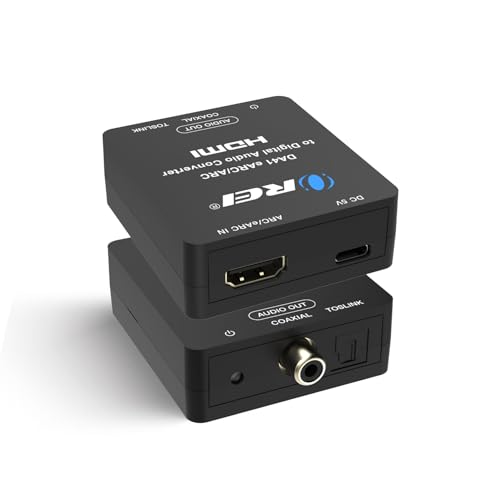
- Toslink and coaxial digital outputs
- Supports LPCM 2.0, Dolby 5.1, and DTS 5.1
- Does not support Dolby Digital Plus
Best For: Audio gear with optical or coaxial digital input
Best All-in-One Cable
PROZOR 7-Foot eARC/ARC to Optical Extractor

- Integrated 7-foot connection
- PCM 2.0, Dolby 5.1, and DTS 5.1
- LED 2.0/5.1 indicators
Best For: Longer TV-to-optical connections
Best for Short Runs
41-Inch eARC/ARC to Optical Converter

- Built-in 41-inch optical cable
- Up to 24-bit/192 kHz sampling
- USB-powered plug-and-play setup
Best For: Soundbars positioned close to the TV
Best for Audio Status Checks
ARC/eARC Optical Adapter with LEDs

- LEDs show 2.0 or 5.1 audio
- PCM, Dolby 5.1, and DTS 5.1
- HDMI, optical, and USB cables included
Best For: Checking audio channel output during setup
Best for High-Refresh Gaming
J-Tech Digital 8K HDMI Audio Extractor

- Passes 8K/60Hz or 4K/120Hz video
- Extracts TV ARC/eARC or HDMI-source audio
- Optical supports Dolby Digital 5.1
Best For: High-refresh gaming with an optical sound system
Best for Flexible TV Audio
HDMI ARC Audio Extractor YE-008B

- Switches between TV ARC and HDMI-source audio
- Optical, 3.5mm, and ARC audio connections
- Optical lacks TV-remote volume control
Best For: TV or HDMI-source audio to a soundbar or amplifier
Best for 4K/60Hz Setups
avedio links HDMI Audio Extractor
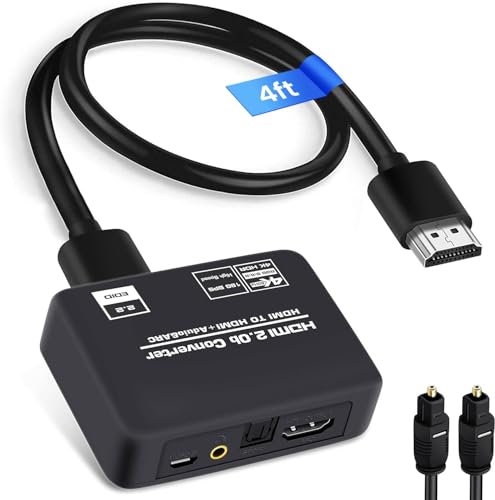
- Passes up to 4K/60Hz video
- Offers optical and 3.5mm audio outputs
- Includes HDMI and optical cables
Best For: 4K/60Hz sources with an optical sound system
Best Simple Setup – eSynic Single-Optical eARC Extractor
If you need an hdmi earc adapter with optical output for an older soundbar or wireless headphone base, this eSynic model keeps the connection straightforward: TV eARC/ARC in, one Toslink output out. It is USB-powered and supports PCM 2.0, Dolby 5.1, and DTS 5.1.
Best For: Connecting an eARC/ARC-equipped TV to one optical-only audio device.
Pros:
- Single optical output avoids unused audio connections.
- Includes an HDMI cable, optical cable, and USB power cable.
- Status LED helps confirm power and signal.
Cons:
- Requires a TV port labeled eARC or ARC; an ordinary HDMI port will not work.
- Optical output does not provide TV-remote CEC volume control.
Choose this one when a tidy, single-device hookup matters more than extra outputs. Check your TV’s ARC/eARC settings before installation; ARC setups require HDMI-CEC to be enabled.
Best Basic Converter – AUTOUTLET eARC-to-Optical Adapter
The AUTOUTLET is an hdmi earc adapter with optical output for sending audio from a TV’s eARC/ARC connection to an optical-equipped soundbar or home theater system. Its listed formats are PCM 2.0, Dolby 5.1, and DTS 5.1, with sampling support up to 24-bit/192 kHz.
Best For: Shoppers who want a basic eARC/ARC-to-optical converter with common stereo and 5.1-format support.
Pros:
- Supports PCM 2.0, Dolby 5.1, and DTS 5.1.
- Listed for use with soundbars, wireless headphones, and home theater systems.
- Plug-and-play setup requires no software or drivers.
Cons:
- No CEC volume control is listed.
- Needs an eARC/ARC audio source, rather than a standard HDMI output.
This is a focused option if optical conversion is all you need. Verify that your TV can output a format your optical audio device accepts.
Best for Two Optical Devices – eSynic Dual-Optical eARC Extractor
This eSynic hdmi earc adapter with optical output stands out by providing two Toslink outputs carrying the same TV audio simultaneously. It connects to the TV’s labeled eARC/ARC port—not directly to a game console—and uses USB power.
Best For: Sending the same TV audio to two optical devices, such as a soundbar and a headphone base.
Pros:
- Dual optical ports eliminate the need to swap one optical cable between devices.
- Supports PCM 2.0, Dolby 5.1, and DTS 5.1.
- 2.0-channel and 5.1-channel status LEDs indicate the incoming audio format.
Cons:
- Requires a TV eARC/ARC port; it cannot extract audio directly from a console.
- Optical connections do not provide TV-remote CEC volume control.
Its practical advantage is simultaneous output, not separate audio feeds: both connected devices receive identical audio. For an ARC connection, enable HDMI-CEC on the TV.
Best Optical-and-Coaxial Option – OREI DA41 Audio Converter
The OREI DA41 is an hdmi earc adapter with optical output that also offers a coaxial digital output. It takes audio from a TV’s ARC/eARC port and is listed as supporting LPCM 2.0, Dolby 5.1, and DTS 5.1; OREI recommends an HDMI 2.1 cable for eARC use.
Best For: Connecting TV ARC/eARC audio to equipment that accepts optical or coaxial digital input.
Pros:
- Offers both Toslink and coaxial digital outputs.
- Includes a power switch and LED indicator.
- Comes with a one-year warranty.
Cons:
- TV-remote volume control is not available through its optical or coaxial output.
- OREI states that it will not work with Dolby Digital Plus.
The extra coaxial connector makes this the most flexible output choice here. Check your TV’s audio-output format carefully, particularly if it defaults to Dolby Digital Plus.
Best All-in-One Cable – PROZOR 7-Foot eARC/ARC to Optical Extractor
If you want an HDMI eARC adapter with optical output without juggling separate HDMI and optical cables, this PROZOR model combines both connections in a 7-foot assembly. It takes audio from a TV’s labeled eARC/ARC port and sends it to an optical-input soundbar, amplifier, or headphones.
Best For: TV-to-optical setups that benefit from a longer, integrated cable.
Pros:
- Supports PCM 2.0, Dolby 5.1, and DTS 5.1, with up to 24-bit/192 kHz sampling.
- LED indicators show whether 2.0- or 5.1-channel audio is active.
- Integrated 7-foot design includes USB power for a space-saving setup.
Cons:
- Works only from a TV’s eARC/ARC port to optical; it cannot feed a soundbar’s HDMI ARC port.
- Optical output does not carry CEC volume control, so adjust volume on the audio device.
Choose this one for cable reach and visible audio-mode feedback. Confirm your TV’s eARC/ARC output is enabled and your receiving device has an optical input.
Best for Short Runs – 41-Inch eARC/ARC to Optical Converter
This HDMI eARC adapter with optical output is a compact option when your soundbar sits close to your TV. Its built-in optical cable measures approximately 41 inches, so check the distance before ordering.
Best For: Nearby optical-input audio equipment where a short, integrated cable keeps wiring simple.
Pros:
- Built-in optical cable makes for a straightforward plug-and-play connection.
- Supports up to 24-bit/192 kHz sampling and PCM, Dolby 5.1, or DTS 5.1 audio formats.
- Can draw power from a TV USB port or another compatible USB port.
Cons:
- Requires a TV port with eARC or ARC; a standard HDMI port will not work.
- The approximately 41-inch cable may be too short for separated equipment.
- Optical output does not support CEC volume control.
It is a sensible fit for a close TV-and-soundbar pairing. Set the TV to ARC/eARC output and select a format your audio system supports; adjust volume on the soundbar.
Best for Audio Status Checks – ARC/eARC Optical Adapter with LEDs
If you want to verify what your TV is sending, this HDMI eARC adapter with optical output includes LEDs that indicate active 2.0- or 5.1-channel audio. It connects a TV’s labeled ARC/eARC port to an optical-input soundbar, receiver, home theater system, or wireless headphones.
Best For: Optical audio setups where a visible channel-status indicator helps with setup.
Pros:
- Supports PCM 2.0, Dolby 5.1, and DTS 5.1, with up to 24-bit/192 kHz output.
- LED indicators identify active 2.0- or 5.1-channel audio.
- Includes HDMI and optical cables plus a USB power cable; no drivers or apps are required.
Cons:
- Its input requires a TV’s ARC/eARC port, not a standard HDMI port or computer connection.
- Does not work with HDMI-only soundbars or pass CEC volume control through optical.
This is a practical pick when channel indicators matter more than an integrated cable. Check that the TV’s ARC/eARC function is enabled and the receiving device accepts optical audio.
Best for High-Refresh Gaming – J-Tech Digital 8K HDMI Audio Extractor
If you need an HDMI eARC adapter with optical output without giving up high-refresh video, the J-Tech Digital JTECH-8KAE passes through up to 8K at 60Hz or 4K at 120Hz. It can extract audio from an HDMI source or an ARC/eARC-enabled TV.
Best For: Gaming or home theater setups that need 4K/120Hz video alongside optical audio for an existing sound system.
Pros:
- Passes through 8K/60Hz or 4K/120Hz video, plus HDR formats including Dolby Vision.
- Offers optical, analog L/R, and HDMI audio outputs.
- Includes EDID DIP-switch management and supports CEC control.
Cons:
- Optical output is limited to standard Dolby Digital 5.1; 7.1-channel output requires HDMI audio.
- Analog L/R output is stereo only.
Choose this model when video bandwidth and output flexibility matter most. Set your source audio format to match the output you plan to use, especially when connecting through optical.
Best for Flexible TV Audio – HDMI ARC Audio Extractor YE-008B
This HDMI eARC adapter with optical output is aimed at TVs that lack a convenient standard audio output. A switch lets you extract audio either from the TV’s ARC/eARC connection or from an HDMI source such as a streaming device or game console.
Best For: Connecting a TV or HDMI source to an optical soundbar, amplifier, or 3.5mm audio device.
Pros:
- Switches between TV ARC audio and HDMI-source audio extraction.
- Provides optical and 3.5mm outputs, plus an ARC connection for a compatible soundbar.
- Supports Dolby and DTS 5.1 or PCM 2.0 audio.
- Includes optical and ARC cables, a USB power cable, and a 3.5mm-to-RCA cable.
Cons:
- Does not support 7.1-channel audio.
- The optical output does not support volume control from the TV remote.
The input-mode switch makes this a practical choice if you may alternate between TV-return audio and a separate HDMI source. If remote-controlled volume is essential, note that the stated volume-control support applies to the ARC and 3.5mm outputs, not optical.
Best for 4K/60Hz Setups – avedio links HDMI Audio Extractor
For a 4K/60Hz setup, this avedio links HDMI eARC adapter with optical output separates sound from an HDMI source while passing video to a display. Its listed ARC function works with a TV’s ARC/eARC interface, and it also provides a 3.5mm stereo output.
Best For: Connecting a 4K/60Hz HDMI source or ARC-compatible TV to an optical sound system.
Pros:
- Supports video pass-through up to 4K at 60Hz, HDR10, and HDCP 2.2.
- Offers TV, 2.0-channel, and 5.1-channel audio mode options.
- Includes an optical cable, HDMI cable, and USB power adapter.
Cons:
- Video support tops out at 4K/60Hz rather than 4K/120Hz.
- The 3.5mm output supports stereo audio only.
This is a sensible match for a 4K/60Hz source when you want optical or analog audio without buying cables separately. Check that your TV has an ARC/eARC interface if you intend to use its audio-return function.
How We Picked the Best Hdmi Earc Adapter with Optical Output
We focused on whether each device fits a specific connection path: TV eARC/ARC to optical, or HDMI source to optical. We also considered stated audio-format support, power requirements, extra outputs, and features such as HDMI pass-through and EDID controls. Product names and specifications are a starting point, not a guarantee that every TV, app, or soundbar combination will work. Check the current listing and your equipment manuals before ordering.
Quick Comparison: Which Type Do You Need?
TV-to-optical converters connect to the TV’s HDMI port labeled ARC or eARC and feed a soundbar or receiver through Toslink. They are the simplest choice when your TV is already handling the video sources. The dedicated eSynic, AUTOUTLET, OREI, and PROZOR models in this roundup fit this general category; compare their exact format and power requirements.
HDMI audio extractors sit in a source-to-display HDMI chain, splitting audio to optical while passing video onward. The J-Tech Digital 8K model and the listed 4K extractors warrant a closer look if you also need source-device extraction or HDMI pass-through. Do not assume a device labeled “audio extractor” accepts audio returning from a TV’s eARC port; confirm its signal direction and connection diagram.
Key Buying Factors for an Hdmi Earc Adapter with Optical Output
Audio Formats and Optical Limits
Optical output commonly carries stereo PCM or compressed 5.1 formats such as Dolby Digital and DTS, when supported by both devices. It cannot carry lossless multichannel formats such as Dolby TrueHD or Dolby Atmos in TrueHD. If you hear silence, try setting the TV’s digital audio output to PCM first, then test a supported compressed format if you want surround sound. A “192 kHz” claim alone does not establish surround-format compatibility.
Ports, Video, and Power
For a direct TV connection, verify that the adapter explicitly supports receiving ARC/eARC audio; a standard HDMI input is not equivalent. If video passes through the adapter, check the supported resolution, refresh rate, HDR, and HDCP against your source and display—especially for 4K/120 Hz gaming. Note whether power comes from USB or a separate supply, and whether cables are included.
TV Controls and Compatibility
ARC setup may require enabling HDMI-CEC and selecting the correct audio-output setting on your TV, even if an adapter itself does not provide CEC control. Also check whether you will retain remote volume control: optical connections do not inherently carry TV remote commands to a soundbar.
Who Should Buy Which Hdmi Earc Adapter with Optical Output?
Choose a dedicated TV eARC/ARC-to-optical converter if your goal is simply to keep an optical soundbar with a newer TV. Choose an HDMI extractor with optical output if you need to split audio from a game console, streaming box, or other source—and match its video pass-through specifications to your setup. If you need lossless Atmos, consider an eARC-capable soundbar or receiver instead of an optical adapter.
