Last updated on October 10th, 2026
A Dolby Atmos-capable TV or source does not guarantee Atmos at your speakers. If your soundbar or receiver has the wrong HDMI connection—or your TV will not pass the audio format you want—an eARC adapter may help bridge the gap.
These nine options cover everything from extracting TV audio for an older receiver to separating high-bandwidth video and audio for a gaming setup. The right choice depends on your signal path, not just an Atmos logo on the box.
Best 9 Earc Adapter for Dolby Atmos Picks for 2026
4K Source Companion

- Extracts HDMI-source audio
- Passes compatible 4K/60 Hz HDR video
- Atmos support; selectable audio settings
Best For: External HDMI sources with 4K video pass-through
Dual-System Audio

- One TV ARC/eARC input, two audio outputs
- Supports Atmos, TrueHD, and DTS:X
- CEC control; no video pass-through
Best For: Two audio systems sharing one TV ARC/eARC output
Best for eARC Soundbars
DVDO 8K HDMI 2.1 Audio Extractor
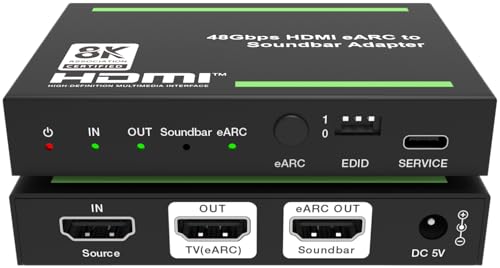
- Routes source or TV ARC/eARC audio to an eARC soundbar
- Passes Dolby Atmos, TrueHD, and DTS:X
- Supports 8K/60Hz, 4K/120Hz, and CEC control
Best For: Modern eARC soundbars with HDMI 2.1 setups
Most Flexible Outputs
OREI BK-931 8K Audio Extractor
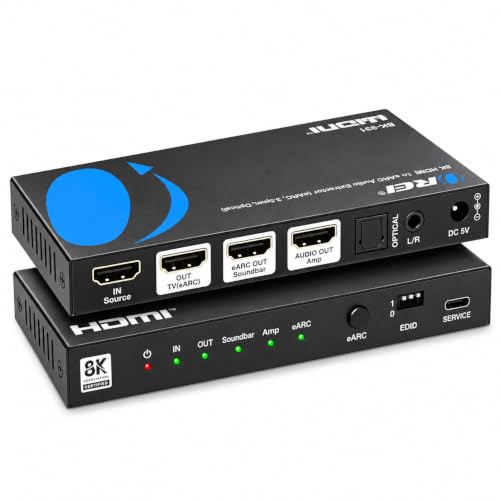
- HDMI/eARC, optical, and analog audio connections
- Supports Atmos and TrueHD through supported HDMI paths
- Passes 8K/60Hz and 4K/120Hz video
Best For: Mixed modern and legacy audio connections
Best for Older AV Receivers

- Sends TV ARC/eARC audio to an HDMI-input receiver
- Supports Atmos, TrueHD, and DTS-HD Master Audio
- Passes 8K/60Hz or 4K/120Hz video; not for eARC soundbars
Best For: HDMI-equipped AV receivers without ARC/eARC
Best for Older Receivers

- Sends TV eARC audio to a standard AVR HDMI input
- Separate 4K/60Hz HDMI splitter mode
- Not for a soundbar’s HDMI-ARC port
Best For: Keeping an older HDMI-equipped AVR with a newer TV
Best for 4K/120Hz Gaming
OREI BK-929U 8K eARC Extractor

- 48Gbps passthrough up to 4K/120Hz
- Supports Atmos, DTS:X, and LPCM 7.1
- Audio options for eARC soundbars or HDMI-input AVRs
Best For: High-refresh-rate gaming monitors paired with external audio
Best 4K/60Hz AVR Option

- Routes TV ARC/eARC audio to a non-ARC AVR
- Dedicated HDMI audio-only output
- 18Gbps video passthrough up to 4K/60Hz
Best For: Older HDMI-input receivers in 4K/60Hz TV setups
Legacy Receiver Upgrade – HDMI eARC Audio Extractor
If you need an eARC adapter for Dolby Atmos to connect a TV to an older HDMI-input receiver, this compact extractor converts the TV’s ARC/eARC audio into a dedicated HDMI audio-only output. It supports Dolby Atmos, TrueHD, DTS:X, and up to 7.1-channel audio.
Best For: Using a TV’s ARC/eARC port with a non-ARC AV receiver or compatible amplifier.
Pros:
- Supports both ARC and eARC TVs.
- Handles Dolby Atmos, Dolby TrueHD, DTS:X, and other listed surround formats.
- Built-in CEC supports volume and power control from the TV remote.
Cons:
- HDMI output carries audio only, not video.
- Not designed to connect a non-ARC TV to an ARC/eARC soundbar such as Sonos.
Choose this for the specific job of getting TV audio into older HDMI-input gear; check your equipment’s ports before ordering.
For an eARC adapter for Dolby Atmos that also handles an external HDMI source, the OREI HDA-929 extracts audio to a compatible soundbar or HDMI-input receiver while passing video to a TV. Its listed video support includes 4K at 60 Hz and HDR.
Best For: Setups that need HDMI-source audio extraction alongside 4K video pass-through.
Pros:
- Passes compatible 4K/60 Hz HDR video to a display.
- Supports Dolby Atmos and offers 2-channel, 5.1-channel, and 7.1-channel audio settings.
- Includes a dual-voltage power adapter and a one-year warranty.
Cons:
- No optical audio output.
- TV and soundbar settings may need adjustment for optimal audio.
This is the more useful choice when video pass-through matters, but confirm the HDMI connections and audio capabilities of your soundbar or receiver.
If your search for an eARC adapter for Dolby Atmos is really about feeding two audio systems, this OREI splitter takes audio from a TV’s ARC/eARC port and sends it to two outputs. It supports Dolby Atmos, TrueHD, DTS:X, and other listed multichannel formats.
Best For: Sending a TV’s ARC/eARC audio to two soundbars, receivers, or audio systems.
Pros:
- Provides two audio outputs from one TV ARC/eARC connection.
- Supports both standard ARC audio and eARC high-bitrate formats.
- Built-in CEC enables volume control with the TV remote.
Cons:
- Audio only; it does not pass video.
Pick this for a dual-audio setup rather than source-to-TV video routing. Its appeal is the two-output layout, so verify that it matches your intended connections.
Best for eARC Soundbars – DVDO 8K HDMI 2.1 Audio Extractor
If you need an eARC adapter for Dolby Atmos with a Sonos Arc, Beam, or another eARC soundbar, this DVDO extractor can send audio from an HDMI source or a TV’s ARC/eARC connection to its HDMI audio output. It also passes through video up to 8K at 60Hz or 4K at 120Hz.
Best For: Pairing an eARC soundbar with HDMI sources or a TV’s ARC/eARC audio while retaining HDMI 2.1 video features.
Pros:
- Supports Dolby Atmos, Dolby TrueHD, DTS:X, and LPCM 7.1 audio pass-through.
- Passes through VRR, ALLM, HDR10+, and Dolby Vision.
- Supports TV-to-source and TV-to-soundbar CEC control, including volume control.
Cons:
- Its HDMI audio output is aimed at eARC soundbars; check your audio system’s input before buying.
This is the most directly soundbar-focused option here. Its combination of eARC audio routing, CEC control, and high-bandwidth video makes sense when you want to keep a modern soundbar in an HDMI 2.1 setup.
Most Flexible Outputs – OREI BK-931 8K Audio Extractor
For shoppers comparing an eARC adapter for Dolby Atmos across different audio setups, the OREI BK-931 offers HDMI/eARC audio extraction alongside optical and analog outputs. It supports audio from a TV or HDMI source and passes through video up to 8K at 60Hz or 4K at 120Hz.
Best For: Setups that may need HDMI audio for Atmos now and optical or stereo analog connections for other equipment.
Pros:
- Supports Dolby Atmos, Dolby TrueHD, DTS-HD Master Audio, and DTS:X through its supported HDMI audio paths.
- Offers HDMI, optical, and analog audio outputs for different systems.
- Supports 48Gbps HDMI 2.1 video, Dolby Vision, VRR, and ALLM.
- Can generate eARC audio directly from an HDMI source for a display without an eARC port.
Cons:
- Optical is limited to PCM stereo or Dolby Digital/DTS 5.1 and does not downmix 7.1 audio.
- No built-in volume adjustment; connected audio equipment needs its own volume control.
Choose this model for its connection choices, but match the output to the format you need. In particular, the optical and analog ports are not substitutes for the HDMI path when Dolby Atmos is the goal.
Best for Older AV Receivers – OREI BK-927 8K eARC Extractor
If your receiver has an HDMI input but lacks ARC/eARC, this OREI eARC adapter for Dolby Atmos can send audio from a TV’s ARC/eARC port or an HDMI source to its dedicated HDMI audio output. Video passes through to a compatible display at up to 8K at 60Hz or 4K at 120Hz.
Best For: Connecting an ARC/eARC TV or HDMI source to an AV receiver with an HDMI input but no ARC/eARC support.
Pros:
- Dedicated HDMI audio-only output supports Dolby Atmos, Dolby TrueHD, DTS-HD Master Audio, and multichannel PCM.
- Extracts TV ARC/eARC return audio for a non-ARC AV receiver.
- Supports HDMI 2.1 video features including VRR, ALLM, QMS, and QFT.
Cons:
- Not compatible with eARC soundbars.
- Requires an AV receiver or other compatible audio system with an HDMI input.
The BK-927 solves a specific receiver problem rather than a soundbar problem. If your goal is feeding an older HDMI-equipped AV receiver without giving up high-resolution video pass-through, its dedicated audio output is the key feature.
Best for Older Receivers – PureTools eARC Audio Adapter
This eARC adapter for Dolby Atmos lets you keep an older AVR with a standard HDMI input while routing audio back from a newer TV’s eARC or ARC port. Its separate splitter mode also works with a direct HDMI source and a display up to 4K/60Hz.
Best For: Owners of older HDMI-equipped receivers who want TV audio without replacing their AVR.
Pros:
- eARC extraction mode sends supported multichannel audio, including Atmos and DTS formats, to a standard HDMI input.
- Splitter mode separates audio from a direct HDMI source and passes video to a 4K/60Hz display.
- Audio output uses a black 720p image for compatibility with older HDMI receivers.
Cons:
- Does not work with a soundbar’s HDMI-ARC connection; the sound system needs a standard HDMI input.
- Splitter-mode video is limited to HDMI 2.0 bandwidth, not 4K/120Hz passthrough.
Choose it when receiver compatibility matters most. In eARC extraction mode, your HDMI 2.1 source can connect directly to the TV because the adapter processes the returning audio, not its video.
Best for 4K/120Hz Gaming – OREI BK-929U 8K eARC Extractor
For a gaming monitor without ARC or eARC, this eARC adapter for Dolby Atmos can separate audio from an HDMI source while passing video through at up to 4K/120Hz or 8K/60Hz. It is aimed at setups using a PS5, Xbox, PC, or streaming device with an external sound system.
Best For: Gamers who want high-refresh-rate video and HDMI audio for a compatible soundbar or AVR.
Pros:
- Supports 48Gbps video passthrough, including 4K/120Hz and 8K/60Hz.
- Lists Dolby TrueHD, Atmos, DTS-HD Master Audio, DTS:X, and LPCM 7.1 support.
- Can send extracted audio toward an eARC soundbar or an AVR with an HDMI input.
Cons:
- CEC volume and power control can require troubleshooting in some setups.
- An external power adapter is required.
Its main advantage is retaining high-refresh-rate video while providing an audio path for monitors that lack ARC/eARC. Check your display, source, and sound system connections before buying.
Best 4K/60Hz AVR Option – OREI HDA-927 eARC Extractor
This eARC adapter for Dolby Atmos is a practical option for sending audio from a TV’s ARC or eARC port to an older, non-ARC receiver with a standard HDMI input. It also extracts audio from a direct HDMI source while passing video through at up to 4K/60Hz.
Best For: 4K/60Hz TV setups that need an audio-only HDMI feed for an older AVR.
Pros:
- eARC mode routes TV-return audio to a non-ARC AVR’s HDMI input.
- Dedicated HDMI audio output supports listed formats including Dolby TrueHD, DTS-HD Master Audio, and multichannel PCM.
- HDMI 2.0 passthrough supports 18Gbps video up to 4K/60Hz with HDR.
Cons:
- Not intended to send ARC/eARC audio from a non-ARC TV to an ARC/eARC soundbar such as Sonos.
- 18Gbps passthrough does not cover 4K/120Hz video.
Pick this model for straightforward TV-to-receiver audio extraction when 4K/60Hz video meets your needs. The receiver must have a regular HDMI input; this is not a substitute for a missing TV ARC/eARC port.
How We Picked the Best Earc Adapter for Dolby Atmos
We prioritized the connection problems shoppers are trying to solve: getting audio from a TV’s eARC port to existing equipment, splitting a source’s video and audio, or preserving high-refresh-rate video while routing sound separately. We also compared listed support for Dolby Atmos formats, HDMI bandwidth, EDID controls, CEC, and gaming features. Product specifications are a starting point, not a guarantee that every TV, source, and sound system will work together; check the exact ports and supported signal direction before ordering.
Quick Comparison: Which Type Fits Your Setup?
TV EARC to Older Audio Gear
Choose an adapter explicitly designed to receive audio from your TV’s eARC port and output it through a connection your receiver or soundbar accepts. Confirm that the destination HDMI port accepts audio input: an ordinary HDMI video input is not necessarily interchangeable with a dedicated audio output on an extractor.
Source to Display and Sound System
An HDMI audio extractor or splitter can send video toward the TV and audio toward your sound system. This route may be useful when TV audio passthrough is limited, but the extractor must support your source’s video mode, HDCP requirements, and the audio format you intend to use.
Key Buying Factors for an Earc Adapter for Dolby Atmos
Signal Direction and Audio Format
Start by drawing your setup: source, TV, adapter, and sound system. Some products extract audio from a source’s HDMI output; others take audio returning from the TV over eARC. They are not automatically substitutes. Dolby Atmos can arrive in lossy Dolby Digital Plus or lossless Dolby TrueHD, depending on the content and device chain. Verify support for the specific format you need, especially for Blu-ray playback and older receivers.
Video Bandwidth and Gaming Features
If the adapter sits between a console or PC and the display, check the supported resolution, refresh rate, color settings, and HDMI bandwidth. A 4K/60 setup has different needs from 4K/120 or 8K. For gaming, confirm VRR and ALLM support where needed; a claim of “HDMI 2.1” alone does not establish that every feature passes through.
EDID, CEC, and Compatibility
EDID settings can help a source recognize the display’s video capabilities and the sound system’s audio capabilities. CEC may enable TV-remote volume control, but behavior varies by device. Also confirm HDCP compatibility for protected content and check whether the product requires external power.
Who Should Buy Which Earc Adapter for Dolby Atmos?
For an older receiver, prioritize a TV-eARC-to-audio adapter with a clearly compatible output. For a soundbar with its own HDMI audio input, consider a splitter that explicitly supports that connection. For 4K/120 gaming, look to the listed high-bandwidth OREI or DVDO options and verify the precise video features your setup uses. For a simpler 4K/60 system, an 18Gbps model may be sufficient if its ports and supported audio formats match your needs. When in doubt, match the adapter’s connection diagram to your equipment before comparing headline specifications.
