Choosing the right headphone splitter can make a live stream easier to monitor, co-host, and troubleshoot. The best option depends on how many listeners you need to connect and whether you are splitting headphones, microphones, or both.
We selected 10 practical solutions, including simple 3.5mm Y-splitters, multi-output audio adapters, and a powered headphone amplifier for more demanding setups.
Best 10 Headphone Splitters for Live Streaming Picks for 2026
Best 5-Way Passive Pick
Cubilux 5-Way 3.5mm AUX Splitter

- Five 3.5mm outputs
- No external power required
- Compact aluminum housing
Best For: Sharing one stereo source with up to five listeners
Best Amplified Monitoring Hub
FIFINE N6 4-Channel Headphone Amplifier
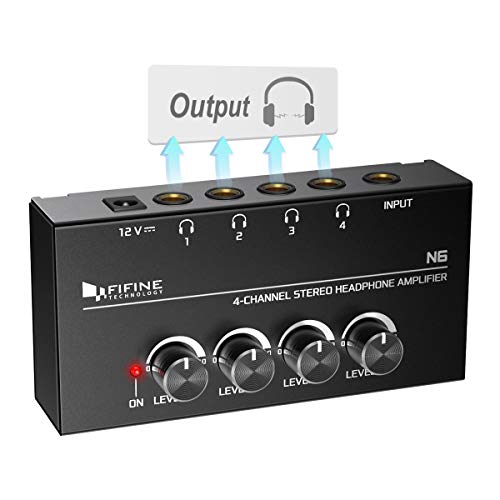
- Four individually controlled outputs
- Powered 1/4-inch headphone amplifier
- Rugged compact metal build
Best For: Multi-person studio or live monitoring
Best USB-C Recording Adapter
Cubilux USB-C Mic and Headphone Adapter

- Mic-in and line-in support
- Headphone monitoring output
- USB-C laptop and PC focused
Best For: Streaming or recording with USB-C computers
Best Simple 5-Device Share Box
5-Jack Multi-Headphone Audio Splitter

- Supports up to five devices
- Compact for travel and classrooms
- Uses standard 3.5mm connections
Best For: Simple shared listening from one 3.5mm source
Best Compact Stereo Share Cable
Syncwire Nylon-Braided Y Splitter

- Two 3.5mm female outputs for shared stereo audio
- Gold-plated connector and double shielding
- Nylon braid rated for 15,000+ bends
Best For: Sharing audio from standard 3.5mm devices
Best Dual-Headset TRRS Splitter
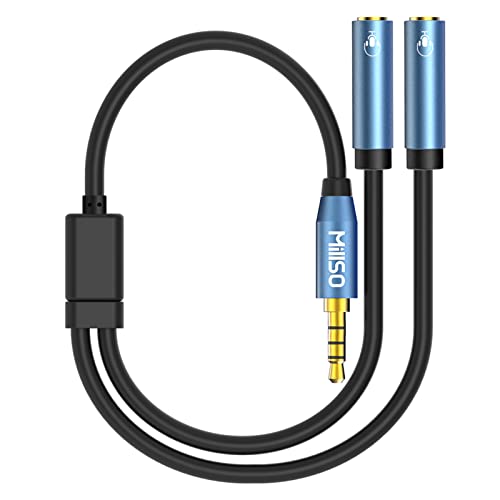
- Two TRRS ports support audio and microphones
- Designed for 4-pole combo-jack devices
- Metal housing with gold-plated connectors
Best For: Connecting compatible TRRS headsets or microphones
Best PC Headset Adapter
UGREEN TRRS-to-Dual-Jack Splitter

- Splits headset audio and mic for separate PC jacks
- Supports compatible CTIA TRRS headsets
- Braided cable with alloy housing
Best For: PC streaming, gaming, calls, and voice chat
PC Gaming Y-Splitter
CTIA Headset Mic and Audio Adapter

- Splits one TRRS headset plug into separate mic and audio plugs
- Supports compatible gaming headsets and PC setups
- Compact 20 cm braided cable for portable use
Best For: PC streaming setups with separate microphone and headphone ports
Three-Listener Splitter
1-to-3 TRRS Audio Sharing Cable

- Expands one TRRS source to three female connections
- Supports audio and microphone functions
- Compact 50 cm cable with gold-plated connectors
Best For: Collaborative monitoring from one shared audio source
Console Streaming Adapter
KINGTOP Dual-Plug Headset Splitter

- Separates one combo jack into mic and headphone ports
- Supports listed consoles, laptops, phones, and tablets
- Labeled ports and durable flat 20 cm cable
Best For: Console or laptop streaming with a dual-plug headset
Best 5-Way Passive Pick – Cubilux 5-Way 3.5mm AUX Splitter
For straightforward headphone splitters for live streaming, the Cubilux 5-way AUX splitter sends one stereo source to up to five 3.5mm headphones or speakers. Its passive, plug-and-play design works with laptops, PCs, tablets, and smartphones without external power.
Best For: Sharing one stereo monitoring source with several listeners when everyone uses 3.5mm connections.
Pros:
- Provides five 3.5mm auxiliary output ports.
- Aluminum housing is designed to isolate electrical interference.
- Compact 3.1 x 0.8 x 0.4-inch body is easy to carry.
Cons:
- Does not support microphones.
- Cannot mix five audio sources into one.
- Because it is passive, volume may need to be increased with multiple outputs connected.
This is a convenient choice for basic multi-person monitoring, but streamers needing microphone routing or independent volume control should use an amplified or dedicated audio interface solution instead.
Best Amplified Monitoring Hub – FIFINE N6 4-Channel Headphone Amplifier
The FIFINE N6 is a powered option for headphone splitters for live streaming, with one stereo input feeding four 1/4-inch headphone outputs. Separate volume controls help each listener adjust monitoring levels without the signal loss associated with a simple passive splitter.
Best For: Studio, stage, or streaming setups where up to four people need individually adjustable headphone monitoring.
Pros:
- Offers four outputs with separate volume knobs.
- Metal construction is compact and suited to studio or stage use.
- Includes a 12V DC power adapter and power indicator.
Cons:
- Uses 1/4-inch TRS input and output connectors, not 3.5mm ports.
- The required TRS/TS audio cable is not included.
- It is a one-input, four-output amplifier, not a mixer.
Choose this model when controlled, multi-person monitoring matters more than pocket-size portability. You will need compatible 1/4-inch cabling, and its powered design requires access to an outlet or power source.
Best USB-C Recording Adapter – Cubilux USB-C Mic and Headphone Adapter
Unlike a basic audio-sharing splitter, this Cubilux adapter targets USB-C laptops and PCs used for streaming or recording. It combines line-in, mic-in, and a headphone monitoring jack, making it useful when your setup needs both audio capture and monitoring through one compact adapter.
Best For: Laptop- or PC-based live streaming, interviews, vlogs, and recordings that require microphone or line input plus headphone monitoring.
Pros:
- Provides line-in, mic-in, and 3.5mm headphone connections.
- Supports playback up to 96kHz/24-bit and recording up to 48kHz/24-bit.
- Designed for USB-C laptops and PCs without requiring a separate power plug.
Cons:
- Intended for laptops and PCs rather than general-purpose phones or tablets.
- The headphone monitoring function requires setup.
- It does not provide multiple headphone outputs for several listeners.
This is the more relevant pick when “splitter” means separating recording input and headphone monitoring in a streaming workflow. It is not the right choice for distributing one headphone signal to a group.
Best Simple 5-Device Share Box – 5-Jack Multi-Headphone Audio Splitter
5-Jack Multi-Headphone Audio Splitter Injection Molding - Designed for Up to 5 Devices
Check Price On AmazonThis five-jack auxiliary splitter is a simple option for headphone splitters for live streaming when several people need to hear the same 3.5mm source. Its compact form is also suited to travel, classroom listening, shared entertainment, and other setups using standard 3.5mm connections.
Best For: Basic shared listening with up to five 3.5mm headphones or speakers from one compatible source.
Pros:
- Connects up to five devices through multiple 3.5mm female ports.
- Lightweight, compact design is convenient for travel.
- Gold-plated aluminum alloy plug is intended for shared audio use.
Cons:
- Requires a source with a 3.5mm audio interface.
- Does not offer individual volume controls or amplification.
- The listing describes shared audio and speaker splitting rather than microphone routing.
For a low-complexity group listening setup, this splitter covers the essentials. Check your source connection first, and remember that a passive five-way design is better suited to shared playback than advanced live-stream audio control.
Best Compact Stereo Share Cable – Syncwire Nylon-Braided Y Splitter
For straightforward headphone splitters for live streaming setups that need to send stereo audio to two listening devices, the SYNCWIRE Y cable is a compact option. Its standard 3.5mm male plug connects to compatible audio devices, while the two female outputs support headphones, speakers, and similar gear.
Best For: Sharing stereo audio from phones, tablets, laptops, gaming consoles, and other standard 3.5mm devices.
Pros:
- Supports two output devices, including headphones and speakers.
- 24K gold-plated connector and double shielding are designed to help reduce signal loss and interference.
- Nylon-braided construction is rated for at least 15,000 90-degree bends.
- Compact, lightweight design with a slim connector that fits most cases.
Cons:
- Provides stereo output sharing but does not describe microphone support.
- Requires devices with standard 3.5mm audio ports.
- The connector may not fit LifeProof cases.
This is a good fit when your streaming or monitoring arrangement only needs duplicated stereo output. Choose a different model if your setup depends on combining separate microphone and headphone connections.
Best Dual-Headset TRRS Splitter – MillSO 3.5mm Headset Splitter
Among headphone splitters for live streaming, the MillSO model stands out for setups that need two TRRS headset or microphone connections from one 3.5mm combo jack. Both female ports retain microphone and audio functionality when used with compatible four-pole TRRS equipment.
Best For: Laptop, smartphone, Xbox, tablet, or PC users connecting two compatible TRRS headsets or an external TRRS microphone.
Pros:
- Two TRRS female ports support both audio and microphone functions.
- Works with compatible 4-pole 3.5mm combo-jack devices.
- Metal housing and 24K gold-plated connectors help resist corrosion.
- Small, lightweight design is convenient for travel and portable setups.
Cons:
- Microphone use requires both connected plugs to be 4-pole TRRS.
- Not compatible with iOS-standard headphones according to the supplied notes.
- Will not support a 3-pole TRS microphone for mic functionality.
This splitter is the more capable choice when a live-streaming arrangement involves headset microphones or two TRRS headsets. Check your device and headset wiring standards before buying, since compatibility is more specific than with a basic stereo splitter.
Best PC Headset Adapter – UGREEN TRRS-to-Dual-Jack Splitter
For headphone splitters for live streaming on older PCs or laptops with separate audio and microphone jacks, the UGREEN adapter offers a purpose-built connection. It converts a compatible 4-pole TRRS headset plug to separate 3.5mm headphone and microphone plugs for chat, recording, gaming, and calls.
Best For: Connecting CTIA-compliant TRRS headsets to computers with separate headphone and microphone inputs.
Pros:
- Separates headset audio and microphone connections for compatible PCs and laptops.
- Gold-plated connectors and oxygen-free copper wire are designed for clear transmission.
- Aluminum alloy casing and nylon braiding support durability.
- 20 cm length and slim design are convenient for desktop or portable use.
Cons:
- Only compatible with CTIA-standard headphones; OMTP and other standards can cause mic failure.
- Not compatible with CTIA-standard Apple Earbuds and Beats headphones according to the notes.
- This is a TRRS female-to-two-TRS-male PC adapter, not a standard male-to-two-female stereo splitter.
UGREEN makes the most sense when your streaming computer has legacy dual 3.5mm jacks and your headset uses the CTIA TRRS standard. Verify both the computer ports and headset compatibility before adding it to your setup.
PC Gaming Y-Splitter – CTIA Headset Mic and Audio Adapter
For live streaming from a PC, this headset adapter separates a single CTIA TRRS headset connection into dedicated microphone and headphone plugs. It is a practical choice when your computer has separate audio and mic ports.
Best For: PC streamers using a four-pole gaming headset with separate microphone and headphone inputs.
Pros:
- Connects CTIA TRRS gaming headsets to PCs with separate audio and microphone jacks.
- Works with compatible gaming headsets and consoles or smartphones using a single 3.5mm jack.
- Braided, compact 20 cm cable supports portable use and VOIP applications.
Cons:
- Designed for splitting one headset connection into mic and audio plugs, not for connecting two headphones.
- Compatibility depends on a CTIA-standard four-pole headset.
This is a straightforward option among headphone splitters for live streaming when your setup requires separate PC microphone and headphone connections. Check your headset standard and computer ports before buying.
Three-Listener Splitter – 1-to-3 TRRS Audio Sharing Cable
This 1-to-3 audio splitter is suited to headphone splitters for live streaming when several listeners need to monitor the same source. It provides three 3.5mm TRRS female connections from one male jack and requires no drivers or software.
Best For: Sharing one audio source with up to three compatible headphones or microphones during collaborative monitoring.
Pros:
- Converts one 3.5mm TRRS male connection into three 3.5mm TRRS female jacks.
- Supports microphone and audio functions with plug-and-play operation.
- Gold-plated connectors are designed for stable transmission and reduced signal loss.
- Lightweight 50 cm cable is easy to carry in a bag or pocket.
Cons:
- It shares one source rather than creating separate audio mixes or independent volume controls.
- All connected devices must use compatible 3.5mm TRRS connections.
Choose this model if your live-streaming workflow involves multiple people monitoring the same feed. Its three-output design is more useful for shared listening than for converting a single headset to separate PC mic and audio ports.
Console Streaming Adapter – KINGTOP Dual-Plug Headset Splitter
The KINGTOP splitter is a focused option for headphone splitters for live streaming when a single combo jack must connect to separate microphone and headphone plugs. Labeled ports make it easier to route a dual-plug headset for gaming, calls, or streaming.
Best For: Streamers using compatible laptops, controllers, consoles, or phones with one CTIA combo jack and a dual-plug headset.
Pros:
- Converts one 3.5mm TRRS combo jack into dedicated TRS microphone and headphone ports.
- Compatible with listed Xbox One, PS4, PS5, Nintendo Switch, newer laptop, and Android devices.
- Labeled mic and audio ports help simplify setup.
- Flat 20 cm cable uses gold-plated contacts, shielded aluminum shells, and TPE insulation.
Cons:
- Not compatible with Apple devices or Beats headphones made for Apple devices.
- Does not fit PCs that already have two separate jacks.
- It is not designed to split audio to two headphones.
This is a versatile choice for console and laptop streamers who need to connect a dual-plug headset to one combo jack. Confirm your device uses a compatible CTIA arrangement before ordering.
How We Picked the Best Headphone Splitters for Live Streaming
We compared these Headphone Splitters for Live Streaming by connection type, output count, device compatibility, build quality, and ease of use. The list includes passive splitters for quick two-person monitoring, multi-jack adapters for group listening, and an amplifier for setups where several headphones need a stronger, more consistent signal.
We also considered common streaming scenarios: monitoring from a computer or mixer, connecting headsets with microphones, using USB-C devices, and sharing audio without introducing unnecessary software or configuration.
Quick Comparison
| Type | Best for | Main advantage |
|---|---|---|
| 2-way Y-splitter | Two listeners | Compact and inexpensive |
| 3- to 5-way passive splitter | Small groups | Multiple headphone connections |
| Headset/mic splitter | PC headset setups | Separates headphone and microphone plugs |
| USB-C audio adapter | Modern laptops and phones | Adds wired audio connectivity |
| Headphone amplifier | Frequent multi-person monitoring | Dedicated outputs and stronger signal control |
Key Buying Factors for Headphone Splitters for Live Streaming
Connector and Wiring Compatibility
Check whether your source uses 3.5mm TRS stereo, 3.5mm TRRS headset wiring, or USB-C. A standard headphone splitter may not carry microphone signals correctly. For PC setups with separate headphone and mic ports, choose a headset splitter designed to combine or separate those connections as needed.
Number of Outputs
A two-way cable is usually sufficient for a streamer and one co-host. For three or more listeners, a multi-port splitter is more convenient, but passive designs can reduce volume as more headphones are connected. Count the outputs you actually need and leave room for future use.
Powered Versus Passive Designs
Passive splitters are small, affordable, and require no power. A headphone amplifier is better when several users need independent volume control, higher output, or reliable performance from a mixer or audio interface.
Build Quality and Cable Reach
Look for reinforced plugs, strain relief, braided or flexible cables, and a metal housing where the adapter will be frequently handled. Confirm that the cable is long enough to avoid pulling on the source device during a stream.
Who Should Buy Which Headphone Splitters for Live Streaming?
Choose a basic Y-splitter if two people need to monitor the same source occasionally. It is the simplest choice for a laptop, phone, controller, or compact streaming setup.
Choose a 3- to 5-output splitter for small teams, classroom-style monitoring, or shared playback. Verify that the source can provide enough volume for every connected headset.
Choose a headset or microphone splitter when your computer uses separate audio and microphone connections, or when you need to preserve TRRS headset functionality.
Choose a USB-C adapter for devices without a 3.5mm jack, but confirm operating-system and microphone support before buying.
Choose a headphone amplifier for regular live production, multiple listeners, and better control over output levels. It costs more and may require power, but it is the most dependable option for a growing streaming station.
