Recording voiceover with a client, director, or co-host often means two people need to monitor the same take. The right headphone splitter makes shared listening simple while helping you avoid mismatched connectors, loose cables, and unnecessary audio problems.
We selected 10 options covering standard stereo Y-splitters, PC headset adapters, braided cables, and multi-port designs. Use the guide below to match the splitter to your headphones, microphone setup, and recording workflow.
Best 10 Headphone Splitters for Voiceover Picks for 2026
Durable Audio Sharing
Syncwire Nylon-Braided Y Splitter

- Splits one 3.5mm source to two audio outputs
- Gold-plated connectors and double shielding
- Nylon braid rated for 15,000+ bends
Best For: Portable stereo audio sharing and monitoring
Compact Sharing Pick
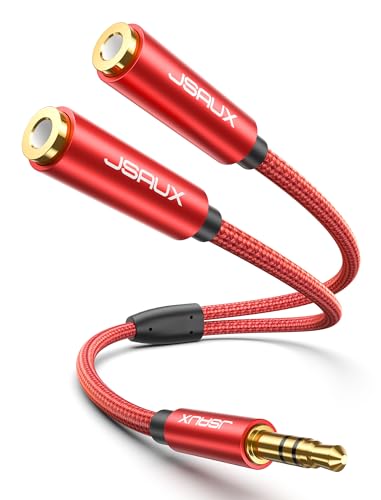
- One 3.5mm input to two outputs
- Braided cable with 15,000+ bend lifespan
- Compact 0.9-foot portable design
Best For: Simple headphone sharing without microphone support
PC Headset Adapter

- Connects a TRRS headset to separate PC ports
- Supports microphone and headphone functions
- Requires CTIA-compatible wiring
Best For: PC voiceover, VOIP, meetings, and gaming headsets
Gaming Headset PC Splitter

- Separates mic and audio for compatible PCs
- Designed for 4-pole CTIA TRRS headsets
- Compact 20cm braided cable
Best For: PC voiceover and VOIP setups using a single-plug headset
Comfort Share Pick
11-Inch Stereo Headphone Splitter

- Two full stereo headphone outputs
- 11-inch braided cable for comfortable sharing
- Audio-only design with no mic or separate volume control
Best For: Sharing voiceover playback with a second listener
Best for Everyday Use

- Separates headset audio and microphone plugs
- Color-coded green and pink connectors
- Braided, lightweight, and designed for PC applications
Best For: Using a single-plug headset with separate PC audio and mic ports
Headset Compatibility Pick

- Converts one TRRS jack to audio and mic ports
- Labeled connectors simplify headset setup
- Not for two-headphone audio sharing
Best For: Voiceover headsets needing separate microphone and headphone connections
Best for Shared Stereo Listening
Braided Dual Headphone Splitter

- Two-pack for sharing one stereo source
- Braided cable with gold-plated connectors
- TRS stereo only; microphones unsupported
Best For: Sharing audio with two headphones or speakers
Best for PC Voiceover Headsets

- Splits combined headset audio and mic signals
- Made for separate PC headphone and mic ports
- Compact gold-plated 3.5mm adapter
Best For: Connecting a headset to a PC or laptop for recording and VOIP
Best for Group Monitoring
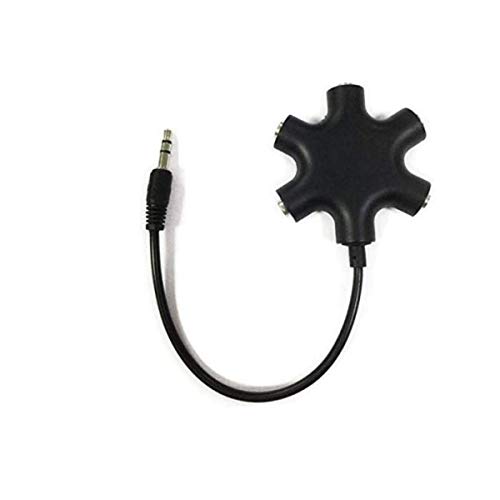
- Sends one source to up to five outputs
- Compatible with 3.5mm audio devices
- Useful for shared listening and review
Best For: Monitoring one audio feed with several listeners
Durable Audio Sharing – Syncwire Nylon-Braided Y Splitter
For shoppers comparing headphone splitters for voiceover, the Syncwire Y cable is a straightforward choice for sending stereo audio from one 3.5mm source to two headphones or speakers. Its compact design suits mobile recording kits, travel, and shared monitoring setups.
Best For: Sharing stereo playback from phones, tablets, laptops, and other standard 3.5mm devices.
Pros:
- Supports two output devices from one standard 3.5mm jack.
- Gold-plated connectors and double shielding are designed to support clear, low-interference stereo audio.
- Nylon-braided construction is rated for at least 15,000 90-degree bends.
- Compact, lightweight design and a slim connector fit most device cases.
Cons:
- Designed for audio output sharing, not microphone input splitting.
- It may not fit LifeProof cases.
This is a strong general-purpose splitter when durability and portable audio sharing matter. Voiceover users should confirm that their setup only needs duplicated headphone output rather than separate microphone connections.
Compact Sharing Pick – JSAUX Red Headphone Splitter
The JSAUX splitter is a compact option for headphone splitters for voiceover when you need to share playback from one 3.5mm device with another listener. Its short, braided cable is convenient for travel, editing sessions, and simple monitoring setups.
Best For: Sharing music, movies, games, or voiceover playback through two headphones or speakers.
Pros:
- Converts one 3.5mm jack into two 3.5mm outputs.
- Gold-plated connectors and an oxygen-free copper wire core are intended to support clean stereo sound.
- Double-braided nylon construction is rated for more than 15,000 bends.
- Compact 0.9-foot length is easy to carry.
Cons:
- It cannot be used with microphones.
- The short cable may offer limited reach in larger recording setups.
- No warranty is listed in the supplied specifications.
Choose this model for simple two-person listening or compact playback monitoring. It is not the right fit if your voiceover workflow requires microphone signal routing.
PC Headset Adapter – UGREEN Mic and Audio Splitter
Among headphone splitters for voiceover, the UGREEN adapter is aimed at computers with separate headphone and microphone jacks. It connects a compatible 4-pole TRRS headset to legacy PCs or laptops while preserving separate audio and mic connections for communication and recording applications.
Best For: Connecting a CTIA-compatible single-plug headset to a PC with separate audio and microphone ports.
Pros:
- Designed for VOIP, online classes, meetings, gaming, and microphone use.
- Gold-plated connectors and oxygen-free copper wire support audio transmission with reduced noise.
- Aluminum alloy casing and nylon braiding add durability.
- Compact 20cm/7.87-inch cable is portable.
Cons:
- It is a 2-male-to-1-female PC headset adapter, not a standard one-source-to-two-headphones splitter.
- Microphone operation requires a CTIA-compliant TRRS cable.
- It is incompatible with CTIA Apple Earbuds and Beats headphones according to the supplied notes.
This is the most relevant option here for a computer-based voiceover or communication setup that needs microphone connectivity. Check your headset wiring standard and confirm that your computer has separate audio and mic jacks before buying.
Gaming Headset PC Splitter – CTIA Mic Audio Y Cable
This PC Y-splitter is a practical choice among headphone splitters for voiceover when a single 4-pole CTIA headset plug must connect to separate microphone and headphone ports. Its 20cm cable is intended for compatible computers, consoles, and VOIP setups.
Best For: Using a CTIA TRRS gaming or smartphone headset with a PC that has separate mic and audio jacks.
Pros:
- Separates headset microphone and audio signals for compatible PCs.
- Works with listed headset families from Astro, Turtle Beach, HyperX, SteelSeries, Razer, Sennheiser, and Sades.
- Supports compatible PS4, Xbox One, Switch, smartphone, and VOIP headset applications.
- Braided construction and a compact 20cm length suit desk setups.
Cons:
- Requires a 4-pole CTIA TRRS headset.
- It is intended for separate PC mic and audio connections, not duplicating audio to two headphones.
- Compatibility may vary with headset wiring and device configuration.
Consider this adapter when your voiceover or communication headset has one combined plug but your computer requires two connections. Verify the CTIA standard and available ports before ordering.
Comfort Share Pick – 11-Inch Stereo Headphone Splitter
For sharing recorded audio during voiceover reviews, lessons, or playback, this 3.5mm headphone splitter for voiceover turns one audio jack into two headphone outputs. Its 11-inch braided cable offers extra room between listeners while keeping the setup compact.
Best For: Two people listening to the same stereo playback from a standard 3.5mm device.
Pros:
- Provides two full left-and-right stereo headphone outputs.
- 11-inch nylon-braided cable supports more comfortable sharing.
- Works with PCs, laptops, tablets, phones, consoles, and other standard 3.5mm devices.
- Gold-plated connectors and reinforced aluminum housings support everyday use.
Cons:
- Audio output only; it does not support microphones, calls, gaming chat, or inline controls.
- There is no separate volume adjustment for the two listeners.
This is the straightforward choice when the goal is shared monitoring or playback rather than connecting a headset microphone. Its longer cable and durable construction make it especially practical for travel and routine use.
Best for Everyday Use – ENVEL Audio and Mic Splitter
For voiceover users with a single-plug headset and a computer with separate audio and microphone ports, this headphone splitter for voiceover provides a simple connection. Its green audio and pink microphone plugs are designed for simultaneous PC headset use.
Best For: Connecting a combined audio-and-microphone headset to a desktop or laptop with separate 3.5mm jacks.
Pros:
- Separates a headset’s audio and microphone connections for PC use.
- Color-coded green and pink plugs make setup easy.
- Braided cable and gold-plated connectors support portability and everyday durability.
- Suitable for VOIP, Zoom, Skype, chat, and similar applications.
Cons:
- Designed around computers with separate audio and microphone ports, not two-headphone sharing.
- Specific smartphone compatibility is not listed.
This adapter is the better fit for recording or communicating through a PC headset that combines audio and microphone wiring. Confirm that your computer has separate 3.5mm ports before buying.
Headset Compatibility Pick – KINGTOP Mic Splitter
For voiceover setups that use a headset microphone with a single combo jack, this headphone splitter for voiceover converts one 3.5mm TRRS connection into separate headphone and microphone ports. Labeled connectors simplify setup on supported laptops, controllers, phones, and consoles.
Best For: Connecting dual-plug headphones or microphones to a CTIA-compatible single-jack device for chat, calls, streaming, or meetings.
Pros:
- Converts one TRRS combo jack into separate TRS audio and microphone ports.
- Supports listed devices including newer laptops, Nintendo Switch, PS4, PS5, Xbox One S, and compatible smartphones.
- Labeled ports, shielded aluminum shells, and a compact flat cable make it easy to use and carry.
- Includes a 12-month warranty and customer service.
Cons:
- Not compatible with Apple devices or Beats headphones made for them.
- It is not designed to split audio to two headphones.
- It does not fit PCs that already use two separate jacks.
This is a targeted headset-and-microphone adapter rather than a conventional audio-sharing splitter. Its labeled ports and broad listed device support make it useful for compatible voiceover, streaming, and chat setups, provided the connector requirements match.
Best for Shared Stereo Listening – Braided Dual Headphone Splitter
For shoppers comparing headphone splitters for voiceover, this two-pack is a straightforward option for sharing stereo audio from one 3.5mm source. Its braided cable, gold-plated connectors, and TRS-only design make compatibility checking especially important.
Best For: Sharing stereo playback between two headphones, speakers, or amplifiers from a compatible TRS 3.5mm device.
Pros:
- Includes two Y splitters for sharing audio across multiple setups.
- Oxygen-free copper cores and double-shielded, gold-plated connectors are designed to reduce signal loss and interference.
- Nylon braiding and an aluminum-alloy shell support durability and portability.
Cons:
- Supports channel separation only; microphones are not supported.
- Not compatible with TRRS or TS appliances and plugs.
- Requires a 3.5mm connection and does not provide USB or digital audio conversion.
This is a practical stereo-sharing cable rather than a microphone-routing adapter. Confirm that your voiceover equipment uses compatible TRS connections before buying.
Best for PC Voiceover Headsets – Headset-to-PC Mic Splitter
Among headphone splitters for voiceover, this adapter is tailored to computers with separate headphone and microphone jacks. It converts a headset’s combined 3.5mm connection into two plugs, making it useful for compatible PC or laptop recording and communication setups.
Best For: Connecting a newer headset with combined audio and microphone support to separate headphone and mic ports on a PC or laptop.
Pros:
- Separates headset audio and microphone connections for compatible computers.
- Designed for VOIP, chat, Skype, and similar applications.
- Gold-plated connectors and oxygen-free copper support conductivity and durability.
- Compact 18-gram design is convenient for a laptop bag.
Cons:
- It is intended for PCs or laptops with separate 3.5mm audio and mic jacks.
- Not a simple two-headphone audio-sharing splitter.
- Requires compatible 3.5mm headset and computer connections.
This is the most purpose-built choice here for a voiceover headset connected to a traditional computer. Check whether your computer has separate headphone and microphone ports before ordering.
Best for Group Monitoring – Five-Port Headphone Splitter
This five-port model stands out among headphone splitters for voiceover when several listeners need the same audio feed. It accepts one 3.5mm input and provides up to five outputs, making it useful for group monitoring, classroom playback, or collaborative review.
Best For: Sending one 3.5mm stereo audio source to up to five headphones or speakers at the same time.
Pros:
- Provides five 3.5mm output ports for simultaneous listening.
- Works with compatible phones, tablets, laptops, PCs, MP3 players, headphones, and speakers.
- Simple plug-and-play design with a hard-wired auxiliary input cable.
- Compact ABS construction is suited to travel or shared listening setups.
Cons:
- Designed for audio distribution, not separate microphone connections.
- All connected listeners share the same source and audio signal.
- Requires a device with a 3.5mm auxiliary port.
Choose this adapter when monitoring or sharing capacity matters more than microphone routing. For a solo voiceover headset with mic support, a dedicated headset-to-PC adapter is a better fit.
How We Picked the Best Headphone Splitters for Voiceover
We focused on compatibility, connector layout, construction, and practical studio use rather than choosing solely by price. The selection includes straightforward 3.5mm stereo splitters for sharing headphone output, PC headset splitters that separate microphone and headphone connections, and a five-port model for group listening.
For voiceover, a splitter should preserve a clean stereo connection, fit securely in the source device, and provide enough cable length for comfortable monitoring. Braided jackets and reinforced plugs can also help when the cable will be packed, moved, or used frequently.
Quick Comparison
| Type | Best for | What to check |
|---|---|---|
| 1-to-2 stereo Y-splitter | Two listeners sharing one headphone output | Two 3.5mm female ports and standard stereo wiring |
| PC headset splitter | Computers with separate headphone and microphone jacks | One TRRS headset plug to distinct audio and mic plugs |
| Braided splitter | Frequent travel or studio handling | Strain relief, flexible jacket, and plug durability |
| Five-port splitter | Small group monitoring | Available output power and practical cable placement |
Key Buying Factors for Headphone Splitters for Voiceover
Connector and Wiring Compatibility
First identify the connector on your recorder, interface, computer, tablet, or phone. A standard stereo splitter normally uses one 3.5mm TRS male plug and two 3.5mm TRS female ports. It is designed to duplicate headphone audio, not to combine two microphones or convert separate mic and headphone signals.
If you have a gaming or communications headset with one four-contact TRRS plug, use a PC headset splitter only when your computer has separate headphone and microphone sockets. Check whether your device uses the common CTIA layout, especially with older or unusual equipment.
Monitoring and Recording Expectations
Most passive splitters send the same output to both listeners. They do not provide independent volume controls, microphone mixing, or extra amplification. If two headphones are difficult to drive, sound quiet, or introduce distortion, a powered headphone amplifier or audio interface with multiple outputs may be a better solution.
Build Quality and Length
Choose a short cable for a desktop interface and a longer design when the listeners need room to move. Braided cables can resist everyday abrasion, while molded strain relief helps protect the plug-to-cable junction. Avoid sharply bending the splitter where the two branches meet.
Who Should Buy Which Headphone Splitters for Voiceover?
- For two people monitoring a voiceover: Choose a standard 1-to-2 stereo splitter with two female 3.5mm outputs.
- For a laptop or desktop with separate ports: Choose a PC headset splitter with clearly marked headphone and microphone plugs.
- For mobile recording: Confirm the phone or tablet supports the splitter’s TRS or TRRS wiring before buying; a USB-C or Lightning audio adapter may also be required.
- For frequent travel: A braided, reinforced design is usually the safer choice for repeated packing and unpacking.
- For more than two listeners: Consider the five-port option for basic shared playback, but use a powered distribution amp when consistent volume and professional monitoring matter.
Before ordering, match the plug standard, confirm whether you need stereo sharing or PC headset separation, and check the expected number of listeners. Those three details will eliminate most compatibility surprises.
