Fast storage, high-resolution video, and modern Wi-Fi can overwhelm ordinary gigabit networking. The right multi-gigabit switch gives creators faster transfers between editing workstations, NAS devices, cameras, access points, and shared production systems.
We selected 10 switches spanning affordable 2.5GbE models, flexible 10GbE options, smart-managed designs, and PoE-capable studio upgrades, so you can match port speed, management features, and capacity to your workflow.
Best 10 Multi-Gigabit Network Switches for Content Creators Picks for 2026
Flexible 10G/2.5G Pick
NICGIGA 10-Port Multi-Gig Switch

- Two 10GbE RJ45 and eight 2.5GbE ports
- Up to 80Gbps switching capacity
- Fanless, plug-and-play desktop or wall-mount design
Best For: Mixed-speed creator networks with NAS and fast workstations
Simple 2.5G Upgrade
TRENDnet TEG-S591 9-Port Switch

- Eight 2.5GbE ports plus one 10GbE port
- Works with existing Cat5e or better cabling
- Wall-mountable design with lifetime protection
Best For: Small studios prioritizing 2.5GbE connections
All-10G Powerhouse

- Eight multi-speed 10GbE RJ45 ports
- 160Gbps switching capacity
- Desktop or 19-inch rack-mount installation
Best For: Dense 10GbE studios with multiple fast systems and NAS devices
Managed Media Network

- Six 10GbE RJ45 and two combo SFP+/RJ45 ports
- VLAN, QoS, LACP, and IGMP Snooping support
- 12K jumbo frames and 160Gbps switching capacity
Best For: Growing studios needing managed 10GbE networking
Best Silent Value
TP-Link TL-SG108S-M2 8-Port 2.5G Switch

- Eight 2.5Gbps ports with 40Gbps switching capacity
- Fanless and silent for studios or offices
- Plug-and-play with desktop or wall mounting
Best For: Quiet creator workspaces needing several 2.5G connections
Best for Network Control
NETGEAR MS308E 8-Port 2.5G Switch

- Eight auto-negotiating 2.5Gbps ports
- Easy Smart tools include VLANs and QoS
- Fanless metal design with flexible mounting
Best For: Small studios needing managed traffic and network controls
Best Durable Plug-and-Play Pick
Omada DS108G-M2 8-Port 2.5G Switch

- Eight 2.5Gbps ports and 40Gbps switching capacity
- Silent, fanless operation with metal casing
- Plug-and-play desktop or wall-mount installation
Best For: Creators wanting a durable and simple 2.5G network upgrade
Powerhouse Creator Hub
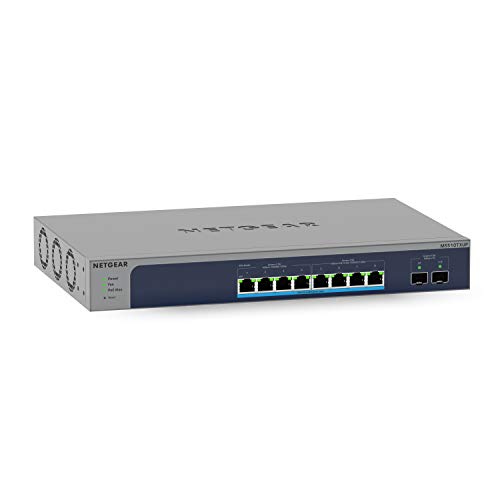
- Four 10Gbps and four 2.5Gbps ports
- 295W of Ultra60 PoE++ power
- 10G SFP+ and smart management
Best For: Growing studios needing speed, PoE, and network control
Quiet Plug-and-Play Pick

- Five auto-negotiating 10G ports
- Fanless and quiet operation
- Simple desktop or wall-mounted setup
Best For: Quiet, unmanaged creator workstations and NAS links
Flexible 10G/2.5G Pick – NICGIGA 10-Port Multi-Gig Switch
For content creators building multi-gigabit network switches for content creators into a flexible home studio or office network, this NICGIGA model combines two 10GbE RJ45 ports with eight 2.5GbE ports. Its unmanaged design keeps setup simple while providing up to 80Gbps of switching capacity for NAS devices, fast PCs, wireless access points, and media workflows.
Best For: Creators who need a mix of 10GbE uplinks and multiple 2.5GbE connections without configuring a managed switch.
Pros:
- Offers two 10GbE RJ45 ports and eight 2.5GbE ports.
- Supports multiple link speeds, including 10G, 5G, 2.5G, 1G, and 100Mbps on the 10GbE ports.
- Plug-and-play setup with a fanless design and desktop or wall-mount installation.
- Includes 4KV lightning protection, a metal case, one-year warranty, and lifetime technical support.
Cons:
- As an unmanaged switch, it does not provide VLAN, QoS, or other configuration features.
- Only two ports support 10GbE connectivity.
This is a practical middle ground for creators upgrading beyond Gigabit Ethernet: it provides fast 10GbE connections for key systems while giving the rest of the studio affordable 2.5GbE access.
Simple 2.5G Upgrade – TRENDnet TEG-S591 9-Port Switch
The TRENDnet TEG-S591 is a straightforward option for content creators moving to multi-gigabit network switches for content creators without replacing existing Cat5e-or-better cabling. It provides eight 2.5GbE ports for computers and peripherals plus one 10GbE port for a high-speed NAS, workstation, or network uplink.
Best For: Small studios that primarily need 2.5GbE connections with one 10GbE port for a central storage device or uplink.
Pros:
- Includes eight 2.5GbE RJ45 ports and one 10GbE RJ45 port.
- Can deliver 2.5Gbps over existing Cat5e or better cabling.
- Provides 60Gbps switching capacity and a wall-mountable design.
- Backed by TRENDnet lifetime manufacturer protection and English-language technical support.
Cons:
- Has only one 10GbE port.
- The plastic case may be less substantial than metal-bodied alternatives.
- It is not presented with managed networking features such as VLAN or QoS.
For creators whose main goal is faster workstation and editing-system connections, the TEG-S591 offers a focused 2.5GbE upgrade path while reserving one 10GbE connection for the most demanding device.
All-10G Powerhouse – NICGIGA 8-Port 10GbE Switch
When several editing systems, servers, or storage devices need full-speed links, this NICGIGA model is one of the more direct multi-gigabit network switches for content creators. All eight RJ45 ports support 10G, 5G, 2.5G, 1G, and 100Mbps connections, while the 160Gbps switching capacity is suited to dense local file-transfer workloads.
Best For: 10GbE-equipped studios with multiple high-speed PCs, NAS devices, servers, or Wi-Fi 7 networking equipment.
Pros:
- All eight RJ45 ports support up to 10GbE.
- Provides 160Gbps switching capacity and automatic speed negotiation.
- Supports desktop use or installation in a 19-inch rack.
- Uses a metal case with 4KV lightning protection and a stated 24dB fan.
Cons:
- The unmanaged design offers no listed VLAN, QoS, or traffic-management controls.
- Cooling relies on an industrial-grade fan rather than a fanless design.
- Its eight-port layout may provide less capacity than larger switches for expanding studios.
This is the strongest fit here for a creator who already owns multiple 10GbE devices and wants every switch port ready for high-speed transfers, with rack mounting available for a more permanent setup.
Managed Media Network – QNAP QSW-L3208-2C6T-US
The QNAP QSW-L3208-2C6T-US is aimed at creators who need more than plug-and-play connectivity from multi-gigabit network switches for content creators. It combines six multi-speed 10GbE RJ45 ports with two 10GbE SFP+/RJ45 combo ports, while lite-managed features such as VLAN, QoS, LACP, IGMP Snooping, and loop detection provide useful control for larger media networks.
Best For: Content studios that need 10GbE performance, jumbo frames, and basic traffic or network-segmentation controls.
Pros:
- Offers six 10GbE RJ45 ports plus two 10GbE SFP+/RJ45 combo ports.
- Includes VLAN, QoS, LACP, IGMP Snooping, and loop detection.
- Supports 12K jumbo frames for large-file transfers and media streaming.
- Provides 160Gbps switching capacity, 80Gbps non-blocking throughput, and a metal design.
Cons:
- Its managed features may be unnecessary for users seeking a purely plug-and-play switch.
- The two combo ports require choosing between SFP+ and RJ45 use per port.
- It has a higher stated power draw of 36W than simpler unmanaged designs.
For a growing production environment, the QNAP stands out by pairing broad 10GbE connectivity with practical network controls. It is the most suitable choice here when reliable file movement and traffic organization matter as much as raw port speed.
Best Silent Value – TP-Link TL-SG108S-M2 8-Port 2.5G Switch
For creators building a fast home studio or workstation network, the TP-Link TL-SG108S-M2 is a straightforward choice among multi-gigabit network switches for content creators. Its eight 2.5Gbps ports provide up to 40Gbps of switching capacity, while auto-negotiation supports 100Mb, 1G, and 2.5G devices.
Best For: Content creators who need several 2.5G connections for a NAS, workstation, Wi-Fi 6 access point, or 4K video setup without fan noise.
Pros:
- Eight 2.5Gbps ports and up to 40Gbps switching capacity
- Fanless design for silent operation
- Plug-and-play setup with desktop or wall mounting
- Works with existing Cat5e cabling for a 2.5G upgrade
Cons:
- Unmanaged design offers no VLAN, QoS, or traffic-monitoring controls
- Plastic case may feel less substantial than metal alternatives
The TL-SG108S-M2 is a practical fit when quiet operation and simple deployment matter more than advanced network management. It delivers multiple 2.5G links without requiring a wiring overhaul.
Best for Network Control – NETGEAR MS308E 8-Port 2.5G Switch
The NETGEAR MS308E adds basic network-management tools to the multi-gigabit network switches for content creators category. All eight ports support 2.5Gbps connections, while its Easy Smart interface provides VLAN configuration, traffic prioritization with QoS, port monitoring, and network-security management.
Best For: Small creative studios or home offices that need 2.5G connectivity plus control over traffic, segmentation, and port behavior.
Pros:
- Eight auto-negotiating 2.5Gbps Ethernet ports
- Supports VLANs, QoS, port monitoring, and security management
- Fanless, energy-efficient operation
- Compact metal case supports desktop or wall mounting
Cons:
- Designed for use in the U.S. and Canada only
- Smart-management features require more setup than an unmanaged switch
Choose the MS308E if your editing or production network benefits from traffic prioritization and segmentation. Its metal, fanless design also suits workspaces where quiet, tidy equipment is important.
Best Durable Plug-and-Play Pick – Omada DS108G-M2 8-Port 2.5G Switch
The Omada DS108G-M2 is one of the simpler multi-gigabit network switches for content creators, offering eight 2.5Gbps ports and up to 40Gbps of switching capacity without configuration or central management. It is designed for fast connections to NAS devices, workstations, Wi-Fi 6 access points, and 4K video setups.
Best For: Creators who want a durable, quiet, easy-to-install switch for a home office, editing workstation, or small production network.
Pros:
- Eight 2.5Gbps ports with up to 40Gbps switching capacity
- Plug-and-play operation with no configuration required
- Fanless design keeps operation quiet
- Metal casing provides durability and heat dissipation
Cons:
- Unmanaged switch lacks VLAN and QoS features
- Provides no faster-than-2.5Gbps ports for higher-speed uplinks
The DS108G-M2 is a strong choice for a simple, robust creator network. Its metal enclosure, silent cooling, and flexible desktop or wall mounting make it easy to place near production equipment.
Powerhouse Creator Hub – NETGEAR MS510TXUP
For content creators managing fast workstations, storage, and powered network gear, the NETGEAR MS510TXUP is a flexible choice among multi-gigabit network switches for content creators. It combines four 10Gbps ports, four 2.5Gbps ports, two 10G SFP+ connections, and substantial PoE++ capacity in a smart-managed design.
Best For: Studios that need high-speed wired connections, PoE power, fiber expansion, and remote network management.
Pros:
- Four 10Gbps and four 2.5Gbps multi-gig ports support a range of creator devices.
- Eight Ultra60 PoE++ ports provide a 295W total power budget.
- Two 10G SFP+ ports support fiber connectivity and network expansion.
- Smart management includes VLAN, access, and SNMP-related control, plus one year of NETGEAR Insight.
Cons:
- Its PoE and smart-management features may be more than a small, simple editing setup needs.
- The 3.5 kg metal unit is less compact than basic five-port desktop switches.
The MS510TXUP stands out when a creator network must do more than connect computers. Its PoE budget, fiber options, and managed controls make it particularly suitable for a growing studio or production workspace.
Rack-Ready 10G Core – Real HD 5-Port 10G Switch
The Real HD five-port switch is a practical option among multi-gigabit network switches for content creators who want several 10G RJ45 connections without moving to a larger switch. Its web management, rack-mount support, and compatibility with slower Ethernet devices make it suited to compact editing and storage networks.
Best For: Creators connecting a 10G NAS, workstation, router, access point, or other high-throughput devices in a small rack or desktop setup.
Pros:
- Five 10G RJ45 ports provide a 100Gbps switching capacity.
- Auto-negotiates with 5G, 2.5G, 1G, and 100M devices.
- Web management supports VLAN, QoS, security, multicast, and diagnostics.
- Metal casing, built-in fan, and included 19-inch rack-mount support suit structured installations.
Cons:
- 10G performance requires Cat6A or higher pure copper Ethernet cable.
- The built-in fan may be less suitable for a noise-sensitive editing room than a fanless design.
- It has only five ports and a one-year warranty.
This switch offers a strong balance of 10G connectivity and configuration options in a compact footprint. It is a good fit when you need managed features and rack flexibility, provided fan noise and cable requirements are acceptable.
Quiet Plug-and-Play Pick – TP-Link TL-SX105
The TP-Link TL-SX105 keeps setup simple while providing five 10G/multi-gig RJ45 ports. For creators comparing multi-gigabit network switches for content creators, its fanless operation, automatic speed negotiation, and 100Gbps switching capacity make it a straightforward choice for a quiet desktop or wall-mounted workspace.
Best For: Solo creators and small studios connecting 10G storage, editing computers, adapters, or Wi-Fi equipment without configuring a managed network.
Pros:
- Five ports support 100Mb, 1G, 2.5G, 5G, and 10G connections.
- Fanless construction enables quiet operation near a desk or editing station.
- Plug-and-play setup requires no software installation or configuration.
- Metal casing and desktop/wall-mounting options provide installation flexibility.
Cons:
- As an unmanaged switch, it lacks VLAN, QoS, and other configurable network controls.
- It has no PoE or SFP+ ports for powering devices or adding fiber links.
- Only five RJ45 ports are available for connected equipment.
The TL-SX105 is best when quiet, uncomplicated 10G connectivity matters more than advanced management. Its auto-negotiation also lets a mixed-speed creator network evolve without requiring every device to support 10G immediately.
How We Picked the Best Multi-Gigabit Network Switches for Content Creators
We focused on practical networking needs in creator studios: port speed, port count, RJ45 compatibility, ease of setup, and the ability to connect fast PCs, NAS systems, Wi-Fi 6E or Wi-Fi 7 access points, and other production hardware. The lineup includes unmanaged switches for plug-and-play installations, smart-managed models for VLANs and traffic control, and PoE options for powering compatible devices.
We also considered whether each switch offers a useful upgrade path. A 2.5GbE model can be an excellent value for current workstations, while 10GbE is better suited to large project files, multicamera workflows, and multiple simultaneous users.
Quick Comparison
| Switch Type | Best For | What to Check |
|---|---|---|
| 2.5GbE unmanaged | Affordable workstation and NAS upgrades | Number of 2.5GbE ports and uplink needs |
| 10GbE RJ45 unmanaged | Large file transfers and high-speed editing | 10GbE compatibility, heat, and cabling |
| Smart-managed | Studios needing VLANs or traffic controls | Management interface and configuration options |
| PoE smart-managed | Access points, cameras, phones, and powered devices | PoE budget and per-port power limits |
Key Buying Factors for Multi-Gigabit Network Switches for Content Creators
Port Speed and Layout
Choose 2.5GbE for noticeably faster shared storage and internet uplinks without replacing every cable or device. Choose 10GbE when moving large video files is central to your work. Mixed-speed switches are useful when a few editing systems need 10GbE while other devices remain on 1GbE or 2.5GbE.
Cabling and Compatibility
Many RJ45 multi-gigabit switches work with existing Cat5e or better cabling, but cable quality, distance, and installation condition affect reliability. Confirm that your computers, NAS, adapters, and router support the target speed; a fast switch cannot make a gigabit device operate at 10GbE.
Management, Noise, and Power
Unmanaged switches are simplest, while smart-managed models add VLANs, link aggregation, monitoring, and traffic controls. Check whether the unit is fanless if it will sit beside microphones. For PoE models, compare total power budget with the requirements of cameras and access points, and allow headroom for expansion.
Who Should Buy Which Multi-Gigabit Network Switches for Content Creators?
Choose a compact 2.5GbE unmanaged switch for a solo creator upgrading a desktop, NAS, and Wi-Fi access point on a reasonable budget. Pick a 10GbE unmanaged model for a workstation-centered editing setup where maximum file-transfer speed matters more than advanced controls.
A mixed-port switch is the most flexible choice for a growing studio with a combination of 10GbE editing systems and 2.5GbE peripherals. Select a smart-managed switch if you need separate guest, production, storage, or camera networks. Finally, choose a PoE smart-managed model when the switch must also power access points, surveillance cameras, VoIP equipment, or other compatible hardware.
