A reliable network switch can make a noticeable difference in a home office, especially when multiple computers, Wi-Fi access points, NAS devices, and workstations compete for bandwidth. The best multi-gigabit network switches for remote work add faster wired connections without requiring a full enterprise network.
We selected 10 options ranging from simple plug-and-play 2.5GbE switches to managed models with 10GbE uplinks, SFP+ ports, and flexible mounting. The right choice depends on your internet speed, local file-transfer needs, port count, and whether you want hands-on network controls.
Best 10 Multi-Gigabit Network Switches for Remote Work Picks for 2026
Best Balanced 2.5G Pick
TP-Link TL-SG108S-M2 8-Port Switch

- Eight 2.5Gbps ports
- Up to 40Gbps switching capacity
- Fanless and plug-and-play
Best For: Home offices needing eight silent 2.5G connections
Best Metal 2.5G Upgrade

- Eight 2.5Gbps RJ45 ports
- Metal housing with thermal design
- Fanless plug-and-play setup
Best For: Remote offices wanting a durable, quiet 2.5G switch
Best Compact 2.5G Switch

- Five 2.5Gbps ports
- Up to 25Gbps switching capacity
- Metal, fanless, and unmanaged
Best For: Small home offices with a few multi-gigabit devices
Best 10G Expansion

- Two 10Gbps and four 2.5Gbps ports
- Up to 60Gbps switching capacity
- Fanless metal enclosure
Best For: Hybrid home offices using 10G and 2.5G equipment
Best Balanced Pick
NETGEAR MS308E 8-Port 2.5G Switch

- Eight 2.5Gbps RJ45 ports
- Easy Smart VLAN and QoS controls
- Fanless desktop or wall-mount design
Best For: Home offices needing manageable 2.5Gbps connectivity
Best Plug-and-Play 10G Value
TP-Link TL-SX105 5-Port 10G Switch

- Five 10Gbps ports
- Negotiates 100Mbps to 10Gbps speeds
- Fanless, plug-and-play metal design
Best For: Mixed-speed home offices with 10G devices
Best for Larger Offices
NETGEAR XS512EM 12-Port 10G Switch
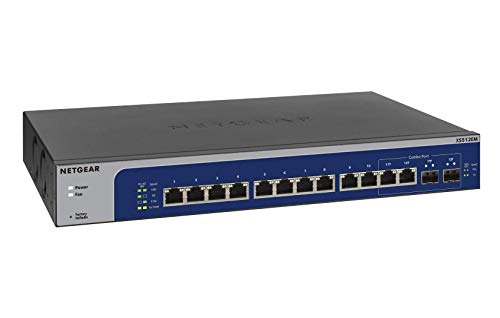
- Twelve multi-gig Ethernet ports
- Two shared 1G/10G SFP+ ports
- Desktop or rackmount installation
Best For: Small offices needing expandable 10G connectivity
Best Silent 2.5G Expansion
Hitron APEX2008 8-Port 2.5G Switch

- Eight 2.5Gbps ports
- Fanless metal housing
- Plug-and-play installation
Best For: Quiet home offices needing several multi-gig wired connections
Best Mounting Flexibility
NETGEAR GS110MX 10-Port Multi-Gig Switch
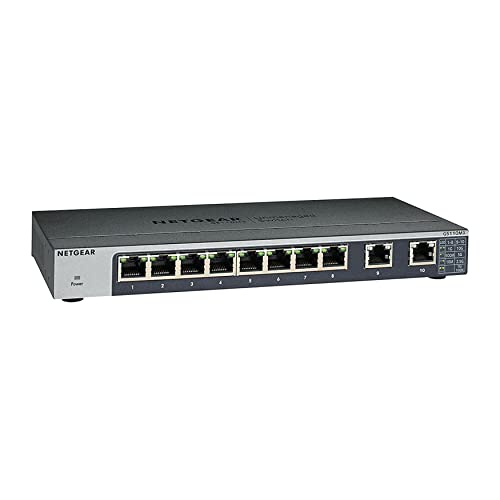
- Two ports support up to 10Gbps
- Eight 1Gbps expansion ports
- Desktop, wall, or rack mounting
Best For: Growing offices needing flexible installation and two multi-gig links
Best Balanced 2.5G Pick – TP-Link TL-SG108S-M2 8-Port Switch
For remote workers building a fast home office network, the TP-Link TL-SG108S-M2 is a practical choice among multi-gigabit network switches for remote work. Its eight 2.5Gbps ports support 100Mbps, 1Gbps, and 2.5Gbps connections, making it suitable for a workstation, NAS, Wi-Fi 6 access point, and other wired devices.
Best For: Home offices that need eight 2.5G ports, silent operation, and simple plug-and-play installation.
Pros:
- Eight 2.5Gbps ports provide up to 40Gbps of switching capacity.
- Auto-negotiation supports 100Mbps, 1Gbps, and 2.5Gbps devices.
- Fanless design operates silently and supports desktop or wall mounting.
- Can upgrade compatible networks to 2.5Gbps without requiring Cat6 wiring.
Cons:
- It is an unmanaged switch, so it does not provide advanced configuration or central management.
- The plastic case may be less substantial than a metal alternative.
With eight multi-gigabit ports and a silent design, this TP-Link is a well-rounded option for expanding a remote-work setup without adding configuration overhead.
Best Metal 2.5G Upgrade – UGREEN 8-Port 2.5Gb Switch
The UGREEN 8-Port 2.5Gb Switch offers a straightforward way to expand a remote office network. All eight RJ45 ports support up to 2.5Gbps and automatically adapt to 100Mbps, 1Gbps, or 2.5Gbps connections, making it a flexible fit for NAS devices, gaming PCs, and Wi-Fi 6 or 6E routers.
Best For: Users who want eight 2.5G ports, a metal enclosure, and quiet plug-and-play operation.
Pros:
- Eight full 2.5Gbps ports support multi-gigabit devices throughout the network.
- Metal housing, heatsinks, thermal pads, and ventilation support heat management.
- Fanless operation, LED indicators, and desktop or wall placement simplify installation.
- Automatically adapts across 100Mbps, 1Gbps, and 2.5Gbps links.
Cons:
- It is unmanaged, with no software-based network configuration.
- The listed warranty is 24 months, shorter than some competing options.
This UGREEN model is a sensible pick for multi-gigabit network switches for remote work when you want broad 2.5G coverage and a more durable metal chassis without managing settings.
Best Compact 2.5G Switch – Omada DS105G-M2 5-Port
The Omada DS105G-M2 is a compact option for remote workers who need multi-gigabit network switches for remote work but have fewer wired devices. It provides five 2.5Gbps RJ45 ports, up to 25Gbps of switching capacity, and plug-and-play operation for a workstation, NAS, access point, or entertainment setup.
Best For: Small home offices that need five fast ports and a compact, silent switch.
Pros:
- Five 2.5Gbps ports deliver up to 25Gbps of switching capacity.
- Fanless operation provides silent connectivity for desks and home offices.
- Plug-and-play design requires no configuration or central management.
- Metal construction adds a sturdy enclosure for a compact switch.
Cons:
- Five ports provide less expansion room than eight-port models.
- It is an unmanaged switch without advanced traffic controls.
Choose this model when your remote-work network has a handful of wired devices and you value a small, quiet enclosure over maximum port count.
Best 10G Expansion – NICGIGA 6-Port 10Gbps Switch
The NICGIGA six-port switch is aimed at remote-work setups that combine 10G equipment with 2.5G devices. It includes two 10Gbps RJ45 ports and four ports supporting up to 2.5Gbps, giving a workstation, NAS, Wi-Fi 7 router, or server room to grow beyond standard gigabit networking.
Best For: Remote offices with 10G NAS, adapters, servers, or other high-throughput equipment alongside 2.5G devices.
Pros:
- Two 10Gbps RJ45 ports and four 2.5Gbps ports support mixed-speed networks.
- Up to 60Gbps of switching capacity helps accommodate heavier data traffic.
- Metal, fanless design supports quiet operation and includes desktop or wall mounting.
- Supports automatic MDI/MDIX and requires no software or configuration.
Cons:
- Only two ports support 10Gbps; the remaining four top out at 2.5Gbps.
- The one-year warranty is shorter than the five-year warranty listed for the Omada model.
This is the strongest fit here for a hybrid 10G/2.5G home office, especially when fast NAS transfers or high-speed wired uplinks matter more than having eight identical ports.
Best Balanced Pick – NETGEAR MS308E 8-Port 2.5G Switch
For remote workers upgrading to multi-gigabit network switches, the NETGEAR MS308E offers eight 2.5Gbps Ethernet ports in a compact, quiet design. Its auto-negotiating ports work with existing Cat5e or Cat6 cables, while basic management tools help organize and prioritize network traffic.
Best For: Home offices and small businesses that need several 2.5Gbps wired connections with straightforward network management.
Pros:
- Eight 2.5Gbps RJ45 ports support fast wired connections.
- Easy Smart features include VLANs, QoS, port monitoring, and security controls.
- Fanless metal design supports quiet desktop or wall-mounted operation.
Cons:
- Its maximum port speed is lower than the 10Gbps switches in this roundup.
- Designed for use in the U.S. and Canada only.
The MS308E is a practical middle ground for remote-work networks: faster than standard gigabit switching without requiring 10Gbps hardware throughout the setup. Choose it when manageable 2.5Gbps connectivity and quiet operation matter more than maximum throughput.
Best Plug-and-Play 10G Value – TP-Link TL-SX105 5-Port 10G Switch
The TP-Link TL-SX105 is a strong option among multi-gigabit network switches for remote work when you want 10Gbps capability without software setup. Its five ports automatically negotiate among 100Mbps, 1Gbps, 2.5Gbps, 5Gbps, and 10Gbps connections, making it suitable for mixed-speed devices.
Best For: Remote workers connecting a 10G NAS, high-speed workstation, Wi-Fi access point, or other multi-gig devices with minimal configuration.
Pros:
- Five 10Gbps ports provide up to 100Gbps switching capacity.
- Auto-negotiation supports five link speeds from 100Mbps through 10Gbps.
- Fanless metal casing offers quiet operation and desktop or wall mounting.
Cons:
- Only five Ethernet ports are available.
- Unmanaged design does not provide VLAN, QoS, or monitoring controls.
With broad speed compatibility and plug-and-play installation, the TL-SX105 is convenient for a performance-focused home office. It is best suited to users who want fast connections without needing managed-network features.
Best for Larger Offices – NETGEAR XS512EM 12-Port 10G Switch
For larger remote-work setups or small offices, the NETGEAR XS512EM combines twelve multi-gigabit Ethernet ports with two 1G/10G SFP+ ports. Its Easy Smart management interface adds basic configuration, security, and monitoring, while desktop or rackmount placement supports more structured installations.
Best For: Small offices and advanced home labs that need many multi-gig wired connections, SFP+ flexibility, and a rackmount-ready form factor.
Pros:
- Twelve ports support 1G, 2.5G, 5G, and 10G Ethernet connections.
- Two shared 1G/10G SFP+ ports add fiber or high-speed uplink flexibility.
- Easy Smart management, rackmount hardware, and energy-efficient operation are included.
Cons:
- The two SFP+ ports are shared rather than additional independent ports.
- Its larger 5.5-pound chassis is less convenient for a small desk.
- Designed for use in the U.S. and Canada only.
The XS512EM is the most expandable choice here for a multi-device office network. Its port count and SFP+ options provide room to grow, while the smart-management tools help keep a more demanding setup organized.
Best Silent 2.5G Expansion – Hitron APEX2008 8-Port 2.5G Switch
For remote workers replacing a crowded Gigabit setup, the Hitron APEX2008 is a practical choice among multi-gigabit network switches for remote work. It adds eight 2.5Gbps wired ports behind an existing router, helping connect workstations, NAS storage, access points, and other high-bandwidth devices without software or configuration.
Best For: Home offices and small offices that need multiple silent 2.5G wired connections.
Pros:
- Eight ports support up to 2.5Gbps each.
- Fanless metal housing operates quietly in an office.
- Plug-and-play setup with automatic 2.5G, 1G, and 100Mbps negotiation.
- Wall-mountable design and compatibility with existing devices.
Cons:
- Unmanaged design offers no advanced network configuration.
- Does not include PoE features.
The APEX2008 is a strong fit when several devices need faster-than-Gigabit connections at once. Its eight equal-speed ports are especially useful for file transfers, NAS backups, and creative workstations, while the silent design suits shared workspaces.
Best 10G Uplink – NETGEAR GS108MX 8-Port Multi-Gig Switch
The NETGEAR GS108MX is a straightforward option for remote work setups that need a faster central connection without managed-switch complexity. It combines one 10Gbps multi-gig port with eight 1Gbps Ethernet ports, making it useful for linking a high-speed workstation, storage device, or router to a group of standard wired devices.
Best For: Home offices that need one 10G connection alongside several dependable Gigabit ports.
Pros:
- Includes one 10Gbps multi-gig port and eight 1Gbps ports.
- Auto-negotiation works with existing Cat5e or Cat6 cables.
- Fanless operation keeps the switch quiet.
- Supports desktop or wall mounting and includes energy-efficient operation.
Cons:
- Only one port supports multi-gig speeds.
- Unmanaged operation provides no configuration controls.
This switch makes sense when a remote worker has one especially demanding connection—such as a NAS, workstation, or router link—but does not need every port to exceed 1Gbps. Its compact metal design and silent operation also work well in a home office.
Best Mounting Flexibility – NETGEAR GS110MX 10-Port Multi-Gig Switch
The NETGEAR GS110MX suits remote work networks that need a mix of standard and multi-gig connections plus flexible installation. It provides eight 1Gbps ports and two ports that support 1G, 2.5G, 5G, or 10G, giving a home office room to connect demanding equipment while retaining plenty of conventional Ethernet ports.
Best For: Growing home offices that need two multi-gig ports and desktop, wall, or rack mounting.
Pros:
- Two multi-gig ports support speeds from 1Gbps through 10Gbps.
- Eight additional 1Gbps ports accommodate everyday wired devices.
- Supports desktop, wall, or rackmount placement.
- Includes a lifetime hardware warranty and energy-efficient, quiet operation.
Cons:
- Most ports remain limited to 1Gbps.
- Unmanaged operation does not provide advanced controls.
For remote workers planning a larger wired setup, the GS110MX offers more placement choices and two flexible multi-gig links. It is a practical middle ground between an all-Gigabit switch and a fully multi-gig model, particularly when warranty coverage is important.
How We Picked the Best Multi-Gigabit Network Switches for Remote Work
We compared these switches by looking at port speed, total port count, uplink capability, management features, installation flexibility, and suitability for a typical home office. Unmanaged switches are favored for simple expansion, while easy-smart and managed models offer VLANs, traffic controls, monitoring, and more advanced network planning.
We also considered practical details such as fanless or quiet operation, desktop and rack-mount options, backward compatibility with Gigabit Ethernet, and whether a switch can support fast local transfers between workstations, servers, and network-attached storage.
Quick Comparison
- Best for simple 2.5GbE expansion: Choose an 8-port unmanaged model such as the TP-Link TL-SG108S-M2, UGREEN 2.5Gb Switch, or Hitron APEX2008.
- Best compact option: A 5-port switch such as the Omada DS105G-M2 or TP-Link TL-SX105 works well for a small desk or limited device group.
- Best for management features: The NETGEAR MS308E and XS512EM add smart or managed controls for more structured networks.
- Best for mixed-speed equipment: NETGEAR’s GS108MX and GS110MX combine Gigabit ports with faster 10GbE or multi-gig ports.
- Best for 10GbE growth: Look to the TP-Link TL-SX105, NICGIGA 10GbE model, or NETGEAR XS512EM.
Key Buying Factors for Multi-Gigabit Network Switches for Remote Work
Port Speed and Compatibility
2.5GbE is often the most practical upgrade for home offices because it works with newer routers, access points, and computers while remaining compatible with Gigabit devices. Choose 10GbE when you regularly move large video files, use a high-speed NAS, or expect to upgrade several devices soon.
Port Count and Uplinks
Count every device that will use a wired connection, then leave room for expansion. A five-port switch may suit a desk, while eight or more ports are safer for an office with a router, workstation, printer, access point, NAS, and backup system. Check whether the listed port count includes dedicated uplinks.
Managed Versus Unmanaged Operation
Unmanaged switches are easy to install and require little maintenance. Smart or managed switches are better if you need VLANs, quality-of-service settings, traffic monitoring, link aggregation, or tighter separation between work, guest, and smart-home devices.
Cooling, Placement, and Cabling
A fanless desktop switch can be preferable in a quiet office, but verify ventilation requirements. For a rack, wiring cabinet, or larger setup, consider rack-mount compatibility. Cat5e may support some 2.5GbE connections, while Cat6 or better is a safer choice for longer runs and 10GbE.
Who Should Buy Which Multi-Gigabit Network Switches for Remote Work?
Choose an 8-port 2.5GbE unmanaged switch if you want a straightforward upgrade for several office devices. Select a five-port model when space and budget matter more than expansion. Users with a 10GbE NAS, powerful workstation, or multi-gigabit backbone should choose a 10GbE switch with enough faster ports for their most demanding devices.
If your home office needs network segmentation, monitoring, or future expansion, an easy-smart or managed switch is worth the added setup. For mixed older and newer equipment, a model combining Gigabit and multi-gigabit ports can keep existing devices connected while giving key workstations faster links.
