If you need a simple way to send digital audio from a computer to a DAC, soundbar, or AV receiver, a USB audio adapter with optical output can be the right fix.
This guide focuses on compatibility, audio format support, and real-world use so you can choose a model that fits your setup without guesswork.
Best 10 USB Audio Adapter with Optical Output Picks for 2026
Computer-Only USB A to Optical
USB A to TOSLINK Optical Audio Adapter

- USB Type A input for Windows and Mac computers
- Hi-res digital output up to 192KHz/24-bit
- Plug-and-play with no driver or external power
Best For: Computer users needing a simple USB A optical output adapter
Stereo-Only USB Optical Link
USB to Optical SPDIF Toslink Audio Adapter

- USB A computer connection for optical output
- Works with Windows, Mac, and Linux
- Stereo-only digital audio up to 96KHz/24-bit
Best For: Users who want a no-driver stereo optical adapter for computers
USB-C Surround Output Adapter

- USB-C optical output for laptops and MacBooks
- Stereo by default, with 5.1 possible via decoding
- Supports hi-res audio up to 192KHz/24-bit
Best For: USB-C users who want optical output and optional 5.1 playback
Dual-Output Digital Audio Hub
USB to Toslink & Coaxial SPDIF Adapter

- Optical and coaxial digital outputs
- Up to 192kHz/24bit PCM support
- Plug-and-play with aluminum shielding
Best For: Home theater and Hi-Fi users who want both optical and coaxial USB audio output.
Stereo-Only Optical Transmitter
USB A to TOSLINK Output Adapter

- USB to TOSLINK output for computers
- Stereo only, no 5.1/7.1 support
- 48KHz/24-bit plug-and-play chipset
Best For: Computer users who want simple stereo optical output over USB.
Simple USB-A to Toslink Adapter
CERRXIAN USB A to Toslink Optical Audio Adapter

- USB-A input to Toslink output only
- Plug-and-play with no drivers required
- 16-bit/48 kHz stereo digital audio
Best For: Laptop and PC users connecting to optical audio gear
Plug-and-Play PC Optical Cable
USB to Optical Audio Adapter Cable
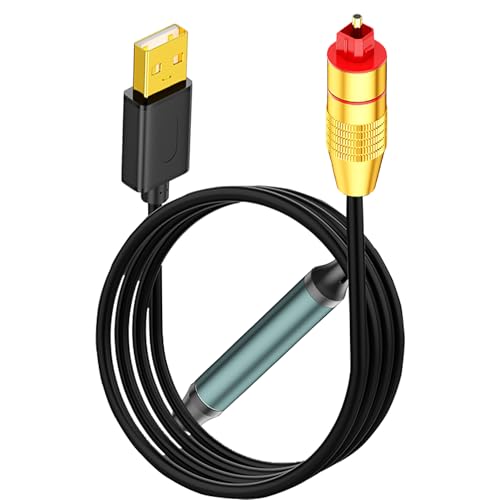
- USB-A to SPDIF optical output only
- No driver or external power required
- Compatible with Windows, Linux, and Mac OS
Best For: Simple computer-to-optical audio hookups
High-Resolution Optical Pick
USB to Optical Audio Adapter 24Bit

- Up to 24-bit/96 kHz optical output
- Plug-and-play for Windows and macOS
- USB-to-SPDIF only, no reverse conversion
Best For: Higher-resolution USB-A to optical audio on computers
Computer-Only USB A to Optical – USB A to TOSLINK Optical Audio Adapter
If you need a usb audio adapter with optical output for a Windows or Mac computer, this USB A to TOSLINK adapter is a straightforward plug-and-play option. It connects a USB Type A laptop, PC, or compatible gaming console to an S/PDIF sound system, with support for high-resolution digital audio and no driver or external power required.
Best For: Desktop or laptop users who want a simple USB A-to-optical output for stereo or surround-compatible playback from a computer.
Pros:
- Works with Windows and Mac OS computers through USB Type A.
- Supports 48KHz/24-bit, 96KHz/24-bit, and 192KHz/24-bit output.
- Plug-and-play with no driver or external power needed.
- Aluminum alloy case and braided cable help with durability and interference resistance.
Cons:
- For computers only; not for TVs, Xbox, or Switch audio output.
- Unidirectional design means it only sends audio from USB to optical.
- Does not support all gaming devices despite the broader compatibility wording.
As a basic computer-focused optical adapter, this model is a solid choice when you want a simple, portable connection to a sound bar, amplifier, DAC, or home audio setup. Its main advantage is easy setup; just make sure your source device is a supported USB A computer rather than a TV or console.
Stereo-Only USB Optical Link – USB to Optical SPDIF Toslink Audio Adapter
This usb audio adapter with optical output is built for users who want a simple digital link from a USB A computer to an optical sound system. It’s a one-way USB-to-TOSLINK converter with plug-and-play setup, making it a practical pick for laptops and desktops that just need clean stereo digital audio.
Best For: Windows, Mac, or Linux computer users who want an easy stereo optical output connection without drivers.
Pros:
- Works with Windows, Mac OS, and Linux on USB Type A computers.
- No driver installation or external power needed.
- Outputs up to 96KHz/24-bit for clear digital audio.
- Simple one-way design keeps setup straightforward.
Cons:
- Not compatible with televisions.
- Does not support 5.1 surround sound; optical end outputs stereo only.
- Unidirectional only, so it cannot receive optical input.
For buyers who only need stereo optical audio from a computer, this adapter keeps things uncomplicated. The key tradeoff is lack of surround sound support, but that limitation also makes it easier to use for everyday desktop audio setups.
USB-C Surround Output Adapter – USB C to SPDIF Transmitter
If you need a usb audio adapter with optical output for a modern USB-C laptop or MacBook, this transmitter is designed to send digital audio from a Type C port to an optical S/PDIF system. It supports plug-and-play stereo output and can handle 5.1 files with the proper media player and settings, making it a flexible option for computer-based home audio.
Best For: USB-C laptop and Mac users who want optical output with the option for 5.1 playback.
Pros:
- Built for USB-C and Thunderbolt 4/3 compatible devices.
- Supports stereo output by default and 5.1 with proper decoding settings.
- Hi-res audio support from 48KHz/24-bit up to 192KHz/24-bit.
- No external power or special setup required for basic use.
Cons:
- Does not support 7.1 surround sound.
- Not for partial-featured USB ports such as TVs, car USB ports, or speaker USB ports.
- Output only; it cannot receive SPDIF or record audio.
This model stands out if you specifically need a USB-C optical transmitter rather than a USB A adapter. It’s best suited to computer setups where the source device and playback settings are under your control, especially if you want the option of 5.1 output.
Long-Cable USB A Optical Pick – USB A to Optical Audio Adapter
This usb audio adapter with optical output is aimed at Windows and Mac computer users who want a longer 6.6-foot lead for easier placement. It sends audio one way from USB A to TOSLINK, supports plug-and-play operation, and is tuned for high-resolution stereo digital output to a receiver, speaker, or amplifier.
Best For: Computer owners who want a longer USB A optical adapter with simple setup and stereo digital output.
Pros:
- Works with Windows and Mac OS computers using USB Type A.
- 6.6-foot cable gives more flexibility for desktop or home audio layouts.
- Supports 96KHz/24-bit high-resolution output.
- Aluminum shell, gold-plated connectors, and PVC sheath add durability.
Cons:
- For computers only; not supported with TVs, Xbox, Switch, or PS4/PS5.
- Unidirectional and cannot convert optical back to USB.
- Volume must be adjusted on the optical receiver, not through the computer.
If cable reach matters as much as simplicity, this adapter is a practical choice. Its longer cord and durable construction make it convenient for everyday computer-to-optical setups, as long as you’re staying within the supported computer-only use case.
Dual-Output Digital Audio Hub – USB to Toslink & Coaxial SPDIF Adapter
If you want a USB audio adapter with optical output that can also feed coaxial gear, this dual-output adapter is built for practical home-theater use. It converts USB into TOSLINK and coaxial SPDIF, supports up to 192kHz/24bit PCM, and is aimed at stereo or 5.1 pass-through setups with compatible content and receivers.
Best For: Users who need one compact USB digital audio adapter for both optical and coaxial connections in a home theater or Hi-Fi setup.
Pros:
- Provides both optical and coaxial SPDIF outputs, which can be used separately or together.
- Supports PCM up to 192kHz/24bit and stereo or 5.1 pass-through with compatible equipment.
- Aluminium-alloy housing and optical output help improve shielding and reduce interference.
- Plug-and-play design with no drivers required and an LED power indicator.
Cons:
- Does not support DSD/DoP or analogue output.
- Not compatible with PS5 or TVs.
- Requires compatible source content and AV receiver for 5.1 pass-through.
This is the strongest pick if you want flexibility between optical and coaxial digital output from a USB connection. Its main appeal is simple setup plus broad digital compatibility, rather than advanced format support.
Compact Optical Lead Adapter – Male USB A to Female Toslink Cable
This USB audio adapter with optical output is a simple one-way converter for sending digital sound from a USB-A port to Toslink gear. It is designed for straightforward plug-and-play use, with no external power or driver installation, and its short cable format makes it easy to pack for travel or desktop setups.
Best For: People who want a compact USB-A to optical adapter cable for laptops, desktops, or supported consoles.
Pros:
- Plug-and-play operation with no driver installation or external power supply required.
- Supports digital optical transmission for external SPDIF devices like DACs, amplifiers, soundbars, and speakers.
- Compact 0.6 ft cable is easy to carry for travel or business use.
- Alloy housing, gold-plated connectors, and flexible PVC jacket add durability.
Cons:
- One-way only: USB-A to SPDIF, with no reverse transmission.
- Not for TVs or other game consoles.
- Volume must be adjusted through the optical receiver, not the computer.
This model is best when you want a low-friction optical adapter rather than a feature-heavy converter. Its strength is portability and simple setup, especially for users who already have an SPDIF receiver or speaker system.
Stereo-Only Optical Transmitter – USB A to TOSLINK Output Adapter
If you need a USB audio adapter with optical output for a computer-based stereo system, this transmitter keeps things focused and simple. It turns a USB port into an optical SPDIF output, but it is specifically limited to stereo playback and is not intended for surround sound or TV use.
Best For: Computer users who only need reliable stereo optical audio from USB.
Pros:
- Converts a USB port into a TOSLINK optical audio output for computers.
- Stereo-only design keeps the signal path simple and compatible.
- 48KHz/24-bit chipset with plug-and-play convenience.
- Aluminum alloy case and braided cord improve durability.
Cons:
- Does not support 7.1/5.1 surround sound.
- Not suitable for TVs, cars, or other non-computer devices.
- Higher sample rates than 48KHz/24-bit may cause distortion or dropouts.
This is a good choice if your priority is dependable stereo optical output rather than surround features. It makes the most sense for users with a simple digital audio chain and a computer as the source.
Simple USB-A to Toslink Adapter – CERRXIAN USB A to Toslink Optical Audio Adapter
If you want a simple usb audio adapter with optical output for a laptop or PC, this CERRXIAN cable focuses on one job: sending USB-A audio out to Toslink/SPDIF gear. It’s a plug-and-play option for feeding a soundbar, amplifier, DAC, or home-theater setup with a clean digital signal, and it supports 16-bit/48 kHz stereo output.
Best For: Laptop or PC users who need a straightforward USB-A to optical audio link for home audio or studio-style listening.
Pros:
- Unidirectional USB-A input to Toslink output for simple source-to-receiver use
- Plug-and-play design with no drivers required
- 16-bit/48 kHz digital stereo output for noise-free optical transmission
- Durable build with aluminum housing, PVC cable, and gold-plated USB contacts
Cons:
- Only works from USB-A to optical, not the reverse
- Limited to stereo 2-channel output
- Requires compatible USB-A source devices like a laptop or PC
This is a practical pick if you already know you need a one-way USB-A to Toslink connection and want a low-friction setup. The focus is on stable digital output rather than extra controls or advanced conversion features.
Plug-and-Play PC Optical Cable – USB to Optical Audio Adapter Cable
This usb audio adapter with optical output is built for sending sound from a USB-A device directly into a Toslink/SPDIF system. It’s a plug-and-play cable for PCs, laptops, and PS5 setups, and the notes call out 16-bit/48 kHz output with a smart chip for crisp, clear digital audio.
Best For: Users who want a simple USB-A to optical connection for a computer or compatible console into a soundbar, DAC, or amplifier.
Pros:
- Unidirectional USB-A to SPDIF optical output
- Plug-and-play with no driver or separate power source needed
- Supports Windows, Linux, and Mac OS according to the notes
- Works with common audio gear like sound bars, DACs, amplifiers, and speakers
Cons:
- Not reversible; optical-to-USB conversion is not supported
- Laptop/computer volume adjustment will not work
- Notes indicate it is not for TV use despite some listed device mentions
For buyers who mainly want an easy digital audio feed from a USB-A source, this model keeps the setup straightforward. Just be aware that the output is fixed to the optical receiver’s volume control and the cable is strictly one-way.
High-Resolution Optical Pick – USB to Optical Audio Adapter 24Bit
If you need a usb audio adapter with optical output for a laptop or computer, this Tackston unit is geared toward clean digital playback through a S/PDIF system. It supports plug-and-play use on Windows and macOS, offers up to 24-bit/96 kHz output, and is meant for USB-to-Toslink conversion only.
Best For: Windows or macOS users who want higher-resolution optical audio from a USB-A computer or laptop.
Pros:
- Up to 24-bit/96 kHz output for higher-resolution digital audio
- Plug-and-play with no driver installation or external power needed
- Compatible with Windows and macOS laptops and computers
- Works with sound bars, DACs, amplifiers, speakers, and wireless headphones
Cons:
- Not compatible with televisions or gaming consoles
- USB-to-SPDIF only; no optical-to-USB direction
- Requires a USB Type-A source device
This model stands out if you care about higher sample depth and sample rate in a simple optical adapter. It keeps the feature set focused, which is helpful if you want a straightforward digital link without extra setup.
How We Picked the Best USB Audio Adapter with Optical Output
We prioritized adapters that are clearly built for USB-to-optical audio output, with attention to operating-system support, connector type, and the audio formats they can actually pass. We also favored compact, plug-and-play designs, since these are usually used as quick desktop or travel solutions.
Quick Comparison
The main differences come down to USB-A versus USB-C input, stereo versus 5.1/optical surround support, and whether the adapter is truly one-way from USB to TOSLINK/SPDIF. Some models are designed for Windows only, while others work with both Windows and macOS. A few include coaxial output as well, which adds flexibility if your receiver supports it.
Key Buying Factors for a USB Audio Adapter with Optical Output
Compatibility
Check the supported operating systems first. Many USB optical adapters are compatible with Windows, but macOS support is less universal. Also confirm whether the device works with laptops only, desktop PCs, or both.
Output Format
Most buyers should decide between stereo audio and surround-sound support. If you only need basic digital playback for speakers or a DAC, stereo is fine. If you want to feed a home theater receiver, look for explicit 5.1 support and verify that your source apps and device settings can output it correctly.
USB Connection Type
Choose USB-A if you want broad compatibility with traditional PCs. Choose USB-C if you are connecting a newer laptop or MacBook and want a cleaner direct connection without adapters.
Audio Quality Specs
Sample rate and bit depth can matter, especially if you care about higher-resolution playback. A 192kHz/24-bit rating is a strong sign for modern use, though actual performance still depends on the source device and software configuration.
Use Case and Limits
These devices are typically one-way transmitters, not full audio interfaces. They are best for sending digital audio out to external gear, not for recording or replacing a multi-function sound card. Also watch for products that are explicitly not for TVs, game consoles, or 7.1 output.
Who Should Buy Which USB Audio Adapter with Optical Output?
If you need a straightforward desktop solution for Windows, a basic USB-A optical adapter is usually the easiest pick. If you use a MacBook or newer laptop, a USB-C transmitter is the cleaner option. If you want maximum flexibility for a receiver or DAC setup, consider a model with both optical and coaxial output. For home theater users, prioritize verified surround support; for everyday listening, stable stereo output and broad compatibility matter more than extra specs.
