Choosing the right usb microphone for mac can make a big difference in call quality, voiceovers, podcasts, and streaming. The best options are easy to connect, sound clean on macOS, and match your recording style.
In this roundup, we focused on plug-and-play usability, voice clarity, build quality, and features that matter most to Mac users, from mute controls to headphone monitoring.
Best 10 USB Microphone for Mac Picks for 2026
Blue Yeti
Broadcast-Quality All-Purpose USB Mic

- Three-capsule array for clear, powerful sound
- Four pickup patterns for flexible recording
- Onboard controls with plug-and-play setup on Mac
Best For: Mac creators who want one versatile mic for streaming, podcasts, and calls
Sennheiser Profile

- Simple plug-and-play USB-C setup
- Natural, warm voice-focused sound
- Headphone jack with gain, mix, and volume controls
Best For: Mac users who want a straightforward podcast and streaming mic with manual controls
Blue Yeti Nano
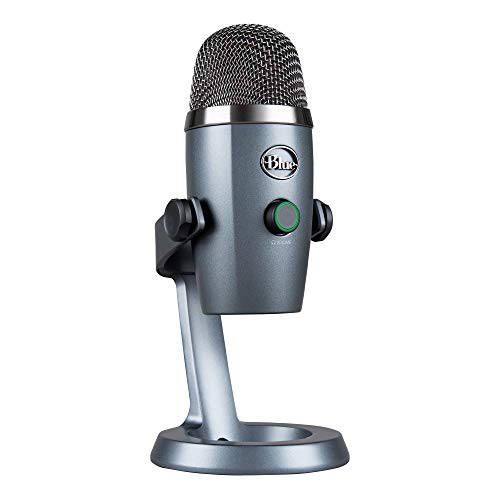
- Smaller footprint for tight desk setups
- Two capsules with cardioid and omni modes
- Headphone monitoring with onboard controls
Best For: Mac users who want a compact mic for streaming, calls, and voice work
Etour Mini USB-C
Mac Mini Desktop Gooseneck Mic

- Built specifically for Mac Mini M4 and MacBook use
- USB-C plug-and-play with no drivers
- Mute button, LED light, and pop filter included
Best For: Mac Mini and MacBook users needing a compact mic for meetings and dictation
Studio-Ready All-Rounder
ZealSound USB Podcast Mic for Mac, iPhone & PC

- Plug-and-play USB setup
- Noise reduction mode plus echo control
- Real-time monitoring with headphone jack
Best For: Multi-device creators who want flexible voice recording
Budget Desk Mic
FIFINE K669B USB Mic for Mac OS

- Simple plug-and-play desktop setup
- Cardioid pickup for clearer voice focus
- Metal body with volume knob
Best For: Affordable Mac recording and meeting use
Dual-Mode Gamer Pick
FIFINE AmpliGame AM8 USB/XLR Mic

- USB and XLR connectivity
- Dynamic cardioid pattern reduces off-axis noise
- USB mode includes mute, monitoring, and gain
Best For: Streamers wanting upgrade flexibility on Mac
Best Budget Desktop Pick
FIFINE USB Computer Microphone K054

- Plug-and-play USB for Mac and Windows
- Cardioid pickup helps reduce feedback
- Mute button, LED, and volume knob included
Best For: Mac users who want a simple desk mic for meetings and casual recording
Best Noise-Reducing Choice
CMTECK USB Computer Microphone G009

- Mac-compatible plug-and-play USB setup
- Noise-cancelling chip and cardioid pattern
- Built-in pop filter and mute button
Best For: Mac users who need a compact mic for clearer voice pickup in chats and calls
Best All-Round Desk Mic
USB Computer Microphone with Mute

- Mac OS plug-and-play with built-in sound card
- Omnidirectional pickup with smart noise reduction
- 360° adjustment plus one-button mute
Best For: Mac users who want a flexible desk mic for streaming, meetings, and voice tasks
Blue Yeti – Broadcast-Quality All-Purpose USB Mic
If you want a USB microphone for Mac that can handle streaming, podcasting, Zoom calls, and music recording, the Blue Yeti is built for versatile desktop use. Its custom three-capsule array, four pickup patterns, and onboard controls make it easy to adapt to different recording setups without extra gear.
Best For: Mac users who want a flexible, feature-rich USB mic for content creation and everyday recording.
Pros:
- Custom three-capsule array delivers clear, powerful, broadcast-quality sound
- Four pickup patterns: cardioid, omni, bidirectional, and stereo
- Onboard controls for headphone volume, pattern selection, mute, and gain
- Plug-and-play setup on Mac or PC
Cons:
- Desktop stand included, but you may still want a boom arm for ideal placement
- Larger tabletop design may take up more space than compact mics
The Blue Yeti stands out as a practical all-rounder for creators who need one mic to cover several use cases. If flexibility matters more than minimal size, it offers a strong mix of convenience and control.
Sennheiser Profile – Warm Cardioid USB Mic
For buyers looking for a USB microphone for Mac with a simple setup and a more polished voice-focused sound, the Sennheiser Profile keeps things straightforward. It uses a cardioid condenser capsule, a built-in headphone jack, and physical controls for gain, mix, and volume so you can adjust without relying on software.
Best For: Mac users who want a clean, easy-to-control mic for podcasting and live streaming.
Pros:
- One-cable plug-and-play simplicity
- Natural, warm sound that emphasizes voice body and presence
- Built-in headphone jack plus gain, mix, and volume controls
- Compact table stand for convenient placement
Cons:
- Cardioid-only design is less flexible than multi-pattern alternatives
- Built for desktop use, so placement still matters for best results
The Profile is a strong option if you want a streamlined desktop microphone with hands-on control. It suits users who value ease of use and voice clarity over extra pattern options or advanced customization.
Blue Yeti Nano – Compact Desktop USB Mic
The Blue Yeti Nano is a smart pick if you want a USB microphone for Mac that saves desk space without giving up the familiar Blue sound. It uses two custom capsules, supports cardioid and omni patterns, and includes onboard controls plus no-latency monitoring for recording and streaming.
Best For: Mac users who want a smaller desktop mic for streaming, voice-over, and online meetings.
Pros:
- Compact footprint that fits easily on smaller desks
- Two custom capsules deliver strong presence and detail
- Cardioid and omni pickup patterns for different use cases
- Headphone output with volume control and no-latency monitoring
Cons:
- Only two pickup patterns, so it is less flexible than the full-size Yeti
- Plastic enclosure may feel less premium than metal-bodied options
If your Mac setup needs a smaller mic that still covers everyday content work, the Nano is the most compact of the group. It balances easy setup, useful controls, and a desktop-friendly size.
Etour Mini USB-C – Mac Mini Desktop Gooseneck Mic
This USB microphone for Mac is tailored specifically for Mac Mini M4 and MacBook users who want a compact desktop mic with simple setup. It connects over USB-C, uses a cardioid pickup pattern to reduce off-axis noise, and adds a mute button, LED status indicator, and included pop filter for practical everyday use.
Best For: Mac Mini and MacBook users who want a compact mic for meetings, dictation, and voice input.
Pros:
- Designed specifically for Mac Mini M4/M4 Pro and MacBook compatibility
- USB-C plug-and-play connection with no drivers required
- Cardioid pattern helps minimize noise from the sides and rear
- Mute button, LED indicator, and included pop filter add convenience
Cons:
- Single-channel design is aimed more at basic voice use than creator recording
- Best suited to close-range desktop placement rather than flexible studio setups
For Mac users who mainly need a neat, no-fuss microphone for calls and dictation, this model is highly focused. It is less of a creator’s all-purpose mic and more of a compact productivity tool.
Studio-Ready All-Rounder – ZealSound USB Podcast Mic for Mac, iPhone & PC
If you want a USB microphone for Mac that can also move between phone and desktop setups, this ZealSound model is built for flexible everyday recording. It offers plug-and-play USB use, real-time monitoring, and onboard controls that make it easier to dial in clean voice audio for podcasts, streaming, classes, and calls.
Best For: Creators who want an easy-to-use USB mic for Mac, iPhone, and other devices with hands-on control.
Pros:
- Plug-and-play setup with no drivers or software required
- Includes noise reduction mode for reducing keyboard, fan, and room noise
- Real-time zero-latency monitoring through a built-in headphone jack
- Dedicated knobs for mic volume, monitoring volume, and echo control
Cons:
- Designed around condenser-style voice capture, so quiet-room use is the best fit
- Some controls and features are more useful for spoken voice than music recording
This is a practical pick if you want a USB microphone for Mac that balances convenience with live monitoring and physical controls. The included adapters and wide device support make it especially appealing for creators who switch between desktop and mobile setups.
Budget Desk Mic – FIFINE K669B USB Mic for Mac OS
If you need a straightforward USB microphone for Mac, the FIFINE K669B is a simple plug-and-play desktop option for voice, meetings, and basic content creation. Its cardioid pickup focuses on your voice, while the metal body and included tripod make it a compact choice for a desk setup.
Best For: Mac users who want an affordable USB mic for meetings, voiceovers, and casual recording.
Pros:
- Plug-and-play USB connection with a long included cable
- Cardioid pattern helps reduce background noise and focus on speech
- Solid metal construction for a sturdier desktop feel
- Built-in volume knob for quick level adjustment
Cons:
- Not compatible with phones or Xbox
- Best suited to basic desk use rather than advanced studio workflows
For buyers who mainly want a dependable USB microphone for Mac without extra setup, this model covers the essentials well. It is a practical entry-level choice for Zoom, YouTube, streaming, and everyday voice recording.
Dual-Mode Gamer Pick – FIFINE AmpliGame AM8 USB/XLR Mic
If you want a USB microphone for Mac that can grow with your setup, the FIFINE AM8 offers simple USB use now and XLR upgrade potential later. It uses a dynamic cardioid design that helps reject off-axis noise, and the USB mode adds handy controls for mute, monitoring, and gain.
Best For: Streamers and podcasters who want an easy USB mic for Mac with an upgrade path to XLR.
Pros:
- USB plug-and-play mode for quick setup on Mac and PC
- Dynamic cardioid pickup helps reduce unwanted background noise
- Tap-to-mute, headphone jack, and gain control available in USB mode
- XLR support offers more flexibility with an audio interface or mixer
Cons:
- RGB and function keys do not work in XLR mode
- XLR cable is not included
This is a strong option if you want one mic that can handle both easy USB recording and a more advanced XLR path later. For Mac users focused on streaming, gaming, or podcasting, it combines everyday convenience with room to expand.
Best Budget Desktop Pick – FIFINE USB Computer Microphone K054
If you want a usb microphone for mac that’s simple to set up for calls, streaming, and casual recording, the FIFINE K054 is a practical desktop option. Its plug-and-play USB connection, flexible gooseneck, and cardioid pickup make it easy to aim toward your voice while keeping the setup clean and compact.
Best For: Mac users who want an easy plug-and-play desk mic for Zoom, YouTube, Discord, and light recording.
Pros:
- Plug-and-play USB connection works with Mac and Windows.
- Cardioid pattern helps focus on speech and reduce feedback.
- Flexible gooseneck makes positioning straightforward.
- Mute button, LED indicator, and volume knob add convenient control.
Cons:
- Gooseneck desktop design is less portable than a compact handheld mic.
- Single-channel setup is aimed at basic voice capture rather than advanced audio work.
Overall, the K054 is a solid entry-level choice if your priority is a reliable USB microphone for mac tasks without extra setup. It focuses on usability, voice clarity, and desk-friendly convenience.
Best Noise-Reducing Choice – CMTECK USB Computer Microphone G009
The CMTECK G009 is a useful usb microphone for mac if you want a compact desktop mic with built-in noise reduction and a straightforward setup. It connects by USB with no drivers required, and the cardioid condenser design is built to capture voice clearly for chat, podcasting, and voice work.
Best For: Mac users who want a small, easy-to-use USB mic with noise-reducing features for online calls and basic recording.
Pros:
- Compatible with Mac OS and plug-and-play operation keeps setup easy.
- Active noise-cancelling chip and cardioid pattern help block background noise.
- Built-in pop filter helps reduce plosives.
- Mute button with LED indicator makes status easy to see.
Cons:
- Not compatible with Raspberry Pi, Linux, or Android.
- Compact gooseneck desktop design is best for stationary use.
For buyers who care more about clean voice pickup than advanced features, the G009 is a sensible pick. It keeps the basics focused on clarity, convenience, and small-desk practicality.
Best All-Round Desk Mic – USB Computer Microphone with Mute
If you’re comparing a usb microphone for mac for podcasting, streaming, or voice search, this desktop condenser model is built around simplicity and flexibility. It supports Mac OS through plug-and-play USB use, includes a built-in sound card, and uses an omnidirectional design with intelligent noise reduction to keep voice capture smooth and easy.
Best For: Mac users who want a flexible desktop mic for streaming, meetings, and everyday voice recording.
Pros:
- Compatible with Mac OS and other common platforms through plug-and-play USB.
- Omnidirectional pickup captures voice from 360 degrees.
- Smart chip helps automatically reduce background noise.
- One-button mute and adjustable 360° design add convenience.
Cons:
- Omnidirectional pickup may suit room-based use better than noisy environments.
- Desktop stand design is less ideal if you need a highly mobile mic.
This model is appealing if you want broad compatibility and simple controls in one package. It’s a balanced option for everyday Mac use when you want a desk mic that can handle a range of voice tasks.
How We Picked the Best USB Microphone for Mac
We selected microphones that work well with Macs in real-world use, prioritizing simple setup, consistent voice pickup, and useful controls. Since many buyers want a USB Microphone for Mac that works without extra software, we emphasized models with plug-and-play operation, dependable compatibility, and practical desktop features.
We also looked at whether each mic suits common Mac use cases such as Zoom calls, remote work, voiceovers, podcasting, gaming, and content creation. Features like gain control, headphone monitoring, and cardioid pickup were considered especially important.
Quick Comparison
For the simplest setup, plug-and-play condenser mics are usually the easiest choice. If you want more control over sound and monitoring, look for headphone jacks, mute buttons, and gain knobs. Dynamic mics can help in noisy rooms, while cardioid condensers often provide a clearer, more detailed vocal sound in quieter spaces.
Key Buying Factors for USB Microphone for Mac
Compatibility and Connection
Check whether the mic uses USB-A or USB-C and confirm it will connect easily to your Mac model. Some newer Macs may need a hub or adapter for USB-A devices. A good USB Microphone for Mac should be recognized quickly with minimal setup.
Pickup Pattern and Voice Isolation
Cardioid microphones are usually the best fit for solo voice recording because they focus on sound from the front and reduce room noise. Omnidirectional models can be useful for group chats or conference-style recording, but they are less ideal in untreated rooms.
Monitoring and Controls
Headphone monitoring helps you hear your voice in real time, which is useful for streaming and recording. Mute buttons, gain knobs, and volume controls make a microphone much easier to use day to day, especially during calls or live sessions.
Desk Space and Build
If your workspace is tight, consider a compact desktop mic or a model with a small stand. Larger mics often offer better control and sturdier construction, but they can take up more space on a crowded Mac setup.
Who Should Buy Which USB Microphone for Mac?
Creators, streamers, and podcasters should lean toward microphones with stronger voice detail, headphone monitoring, and easy control access. Remote workers and students may prefer a straightforward plug-and-play model with a clear mute button and solid noise rejection. If you record in a louder room, a dynamic or noise-focused option may be the better choice. If you want a general-purpose USB Microphone for Mac, a cardioid condenser is usually the safest place to start.
In the end, the best choice depends on how you use your Mac every day. Match the microphone to your room, your workflow, and how much control you want over your sound.
