As remote work continues to shape the way we communicate, the right audio system can make all the difference in your video conferencing experience. You’ll want a solution that offers clear sound, easy setup, and compatibility with popular platforms. In 2026, several standout options promise to enhance your virtual meetings. Let’s explore these top picks and see which one could elevate your communication game.
Logitech Group Video Conferencing Bundle

If you’re managing a large team or hosting frequent group meetings, the Logitech Group Video Conferencing Bundle is an excellent choice for you. This system supports up to 20 participants while delivering audio clarity within a 28 ft. range. You’ll enjoy HD 1080p video with autofocus and premium optics, ensuring everyone looks sharp on screen. With its business-grade speakerphone and expansion mics, communication remains seamless. Plus, it’s compatible with both Mac and PC, working effortlessly with popular UC and video conferencing apps. Invest in this bundle for a professional, reliable solution to elevate your conference experience.
Best For: Teams managing large group meetings of up to 20 participants seeking a reliable and high-quality video conferencing solution.
Pros:
- Exceptional HD 1080p video quality with premium Zeiss-certified optics for clear visuals.
- Business-grade speakerphone and expansion mics ensure seamless audio communication.
- Compatible with Mac and PC, as well as various UC and video conferencing apps for versatile usage.
Cons:
- May be overkill for smaller teams or meetings with fewer participants.
- Requires a sufficient internet connection to fully utilize HD video capabilities.
- The initial setup may be complicated for users unfamiliar with video conferencing technology.
Logitech MeetUp HD Video and Audio Conferencing System

The Logitech MeetUp HD Video and Audio Conferencing System is the ideal choice for small meeting rooms and huddle spaces, thanks to its compact all-in-one design that minimizes cable clutter. With a super-wide 120-degree field of view and motorized pan/tilt capabilities extending up to 170°, everyone at the table is easily visible. You’ll enjoy stunning Ultra HD 4K video quality, while the integrated audio system guarantees exceptional sound with three beamforming microphones. Plus, its USB plug-and-play functionality makes setup a breeze. With a 2-year warranty and great customer reviews, the MeetUp is a reliable choice for your conferencing needs.
Best For: Small meeting rooms and huddle spaces that require high-quality video and audio conferencing solutions.
Pros:
- Compact all-in-one design minimizes cable clutter, making setup and organization easy.
- Super-wide 120-degree field of view with motorized pan/tilt capabilities ensures everyone is visible during meetings.
- Exceptional audio performance with three beamforming microphones and Bluetooth connectivity for mobile devices.
Cons:
- May be overkill for very small meetings or one-on-one video calls.
- Higher price point compared to basic webcam solutions.
- Limited to specific meeting room sizes for optimal performance; may not suit larger spaces.
Logitech Group HD Video and Audio Conferencing System for Big Meeting Rooms

For organizations that frequently host meetings with up to 14 participants, the Logitech Group HD Video and Audio Conferencing System stands out as an ideal solution. This all-in-one system delivers HD 1080p video with Zeiss-certified optics and a 90-degree field of view, ensuring everyone is seen clearly. Its advanced audio features include a full-duplex speakerphone and four omni-directional mics, optimizing sound quality and minimizing background noise. Compatible with various operating systems and video conferencing apps, it offers plug-and-play connectivity via USB. Weighing just 7.9 lbs, it’s perfect for mid to large conference rooms, enhancing your meeting experience.
Best For: Organizations that frequently host meetings with up to 14 participants and require high-quality video and audio conferencing solutions.
Pros:
- High-definition 1080p video resolution with Zeiss-certified optics for clear visuals.
- Advanced audio capabilities with four omni-directional mics and full-duplex speakerphone for optimal sound quality.
- Easy plug-and-play USB connectivity compatible with various operating systems and video conferencing apps.
Cons:
- Limited to 14 participants without optional expansion mics, which may not suffice for larger groups.
- Weighs 7.9 lbs, which may be less portable compared to lighter alternatives.
- Requires specific operating systems and may not be suitable for all users’ setups.
Bose Professional VB-S All-in-one Video Conference HD Camera

Designed for professionals seeking seamless communication, the Bose Professional VB-S All-in-one Video Conference HD Camera combines high-quality video with outstanding audio. With a 4K Ultra-HD camera, 5x digital zoom, and a wide field of view, it guarantees everyone’s seen clearly. The two auto-framing modes and digital PTZ features allow you to customize your setup easily. Its four beamforming microphones focus on voices while minimizing background noise, delivering exceptional sound. Plus, it’s compatible with major platforms like Zoom and Teams. Whether in the office or classroom, this elegant camera blends style and functionality, making your meetings more engaging and effective.
Best For: Professionals and educators seeking high-quality video conferencing solutions for seamless communication in office or classroom environments.
Pros:
- Exceptional Audio Quality: Four beamforming microphones ensure clear sound by focusing on voices and minimizing background noise.
- High-Quality Video: 4K Ultra-HD camera with 5x digital zoom and wide field of view enhances visibility for all participants.
- Versatile Compatibility: Works seamlessly with major video conferencing platforms like Zoom, Microsoft Teams, and Google Meet.
Cons:
- Limited Physical Controls: Remote control may not be as intuitive for some users who prefer physical buttons on the device.
- Price Point: Higher cost compared to standard webcams may be a consideration for budget-conscious buyers.
- Mounting Options: While it offers flexibility, additional mounting kits may be needed for specific setups, potentially increasing overall costs.
Logitech BCC950 Desktop Conferencing Solution (Full HD 1080p)

If you’re looking for a reliable solution to elevate your remote meetings, the Logitech BCC950 Desktop Conferencing Solution is an excellent choice. This all-in-one device features a Carl Zeiss lens, delivering stunning 1080p HD video at 30 fps. With its built-in full duplex speakerphone and noise-cancelling microphone, you’ll enjoy crystal-clear audio for everyone in the room, up to 8 feet away. Plus, its plug-and-play USB connectivity guarantees compatibility with platforms like Skype for Business and Cisco Jabber. The sleek design and remote control options allow for effortless adjustments, making your video conferencing experience both professional and user-friendly.
Best For: Small to medium-sized businesses looking for a high-quality, easy-to-use video conferencing solution.
Pros:
- High-definition video quality with 1080p resolution for clear visuals.
- Built-in audio features including a full duplex speakerphone and noise-cancelling microphone for superior sound quality.
- Easy compatibility with major conferencing platforms like Skype for Business and Cisco Jabber through plug-and-play USB connectivity.
Cons:
- Limited range for optimum audio pickup (up to 8 feet), which may not be ideal for larger rooms.
- The all-in-one design may not be suitable for users who prefer separate components for video and audio.
- Requires a USB connection, which could be inconvenient if ports are limited on the device being used.
Logitech ConferenceCam CC3000e HD Video and Audio Conferencing System
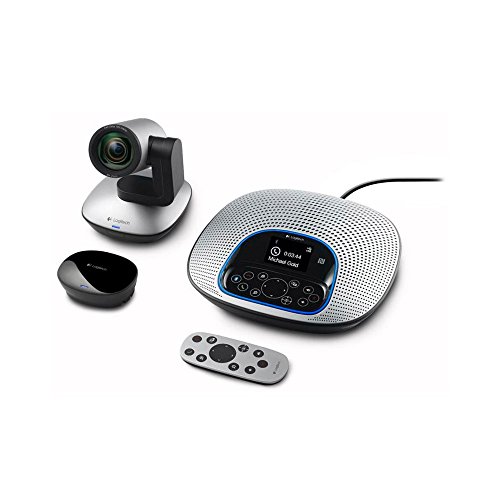
The Logitech ConferenceCam CC3000e stands out as the ideal choice for businesses looking to enhance their remote communication with a powerful all-in-one solution. With its 1080p HD camera and 90-degree field of view, it captures every detail in mid-sized meeting rooms, accommodating groups of up to 10. The omnidirectional speakerphone features noise-canceling mics, ensuring clear audio during calls. Plus, its plug-and-play USB connectivity works seamlessly with PCs or Macs, while Bluetooth and NFC pairing add versatility. Lightweight and compact, this system is perfect for online collaboration and presentations, making it an essential tool for today’s remote work environment.
Best For: Businesses seeking an all-in-one HD video and audio conferencing solution for effective remote communication in mid-sized meeting rooms.
Pros:
- High-quality 1080p HD video with a wide 90-degree field of view, ideal for group meetings.
- Omnidirectional speakerphone with noise-canceling technology ensures clear audio during calls.
- Easy plug-and-play USB connectivity along with Bluetooth and NFC pairing for added convenience.
Cons:
- Limited to mid-sized meeting rooms, may not accommodate larger groups effectively.
- Compact design may lack some advanced features found in more expensive conferencing systems.
- Potential return fees for misrepresented conditions and higher restocking fees for damaged items.
Logitech Group Expansion Microphones for Video & Audio Conferencing, Black

For larger groups in professional settings, the Logitech Group Expansion Microphones are an essential addition to your video conferencing setup. These microphones extend your audio range from 20 ft. to 28 ft., accommodating up to 20 participants—perfect for meetings that require enhanced communication. With a simple plug-and-play connection to the Logitech Group speakerphone and 8 ft. cables, you can easily position them around your conference table. Plus, the mute button and indicator light allow for effortless control. Elevate your meetings with superior audio clarity and coverage, ensuring everyone’s voice is heard loud and clear.
Best For: Larger groups in professional settings who require enhanced audio clarity during video conferencing.
Pros:
- Extended audio range accommodates more participants, making it ideal for meetings with up to 20 people.
- Simple plug-and-play connectivity allows for quick setup and flexible placement with 8 ft. cables.
- Mute button and indicator light provide easy control over the audio during discussions.
Cons:
- Requires Logitech Group speakerphone for functionality, limiting compatibility with other systems.
- Additional investment needed for expansion microphones if the initial setup did not include them.
- Cables may require management to avoid clutter in larger conference setups.
TONGVEO All-in-One Conference Room Video Camera System

Designed specifically for small-to-medium conference rooms, the TONGVEO All-in-One Conference Room Video Camera System delivers a thorough solution for businesses seeking professional-grade video conferencing. With HD 1080p resolution and a 3x optical zoom, you’ll enjoy stunning video quality. Its AI auto-tracking feature keeps speakers in view, while the full-duplex microphone array captures sound clearly within a 16.4-foot range. Easy to set up via USB or HDMI, it works seamlessly with popular video conferencing apps. Plus, the Bluetooth speakerphone enhances audio, making it perfect for meetings with 8-12 participants. Experience effortless communication with TONGVEO.
Best For: Businesses seeking a professional-grade video conferencing solution for small-to-medium conference rooms.
Pros:
- High-quality video with Full HD 1080p resolution and 3x optical zoom for enhanced clarity.
- AI auto-tracking feature ensures speakers are always in view, improving the meeting experience.
- Easy setup with plug-and-play functionality compatible with major video conferencing apps.
Cons:
- Limited range of the microphone array, which may not capture sound effectively beyond 16.4 feet.
- Wired PTZ camera may restrict placement options compared to fully wireless solutions.
- Battery life of 6-8 hours may be insufficient for longer meetings without access to power.
Poly Studio P15 Personal Video Bar

Elevating your video conferencing experience, the Poly Studio P15 Personal Video Bar is perfect for professionals seeking exceptional audio and visual clarity. With its premium 4K video and automatic camera framing, you’ll enjoy brilliant colors and sharp images. The powerful integrated speaker and advanced multi-microphone array guarantee pristine audio capture, while intelligent features like NoiseBlockAI keep distractions at bay. Whether you’re in a home office or a micro huddle room, its versatility shines. Plus, it’s compatible with PC and Mac, making setup a breeze. Customize your experience with the Poly Lens app for ideal performance tailored to your needs.
Best For: Professionals who require exceptional audio and visual clarity for video conferencing in various settings.
Pros:
- Premium 4K video quality with automatic camera framing for sharp images.
- Powerful integrated speaker and multi-microphone array ensure clear audio capture.
- Versatile compatibility with PC and Mac, and works seamlessly with popular video conferencing services.
Cons:
- USB-A adapter not included, which may require an additional purchase for some users.
- Tripod-ready design may not be suitable for all setups without additional equipment.
- Higher price point compared to standard webcams, which may not suit all budgets.
Bose Videobar VB1- Video Soundbar for Home Office or Small Conference Rooms

The Bose Videobar VB1 is perfect for anyone looking to enhance their home office or small conference room with high-quality audio and video capabilities. This all-in-one video soundbar features six beam-steering microphones that focus on voices while minimizing background noise, ensuring you’re always heard clearly. With auto EQ technology, the audio is optimized for everyone in the room. The 4K ultra-HD camera with autoframing captures all participants and objects, adding to the meeting experience. Plus, it seamlessly integrates with platforms like Microsoft Teams, Google Hangouts Meet, and Zoom, making it a versatile choice for your video conferencing needs.
Best For: Professionals working from home or in small conference rooms who need reliable audio and video for online meetings.
Pros:
- High-quality audio with six beam-steering microphones that minimize background noise.
- 4K ultra-HD camera with autoframing for clear visibility of participants and presentation materials.
- Compatibility with major Unified Communications platforms like Microsoft Teams, Google Hangouts Meet, and Zoom.
Cons:
- Limited to small spaces, not ideal for larger conference rooms.
- USB connection required for optimal performance, which may limit flexibility in setup.
- Price point may be higher compared to basic video conferencing solutions.
Factors to Consider When Choosing a Video Conferencing Audio System
When choosing a video conferencing audio system, you need to take into account several key factors. Audio quality standards, microphone range and sensitivity, and compatibility with your preferred platforms can make a big difference in your experience. Plus, think about ease of setup and the design to guarantee it fits well in your space.
Audio Quality Standards
Choosing the right audio system for video conferencing can greatly impact the quality of your discussions, especially since clear communication is essential. Look for systems with full-duplex capabilities, allowing you to speak and listen simultaneously without interruptions. Beamforming microphones are key, as they capture sound from specific directions while reducing background noise, enhancing conversation clarity. Advanced noise cancellation helps eliminate distracting ambient sounds, so you can focus on what’s being said. Pay attention to audio frequency response, aiming for a range between 200Hz to 8KHz to verify all vocal frequencies are clearly reproduced. Finally, consider systems that integrate with Bluetooth and other wireless technologies for seamless connectivity with your devices, making your conferencing experience even more effective.
Microphone Range and Sensitivity
Microphone range and sensitivity play pivotal roles in ensuring a seamless video conferencing experience. The microphone range determines how far you can be from the mic while still being clearly heard, with some systems effective up to 28 feet. Sensitivity levels reveal how well a microphone picks up sound; greater sensitivity captures audio from quieter speakers or faint sounds around the room. Consider systems with beamforming microphones, which focus on voices from specific directions and minimize background noise for enhanced clarity. Full-duplex audio capabilities are essential, allowing you to speak and listen simultaneously, ensuring a natural conversation flow. Finally, the number of microphones can greatly impact audio performance, covering larger areas and reducing dead zones.
Compatibility With Platforms
Audio quality is only one piece of the puzzle in creating an effective video conferencing setup. You’ll want to make sure your audio system is compatible with major platforms like Zoom, Microsoft Teams, and Google Meet for seamless integration. Look for systems certified for specific applications, such as Skype for Business or optimized for Microsoft Lync. Plug-and-play functionality makes it easier to use across different operating systems, like Windows and macOS. Check how the audio system connects—USB and Bluetooth options enhance versatility with various devices. Additionally, consider advanced features like noise cancellation or beamforming microphones, as these can greatly improve audio clarity during conferences on multiple platforms. Compatibility is key to a smooth and productive meeting experience.
Ease of Setup
When it comes to setting up a video conferencing audio system, ease of setup can make a considerable difference in your overall experience. Look for systems with plug-and-play functionality, so you can connect quickly using just a USB. Devices that integrate audio and video components help minimize clutter by reducing the number of cables and components you need. Wireless connectivity options, like Bluetooth, can simplify the process even further. Verify the system is compatible with popular video conferencing applications, as this often means less complex configuration. Additionally, check for clear setup instructions and user-friendly interfaces, which can greatly streamline your initial installation and configuration. Choosing a system that prioritizes ease of setup will enhance your video conferencing experience.
Design and Aesthetics
Design and aesthetics are essential factors to contemplate when choosing a video conferencing audio system. You’ll want a compact design that minimizes cable clutter, helping maintain a clean, professional workspace. Sleek, low-profile systems can blend seamlessly into various office environments, enhancing your overall decor. Consider the materials and finishes; options like matte or glossy surfaces can complement your existing furniture and elevate the visual appeal of your setup. Color choices should align with your office style, as a well-matched audio system contributes to a cohesive meeting space. Finally, look for ergonomic design elements like user-friendly controls and easy accessibility, ensuring an aesthetically pleasing appearance while enhancing the overall user experience.
