The Upgraded Wireless HDMI Transmitter review centers on a practical wireless video kit for sending a source to two displays, with support for expanding to six screens.
Its strongest appeal is straightforward 1080p mirroring without an app, Bluetooth, Wi-Fi setup, or complicated pairing.
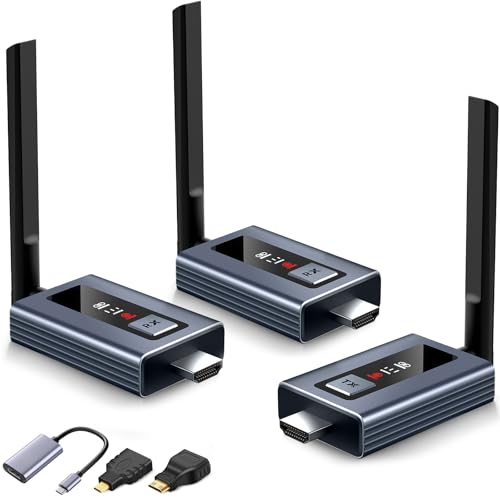
Upgraded Wireless HDMI Transmitter Review Summary
The Upgraded Wireless HDMI Transmitter suits people who want to connect a laptop, camera, Blu-ray player, TV box, or other HDMI source to multiple screens while reducing cable runs.
The package includes one transmitter and two receivers, plus adapters for USB-C, mini HDMI, and micro HDMI connections.
That makes it particularly flexible for presentations, classrooms, bars, churches, and home entertainment setups.
The listing describes a five-second plug-and-play connection, a visible LED display for connection and signal information, and a line-of-sight range of up to 165 feet.
It supports 4K input but outputs true 1080p at 60 Hz.
Those specifications make the system more suitable for clean, responsive screen sharing than for a native-4K wireless cinema setup.
For buyers prioritizing simple multi-screen 1080p distribution, this is a well-targeted bundle; buyers demanding native 4K output or dependable performance through several solid walls should look elsewhere.
Review Scorecard
| Category | Score | Editorial assessment |
|---|---|---|
| Setup simplicity | 9/10 | Plug-and-play design is intended to connect in about five seconds without apps or Wi-Fi configuration. |
| Multi-screen capability | 9/10 | Two receivers are included, with support for up to six displays when additional receivers are added. |
| Image output | 8/10 | 1080p at 60 Hz is a useful target, while 4K is input-only according to the listing. |
| Compatibility | 8/10 | HDMI, USB-C, mini HDMI, and micro HDMI adapters broaden source-device support. |
| Wireless range | 8/10 | The stated 165-foot maximum is for line-of-sight use and may decrease through solid walls. |
| Status visibility | 8/10 | The LED display reports connection, signal, output, and power information. |
| Home-theater fit | 7/10 | It offers low-latency 1080p distribution, but it is not a native-4K output solution. |
Key Features and Specifications of Upgraded Wireless HDMI Transmitter
The central design is a wireless HDMI transmitter-and-receiver system.
The transmitter connects to the video source, while the receivers connect to remote displays.
The supplied bundle has two receivers, allowing two screens to receive the source at the same time.
The product listing says the system can expand to six screens by adding compatible receivers, making it more scalable than a basic one-to-one wireless HDMI kit.
The headline output is 1080p at 60 Hz.
The system is described as accepting 4K input, but its true output is 1080p, so buyers should set expectations accordingly.
For slides, television, sports, classroom material, business demonstrations, and general video, 1080p60 is a sensible balance of clarity and bandwidth.
It should not be treated as a way to preserve 4K detail on a 4K television.
The transmitter uses 2.4 GHz and 5 GHz wireless bands, with external high-gain antennas and a claimed range of up to 165 feet or 50 meters in line-of-sight conditions.
The manufacturer also claims latency below 0.1 seconds.
Since the listing specifically warns that solid walls can affect transmission distance and speed, room layout matters.
A large open room or direct path between units is a better environment than a multi-room installation with several dense walls.
The LED screen is one of the more useful design choices.
Rather than relying only on a blank indicator or guessing whether a connection failed, users can see information about connection status, signal status, output status, and power.
That does not eliminate every troubleshooting issue, but it should make initial setup and fault-finding easier.
Compatibility is helped by the included conversion cables and adapters: one HDMI-to-USB-C/Type-C conversion cord, one mini HDMI-to-HDMI adapter, and one micro HDMI-to-HDMI adapter.
The listing names laptops, PCs, HDMI cameras, Blu-ray players, and TV boxes among compatible source types.
Compatibility still depends on the source having the appropriate output and on the display accepting HDMI, but the included accessories reduce the need to buy separate adapters immediately.
The system does not require an application, Bluetooth, or an existing Wi-Fi network.
That is important for meeting rooms, classrooms, and temporary installations where users may not control the network or want to avoid pairing each device.
The manufacturer also advertises a 24-month warranty and replacement service with technical guidance, which is a useful consideration for a device intended for repeated presentations or shared spaces.
Pros and Cons of Upgraded Wireless HDMI Transmitter
Pros
- Simple connection concept: The listing promises plug-and-play operation with an approximately five-second connection process.
- Two receivers included: Buyers can send one source to two displays without purchasing a second receiver immediately.
- Expandable design: The system is described as supporting up to six screens with additional receivers.
- Useful 1080p output: 1080p at 60 Hz is appropriate for presentations, streaming, sports, education, and everyday video.
- Visible diagnostics: The LED display exposes connection, signal, output, and power information.
- Broad source support: HDMI, USB-C, mini HDMI, and micro HDMI accessories cover many laptop and camera scenarios.
- Long stated range: Up to 165 feet in line-of-sight conditions gives installers more flexibility than a short cable run.
Cons
- No native 4K output: The system can accept 4K input but is specified for 1080p output.
- Walls can reduce performance: The advertised distance depends on conditions, and solid walls may affect speed and range.
- Expansion requires more receivers: Six-screen operation is not the same as having six receivers in the initial bundle.
- Limited evidence for demanding uses: The supplied product record contains feature claims but no independent testing data for interference, sustained throughput, or real-world latency.
- Wireless conditions still matter: Other devices, room construction, and placement can influence a wireless video link.
Who Should Buy Upgraded Wireless HDMI Transmitter?
This kit is a strong fit for a presenter who wants to show a laptop on a room display without running a long HDMI cable.
The included USB-C conversion cord is especially helpful for newer laptops that rely on USB-C video output.
The mini HDMI and micro HDMI adapters also make the bundle more relevant to camera owners and compact devices.
It also makes sense for a home with two televisions that need to display the same source, or for a bar, church, classroom, conference room, or training space that wants one feed on several screens.
The expansion claim gives organizations room to start with two displays and add more compatible receivers later.
Skip it if your priority is native 4K viewing, if the source and display are separated by several solid walls, or if you need proven performance for competitive gaming or production-critical video.
The listing supports a low-latency use case, but the available evidence does not establish how the system behaves under every interference pattern or at the maximum stated range.
Buyers should also remember that this is a source-mirroring system, not a way to create independent content on each screen.
How Upgraded Wireless HDMI Transmitter Fits Different Installations
Open-room presentations
In a conference room or classroom with a relatively clear path, the combination of plug-and-play setup, 1080p60 output, and status information addresses the main friction points of shared displays.
The lack of an app or network dependency can simplify handoffs between presenters.
Multi-display venues
The two included receivers make a basic dual-screen installation immediately possible, while the claimed six-screen expansion supports larger venues.
This is most useful when every display should show the same source; it is not a substitute for a system designed to distribute different feeds independently.
Cameras and portable sources
The mini HDMI and micro HDMI adapters broaden the kit beyond conventional laptops and set-top boxes.
A camera-based presentation or live demonstration can therefore fit the same wireless workflow, provided the camera supplies a compatible HDMI signal.
Home entertainment
For a living room or media area, 1080p60 and the stated low-latency target should cover ordinary video use.
The key compromise is resolution: 4K source compatibility does not mean 4K detail reaches the television.
Alternatives to Upgraded Wireless HDMI Transmitter
Buyers who want a more established one-to-one wireless HDMI approach can compare the IOGEAR Wireless HDMI Transmitter and Receiver.
It is worth considering when a single remote display matters more than six-screen expansion.
For users who want a compact presentation-focused system, the J-Tech Digital Wireless HDMI Extender is another product line to investigate.
Its appeal is the same broad category, but buyers should compare the exact resolution, range, and included receiver count for the chosen model.
If native 4K distribution is the deciding factor, search the 4K wireless HDMI transmitter and receiver category and check carefully whether each listing specifies 4K output rather than merely 4K input.
That distinction is central to choosing between those products and the Upgraded Wireless HDMI Transmitter.
Is Upgraded Wireless HDMI Transmitter Worth It?
The Upgraded Wireless HDMI Transmitter is worth considering when the goal is uncomplicated wireless 1080p distribution to two screens, with the option to expand to six.
Its LED diagnostics, broad adapter bundle, claimed 165-foot line-of-sight range, and no-app setup give it a practical edge for presentations, classrooms, venues, and shared home entertainment.
The decision is less favorable for a buyer who expects native 4K output, guaranteed wall-penetrating range, or independently verified gaming-grade latency.
Choose it for flexible multi-screen 1080p convenience; skip it when 4K preservation or difficult-building reliability is the primary requirement.
