Choosing an audio interface with low latency can make the difference between a smooth recording session and a frustrating one. If you monitor vocals, guitars, or synths in real time, every millisecond matters.
This roundup highlights 10 options that balance speed, sound quality, connectivity, and workflow features for home studios, streaming setups, and mobile rigs.
Best 10 Audio Interface with Low Latency Picks for 2026
Best for Guitar FX Control
XTONE PRO 192K Mobile Audio Interface
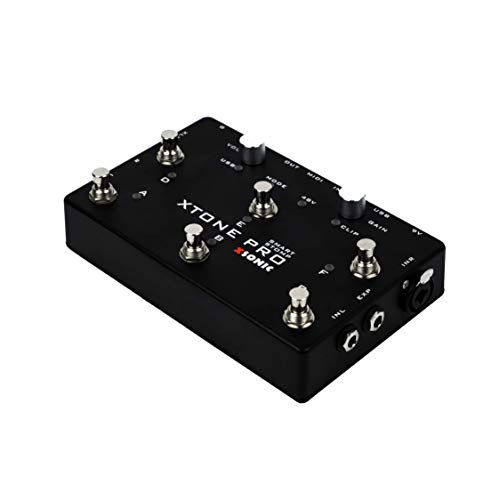
- Ultra-low latency for real-time guitar and vocal plugins
- 192kHz recording with 114dB dynamic range
- Expression pedal input and 6 MIDI foot switches
Best For: Guitarists and vocalists using software effects, amp sims, and mobile or desktop rigs.
Best for Solo Recordings
Focusrite Scarlett Solo 3rd Gen

- Bright, clean Scarlett preamp with Air mode
- High-headroom guitar input for distortion-free takes
- 24-bit/192kHz conversion with balanced monitoring
Best For: Singer-songwriters, podcasters, and solo creators who record vocals and guitar.
Best for Guitar FX
XSONIC Xtone Mobile Audio Interface

- Ultra-low-latency design for live guitar processing
- 192kHz / 108dB specs for detailed audio
- iOS, Windows, and Mac compatibility with pedal inputs
Best For: Guitarists who want responsive amp sims and effects on mobile or desktop rigs.
Best for Multi-Input Home Studios
Behringer U-PHORIA UMC404HD 4x4 USB Interface

- 4-in/4-out design for flexible recording setups
- 24-bit/192 kHz support for detailed audio capture
- Midas preamps and MIDI I/O add studio usefulness
Best For: Home studios and small bands that need multiple inputs without spending big.
Best for Low-Latency Monitoring
Elgato Wave XLR MK.2 USB Audio Interface

- 80dB gain supports a wide range of XLR microphones
- Ultra-low-latency monitoring keeps live audio responsive
- Built-in DSP adds compression, EQ, and voice enhancement
Best For: Streamers and podcasters who want responsive monitoring and easy voice control.
Best for Simple Low-Latency Tracking
PIYONE 2X2 24-bit/192kHz USB-C Interface

- Zero-latency direct monitoring for easier tracking
- 24-bit/192kHz recording with clean, detailed sound
- Two combo inputs with USB-C bus-powered convenience
Best For: Singers, podcasters, and home-studio creators who want a plug-and-play interface with direct monitoring and flexible combo inputs.
Best for Zero-Latency Monitoring
PreSonus AudioBox 96 USB Interface

- Zero-latency monitoring via Mix control
- Two mic/instrument inputs with MIDI I/O
- Bus-powered USB portability and software bundle
Best For: Home recordists and mobile creators who want simple, low-latency monitoring.
Best for Streamers & Podcasters
Fender Quantum LT 4 4x2 USB-C Audio Interface
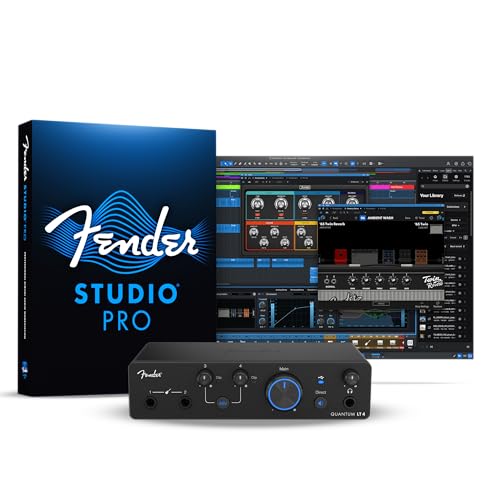
- Dual MAX-HD preamps with 75 dB gain
- Custom low-latency drivers and direct monitoring
- Loopback, headphone amp, and balanced outputs
Best For: Creators who want a low-latency interface for streaming, podcasting, and simple music recording.
Best Budget Zero-Latency Monitoring
M-AUDIO M-Track Solo USB Audio Interface

- Zero-latency direct monitoring for cleaner tracking
- Combo XLR/line input plus instrument input
- Bus-powered, compact, and easy to take anywhere
Best For: Beginners and budget-conscious creators who need a simple interface for solo recording, podcasting, and streaming.
Best for Simple Home Recording
Behringer UCA202 USB Audio Interface Bundle

- Ultra-low latency for real-time monitoring
- Includes closed-back studio headphones
- Driver-free, bus-powered setup for Mac or Windows
Best For: Beginners and home users who want an easy, budget-friendly interface bundle.
Best for Guitar FX Control – XTONE PRO 192K Mobile Audio Interface
If you want an audio interface with low latency for guitar and vocal plugins, the XTONE PRO 192K is built around that use case. It combines 192kHz/24-bit recording, a mic preamp with phantom power, and hands-on MIDI foot control for software-based rigs.
Best For: Guitarists and vocalists who use VSTs, amp sims, and effects software on iOS, Mac, or PC.
Pros:
- Ultra-low latency design helps make real-time effects feel responsive
- 192kHz audio and 114dB dynamic range for high-resolution recording
- Expression pedal input plus 6 definable MIDI foot switches for control
- Mic preamp and phantom power support vocal and mic recordings
Cons:
- BIAS FX Essential pack redeem code is iOS only
- Feature set is geared more toward guitar workflows than general studio use
- Mobile-focused design may be more specialized than a basic desktop interface
Overall, the XTONE PRO 192K stands out as an audio interface with low latency for players who want tight plugin response and foot-controlled performance tools. If your priority is live guitar processing rather than a simple two-channel interface, it offers a strong, focused feature set.
Best for Solo Recordings – Focusrite Scarlett Solo 3rd Gen
If you want an audio interface with low latency for simple vocal-and-guitar tracking, the Focusrite Scarlett Solo 3rd Gen is an easy pick. It keeps the setup lean while delivering clean conversion, a responsive feel, and the kind of sound quality that works well for home studios, podcasts, and songwriter demos.
Best For: Singer-songwriters, podcasters, and beginners who want a straightforward 1-in/2-out interface for recording vocals and guitar.
Pros:
- Clear, upgraded mic preamp with Air mode for brighter vocals and acoustic instruments
- High-headroom instrument input helps prevent clipping when recording guitar or bass
- 24-bit/192kHz converters deliver polished recording and playback quality
- Balanced outputs and headphone monitoring keep listening clean and practical
Cons:
- Only one mic input, so it is not ideal for multi-mic recording sessions
- Best suited to solo work rather than larger band setups
- No bundled MIDI connections for keyboard-based rigs
Overall, the Scarlett Solo 3rd Gen is a strong choice if you need an audio interface with low latency-style responsiveness, dependable sound, and a no-fuss workflow. It is especially appealing for creators who value quick setup and solid core recording features over extra I/O.
Best for Guitar FX – XSONIC Xtone Mobile Audio Interface
If you need an audio interface with low latency for guitar effects, amp sims, or VST add-ons, the XSONIC Xtone is built around that exact workflow. Its 192kHz sampling rate, 108dB dynamic range, and dedicated guitar input make it a focused option for players who want responsive monitoring and clean conversion on desktop or mobile rigs.
Best For: Guitarists using amp modelers, pedal-style effects, and iOS or computer-based practice/recording setups.
Pros:
- Ultra-low-latency design aimed at real-time guitar effects use
- 192kHz / 108dB specs for clean, detailed audio capture
- Works with iOS, Windows, and Mac, with bus power support
- Includes expression pedal and footswitch input for hands-on control
Cons:
- Guitar-focused layout may be less versatile for general studio needs
- BIAS FX Essential bundle is iOS-only
For players who want a compact audio interface with low latency and a guitar-first feature set, the Xtone stands out more for performance feel than all-purpose recording flexibility. It is a smart pick if your priority is fast response, mobile convenience, and direct control over your effects chain.
Best for Multi-Input Home Studios – Behringer U-PHORIA UMC404HD 4×4 USB Interface
If you want an audio interface with low latency that can handle a few mics, instruments, or outboard gear at once, the Behringer U-PHORIA UMC404HD is a practical pick. It offers 4-in/4-out connectivity, 24-bit/192 kHz resolution, and Midas-designed mic preamps, making it a strong fit for small studios that need flexibility without a big price tag.
Best For: Home recordists, podcasters, and small bands that need multiple inputs and straightforward USB recording.
Pros:
- Four inputs and four outputs for more routing options than basic two-channel interfaces
- 24-bit/192 kHz audio support for clean, detailed recording
- Midas mic preamps help deliver solid vocal and instrument capture
- MIDI I/O adds convenience for keyboards and controllers
Cons:
- Larger than entry-level interfaces, so it is less ideal for ultra-portable setups
- Feature set is focused on utility rather than premium extras
Overall, the UMC404HD is a sensible choice if you need an audio interface with low latency and more than the usual two channels. It is especially appealing for buyers who care more about recording flexibility and dependable performance than a minimalist setup.
Best for Low-Latency Monitoring – Elgato Wave XLR MK.2 USB Audio Interface
If you want an audio interface with low latency for streaming or recording, the Elgato Wave XLR MK.2 is built to keep your mic chain clean, responsive, and easy to control. It combines 80dB of gain, direct monitoring, and onboard DSP so you can shape your sound without adding extra delay.
Best For: Streamers, podcasters, and creators who want fast monitoring, strong mic gain, and simple hands-on control in one compact interface.
Pros:
- 80dB of gain can handle demanding XLR microphones with room to spare
- Ultra-low-latency monitoring is ideal for live voice work and streaming
- Built-in effects, compression, and EQ reduce the need for extra software
- Touch mute and LED feedback make level control quick and intuitive
Cons:
- Single-XLR design keeps it focused, but not as flexible as larger mixers
- Best features are easiest to access when using Wave Link software
For creators who care most about responsiveness, the Wave XLR MK.2 stands out as an audio interface with low latency that still delivers strong gain and useful DSP. It’s a smart fit if you want reliable monitoring and polished voice sound without a complicated setup.
Best for Simple Low-Latency Tracking – PIYONE 2X2 24-bit/192kHz USB-C Interface
If you want an audio interface with low latency for straightforward recording on a laptop or mobile setup, this PIYONE 2×2 unit is built to keep things simple. It offers class-compliant USB-C connectivity, 24-bit/192kHz recording, and direct monitoring for clean tracking without extra driver hassle.
Best For: Singers, podcasters, and home-studio creators who want a plug-and-play interface with direct monitoring and flexible combo inputs.
Pros:
- Zero-latency direct monitoring helps performers track comfortably
- 24-bit/192kHz converters deliver detailed, studio-quality capture
- Two combo inputs support mics, line sources, and Hi-Z instruments
- USB-C bus power and class-compliant setup make it easy to use
Cons:
- Only two inputs, so it is not ideal for multi-mic sessions
- Best suited to basic workflows rather than advanced studio routing
Overall, this is a practical pick if you need an audio interface with low latency and no complicated setup. It focuses on the essentials—solid sound, direct monitoring, and portable convenience—making it a smart option for simple recording rigs.
Best for Zero-Latency Monitoring – PreSonus AudioBox 96 USB Interface
If you want an affordable audio interface with low latency for simple home recording, the PreSonus AudioBox 96 keeps the setup straightforward. It gives you two mic/instrument inputs, MIDI I/O, and bus-powered portability, while the Mix control helps you monitor your input signal without distracting delay.
Best For: Singer-songwriters, podcasters, and mobile creators who want a compact interface that’s easy to carry and easy to monitor.
Pros:
- Zero-latency monitoring mix control for direct input blending
- Two Class-A mic preamps plus two instrument inputs and MIDI I/O
- 24-bit/96 kHz recording with bus-powered USB 2.0 convenience
- Includes a large software bundle for getting started quickly
Cons:
- Only two inputs, so it’s not ideal for larger sessions
- USB 2.0 design is basic compared with newer feature-rich interfaces
For small setups, the AudioBox 96 hits a practical sweet spot: simple controls, solid conversion, and monitoring that works well when you need an audio interface with low latency without spending much.
Best for Streamers & Podcasters – Fender Quantum LT 4 4×2 USB-C Audio Interface
The Fender Quantum LT 4 is a practical audio interface with low latency for creators who want flexible input options, clean vocal capture, and easy monitoring in one desktop unit. Its 4×2 USB-C design, dual MAX-HD mic preamps, and loopback support make it a strong fit for music production, streaming, and podcasting.
Best For: Streamers, podcasters, and home-recording musicians who need low-latency monitoring, dual mic inputs, and simple loopback routing.
Pros:
- Two MAX-HD mic preamps with 75 dB of gain for detailed vocal and instrument recording
- Dual instrument inputs plus balanced outputs and a strong headphone amp
- Custom low-latency drivers and near-zero-latency direct monitoring
- Loopback audio is handy for streaming, tutorials, and content creation
Cons:
- Only 4×2 I/O, so larger multi-source setups may outgrow it
- Best features are tied to Fender software, which adds an extra ecosystem step
Overall, the Quantum LT 4 stands out as an audio interface with low latency that balances creator-friendly features with solid recording performance. It’s especially appealing if you want clean preamps, easy monitoring, and loopback without moving up to a larger studio interface.
Best Budget Zero-Latency Monitoring – M-AUDIO M-Track Solo USB Audio Interface
If you want an audio interface with low latency for home recording, podcasting, or simple streaming, the M-Audio M-Track Solo is a practical entry-level pick. It keeps setup simple with USB bus power, 48kHz recording, and direct monitoring so you can track vocals or instruments without distracting delay.
Best For: Beginners and budget-minded creators who need a compact interface for solo recording, podcasting, and streaming.
Pros:
- Zero-latency direct monitoring with a USB/Direct switch
- Combo XLR/line input plus separate instrument input for flexible recording
- Bus-powered, compact design that’s easy to carry and use anywhere
- Includes MPC Beats software to help you start recording right away
Cons:
- Only one mic input, so it is not ideal for two-person recording
- Basic feature set compared with higher-end interfaces
- Best suited to simple setups rather than advanced studio workflows
Overall, the M-Track Solo is a straightforward choice if you need an audio interface with low latency and don’t want to pay for extra channels or pro-grade extras. It focuses on the essentials: reliable input options, direct monitoring, and portable convenience.
Best for Simple Home Recording – Behringer UCA202 USB Audio Interface Bundle
Behringer UCA202 Ultra-Low Latency USB/Audio Interface, Bundle With Turnstile Audio Headphones
Check Price On AmazonIf you want an audio interface with low latency that keeps setup simple, the Behringer UCA202 bundle is a practical entry-level pick. It pairs a compact 2-in/2-out USB interface with closed-back monitoring headphones, making it easier to record, playback, and check levels without buying extra pieces.
Best For: Beginners, home recordists, and anyone who wants a no-fuss interface bundle for basic tracking and monitoring.
Pros:
- Ultra-low latency monitoring for real-time recording and playback
- Includes studio monitor headphones for an all-in-one starter setup
- 2 x RCA inputs/outputs plus optical S/PDIF for flexible connectivity
- Bus-powered and driver-free on Windows or Mac for easy setup
Cons:
- RCA I/O is less convenient than 1/4-inch connections for some studios
- Limited to 2-in/2-out, so it is not ideal for larger recording sessions
- Better suited to basic stereo recording than advanced multitrack work
Overall, this bundle is a smart value choice if you need an audio interface with low latency for straightforward recording and monitoring. It is best for users who care more about simple operation and bundled essentials than expanded studio features.
How We Picked the Best Audio Interface with Low Latency
We focused on interfaces that are practical for real-world recording and monitoring, not just impressive on paper. Priority went to solid driver support, dependable direct monitoring, clean preamps, sensible I/O options, and features that help reduce round-trip delay in everyday use.
We also considered sample rate support, bit depth, bus-powered convenience, and whether the interface suits solo creators, podcasters, guitarists, or small multitrack setups.
Quick Comparison
If you want the simplest setup, compact 2-in/2-out models are usually the easiest choice. If you need more flexibility for drums, band tracking, or multiple mics, step up to 4×4 designs. Mobile players and guitar-focused users may prefer compact interfaces with instrument inputs and low-latency guitar monitoring tools.
Key Buying Factors for an Audio Interface with Low Latency
Driver Performance and Monitoring
Low-latency hardware matters, but stable drivers matter just as much. Look for interfaces with strong ASIO, Core Audio, or class-compliant support, plus direct monitoring or DSP options if you want near-zero-delay monitoring while recording.
Input and Output Needs
Match the interface to your workflow. Solo vocal or podcast setups often need one XLR input, while singers who record guitar and vocals together may want dual combo inputs. Creators using external monitors, headphones, or outboard gear should check the output count and routing options carefully.
Bit Depth, Sample Rate, and Preamps
Higher sample rates can help in some sessions, but they are not a substitute for good drivers. Clean preamps and enough gain are especially important for dynamic microphones and quiet vocal recordings. For many buyers, a well-built interface running at 24-bit/48 kHz will outperform a poorly optimized model advertising higher numbers.
Portability and Power
Think about where you record. USB-C and bus-powered designs are ideal for travel or desktop simplicity, while larger desktop interfaces may offer more connectivity and better control for permanent studios.
Who Should Buy Which Audio Interface with Low Latency?
Solo creators and podcasters should prioritize simple operation, strong mic gain, and easy monitoring. Guitarists should look for instrument-friendly inputs and fast response when using amp sims. Producers who plan to expand later should choose a model with extra I/O, MIDI, or flexible routing. If your top priority is a responsive feel while tracking, a carefully chosen Audio Interface with Low Latency is worth more than headline specs alone.
