If you need to split audio from a modern HDMI 2.1 source without giving up 4K 120Hz performance, the right extractor matters. The best models preserve low-latency video features while sending audio to soundbars, receivers, or headphones.
This roundup focuses on practical options for gamers, home theater users, and mixed-device setups, with attention to HDR, VRR, ARC/eARC, and reliable audio outputs.
Best 10 Hdmi Audio Extractor 4K 120hz Picks for 2026
Top Pick
OREI 4K@120Hz Audio Extractor Converter
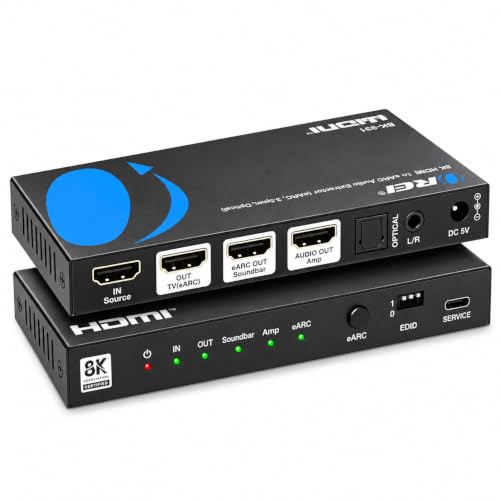
- HDMI 2.1 support up to 4K@120Hz and 8K@60Hz
- eARC, HDMI, optical, and analog audio outputs
- Supports Dolby Atmos, TrueHD, and DTS:X
Best For: Users who want a full-featured extractor for TVs, soundbars, and receivers
Best Switcher Combo
OREI 8K HDMI 2.1 2-Port Switch

- 2-in-1 HDMI switch with audio extraction
- Supports 4K@120Hz, 8K@60Hz, and 1080p@240Hz
- Optical and L/R audio outputs plus IR remote
Best For: People who want to switch between two HDMI sources and extract audio
Best Simple Extractor

- Supports 4K@120Hz and 8K@60Hz
- Optical SPDIF and 3.5mm AUX outputs
- Three audio modes: ByPass, 2.1CH, 5.1CH
Best For: People who want a simple source-device extractor without ARC/eARC
Switchable 8K Gaming Extractor
2 In 1 Out HDMI 2.1 Audio Converter
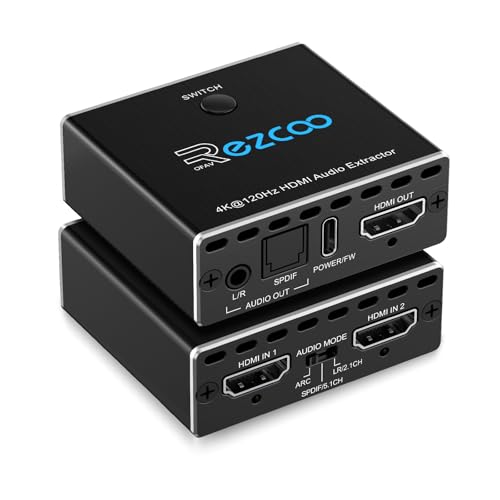
- 8K@60Hz / 4K@120Hz pass-through
- Outputs audio via HDMI, optical, or 3.5mm
- Two-source auto switching with Type-C power
Best For: Players who want one display and two HDMI sources with flexible audio extraction.
Balanced Home Theater Pick

- Supports 4K@120Hz and up to 8K@60Hz
- Optical S/PDIF plus 3.5mm audio out
- ARC, CEC bypass, and HDCP 2.3 support
Best For: Home theater setups that need reliable audio extraction and broad format support.
Feature-Rich eARC Choice
J-Tech Digital 8K HDMI Audio Extractor

- 8K@60Hz / 4K@120Hz video pass-through
- Optical, L/R, and HDMI audio outputs
- EDID switch plus eARC/ARC and CEC support
Best For: Shoppers who want flexible audio outputs and compatibility controls.
High-Refresh 4K Extractor
J-Tech Digital 4K HDMI Audio Extractor

- 4K@60Hz with 1080P@120Hz and 144Hz support
- Optical SPDIF plus 3.5mm analog outputs
- Three EDID modes for easier audio setup
Best For: Users who want high-refresh 1080p/4K60 playback with flexible audio extraction
4K120 Switch + Extractor

- Switches 4 HDMI sources to 1 display
- Supports 4K@120Hz and 8K@60Hz
- Extracts audio to optical SPDIF or 3.5mm/LR
Best For: Multi-source setups that need both HDMI switching and audio extraction
Top Pick – OREI 4K@120Hz Audio Extractor Converter
If you need an HDMI audio extractor 4k 120hz that can handle modern TVs, gaming consoles, and advanced surround formats, this OREI unit is built for that job. It supports HDMI 2.1 bandwidth, eARC pass-through, and multiple output paths, so it fits mixed home theater setups where both video quality and audio flexibility matter.
Best For: Home theater users who want 4K@120Hz video plus eARC/HDMI audio extraction for soundbars or receivers.
Pros:
- Supports up to 8K@60Hz and 4K@120Hz with HDMI 2.1 bandwidth.
- Extracts audio through HDMI, eARC, optical, or analog outputs.
- Handles Dolby Atmos, Dolby TrueHD, DTS-HD Master Audio, and DTS:X.
- Works with smart TVs, Apple TV, Roku, PS5, and Xbox Series X.
Cons:
- Optical output is limited to 5.1 channels.
- No built-in volume control.
- Some older HDMI sources may have audio issues.
This is the most feature-rich option here if you want one box for high-bandwidth video and flexible audio routing. Just make sure your TV and sound system match the eARC setup requirements for the best results.
Best Switcher Combo – OREI 8K HDMI 2.1 2-Port Switch
This hdmi audio extractor 4k 120hz option is really a 2-in-1 HDMI switch and audio extractor for people juggling multiple sources. It lets you switch between two HDMI 2.1 inputs while passing video at up to 4K@120Hz, and it also gives you optical and L/R audio output for a cleaner entertainment setup.
Best For: Gamers and streamers who need a 2-port HDMI 2.1 switch with audio extraction.
Pros:
- Switches between two HDMI 2.1 sources to one display.
- Supports up to 8K@60Hz, 4K@120Hz, and 1080p@240Hz.
- Includes optical and L/R audio extraction outputs.
- Comes with IR remote and auto input switching.
Cons:
- Does not support CEC.
- Not compatible with capture cards.
- Requires manual switching when auto switching is not desired.
This model makes sense if your real need is source switching as much as audio extraction. It is especially practical for a TV or monitor setup with two high-bandwidth devices and a separate sound system.
Best Budget Friendly – 8K eARC HDMI Audio Extractor Converter
If you want an HDMI audio extractor 4k 120hz with flexible output options, this compact converter offers a lot of routing choices for the money. It supports HDMI, optical, RCA L/R, and 3.5mm audio, and it can also operate in eARC/ARC mode when you connect it to a compatible TV.
Best For: Budget-conscious setups that need eARC/ARC support and multiple analog or optical audio outputs.
Pros:
- Supports up to 8K@60Hz and 4K@120Hz video.
- Offers eARC/ARC, PASS, R/L, and SPDIF operating modes.
- Provides optical, RCA L/R, and 3.5mm audio outputs.
- Compatible with many HDMI sources, including PS5, Fire TV, and Apple TV.
Cons:
- Requires external 5V USB power.
- Television cannot be used as the HDMI IN source.
- Analog outputs only support 2.0 PCM in certain modes.
This is a versatile pick if you need both ARC-style extraction and legacy audio connections in one device. Its mode-based design is useful, but you will want to pay close attention to the setup instructions for the audio outputs you plan to use.
Best Simple Extractor – 8K HDMI 2.1 Audio Extractor
This HDMI audio extractor 4k 120hz is a straightforward choice if you want to pull audio from a source device without adding ARC or eARC complexity. It supports HDMI 2.1 video up to 4K@120Hz, then sends sound out through optical SPDIF and 3.5mm AUX for speakers, soundbars, headphones, or an amplifier.
Best For: Users who want a simple HDMI 2.1 audio extractor for consoles, streamers, and PCs.
Pros:
- Supports 8K@60Hz and 4K@120Hz video.
- Provides optical SPDIF and 3.5mm audio outputs.
- Includes three audio modes: ByPass, 2.1CH, and 5.1CH.
- Works with PS4/5, Fire TV, Blu-ray players, PCs, and laptops.
Cons:
- Does not support ARC or eARC.
- TV cannot be used as the input source.
- SPDIF output is limited to 5.1 channels, not 7.1.
This model keeps things focused on source-device extraction rather than TV audio return. If your setup is built around a console or media player feeding a display and external speakers, the simpler design can be easier to manage.
Switchable 8K Gaming Extractor – 2 In 1 Out HDMI 2.1 Audio Converter
If you need an HDMI audio extractor 4k 120hz setup that can also switch between two sources, this 2-in-1-out model is built for that job. It passes up to 8K@60Hz and 4K@120Hz video while extracting audio for a soundbar, AV receiver, or stereo system.
Best For: Gamers and desktop users who want one display, dual HDMI source switching, and flexible audio breakout options.
Pros:
- Supports 8K@60Hz and 4K@120Hz pass-through for modern consoles and PCs
- Extracts audio through HDMI, SPDIF optical, or 3.5mm stereo output
- Handles 7.1-channel audio on HDMI out, plus 5.1-channel optical
- Automatic switching and plug-and-play setup with Type-C power
Cons:
- Only supports 2 in 1 out, not bi-directional switching
- Requires a qualified HDMI 2.1 cable under 10 ft / 3 m for best stability
- ARC mode may require some adjustment depending on your setup
This is a strong pick if your priority is switching between two HDMI sources without losing high-bandwidth video support. It is especially practical for PS5, Xbox Series X, and PC setups where both audio extraction and smooth 4K 120Hz passthrough matter.
Balanced Home Theater Pick – OREI 8K HDMI Audio Extractor
For a straightforward HDMI audio extractor 4k 120hz setup, this OREI unit keeps the focus on clean pass-through and dependable audio output. It supports 4K@120Hz video, plus optical and 3.5mm analog audio extraction for TVs, monitors, projectors, and receivers.
Best For: Home theater users who want a compact extractor with broad format support and ARC compatibility.
Pros:
- Passes 4K@120Hz and up to 8K@50/60Hz video
- Supports Optical S/PDIF and 3.5mm stereo audio output
- Includes ARC support, CEC bypass, and HDCP 2.3 compliance
- Handles Dolby Vision, HDR10+, Dolby Atmos, and DTS:X formats
Cons:
- Does not support eARC
- TV remote volume control is not supported
- Best results depend on using the required HDMI 2.1 cable
This model is a good fit if you want a compact, metal-bodied extractor that covers both gaming and entertainment devices. It offers a solid mix of bandwidth, audio format support, and ARC features without getting overly complicated.
Feature-Rich eARC Choice – J-Tech Digital 8K HDMI Audio Extractor
This HDMI audio extractor 4k 120hz option is aimed at users who want strong compatibility and more control over audio routing. It passes up to 8K@60Hz or 4K@120Hz video and can extract audio through optical, analog L/R, or HDMI audio out.
Best For: Users who want eARC/ARC support, EDID control, and multiple audio output paths in one compact unit.
Pros:
- Supports 8K@60Hz and 4K@120Hz video pass-through
- Offers optical, L/R analog, and HDMI audio outputs
- Includes eARC/ARC extraction and CEC control support
- EDID management via DIP switch helps with device compatibility
Cons:
- Optical output is limited to standard Dolby Digital 5.1
- L/R output is stereo only
- Audio format support depends on the output port you use
If you need more setup flexibility than a basic extractor provides, this J-Tech model stands out. It is especially useful when you want to fine-tune compatibility across gaming consoles, media players, TVs, and sound systems.
8K/4K120 Audio Extractor – 8K 60Hz HDMI Audio Extractor
If you need an HDMI audio extractor 4k 120hz that keeps up with modern consoles and streaming boxes, this model is built around HDMI 2.1 bandwidth and flexible audio outputs. It supports 4K120Hz and 8K60Hz video pass-through while extracting sound to optical, coaxial, RCA/LR, or 3.5mm, making it a practical fit for mixed home theater setups.
Best For: Users who want HDMI 2.1 video support with multiple audio output options for TVs, soundbars, and amps.
Pros:
- Supports 4K120Hz and up to 8K60Hz video with HDMI 2.1 / 48Gbps bandwidth.
- Multiple audio outputs: optical, coaxial, LR, and 3.5mm.
- EDID management with auto and fixed modes for easier setup.
- Works with common sources like PS5, Xbox, Fire TV, and PCs.
Cons:
- Optical and coaxial output support DTS 5.1, while 3.5mm/LR are PCM 2.0 only.
- Does not support 7.1 channel audio.
- May need USB power for stable operation in some setups.
Overall, this is a flexible extractor for high-refresh HDMI setups, especially if you want several analog and digital audio connection choices in one box. Just keep the cable length guidance and audio-format limits in mind.
High-Refresh 4K Extractor – J-Tech Digital 4K HDMI Audio Extractor
This HDMI audio extractor 4k 120hz pick is best viewed as a high-refresh 4K audio break-out for systems that need dependable SPDIF or stereo analog output. It supports 4K@60Hz along with 1080P@120Hz and 1080P@144Hz, so it suits setups where gaming refresh rates matter more than 4K120 passthrough.
Best For: Buyers who need 4K@60Hz video plus optical or 3.5mm audio extraction with flexible EDID control.
Pros:
- Supports 4K@60Hz, 1080P@120Hz, and 1080P@144Hz.
- Offers optical SPDIF and 3.5mm analog audio outputs.
- Three EDID modes: 2CH, 5.1CH, and pass-through.
- Handles HDR10, HDCP 2.2, and Dolby Digital/DTS via optical.
Cons:
- Does not downmix 5.1 digital audio to the 3.5mm analog output.
- Not compatible with HDMI-ARC function.
- May have compatibility issues with some devices, including specific Apple TV and Xfinity boxes.
If your priority is stable audio extraction rather than 4K120 video passthrough, this J-Tech model offers strong refresh-rate support and straightforward output options. It is a solid fit for systems that can live within HDMI 2.0b limits.
4K120 Switch + Extractor – HDMI 2.1 Switch 4 in 1 Out
For shoppers wanting an HDMI audio extractor 4k 120hz plus source switching, this model combines a 4×1 HDMI 2.1 switch with audio de-embedding. It supports up to 4K@120Hz and 8K@60Hz, while sending audio to optical SPDIF or 3.5mm/LR outputs, which makes it a compact hub for game consoles, PCs, and AV setups.
Best For: Users who need to switch between multiple HDMI sources while extracting audio for a soundbar, receiver, or headphones.
Pros:
- 4-in/1-out HDMI 2.1 switch with support up to 4K@120Hz and 8K@60Hz.
- Audio extraction to SPDIF optical 5.1 and 3.5mm/LR stereo.
- Supports CEC, IR remote switching, and plug-and-play use.
- Compatible with PS5, Xbox, Roku, Fire TV, PCs, and AV gear.
Cons:
- It is not bidirectional and does not support 1-in/4-out use.
- Does not support automatic switching.
- Performance depends on using certified HDMI 2.1 cables.
This is a strong choice if you want a switch and extractor in one device instead of separate boxes. It is especially useful when you need one display and multiple sources with audio routed to external gear.
How We Picked the Best Hdmi Audio Extractor 4K 120hz
We focused on models that are built for current HDMI 2.1 setups and are suitable for an Hdmi Audio Extractor 4K 120hz use case. Priority went to devices that support the features buyers actually need: 4K 120Hz passthrough, HDCP 2.3, HDR formats, and stable audio extraction to optical, coaxial, RCA, or 3.5mm outputs.
We also favored units with useful compatibility features such as EDID management, ARC/eARC support, and clear support for gaming features like VRR and ALLM where applicable.
Quick Comparison
Choose a simpler extractor if you only need one source and one audio output. Pick a switch or 2-in-1 unit if you want to route multiple HDMI devices through a single display. For surround-sound systems, prioritize optical/SPDIF or eARC support. For headphones or legacy speakers, look for 3.5mm and RCA outputs.
Key Buying Factors for Hdmi Audio Extractor 4K 120hz
Video Pass-Through
Make sure the extractor explicitly supports 4K at 120Hz if you game on PS5, Xbox Series X, or a capable PC. If you also want future-proofing, check whether the unit lists 8K/60Hz or full HDMI 2.1 bandwidth.
Audio Outputs and Format Support
Match the output to your system. Optical is great for AV receivers and soundbars, while 3.5mm or RCA is better for speakers and headphones. If you need multichannel audio, confirm support for Dolby, DTS, or PCM modes, and check whether the device can pass through or downmix as needed.
ARC, EARC, and EDID
ARC/eARC can simplify TV-based setups by sending sound back from the display, but compatibility varies by TV and sound system. EDID control is helpful when you want to avoid handshake problems or force a specific audio format.
Gaming Features and Stability
If you care about smooth gameplay, look for support for VRR, ALLM, and HDCP 2.3. A strong Hdmi Audio Extractor 4K 120hz should not introduce flicker, black screens, or audio delay when switching inputs.
Who Should Buy Which Hdmi Audio Extractor 4K 120hz?
Gamers should choose a model that clearly supports 4K 120Hz with VRR and low-latency passthrough. Home theater users should lean toward ARC/eARC and surround-friendly digital outputs. If you need flexibility for older speakers or headphones, choose a unit with 3.5mm or RCA alongside optical. If you manage several devices, a switch with integrated extraction is the most practical option.
In short, the best choice depends on whether your priority is gaming performance, theater audio, or simple compatibility across mixed equipment.
