Overheating can cause routers, modems, and network equipment to slow down, disconnect, or restart unexpectedly. The best router cooling fans add targeted airflow without creating distracting noise or complicated installation.
This roundup compares compact USB models, larger multi-fan systems, adjustable-speed designs, and AC-powered options to help you match cooling performance with your setup, available space, and noise tolerance.
Best 10 Router Cooling Fans Picks for 2026
Quiet USB Pick

- Three-speed USB fan
- 52 CFM airflow
- Flat or upright placement
Best For: Quiet cooling for routers and compact electronics
Wide-Area Value
240mm Dual USB Router Cooling Fan
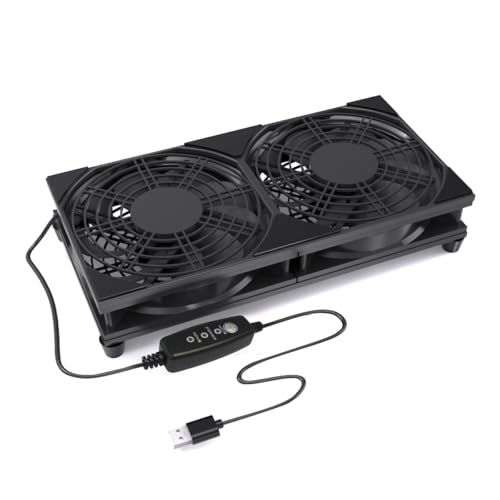
- Dual 120mm fan design
- Three adjustable speeds
- Raised stable base
Best For: Broad airflow across routers and AV equipment
Programmable AV Cooling
AC Infinity AIRCOM S7 Top-Exhaust System

- Top-exhaust dual-fan system
- Thermal trigger modes
- Up to 140 CFM airflow
Best For: Temperature-aware cooling in AV cabinets
Compact Mounting Option

- Three speed settings
- 56.7 CFM stated airflow
- Includes feet and mounting hardware
Best For: Flexible cooling for routers and compact electronics
High-Airflow AC Cooling

- Four 120mm fans deliver 264 CFM rated airflow
- AC-powered with adjustable speed control
- Flat or upright placement; 38 dBA rated noise
Best For: Large routers and electronics needing strong adjustable airflow
Quiet USB Cooling

- Three speeds, including a 21 dB low setting
- USB-powered at 5V and 1.5 watts
- Compact 3.64-inch design with 33 CFM airflow
Best For: Quiet, compact cooling for routers and nearby electronics
DIY Variable-Speed Cooling

- Four 120mm fans for broad device coverage
- Continuously adjustable 3V-to-12V fan control
- AC 100V-240V input and 65,000-hour bearings
Best For: DIY cooling projects for routers, cabinets, and media equipment
Quiet Adjustable Cooling

- Three-speed USB control
- Silicone feet reduce vibration
- Dual ball bearings for durability
Best For: Adjustable cooling for USB-compatible electronics
Long-Reach Adjustable Cooling

- Includes 1000mm extension cable
- Three speeds up to 1500 RPM
- 42.85 CFM high-speed airflow
Best For: Devices positioned far from a USB power source
Quiet USB Pick – AC Infinity MULTIFAN S3
For simple router cooling fans that can run from an available USB port, the AC Infinity MULTIFAN S3 combines adjustable airflow with a low stated noise level. Its compact 120mm design can stand upright or lie flat beside compatible electronics.
Best For: Quiet cooling for routers, modems, AV equipment, game consoles, and other USB-equipped electronics.
Pros:
- Three-speed controller helps balance airflow and noise.
- USB power works with many AV devices and game consoles.
- Dual-ball bearings support upright or flat placement and are rated for 67,000 hours.
- Compact 4.7-inch square design delivers up to 52 CFM at a stated 18 dBA.
Cons:
- It is a single-fan unit rather than a wider dual-fan platform.
- Cooling depends on having a nearby USB power source.
This is a practical choice when you want controlled, low-noise airflow without a complicated installation. Its flexible orientation also helps when space around a router or entertainment component is limited.
Wide-Area Value – 240mm Dual USB Router Cooling Fan
This 240mm option uses two 120mm fans to move air across a broader surface, making it a useful router cooling fans setup for larger devices or grouped electronics. Its three-speed controller and raised base make placement straightforward.
Best For: Routers, modems, TV boxes, AV cabinets, game consoles, and mini PCs that need broad, adjustable airflow.
Pros:
- Dual 120mm fans cover a wider cooling area.
- Three adjustable speeds support different airflow needs.
- USB plug-and-play power works with adapters, power banks, computers, TVs, and monitors.
- Protective grills and raised feet improve everyday usability and stability.
Cons:
- The 240mm form factor requires more surface space than a single fan.
- The supplied notes do not specify an airflow capacity.
Choose this model when coverage matters more than the smallest footprint. It is especially convenient for shelves, cabinets, or desks where a dual-fan base can sit beneath or beside warm equipment.
Programmable AV Cooling – AC Infinity AIRCOM S7 Top-Exhaust System
The AC Infinity AIRCOM S7 is a more advanced router cooling fans system for larger AV components and enclosed setups. Its top-exhaust layout, thermal triggers, and multiple speed controls let it respond to temperature instead of relying only on manual operation.
Best For: Larger routers, modems, receivers, amplifiers, DVRs, and AV cabinet components needing top-exhaust cooling.
Pros:
- Two fans provide up to 140 CFM of stated airflow.
- Two thermal trigger modes can automate cooling response.
- Four speed settings and PWM-controlled motors support noise management.
- Power-outage memory helps retain operating settings.
Cons:
- Its 11.6-inch length and 1.5-inch height need more installation space.
- It uses a 12V, 4-pin power connection rather than simple USB power.
- The supplied specifications list noise levels of both 19 dBA and 26 dB.
This is the strongest fit for users who want an integrated, temperature-aware cooling system rather than a basic plug-in fan. Verify cabinet dimensions and power compatibility before buying.
Compact Mounting Option – Wathai 120mm USB Fan
The Wathai 120mm USB fan offers straightforward router cooling fans performance for tight spaces. It connects through USB and includes a protective net, feet, and mounting hardware, making it adaptable for routers, modems, cases, and home-theater equipment.
Best For: Budget-conscious cooling of routers, switches, modems, TV boxes, mini PCs, and other compact electronics.
Pros:
- USB-powered design supports quick installation.
- Three speed settings provide adjustable airflow.
- Rated airflow is 56.7 CFM with a 23 dBA noise rating.
- Includes a protective net, four feet, and mounting screws and nuts.
Cons:
- Sleeve bearings have a lower stated life rating than the dual-ball-bearing alternatives.
- It is a single 120mm fan.
- The supplied notes do not identify the USB power source as including a wall adapter.
This model makes sense when you need an inexpensive, flexible fan that can sit on feet or be secured with hardware. Its 21-inch cable also gives some freedom when positioning it near a router or other device.
High-Airflow AC Cooling – GDSTIME Router Fan
For setups that need substantial airflow, this router cooling fan uses four 120mm fans and an AC-powered adapter. Its speed control lets you balance cooling performance and noise for routers and other electronics.
Best For: Large routers, cabinets, and electronics that need strong, adjustable airflow from an AC outlet.
Pros:
- Four fans provide a combined rated airflow of 264 CFM.
- Speed control and AC power support higher fan speeds.
- Can be laid flat or stood upright.
- 35,000-hour rated sleeve bearings support extended use.
Cons:
- The 9.65-by-9.65-by-2.17-inch overall size needs substantial space.
- Rated noise is 38 dBA.
- Requires access to an AC outlet.
This is a powerful, large-format option for buyers prioritizing airflow and adjustable operation over compactness or the quietest performance.
Quiet USB Cooling – 80mm Multi-Speed USB Fan
This compact router cooling fan draws power from a USB port, making it convenient for routers, consoles, receivers, and other nearby electronics. Its three-speed controller offers a quieter low setting or increased airflow when needed.
Best For: Compact USB-powered cooling near routers, game consoles, DVRs, and audio-visual equipment.
Pros:
- Three speed settings help tune noise and airflow.
- Low gear is rated at just 21 dB.
- USB power works with compatible equipment and power sources.
- Double ball bearings are rated for a 65,000-hour service life.
Cons:
- Its 33 CFM airflow is lower than larger multi-fan units.
- USB power is limited to 5V and 1.5 watts.
- The 3.64-inch square fan may provide less coverage for large cabinets.
With its small footprint, low-noise setting, and USB connection, this fan is a practical choice when convenience and quiet operation matter more than maximum airflow.
DIY Variable-Speed Cooling – Four-Fan AC Cooling Pad
This router cooling fan is designed as a flexible DIY cooling solution, combining four 120mm fans with a variable-speed controller. The AC input and adjustable 3V-to-12V range make it suitable for tuning airflow across routers, cabinets, media equipment, and other electronics.
Best For: DIY electronics cooling projects that need four fans and continuously adjustable airflow.
Pros:
- Four 120mm fans provide broad cooling coverage.
- Variable control ranges from off to full blast across 3V to 12V.
- AC 100V-240V input supports outlet-powered operation.
- Dual ball bearings are rated for 65,000 hours.
Cons:
- The four-fan layout requires more space than a single fan.
- Its 24-watt rating may be more than needed for small devices.
- The product is oriented toward DIY setups rather than a compact plug-and-play form factor.
This model stands out for customization: buyers can fine-tune airflow for different equipment, though its larger four-fan design is best suited to dedicated cooling projects.
Quiet Adjustable Cooling – 120mm Router Fan Cooler
This 120mm router cooling fan is a practical choice for adding USB-powered airflow to routers, receivers, DVRs, TV boxes, and similar equipment. Its three-speed controller lets you balance cooling performance and operating noise.
Best For: Users who want adjustable, compact cooling for USB-compatible electronics.
Pros:
- Three-speed control cycles through high, medium, low, and off modes.
- USB power supports straightforward plug-and-play use.
- Silicone feet help reduce vibration and noise, with a stated range of 9.3–16.8 dBA.
- Dual ball bearings support flat or upright placement and a stated 50,000-hour lifespan.
Cons:
- It is a single 120mm fan rather than a dual-fan setup.
- The controller requires manual adjustment when conditions change.
Choose this model if flexible speed control and broad device compatibility matter more than maximum airflow. Its USB connection and upright-or-flat positioning make it easy to add to an existing setup.
High-Airflow Dual Fan – X4 Quiet USB Cooling Fan
This dual 140mm router cooling fan is designed for devices that benefit from higher airflow, including routers, receivers, amplifiers, DVRs, consoles, and computer cabinets. It combines a one-touch switch with a stackable design and a 65.8 CFM airflow rating.
Best For: Larger equipment setups needing strong, quiet airflow and elevated storage space.
Pros:
- Two 140mm fans provide a stated 65.8 CFM of airflow.
- 18 dB operation is suited to offices, bedrooms, and gaming areas.
- Stackable raised feet create an elevated layer for compatible accessories.
- Dual USB ports allow the fan to run while charging another device.
Cons:
- The larger dual-fan body requires more placement space than a single-fan cooler.
- It uses a one-touch switch rather than a variable-speed controller.
This is the strongest fit of the three for users prioritizing airflow and quiet operation across larger devices. The stackable construction and extra USB port add useful convenience, provided your setup can accommodate its size.
Long-Reach Adjustable Cooling – ANEXT USB Router Fan
The ANEXT router cooling fan pairs a 1000mm extension cable with a three-speed controller, making it useful when the nearest USB power source is not close to the device. Its 240mm x 120mm format is intended for routers, receivers, DVRs, Xbox consoles, TV boxes, and similar equipment.
Best For: Setups where cable reach and adjustable airflow are important.
Pros:
- The 1000mm extension creates a stated total cable length of 1500mm.
- Three speed settings range from 1100 to 1500 RPM.
- High-speed airflow is rated at 42.85 CFM, while low-speed noise is rated at 21.5 dBA.
- 20mm support feet with silicone pads promote clearance and reduce contact vibration.
Cons:
- Its large 240mm x 120mm footprint may not suit compact spaces.
- The supplied notes list compatibility broadly but do not specify a router model range.
Pick this fan when a short USB cable would limit placement. Its extended reach and three speed levels offer more installation flexibility, while the raised feet help keep airflow moving beneath the device.
How We Picked the Best Router Cooling Fans
We focused on the features that matter most in real home-theater, office, and networking setups: fan size, airflow potential, speed control, power source, noise, cable length, installation flexibility, and compatibility with routers, modems, receivers, TV boxes, and other enclosed electronics. The selection includes single-fan and multi-fan designs so you can choose between simple spot cooling and broader cabinet ventilation.
Because listed specifications and user experiences can vary by seller and configuration, verify dimensions, connector details, and included accessories before buying. A fan that fits your equipment and has a convenient power connection is generally more useful than a faster model that is difficult to place.
Quick Comparison
- Best for simple spot cooling: A quiet 80mm or 120mm USB fan is compact, easy to position, and typically powered by a router, USB charger, or power bank.
- Best for adjustable airflow: Models with low, medium, and high settings let you balance cooling against noise.
- Best for wide equipment: Dual 140mm or 240mm systems can move air across larger receivers, consoles, and cabinet shelves.
- Best for built-in installations: AC-powered or top-exhaust systems may offer more consistent operation when USB ports are limited.
Key Buying Factors for Router Cooling Fans
Size and Airflow Coverage
Measure the available shelf or cabinet space first. Larger fans can move more air at lower speeds, while smaller fans are easier to fit beside or behind a router. Multi-fan designs are useful when heat is spread across a wide device or enclosed compartment.
Speed Control and Noise
Adjustable controls are valuable if the fan will run continuously in a bedroom, office, or living room. Use the lowest setting that keeps temperatures stable. A quiet fan may be preferable to maximum airflow for open-air router placement.
Power and Cable Reach
USB-powered fans are convenient and work with chargers, hubs, power banks, and many electronics. Check whether the device’s USB port can provide sufficient power and whether the included cable reaches a suitable outlet. AC-plug models can be better for permanent installations but offer less placement flexibility.
Placement and Ventilation
Do not block the router’s existing vents. Position the fan to push cool air toward intake openings or pull warm air away from the enclosure. Leave room for exhaust airflow, especially inside TV stands and network cabinets.
Who Should Buy Which Router Cooling Fans?
Choose a compact USB fan if you need an inexpensive, portable solution for one router or modem. Pick a 120mm adjustable model when you want a stronger balance of coverage, noise control, and easy positioning. A dual-fan or 240mm system is better for wide receivers, consoles, or shelves containing several heat-producing devices. For a fixed cabinet installation, consider an AC-powered model or a dedicated top-exhaust system with dependable speed control.
Finally, cooling fans should supplement—not replace—basic ventilation. Keep equipment dust-free, avoid stacking hot devices tightly, and monitor whether temperatures, connection stability, or restart problems improve after installation.
