The best small-business media label makers make it easier to organize inventory, identify products, prepare shipments, and keep workspaces running smoothly. The right choice depends on whether you need compact Bluetooth printing, durable tape labels, or fast desktop shipping labels.
We compared 10 practical options across connectivity, print quality, label formats, portability, ease of use, and business-focused features to help you choose a dependable fit for your workflow.
Best 10 Small-Business Media Label Makers Picks for 2026
Best for Connected Business Labeling

- Bluetooth and USB connectivity
- 175 business templates and 90-label memory
- Prints labels up to 1 inch wide
Best For: Small businesses with recurring asset and inventory labeling needs
Best for High-Resolution Color Accents

- 300DPI printing for clearer small text
- Supports grayscale and red-and-black output
- Connects with multiple Bluetooth devices
Best For: Compact business labels with images or color accents
Best for Portable Mobile Labeling

- Mobile and desktop printing via Bluetooth or USB
- Built-in battery and two starter tapes included
- Supports varied Brother TZe tape styles
Best For: Portable labels for small offices, retail, and crafting
Best for Shipping and Marketplace Labels

- Supports 4 x 6 shipping labels
- Bluetooth, USB, and browser-based workflows
- Includes extensive templates and design elements
Best For: Small-business fulfillment, shipping, and product labeling
Best Portable Starter
Brother P-Touch PT-D210 Bundle

- Portable design with battery or optional AC power
- Includes four black-on-white tape samples
- Built-in fonts, symbols, frames, and templates
Best For: General small-business organization and on-the-go labeling
Best App-Driven Design

- App supports logos, images, QR codes, and barcodes
- Offers 30+ fonts, 50+ frames, and 660+ icons
- Prints 3/4-inch to 2-inch labels without ink or toner
Best For: Branded product and information labels designed from mobile devices
Best Desktop Volume Option

- Prints up to 44 labels per minute
- Handles paper and film labels up to 2.4 inches wide
- Integrates with Microsoft apps through P-touch Editor
Best For: Frequent computer-based labeling at a small-business desk
Best High-Volume Option

- Prints up to 93 labels per minute at 300 dpi
- Supports black-and-red DK-2251 labels
- USB desktop workflow with auto-cutter and continuous tape support
Best For: Fast, professional label production at a small-business workstation
Best Simple Bluetooth Pick
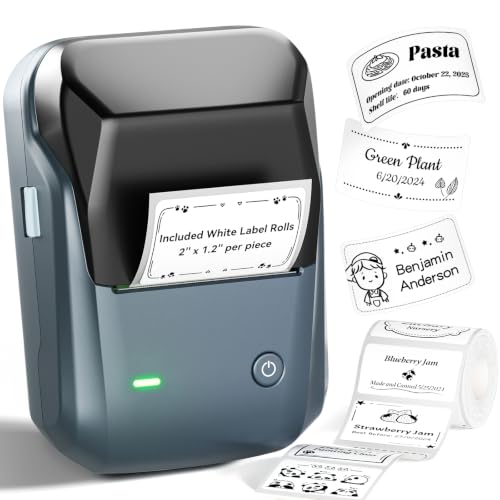
- Inkless thermal printing with no cartridges
- Bluetooth iOS and Android app with templates and symbols
- Compact 2-inch format for tags, reminders, and product labels
Best For: Easy mobile labeling for compact monochrome business tags
Best for Connected Business Labeling – Brother P-Touch PT-D610BT
Brother P-Touch PT-D610BT Business Professional Connected Label Maker with Bluetooth®
Check Price On AmazonFor small-business media label makers, the Brother P-Touch PT-D610BT is a feature-rich choice for teams that need professional labels, asset tags, inventory markers, and security seals. It supports Bluetooth and USB connections, offers a physical QWERTY keyboard, and prints labels up to 1 inch wide.
Best For: Small businesses managing recurring asset, inventory, and merchandise labeling tasks.
Pros:
- Bluetooth and USB connectivity supports computer, mobile, and multi-user workflows.
- Includes 175 business-focused templates, 17 fonts, 17 styles, 160 frames, and 900 symbols.
- Stores up to 90 labels and includes an automatic cutter for repeat jobs.
- Large two-line color LCD helps preview labels before printing.
Cons:
- Limited to monochrome output.
- Uses Brother Genuine TZe label tapes.
- Its larger feature set may be more than occasional label users need.
The PT-D610BT stands out when a small business needs repeatable, polished labeling and room for customization. Its templates, memory, preview screen, and dual connectivity make it especially practical for organized office workflows.
Best for High-Resolution Color Accents – NIIMBOT B1 Pro
Among small-business media label makers, the NIIMBOT B1 Pro is a compact Bluetooth option for teams that want sharper small text and more visual flexibility. Its 300DPI resolution supports grayscale images and red-and-black dual-color printing, while the printer accommodates labels from 0.8 to 2 inches wide.
Best For: Small offices, shops, and teams creating compact labels with images or color accents.
Pros:
- 300DPI printing improves clarity for smaller fonts and detailed designs.
- Supports grayscale images and red-and-black dual-color labels.
- Bluetooth can connect simultaneously to multiple iOS, Android, and Windows devices.
- Compact 10.4-ounce design is easy to place or carry around a workspace.
Cons:
- Photo and red-and-black label papers are sold separately.
- The included roll is a specific 2 x 1.2-inch size.
- Printing is simplex rather than duplex.
The B1 Pro offers an appealing balance of portability and design capability. It is a strong fit when ordinary black-and-white labels are not enough, though businesses should budget for compatible specialty media if they want color or photo effects.
Best for Portable Mobile Labeling – Brother P-Touch Cube Plus
The Brother P-Touch Cube Plus is a practical pick among small-business media label makers for mobile-first labeling. This lightweight thermal printer works with Apple and Android devices as well as desktop computers, prints labels up to 24mm wide, and includes a built-in rechargeable battery plus two starter tapes.
Best For: Small businesses, home offices, and retail or crafting workflows that need portable custom labels.
Pros:
- Bluetooth and USB connectivity supports mobile and desktop printing.
- Works with three Brother software options for templates and custom designs.
- Includes a built-in Li-ion battery, USB cable, and two starter tapes.
- Supports a range of Brother TZe tape colors, patterns, and finishes.
Cons:
- Prints monochrome labels only.
- Label width is limited to 24mm, or about 1 inch.
- Its one-year limited warranty is shorter than some alternatives in this roundup.
The P-Touch Cube Plus is best when convenience and portability matter more than advanced on-device controls. Its broad software support and included supplies make it easy to begin labeling products, storage areas, and office materials.
Best for Shipping and Marketplace Labels – MUNBYN RealWriter 130B
For small-business media label makers focused on fulfillment, the MUNBYN RealWriter 130B is designed around wireless shipping and product-label printing. It supports 4 x 6 shipping labels along with several specialty sizes, connects through Bluetooth or USB, and offers mobile, browser-based, and desktop-friendly workflows.
Best For: Entrepreneurs and small businesses printing shipping labels, barcodes, pricing labels, and product stickers.
Pros:
- Supports common 4 x 6 shipping labels and media from 1.57 to 4.3 inches wide.
- Bluetooth printing works with iOS and Android through the MUNBYN Print app.
- Browser-based Munbyn Editor enables PC label design without additional installation.
- Includes access to more than 2,000 templates, 3,500 elements, and 80 fonts.
Cons:
- Monochrome thermal output does not provide color printing.
- MUNBYN recommends its genuine thermal paper for consistent results.
- The notes caution that it may not be compatible with UPS thermal paper.
The RealWriter 130B is the most shipping-oriented option here, with broad media support and tools for marketplace and fulfillment tasks. It is a sensible choice for growing sellers who need more than narrow organizational tape labels.
Best Portable Starter – Brother P-Touch PT-D210 Bundle
Brother P-Touch, PTD210, Easy-to-Use Label Maker Bundle (4 Label Tapes Included), White, Small
Check Price On AmazonFor small-business media label makers that need to move between a desk, supply cabinet, or storage area, the Brother PT-D210 is a straightforward portable option. Its one-touch controls, preview display, built-in templates, and included tape bundle make it useful for organizing files, supplies, storage containers, and more.
Best For: Small businesses that want a portable, button-controlled label maker for general organization and occasional labeling tasks.
Pros:
- Includes one sample tape plus three full-length black-on-white tapes.
- Offers 10 styles, 14 fonts, 98 frames, more than 600 symbols, and 27 templates.
- Supports 3.5 mm, 6 mm, 9 mm, and 12 mm Brother TZe laminated tapes.
- Lightweight design can run on six AAA batteries or an optional AC adapter.
Cons:
- Requires six AAA batteries, sold separately, for portable use.
- Maximum listed tape width is 12 mm, making it less suitable for larger-format labels.
- Printing is monochrome and controlled through the device rather than a phone or computer.
The PT-D210 is a practical pick when simplicity and portability matter more than wide labels or app-based design. Its included tapes and extensive built-in formatting tools also make it an approachable starter bundle.
Best App-Driven Design – SUPVAN T50M Pro Bluetooth
The SUPVAN T50M Pro is a flexible choice among small-business media label makers for users who prefer creating labels from a smartphone, tablet, or computer. Its free app supports images, QR codes, barcodes, logos, multiple label shapes, and a broad selection of fonts, frames, and icons.
Best For: Small businesses creating product information, address, QR-code, barcode, or branded labels through an app.
Pros:
- Supports label widths from 3/4 inch to 2 inches for varied business uses.
- App includes more than 30 fonts, 50 frames, and 660 icons without requiring registration.
- Can add images from phones, tablets, or PCs and supports QR codes, barcodes, and brand logos.
- Inkless thermal printing and a rechargeable, lightweight design simplify routine use.
Cons:
- Label creation depends on the SUPVAN app and a compatible device.
- Prints monochrome labels at a listed 203 dpi resolution.
- Uses SUPVAN label tape and includes only one 40 mm by 30 mm white tape roll.
Choose the T50M Pro if branded or information-rich labels are central to your workflow and app editing fits your team. It offers more design flexibility than a basic handheld unit while remaining compact and ink-free.
Best Desktop Volume Option – Brother QL-600 Label Printer
For small-business media label makers used at a workstation, the Brother QL-600 is designed for faster computer-based output. It prints up to 44 labels per minute, supports paper and film labels up to 2.4 inches wide, and works with P-touch Editor plus Microsoft Word, Excel, and Outlook.
Best For: Desktop workflows involving frequent address, file, product, or other computer-generated labels.
Pros:
- Prints at up to 44 labels per minute for higher-volume desktop work.
- Supports continuous tape, film labels, and pre-sized paper labels up to 2.4 inches wide.
- Automatic cutter can create banners up to 3 feet long.
- USB connection and P-touch Editor support integration with Microsoft applications, Linux, and Mac.
Cons:
- Designed for desktop use rather than handheld or battery-powered portability.
- Requires a computer and USB connection for the stated workflow.
- Uses Brother Genuine DK drop-in rolls, so media selection is tied to that format.
The QL-600 is the strongest fit here when speed, desktop integration, and wider labels are priorities. It is less convenient for labeling away from a workstation, but its cutter, software support, and 44-label-per-minute rate suit recurring business tasks.
Best Portable Pick – Phomemo M108
For small-business media label makers that need to move between workspaces, the Phomemo M108 combines a compact design with broad label-width support. It prints 3/4- to 2-inch labels and supports Bluetooth or USB connections for mobile and computer workflows.
Best For: Small businesses needing portable shipping, product, QR-code, or organizational labels.
Pros:
- Lightweight 184g design with a rechargeable 1200mAh battery rated for up to 6,000 prints per charge.
- Supports 20-50mm label widths for addresses, product information, logos, QR codes, and more.
- Bluetooth and USB connectivity work with smartphones and PCs.
- Print Master includes extensive templates, icons, borders, fonts, OCR, and voice input features.
Cons:
- Prints black only.
- Mobile printing requires the Print Master app, while PC use requires a driver.
The M108 is a flexible choice when portability and creative label customization matter more than high-volume desktop throughput. Its included starter labels also let you begin printing immediately.
Best High-Volume Option – Brother QL-800
Among small-business media label makers, the Brother QL-800 is built for fast desktop production. Its thermal printing system reaches up to 93 labels per minute, includes an auto-cutter, and supports Brother DK pre-sized labels and continuous tape.
Best For: Small businesses producing shipping labels, office labels, name badges, and other labels in volume.
Pros:
- Prints up to 93 labels per minute at 300 dpi.
- Supports black-and-red printing with the DK-2251 media.
- Plug & Label integration works with Windows and Mac, including Microsoft Word, Excel, and Outlook.
- Built-in auto-cutter supports clean finishing, while continuous tape enables banners and signage up to 3 feet.
Cons:
- USB connectivity and AC power make it less portable than battery-powered models.
- It is limited to Brother Genuine DK media.
- At 2.5 pounds, it is the heaviest option in this selection.
The QL-800 is the strongest fit for a fixed workstation where speed, consistent output, and professional black-and-red accents are priorities. Its desktop-focused design is less suited to labeling away from an outlet.
Best Simple Bluetooth Pick – NIIMBOT B1
The NIIMBOT B1 is a straightforward option among small-business media label makers, using inkless thermal printing and a Bluetooth app for quick label creation. Its 2-inch format suits tags, reminders, inventory notes, and compact product labeling.
Best For: Small businesses wanting an easy mobile label maker for compact, monochrome labels.
Pros:
- Works with iOS and Android through the NIIMBOT app, with USB support for PCs.
- Inkless thermal printing avoids ink cartridges and mess.
- App features auto label-size detection, 30+ fonts, 100+ borders, 1,500+ symbols, and reusable templates.
- Compact rechargeable design includes two 2 x 1.18-inch white label rolls.
Cons:
- Maximum media width is 2 inches and output is monochrome.
- It is not compatible with tablets.
- The supplied notes recommend charging immediately before initial testing.
The B1 offers a low-maintenance workflow for teams that primarily label from phones. Its smaller media format and tablet limitation should be considered before choosing it for broader shipping-label needs.
How We Picked These Small-Business Media Label Makers
We selected products suited to common small-business tasks, including inventory control, product identification, filing, storage, shipping, and address labeling. Our comparison considers print technology, supported label sizes, connection methods, setup, portability, operating cost, and compatibility with phones or computers.
Because business needs vary, the list includes both compact tape-based makers and desktop thermal printers. Bluetooth models are useful for mobile, on-demand labeling, while USB desktop printers can be better for repeat shipping or office workflows.
Quick Comparison
- Best for advanced tape labeling: Brother P-Touch PT-D610BT.
- Best for compact Bluetooth printing: Brother P-Touch Cube Plus PT-P710BT.
- Best for shipping labels: MUNBYN Bluetooth Thermal Label Printer.
- Best for high-speed desktop work: Brother QL-800.
- Best for simple starter use: Brother PTD210 bundle.
- Best for portable photo and sticker printing: NIIMBOT B1Pro.
Key Buying Factors for Small-Business Media Label Makers
Label Type and Size
Start with the labels you actually need. Tape-based machines are well suited to shelves, bins, cables, folders, and product containers. Direct thermal printers are more practical for shipping labels, address labels, barcodes, and larger adhesive formats. Check maximum width and whether the printer requires proprietary rolls or cartridges.
Connectivity and Software
Bluetooth is convenient when labels are created from a phone or tablet, especially in a stockroom or retail environment. USB models may offer a more stable connection for a dedicated office computer. Before buying, verify operating-system support, app quality, template tools, barcode options, and whether multiple users can access the printer easily.
Print Quality, Speed, and Durability
Higher resolution can improve small text, barcodes, and graphics, while faster desktop printers reduce waiting during busy shipping periods. For labels exposed to moisture, heat, abrasion, or handling, prioritize compatible durable or laminated media rather than relying only on advertised resolution.
Total Cost of Ownership
Compare the printer price with ongoing tape, roll, and replacement-media costs. Ink-free thermal printing reduces ink maintenance, but compatible media requirements can affect long-term expenses. Also consider included supplies, power needs, software subscriptions, and the cost of wasted labels during setup.
Who Should Buy Which Small-Business Media Label Makers?
Choose a compact Bluetooth label maker if you run a mobile operation, organize stock in different locations, or want to print directly from a phone. A tape-based Brother or SUPVAN model is a strong fit for durable organizational labels and recurring office tasks.
Choose a thermal shipping printer if your business regularly fulfills online orders. The MUNBYN, Brother QL-600, and Brother QL-800 are better aligned with desktop address, barcode, and shipping workflows. For occasional labeling on a modest budget, an entry-level Brother, Phomemo, or NIIMBOT model may provide enough capability without taking up much space.
