The best computer trackballs can reduce repetitive wrist movement while giving you precise cursor control for work, creative tasks, and everyday browsing. Unlike conventional mice, they let you move the pointer without constantly sliding the device across your desk.
We compared 10 notable models across ergonomic design, ball size, connection options, button layouts, scroll controls, and overall versatility. This guide will help you find the right fit for your workspace and pointing style.
Best 10 Computer Trackballs Picks for 2026
Best for Business Comfort

- Wireless thumb-controlled tracking
- Up to 18-month AA battery life
- Designed for tight office spaces
Best For: Business users seeking comfortable wireless control
Best Ambidextrous Value

- Ambidextrous wired design
- Dedicated scroll ring
- Detachable wrist rest included
Best For: Shared workstations and either-handed users
Best Premium Wireless Upgrade

- 20-degree ergonomic tilt
- Bluetooth and Logi Bolt wireless
- Up to 120 days per charge
Best For: Feature-focused users with medium to large hands
Best Large-Ball Precision
- Large 55mm tracking ball
- Ambidextrous wired design
- Scroll ring and wrist rest
Best For: Precision-focused desktop users who prefer a roomy trackball
Best Quiet Ergonomic Pick

- Thumb-controlled design saves desk space
- Bluetooth and Logi Bolt connectivity
- Up to 18 months of AA battery life
Best For: Right-handed office users seeking quiet, comfortable wireless tracking
Best Wired High-Control Pick

- Large 52 mm finger-operated ball
- Eight buttons with four-way scrolling
- Three switchable DPI settings
Best For: Right-handed users needing detailed control for office or creative work
Best Ambidextrous Wireless Pick

- Bluetooth, 2.4GHz, and wired modes
- Ambidextrous low-profile design
- Rechargeable battery lasts up to four months
Best For: Users wanting flexible connections and left- or right-handed comfort
Flexible Comfort

- Large 55mm ball for precise control
- Ambidextrous design for shared use
- Bluetooth and 2.4 GHz support up to three devices
Best For: Creative work, multitasking, and shared offices
Classic Precision
Kensington Expert Wireless Trackball

- 55mm ball with optical tracking
- Scroll ring and detachable wrist rest
- Bluetooth and 2.4 GHz wireless options
Best For: Desktop users prioritizing comfort and page navigation
Rechargeable Ergonomics

- 16-degree angle for a more natural hand position
- Rechargeable 500mAh battery
- Three-device Bluetooth and 2.4 GHz connectivity
Best For: Right-handed users with medium-to-large hands
Best for Business Comfort – Logitech Ergo M575
The Logitech Ergo M575 is a practical choice among computer trackballs for offices that need wireless convenience, ergonomic support, and easy deployment. Its sculpted, right-handed design uses thumb control, works on any surface, and stays useful in tight workspaces.
Best For: Business users and employees who want an ergonomic wireless trackball for everyday office work.
Pros:
- Bluetooth and wireless receiver connectivity with up to 18 months of battery life.
- Thumb-controlled tracking and adjustable cursor speed support precise everyday use.
- Compact stationary design suits crowded desks and tight workspaces.
- Five buttons can be personalized through Logi Options+.
Cons:
- Right-handed design is not suited to left-handed users.
- Uses a replaceable AA battery rather than rechargeable power.
Choose the M575 when low-maintenance wireless operation and office-wide deployment matter more than advanced charging or extensive button customization.
Best Ambidextrous Value – Kensington Orbit Trackball
The Kensington Orbit is a straightforward wired option among computer trackballs, combining optical tracking with a distinctive scroll ring. Its ambidextrous layout and detachable wrist rest make it a flexible choice for shared desks and extended computer sessions.
Best For: Right- or left-handed users who want reliable USB connectivity and simple scrolling.
Pros:
- Ambidextrous design works for both right- and left-handed users.
- Scroll ring makes moving through web pages and documents convenient.
- Detachable wrist rest helps support the hand and wrist.
- Software allows button assignments and cursor or scrolling-speed adjustments.
Cons:
- USB wired connection limits cable-free flexibility.
- Only two programmable buttons are provided.
The Orbit is a sensible pick for users who value ambidextrous comfort and a dedicated scroll ring over wireless operation or numerous controls.
Best Premium Wireless Upgrade – Logitech MX Ergo S
The Logitech MX Ergo S is a feature-rich entry in computer trackballs for users who want rechargeable wireless performance and ergonomic adjustability. It adds a 20-degree tilt, quieter clicks, dual wireless connectivity, and customizable controls for demanding daily workflows.
Best For: Medium- to large-handed users who want premium ergonomic features and rechargeable convenience.
Pros:
- 20-degree tilt and sculpted grip support a more comfortable forearm posture.
- Bluetooth and included Logi Bolt receiver provide dual wireless connectivity.
- Rechargeable battery offers up to 120 days of use on a full charge.
- Six customizable buttons and Smart Actions expand shortcut options.
Cons:
- Designed for right-handed use only.
- Charging cable is not included.
The MX Ergo S is the strongest fit here for buyers willing to pay for tilt adjustment, quiet operation, extensive customization, and long rechargeable battery life.
Best Large-Ball Precision – Kensington Expert Trackball
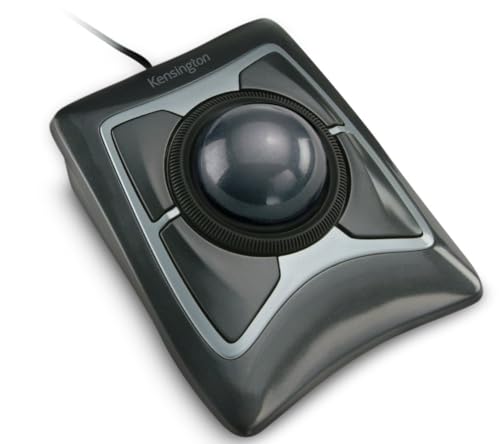
Kensington Expert Trackball Mouse (K64325), Black Silver, 5"W x 5-3/4"D x 2-1/2"H
Check Price On AmazonThe Kensington Expert is a substantial wired choice among computer trackballs, built around a large 55mm ball and optical tracking. Its scroll ring, ambidextrous shape, and detachable wrist rest make it well suited to users who prefer a roomy desktop pointing device.
Best For: Users who prioritize a large ball, precise cursor control, and dependable USB connectivity.
Pros:
- Large 55mm ball provides a spacious control surface.
- Diamond Eye optical tracking is designed for precise cursor movement.
- Ambidextrous design accommodates either hand.
- Scroll ring and customizable controls support navigation and workflow shortcuts.
Cons:
- Wired USB-A connection offers less placement flexibility.
- Software customization is limited on ChromeOS and does not support Windows ARM-based computers.
- Its large footprint may require more desk space.
Pick the Expert when a large, stable trackball and ambidextrous ergonomics are more important than a compact form or wireless convenience.
Best Quiet Ergonomic Pick – Logitech ERGO M575S
For computer trackballs in a compact workspace, the Logitech ERGO M575S keeps cursor movement under your thumb instead of requiring arm movement. Its sculpted right-handed shape, quiet clicks, Bluetooth or Logi Bolt connectivity, and included AA battery make it a practical choice for everyday office and home use.
Best For: Right-handed users who want a quiet, space-saving wireless trackball for extended computer work.
Pros:
- Thumb control reduces the need to move your hand across the desk.
- Bluetooth and included Logi Bolt receiver provide flexible connectivity.
- Up to 18 months of battery life from one included AA battery.
- Three customizable buttons and adjustable cursor speed support personalized workflows.
Cons:
- Designed for right-handed use.
- It uses a replaceable AA battery rather than a rechargeable battery.
- Its two-button specification may be less suitable for users seeking extensive physical controls.
The ERGO M575S is a strong fit when comfort, quiet operation, and minimal desk movement matter most. It is less compelling for left-handed users or those who prefer a rechargeable design.
Best Wired High-Control Pick – ELECOM HUGE Trackball
Among computer trackballs, the wired ELECOM HUGE stands out for its large 52 mm finger-operated ball and eight physical controls. Its adjustable 500/1000/1500 DPI settings, four-way scrolling, and palm rest make it especially suited to detailed desktop work where control and consistent wired performance are priorities.
Best For: Right-handed users who want extensive controls, a large finger-operated ball, and a wired connection for office, creative, or editing tasks.
Pros:
- Large 52 mm trackball provides a distinctive finger-operated control surface.
- Eight buttons include scroll-wheel tilt for horizontal scrolling.
- Switchable 500, 1000, and 1500 DPI settings accommodate different cursor speeds.
- Attached palm rest and smooth ruby ball bearings support extended use and maintenance.
Cons:
- Wired design offers less flexibility than wireless computer trackballs.
- Large 7.2-by-4.5-inch footprint may not suit compact desks.
- Designed for right-handed operation.
The HUGE is a specialized option for users who value a big finger-operated ball and many programmable controls. Choose it over a wireless model when a cable and larger desktop footprint are acceptable trade-offs for control.
Best Ambidextrous Wireless Pick – Kensington SlimBlade Pro
The Kensington SlimBlade Pro is a flexible choice among computer trackballs, offering Bluetooth, 2.4GHz wireless, and wired USB-C connection options. Its low-profile ambidextrous design and large 55 mm ball are built for comfortable, precise tracking with less arm and wrist movement.
Best For: Right- or left-handed users who want versatile connectivity, a low-profile design, and a rechargeable trackball for extended computer use.
Pros:
- Supports Bluetooth, 2.4GHz wireless, and wired connections.
- Ambidextrous low-profile shape accommodates right- and left-handed users.
- Large 55 mm ball uses dual sensors for accurate cursor tracking and scrolling.
- Rechargeable battery provides up to four months of use per charge.
Cons:
- KensingtonKonnect software is required for configuring the programmable button sets.
- Windows ARM-based computers are currently unsupported according to the supplied notes.
- The listed battery-life estimate is shorter than the 18-month claim of the Logitech model.
The SlimBlade Pro is the most connection-flexible option here and a strong match for shared workstations or users who switch between wired and wireless setups. Its ambidextrous shape also makes it more adaptable than right-handed alternatives.
Flexible Comfort – Nulea M512 Wireless Trackball
The Nulea M512 is a versatile choice among computer trackballs, combining a large 55mm ball with wireless connectivity and an ambidextrous design. Its adjustable sensitivity and multi-device support make it practical for everyday work, creative tasks, and shared workspaces.
Best For: Users who want a large, precise trackball for home offices, graphic design, video editing, or shared use.
Pros:
- Large 55mm trackball supports precise control for detailed tasks.
- Ambidextrous design can switch key functions for left- or right-handed use.
- Connects with up to three devices through Bluetooth or 2.4 GHz wireless.
- Four DPI settings from 400 to 1600 support different workflows.
Cons:
- Maximum sensitivity is 1600 DPI.
- Battery-powered operation requires ongoing battery management.
The M512 stands out for its combination of a generously sized ball, flexible connectivity, and two-handed usability. It is a strong all-purpose option when comfort and device switching matter more than a compact footprint.
Classic Precision – Kensington Expert Wireless Trackball
The Kensington Expert is a full-size option for shoppers comparing computer trackballs with an emphasis on control and wrist support. It pairs a 55mm ball and optical tracking with a scroll ring, detachable wrist rest, and Bluetooth or 2.4 GHz wireless connectivity.
Best For: Users seeking an ambidextrous desktop trackball with a wrist rest, scroll ring, and customizable controls.
Pros:
- 55mm ball and Diamond Eye optical tracking are designed for precise cursor control.
- Patented scroll ring makes moving through pages convenient.
- Detachable ergonomic wrist rest supports the hand and wrist.
- Bluetooth and 2.4 GHz wireless options provide connection flexibility.
Cons:
- Its full-size design measures 8 inches long by 6.1 inches wide.
- Uses two AA batteries rather than a rechargeable battery.
- Linux is not supported according to the supplied compatibility information.
The Expert is a substantial desktop model built around comfort and navigational control. Its scroll ring, wrist rest, software customization, and three-year coverage make it appealing for stationary office setups.
Rechargeable Ergonomics – TECKNET Wireless Trackball
The TECKNET TK-MS023 is designed for users who want computer trackballs with a more upright hand position. Its 16-degree angle, thumb-controlled ball, rechargeable battery, and three-device wireless pairing suit longer work sessions and medium-to-large hands.
Best For: Right-handed users with medium-to-large hands who want rechargeable power, quiet operation, and ergonomic positioning.
Pros:
- 16-degree vertical angle is designed to promote a more natural forearm posture.
- Pairs with up to three devices through two Bluetooth connections and 2.4 GHz wireless.
- 500mAh rechargeable battery supports quick charging and avoids disposable batteries.
- Five DPI levels from 100 to 1200 allow sensitivity adjustments.
Cons:
- Designed for right-handed use only.
- Its larger shape may require a one- to two-week adjustment period.
- Maximum sensitivity is 1200 DPI.
The TECKNET is a focused ergonomic choice rather than a universal model. Its angled body and rechargeable design are particularly useful for right-handed users who want a larger trackball for extended computer work.
How We Picked These Computer Trackballs
We focused on the features that most affect daily use: hand comfort, tracking precision, ball placement, button access, scrolling, connectivity, and maintenance. The lineup includes thumb-controlled and finger-operated designs, wired and wireless models, compact options, and larger ambidextrous trackballs.
We also considered practical details such as rechargeable batteries, Bluetooth and 2.4GHz support, USB compatibility, programmable controls, and whether a model suits long work sessions. No single design is best for everyone, so the goal is to cover distinct user needs rather than rank products on specifications alone.
Quick Comparison
| Best For | What to Look For |
|---|---|
| Office productivity | Comfortable thumb control, reliable wireless connection, and easy scrolling |
| Large hands or precise work | A larger finger-operated ball and generous palm support |
| Shared workspaces | Bluetooth, quiet operation, and a compact footprint |
| Gaming or creative control | Accurate tracking, adjustable sensitivity, and accessible buttons |
| Travel | Portable shape, wireless connectivity, and low desk-space requirements |
Key Buying Factors for Computer Trackballs
Thumb Versus Finger Control
Thumb-controlled models generally feel familiar to mouse users and make everyday navigation straightforward. Finger-operated trackballs place the ball under your fingers or palm, which can provide finer control and reduce thumb fatigue. The best choice depends on which joints you prefer to move during long sessions.
Ergonomics and Size
Check the shape, palm support, button placement, and overall footprint. A larger body may be more comfortable for broad hands, while a compact design can work better on a crowded desk. Ambidextrous models offer flexibility but may provide less sculpted support than right-handed shapes.
Connectivity and Power
Wireless models offer a cleaner setup, but confirm whether they use Bluetooth, a USB receiver, or both. Rechargeable batteries reduce disposable-waste costs, while replaceable batteries can be convenient when you need to resume work immediately. Wired models avoid charging and pairing altogether.
Scrolling, Buttons, and Maintenance
A dedicated scroll ring or smooth scroll wheel can make document navigation easier. Extra buttons are useful for shortcuts, but only if they are easy to reach and configurable on your operating system. Trackballs also collect dust over time, so a removable ball and accessible sensor area make cleaning simpler.
Who Should Buy Which Computer Trackballs?
Choose a Logitech Ergo M575-style thumb trackball if you want a familiar, space-saving replacement for a standard mouse. Consider the MX Ergo S when you want a more advanced wireless setup and additional ergonomic adjustability. Kensington Orbit models suit shoppers who prefer a scroll ring and a straightforward finger-operated layout, while Expert and SlimBlade designs are better for users wanting a larger ball and more deliberate precision.
The ELECOM Huge and Nulea options are worth considering for users with larger hands or those who prefer extensive finger control. A wired model such as the ELECOM can be a practical choice for a fixed workstation, while TECKNET is aimed at shoppers seeking basic wireless convenience. Before buying, verify operating-system support, receiver requirements, desk clearance, and whether the control style feels natural for your hand.
