A good boom arm can make your setup feel instantly cleaner, more comfortable, and more professional. If you want better mic placement without spending a lot, the best options are often found in the microphone boom arm under 100 category.
Below, we focus on practical desk-mounted arms that offer solid support, easy adjustment, and compatibility with popular USB and broadcast-style mics.
Best 10 Microphone Boom Arm Under 100 Picks for 2026
Classic Adjustable Boom Arm

- 360° base rotation and flexible arm joints
- 3.3 lb capacity with steel construction
- Folds away compactly for desk storage
Best For: Streamers and recording setups needing broad adjustability
Low-Profile Desk Arm
InnoGear Slim Boom for Clean Setups

- Low-profile design tucks under a monitor
- Up to 25.6" reach with 360° rotation
- 3.3 lb capacity and multiple adapters
Best For: Minimal desk setups and low-profile streaming rigs
High-Capacity Desk Boom
SEMNLAN LM08 Adjustable Mic Arm
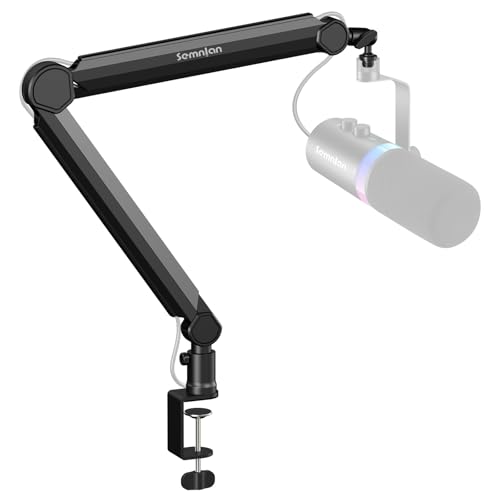
- 2 kg / 4.4 lb load capacity
- Supports 1/4", 3/8", and 5/8" threads
- Flexible stopper and cable-friendly design
Best For: Users wanting a sturdy, multi-thread desk mic arm
Low-Profile Studio Arm
FIFINE BM88 Cable-Managed Boom Stand

- Low-profile arm with built-in cable management
- Extends to 29" with 360° horizontal motion
- Includes 1/4", 3/8", and 5/8" thread sizes
Best For: Streamers and podcasters who want a tidy low-profile arm
Low-Profile Stability Pick
Aokeo AK-58i Desk Low Profile Mic Boom Arm Stand

- Low-profile frame improves stability and reduces shifting.
- 360° arm rotation and 180° swing add placement flexibility.
- Cable can be routed along the arm for a cleaner desk.
Best For: Creators who want a stable, discreet boom arm with low visual distraction.
Light Mic Space-Saver
TODI Mic Arm for Lightweight Mics

- All-metal build with strengthened screws for stability.
- Low-profile, fold-away design saves desk space.
- Cable management and 3/8"/5/8" threads improve setup flexibility.
Best For: Light mic setups that need a compact, tidy boom arm.
Budget Low-Profile Option
Aokeo AK-55 Desk Low Profile Adjustable Mic Boom Arm Stand

- Low center of gravity design supports stability.
- 360° rotation and 180° swing improve positioning.
- Adapters and cable hiding help keep the setup tidy.
Best For: Buyers who want a simple low-profile arm with broad compatibility.
Heavy-Duty Cable-Managed Pick
InnoGear Mic Arm for Blue Yeti and SM7B

- Built-in cable channels for a cleaner desk
- 3.5 lb capacity for heavier mics
- 32.3" horizontal reach with adjustable angles
Best For: Heavy mics and tidy streaming or podcast setups
Aluminum Stability Pick
UBeesize Aluminum Alloy Boom Arm

- Aluminum alloy build for steadier support
- 3.3 lb capacity with 360° base rotation
- Includes cable ties for cleaner routing
Best For: Content creators who want flexible, stable desk mounting
Low-Profile Desk Saver
NEEWER Low Profile Damped Mic Arm

- Low-profile design fits under monitors
- Damping system for stable adjustment
- Hidden cable channels and included adapters
Best For: Tight desks and overhead mic setups
Classic Adjustable Boom Arm – InnoGear Heavy-Duty Mic Stand
If you want a straightforward microphone boom arm under 100 that prioritizes flexibility and durability, this InnoGear stand is built around all-day desk use. It offers wide articulation, a compact fold-away design, and solid load support for popular streaming and recording mics.
Best For: Creators who want a versatile desk boom arm with broad mic compatibility and strong adjustability.
Pros:
- Fully adjustable with 360° base rotation, 135° front/back extension, and 180° arm movement.
- Folds away compactly for easier storage when not in use.
- Steel construction with a 3.3 lb load capacity for many common mics.
- Includes a 5/8″ to 3/8″ adapter and a standard mic clip for wide compatibility.
Cons:
- Desk clamp works best on squared edges up to 2 inches thick.
- Shock mount is not included.
This is a practical pick if you want simple, reliable movement without overcomplicating your setup. It is especially appealing for users who need a sturdy arm that can be pushed out of the way when desk space matters.
Low-Profile Desk Arm – InnoGear Slim Boom for Clean Setups
This microphone boom arm under 100 is designed for users who want a cleaner, lower-profile desk layout. The InnoGear MU-LP26 tucks beneath a monitor, while still giving you enough reach and motion for streaming, podcasting, or recording.
Best For: Desk setups that need a low-profile boom arm with a tidy look and wide mic support.
Pros:
- Low-profile design fits neatly under a monitor for a less cluttered workspace.
- Extends up to 25.6 inches with 360° horizontal rotation and 250° vertical adjustment.
- Supports up to 3.3 lbs and uses a sturdy alloy steel build.
- Includes 3/8″ to 5/8″ and 3/8″ to 1/4″ adapters plus a headphone hook.
Cons:
- Clamp is limited to desks up to 2.75 inches thick.
- Maximum height is relatively low at 12.2 inches.
If your priority is keeping the mic arm out of the way visually, this model does that better than a traditional upright boom. It is a strong fit for minimal desk setups that still need dependable support and easy positioning.
High-Capacity Desk Boom – SEMNLAN LM08 Adjustable Mic Arm
For buyers comparing a microphone boom arm under 100, this SEMNLAN LM08 stands out for its higher load rating and broad thread support. It is a practical desk-mounted option for larger microphones and users who want a simple metal build with a tidy cable-friendly layout.
Best For: Users who need a strong, adjustable boom arm with support for multiple thread sizes.
Pros:
- Supports 1/4″, 3/8″, and 5/8″ thread sizes for wider compatibility.
- Thickened metal build with a 2 kg / 4.4 lb maximum load capacity.
- Flexible stopper helps prevent the arm from snapping open unexpectedly.
- Designed to keep cables organized for a cleaner setup.
Cons:
- No microphone is included.
- Uses a flat base design, which may not suit every desk preference.
This model makes sense if you value practical support over extra features. Its higher weight rating and flexible mounting options make it a sensible choice for users building a straightforward desk recording setup.
Low-Profile Studio Arm – FIFINE BM88 Cable-Managed Boom Stand
If you are shopping for a microphone boom arm under 100 and want a setup that stays low and organized, the FIFINE BM88 is built around that use case. It combines a low-profile arm shape with cable management, long reach, and broad thread compatibility for streaming, gaming, and podcast work.
Best For: Gamers, streamers, and podcasters who want a low-profile arm with built-in cable management.
Pros:
- Low-profile design extends from below the monitor for a clearer sightline.
- Built-in cable management helps keep the desk cleaner.
- Extends up to 29 inches with 220° vertical and 360° horizontal adjustment.
- Includes 1/4″, 3/8″, and 5/8″ thread sizes for wide compatibility.
Cons:
- The section near the C-clamp cannot be adjusted up and down.
- Desk clamp is limited to desktops between 0.8 and 2.4 inches thick.
This is a strong all-around desk arm if you want an unobtrusive look and cleaner cable routing. The long reach and multiple adapters make it especially useful for common streaming and recording setups.
Low-Profile Stability Pick – Aokeo AK-58i Desk Low Profile Mic Boom Arm Stand
If you want a microphone boom arm under 100 that stays out of the way, the Aokeo AK-58i is built around a low-profile design and a lower center of gravity for added stability. It’s a practical choice for streaming, gaming, podcasting, or recording when you want the mic fixed in place with minimal visual clutter.
Best For: Creators who want a stable, low-profile boom arm that reduces desk clutter and visual distraction.
Pros:
- Low-profile design helps improve stability and keeps the mic position from shifting.
- Rotates 360° at both arms and swings 180° at the mic arm for flexible placement.
- Hides and secures the microphone cable along the arm to reduce desk clutter.
- Includes 3/8″ to 1/4″ and 3/8″ to 5/8″ adapters for broader compatibility.
Cons:
- Maximum load capacity is 2 kg, so it may not suit heavier setups.
- Fits tables less than 7 cm thick, which can limit some desks.
- Microphone is not included.
This is a solid pick if stability and a cleaner sightline matter more than extra reach. It’s especially appealing for compact setups where the boom arm needs to stay discreet while still offering enough adjustment.
Light Mic Space-Saver – TODI Mic Arm for Lightweight Mics
The TODI mic arm is a good microphone boom arm under 100 if you’re using a lightweight microphone and want a compact, space-saving setup. Its all-metal body, strengthened screws, and low-profile shape make it a straightforward fit for gaming, podcasting, and streaming desks.
Best For: Light microphone users who want a slim, adjustable arm that folds away neatly.
Pros:
- All-metal body with strengthened screws for a sturdy feel.
- Low-profile design extends behind the monitor and helps keep the view unobstructed.
- Fold-away style and 29-inch max extension help save desk space.
- Includes cable management and both 3/8″ and 5/8″ thread options.
Cons:
- Designed for lightweight mics only, not heavy-duty or studio mics.
- Does not fit some models with 1/4 thread, including Blue Yeti ORB and Yeti X.
- Maximum weight recommendation is 3 pounds.
Overall, this is the kind of arm that makes sense when desk space is tight and your mic is on the lighter side. It offers useful adjustability without adding much bulk to the setup.
Budget Low-Profile Option – Aokeo AK-55 Desk Low Profile Adjustable Mic Boom Arm Stand
If you’re shopping for a microphone boom arm under 100 and want a low-profile layout, the Aokeo AK-55 is built to keep the mic low and the desk looking clean. Its steel construction and adjustable arm design make it suitable for gaming, podcasting, recording, and streaming setups where stability and flexibility both matter.
Best For: Users who want a low-profile boom arm with broad thread compatibility and a clean desk layout.
Pros:
- Low-profile design lowers the center of gravity for better stability.
- Both arms rotate 360° and the mic arm swings 180° for flexible positioning.
- Includes 3/8″ to 1/4″ and 3/8″ to 5/8″ adapters for wide compatibility.
- Cable can be hidden along the arm to reduce visual clutter.
Cons:
- Maximum load capacity is 2 kg.
- Fits tables less than 7 cm thick.
- Microphone is not included.
For buyers who want the same general low-profile approach in a different model, this arm is a practical, no-frills option. It focuses on stability, cable control, and straightforward adjustability rather than extra features.
Heavy-Duty Cable-Managed Pick – InnoGear Mic Arm for Blue Yeti and SM7B
If you want a microphone boom arm under 100 that feels more polished than budget, this InnoGear model is built around a tidy desk and strong support. The built-in cable channels, long reach, and steel construction make it a practical choice for streamers, podcasters, and anyone mounting a heavier mic.
Best For: Users who want a sturdy, cable-managed arm for heavier microphones and cleaner setups.
Pros:
- Built-in cable channels help keep cords hidden and organized.
- 3.5 lb weight capacity supports heavier mics like Blue Yeti and SM7B.
- Long horizontal reach of 32.3 inches and vertical reach of 37.4 inches.
- Adjustable 135° back-and-forth movement and 180° up/down motion.
Cons:
- Clamp only fits desks up to 2 inches thick.
- Heavier steel build may be more than needed for small lightweight mics.
This is a strong pick if desk organization and mic support matter most. It stands out by combining a clean cable solution with the stability needed for popular broadcast-style microphones.
Aluminum Stability Pick – UBeesize Aluminum Alloy Boom Arm
This microphone boom arm under 100 focuses on stable positioning with an aluminum alloy build and a flexible joint layout. It’s a good fit if you want a compact desk mount that can handle common streaming and podcast microphones without taking up much workspace.
Best For: Streamers and podcasters who want a sturdy aluminum arm with flexible positioning.
Pros:
- Aluminum alloy construction is designed for sturdier, steadier support.
- 3.3 lb load capacity works with many popular mics.
- 360° base rotation and multi-angle head make positioning easy.
- Includes cable management ties to help keep the desk neat.
Cons:
- C-clamp is limited to flat-edged desks up to 2.5 inches thick.
- Requires careful tightening to avoid loosening or tilting.
Overall, this model is a straightforward option for users who value adjustability and a clean setup. The aluminum build and included cable ties make it especially appealing for everyday content creation.
Low-Profile Desk Saver – NEEWER Low Profile Damped Mic Arm
If your priority is keeping sightlines open, this microphone boom arm under 100 uses a low-profile layout that folds neatly under a monitor when not in use. The damped joints, hidden cable channel, and heightening pole make it useful for compact creator desks and overhead mic placement.
Best For: Users who need a low-profile arm for tight desk spaces and overhead positioning.
Pros:
- Low-profile design folds under a monitor to save space.
- Damping system helps with stable, quick positioning.
- Hidden cable channels keep wires discreet and organized.
- Includes adapters and accessories for broad mic and gear compatibility.
Cons:
- Clamp fits desks up to 2.4 inches thick, so very thick desks are out.
- More complex multi-part design may be more than some users need.
This is the most space-conscious choice in the group, especially if you want the mic arm out of the way between sessions. It’s a smart pick for creators who want flexibility without cluttering the desk.
How We Picked the Best Microphone Boom Arm Under 100
For this roundup, we prioritized build quality, desk stability, range of motion, compatibility with common microphones, and everyday usability. We also looked for features that matter in real setups, such as cable management, low-profile positioning, and clamp or mount designs that fit typical desks. Every pick needed to make sense as a Microphone Boom Arm Under 100, not just on paper but for actual streaming, podcasting, and recording use.
Quick Comparison
The best budget boom arms generally fall into a few groups: traditional scissor-style arms with broad positioning flexibility, low-profile arms that sit close to the desk for a cleaner camera view, and lightweight options designed for smaller mics. If you need maximum desk clearance, a low-profile design is usually the better fit. If you want more overhead swing and broader reach, a standard articulated arm is often the smarter choice.
Key Buying Factors for a Microphone Boom Arm Under 100
Weight Capacity and Mic Size
Check whether the arm can safely support your microphone, especially if you use heavier models with shock mounts or pop filters. Many affordable arms work best with popular USB microphones, but not all are ideal for larger broadcast mics.
Reach and Positioning
Look at how far the arm extends and whether it can place the mic where you need it without crowding your keyboard, monitor, or camera frame. Low-profile arms are great for a tidy look, while longer arms give more flexibility.
Desk Clamp Quality
A strong clamp matters more than many buyers expect. A secure mount reduces wobble, slipping, and desk vibration, which can help keep your audio setup consistent during typing, gaming, or live sessions.
Noise Control and Cable Management
Some arms include damping, tighter joints, or routing clips to help reduce movement noise and keep cables organized. Those small details can improve both sound and workflow.
Who Should Buy Which Microphone Boom Arm Under 100?
Streamers and video creators often prefer low-profile models because they keep the microphone visible but out of the way. Podcasters and voiceover users may want a more adjustable articulated arm for precise placement. If you use a lighter microphone and want a simple, affordable setup, a compact arm can be enough. If your mic is heavier or you want a more polished long-term desk rig, choose the sturdiest option in your budget and verify compatibility before buying.
In short, the right Microphone Boom Arm Under 100 is the one that matches your mic weight, desk space, and recording style. A well-chosen arm should feel stable, move smoothly, and make your workspace easier to use every day.
