A good low profile microphone boom arm keeps your mic close, your camera view clean, and your desk uncluttered. It’s a practical upgrade for streamers, podcasters, and remote workers who want better positioning without a big arm in the frame.
Below, we focus on 10 solid picks for 2026, with an emphasis on stability, adjustability, cable management, and value across different setups.
Best 10 Low Profile Microphone Boom Arm Picks for 2026
Sturdy low-profile pick
FIFINE BM88 Low Profile Boom Arm for Gaming

- All-metal build for stable desk mounting
- Low-profile arm keeps monitor view clear
- Hidden cable management reduces clutter
Best For: Gamers and streamers who want a sturdy arm that stays below the screen
Premium silent-adjustment choice

- Gas spring adjustment is smooth and silent
- Supports up to 3 kg with accessories
- Hidden cable channels keep the desk clean
Best For: Heavier mic setups that need quiet, premium positioning
Space-saving low-profile option
InnoGear Foldable Low Profile Mic Arm
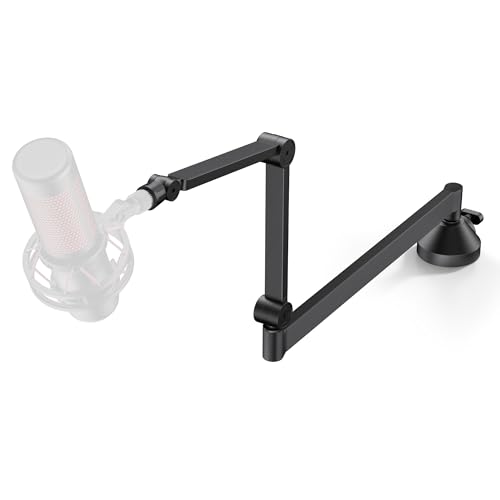
- Slim profile sits neatly under a monitor
- 26.1-inch reach with 360° rotation
- Alloy steel clamp adds stable support
Best For: Compact desks and setups that need clear monitor space
Budget flexible pick
NEEWER BASICS 31" Low Profile Boom Arm

- 31-inch reach with 360° rotation and tilt
- Lightweight aluminum build folds for portability
- Spring-loaded support helps reduce sagging
Best For: Budget-conscious creators needing simple, reliable adjustability
Premium All-Metal Low-Profile Pick

- All-metal, anti-torsion construction
- Below-shoulder low profile design
- Magnetic cable channels included
Best For: Streamers and podcasters wanting a premium, tidy setup
Stable Budget-Friendly Low-Profile Pick

- Lower center of gravity for better stability
- Steel build with hidden cable routing
- Adapters included for broad mic compatibility
Best For: Gamers and streamers who want stability on a budget
Space-Saving Studio Pick

- Low-profile design fits below the screen
- Built-in cable management for tidy desks
- 29-inch reach with wide angle adjustment
Best For: Podcasters and streamers wanting a tidy, adjustable arm
Extreme Stability Low-Profile Pick
Aokeo AK-55 Low Profile Mic Arm

- Low center of gravity for steadier mic placement
- Rotates 360° with 180° vertical swing
- Cable is hidden along the lower arm
Best For: Stable, low-visibility setups for streaming, gaming, and podcasting
Clean Desk Cable-Management Choice
MAONO BA92 Low Profile Boom Arm

- Built-in cable management reduces desk clutter
- Tilts -90° to +90° with 360° rotation
- Supports up to 4.4 lbs on 3/8" or 5/8" threads
Best For: Creators who want a tidy, professional desk setup
Most Discreet Desk Mount
InnoGear LP98 Low Profile Mic Arm

- Sits just 3.35 inches above the desk
- Magnetic cable channel keeps wires hidden
- 360° rotation plus 170° tilt for flexible positioning
Best For: Minimalist or small desks where a very low arm profile matters
Sturdy low-profile pick – FIFINE BM88 Low Profile Boom Arm for Gaming
If you want a low profile microphone boom arm that stays out of the way of your monitor, the FIFINE BM88 is built for a clean gaming or streaming setup. Its all-metal construction and hidden cable management make it a practical choice for keeping your desk stable and uncluttered while still giving you flexible positioning.
Best For: Gamers, streamers, and podcasters who want an unobstructed view and a sturdy desk-mounted arm.
Pros:
- Low-profile design extends from below the screen without blocking monitor view
- All-metal build and C-clamp are designed for stable, wobble-resistant support
- Hidden cable management helps keep the setup neat
- Includes 1/4″, 3/8″, and 5/8″ thread support for broad mic compatibility
Cons:
- The section near the C-clamp cannot be adjusted up or down
- Desk clamp is limited to desktops 0.8 to 2.4 inches thick
- Microphone is not included
This is a straightforward option if stability and screen clearance matter most. It offers useful reach and adjustment while keeping the footprint compact for desk-heavy setups.
Premium silent-adjustment choice – Elgato Wave Mic Arm Pro
The Elgato Wave Mic Arm Pro is a low profile microphone boom arm aimed at cleaner, quieter adjustments and heavier mics. With gas spring suspension, hidden cable channels, and a padded clamp, it’s a strong fit for users who want a polished desk setup with smooth repositioning and broad compatibility.
Best For: Creators using heavier microphones who want silent, easy adjustment and a minimalist look.
Pros:
- Gas-spring design allows smooth, silent adjustments without loosening screws
- Supports up to 3 kg, including accessories
- Hidden magnetic cable covers help keep wiring out of sight
- Padded clamp fits desks up to 60 mm thick
Cons:
- Maximum height is shorter than some taller boom-arm options
- Uses a tripod-style base rather than a simple clamp-only profile
- Heavier and more premium than budget-focused alternatives
For users who care about feel and finish as much as function, this arm stands out. It combines quiet movement with solid load capacity, making it well suited to more demanding desk setups.
Space-saving low-profile option – InnoGear Foldable Low Profile Mic Arm
The InnoGear low profile microphone boom arm is designed for a tidy, monitor-friendly layout with plenty of positioning range. Its slim low-profile shape, foldable design, and 26.1-inch horizontal reach make it a practical choice for streaming, recording, and everyday desktop use.
Best For: Users who want a compact, adjustable arm that tucks neatly under a monitor.
Pros:
- Very low-profile design extends just 3.27 inches from the desk to the top of the lower arm
- 26.1-inch horizontal reach with 360° rotation for flexible placement
- Alloy steel construction supports microphones up to 1.5 kg
- Clamp includes rubber padding and a headphone hook for added utility
Cons:
- Compatible with desks up to 2.75 inches thick only
- Weight capacity is lower than heavier-duty premium arms
- Designed around a more compact range of motion than some larger boom arms
This is a strong fit if desk space and monitor clearance are your top priorities. It offers a good balance of reach, stability, and compactness without adding much visual bulk.
Budget flexible pick – NEEWER BASICS 31" Low Profile Boom Arm
The NEEWER BASICS mic boom arm is a practical low profile microphone boom arm for users who want straightforward adjustability and a lightweight build. It extends to 31 inches, folds for portability, and uses a spring-loaded mechanism to help keep microphones stable during streaming, recording, or gaming.
Best For: Creators who want a simple, budget-minded arm with solid reach and broad mic support.
Pros:
- Extends up to 31 inches for flexible microphone positioning
- Spring-loaded design helps maintain stability and prevent sagging
- Lightweight aluminum construction is foldable and portable
- Standard 5/8-inch thread works with many popular microphones
Cons:
- Uses a tripod-style base rather than a low-clamp visual profile
- Weight limit is 3.3 lb, so it is not ideal for very heavy setups
- Part of the BASICS line, so it is intentionally simple and minimal
If you want the essentials without extra complexity, this arm makes sense. It covers the core needs well: reach, adjustability, and compatibility for common creator microphones.
Premium All-Metal Low-Profile Pick – Elgato Wave Arm
If you want a low profile microphone boom arm that keeps your desk view open, the Elgato Wave Mic Arm is built around that goal. Its all-metal, anti-torsion construction, magnetic cable covers, and long horizontal reach make it a strong fit for tidy streaming, podcasting, and office setups.
Best For: Streamers, podcasters, and creators who want a premium low-profile arm with clean cable management.
Pros:
- All-metal, anti-torsion build for a premium, stable feel
- Sits below shoulder line to preserve an unobstructed view
- Magnetic cable channels hide cables and stay easy to access
- 360-degree rotation plus 90-degree upper vertical movement
Cons:
- More feature-rich than a basic budget arm
- Large 740 mm horizontal reach may be more arm than very small desks need
Overall, this is the most polished low profile microphone boom arm in the group if you value a clean look and smooth adjustment. The long reach and cable system make it especially appealing for larger desks and organized creator spaces.
Stable Budget-Friendly Low-Profile Pick – Aokeo AK-58i
The Aokeo AK-58i is a low profile microphone boom arm aimed at stability and simple desk-friendly placement. Its lower center of gravity, hidden cable routing, and steel construction make it a practical choice for gaming, recording, and streaming when you want the mic kept low and steady.
Best For: Users who want a stable, low-visual-disturbance mic arm with wide compatibility.
Pros:
- Low-profile layout improves stability by lowering the center of gravity
- Steel construction is designed for long-term durability
- Hides and secures the microphone cable along the arm
- Includes 3/8″ to 1/4″ and 3/8″ to 5/8″ adapters for broad compatibility
Cons:
- Maximum load capacity is capped at 2 kg
- Fits tables less than 7 cm thick, so thicker desks are out
- Less premium-feeling than higher-end all-metal arms
As a low profile microphone boom arm, the AK-58i focuses on keeping the mic fixed, the cable tidy, and the setup visually out of the way. It’s a sensible pick if stability and compatibility matter more than premium styling.
Space-Saving Studio Pick – FIFINE BM88W
The FIFINE BM88W is a low profile microphone boom arm built for a clean recording area and flexible positioning. With a metal frame, built-in cable management, and 29-inch reach, it works well for podcasting, streaming, and home office use where you want the arm to stay out of the way.
Best For: Creators who want a tidy, adjustable low-profile arm for podcasting or streaming.
Pros:
- Low-profile layout extends from below the screen for a cleaner workspace
- Metal construction helps reduce vibration and support the mic securely
- Up to 29-inch reach with 220-degree up/down and 360-degree horizontal adjustment
- Built-in cable management keeps the desk area organized
Cons:
- The section near the C-clamp cannot be adjusted up or down
- Maximum weight recommendation is 1.5 kg
- Black or white ball-head is randomly received
This arm is a strong option if you want a low profile microphone boom arm that balances desk space, adjustability, and cable control. Its simple, modular setup should appeal to users building a neat home studio or streaming corner.
Extreme Stability Low-Profile Pick – Aokeo AK-55 Low Profile Mic Arm
If you want a low profile microphone boom arm that stays out of the way while keeping your mic steady, the Aokeo AK-55 is built around stability and a cleaner desk layout. Its low-slung design helps lower the center of gravity, while the arm runs across the bottom of your monitor to reduce visual clutter and keep your recording area focused.
Best For: Streamers, podcasters, and gamers who want a stable, low-visibility arm for everyday desk use.
Pros:
- Low profile design improves stability by keeping the mic arm’s center of gravity lower.
- 360° arm rotation and 180° up/down swing give you flexible positioning.
- Hides and secures the microphone cable along the lower arm for a tidier setup.
- Supports up to 2 kg and includes 3/8″, 5/8″, and 1/4″ adapter support.
Cons:
- Fits tables up to 7 cm thick, so it is not ideal for extra-thick desks.
- Heavier than some alternatives at 2 kg.
- Mic is not included.
Overall, the AK-55 is a practical pick if stability and a low line-of-sight profile matter more than a highly compact footprint. It is especially appealing for users who want a sturdier arm for long-term desk setups.
Clean Desk Cable-Management Choice – MAONO BA92 Low Profile Boom Arm
The MAONO BA92 is a low profile microphone boom arm designed for users who want a cleaner desktop without giving up adjustability. It sits low, extends under your monitor, and adds built-in cable management so your workspace stays neat while still giving you easy positioning for recording or streaming.
Best For: Podcasters, streamers, and creators who want a tidy, professional-looking desktop setup.
Pros:
- Low profile shape keeps the arm unobtrusive and preserves your screen view.
- Built-in cable management helps reduce clutter and tangled cords.
- Strong adjustability with -90° to +90° tilt and 360° rotation.
- Supports up to 4.4 lbs and works with 3/8″ or 5/8″ mic threads.
Cons:
- Desk clamp support is limited to desktops up to 2.2″ thick in the notes.
- The arm is focused on desk setups, so it may be more than some casual users need.
In practice, the BA92 stands out if you care about a professional-looking desk and want cable routing handled as part of the arm design. Its higher weight capacity also makes it a strong option for heavier microphone setups.
Most Discreet Desk Mount – InnoGear LP98 Low Profile Mic Arm
If you need a low profile microphone boom arm that disappears into a compact setup, the InnoGear LP98 keeps the arm just 3.35 inches above the desk. It is designed for small workstations and cluttered streaming desks, and its magnetic cable channel helps maintain a clean look without the hassle of external clips.
Best For: Minimalist desks, small streaming stations, and users who want a very low arm position.
Pros:
- Ultra-sleek low profile design sits just 3.35 inches above the desk.
- Magnetic cable channel keeps wiring hidden and easy to manage.
- Wide adjustability with 360° base rotation, 180° swivel, and 170° tilt.
- Supports up to 3.3 lbs and includes adapters for broad mic compatibility.
Cons:
- Lower weight capacity than some heavier-duty alternatives at 3.3 lbs.
- Clamp is designed for flat-edge desktops up to 2.36 inches thick.
The LP98 is a strong fit if you want the arm to stay visually quiet while still offering plenty of positioning flexibility. Its alloy steel build and integrated cable channel make it a solid pick for clean, practical desk setups.
How We Picked the Best Low Profile Microphone Boom Arm
We focused on the features that matter most in a Low Profile Microphone Boom Arm: stable desk mounting, smooth adjustability, usable reach, cable routing, and compatibility with popular mics. We also looked at build quality, weight support, and whether the arm is practical for real streaming or recording setups rather than just looking good in photos.
Quick Comparison
Short on time? Prioritize fit for your microphone first, then decide how much you value a cleaner camera angle, quieter movement, and easier cable routing. Gas-spring arms tend to feel more premium and effortless, while simpler metal arms can deliver excellent value if you don’t need the smoothest motion.
Key Buying Factors for a Low Profile Microphone Boom Arm
Load Capacity and Mic Weight
Check the arm’s rated payload against your microphone and any shock mount or accessory you plan to use. A heavier broadcast mic needs more support than a lightweight USB mic, and staying within spec helps prevent sagging over time.
Desk Clearance and Viewing Angle
The main advantage of a Low Profile Microphone Boom Arm is keeping the arm below your sightline. Make sure the arm can sit low enough for your monitor and camera setup, especially if you want a cleaner on-camera look for streaming or video calls.
Mounting Style and Desk Thickness
A strong clamp matters as much as the arm itself. Confirm the clamp works with your desk thickness and edge shape, and look for padding if you want to protect laminate or wood surfaces.
Adjustment Feel and Noise
If you move your mic often, smooth joints or gas-spring support can make daily use easier. Quieter adjustment is also a plus in live recording environments where mechanical noise can distract from the session.
Cable Management
Built-in channels or clips help keep the cable tucked away and reduce visual clutter. This is especially useful if your setup is on camera or if you frequently reposition the arm.
Who Should Buy Which Low Profile Microphone Boom Arm?
Streamers and creators who want the cleanest frame should lean toward a Low Profile Microphone Boom Arm with strong cable management and a slim profile. Podcasters and voiceover users may prefer higher-load models for better support with heavier microphones. Budget buyers can do well with simpler fixed metal arms, while users who adjust their mic constantly may be happier with a premium gas-spring design. If you’re matching a popular USB mic or compact XLR setup, prioritize compatibility and stable positioning over extra features you may not need.
