A monitor that looks bright and colorful is not necessarily displaying accurate color. Calibration tools measure your screen and create a correction profile, helping photos, designs, and video appear more consistent from editing to export.
We’ve compared 10 monitor calibration tools for home offices, including approachable options for occasional creators, advanced colorimeters for demanding workflows, and standalone luminance meters for brightness checks.
Best 10 Monitor Calibration Tools for Home Offices Picks for 2026
Portable Everyday Calibration
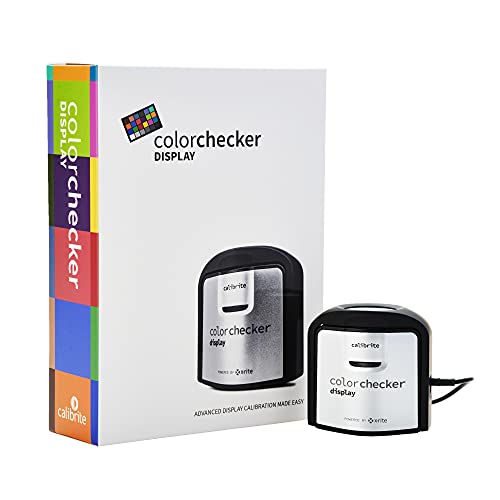
- Compact colorimeter with intuitive ccStudio software
- Supports monitor and projector calibration
- Diffuser arm handles ambient light and tabletop projector profiling
Best For: Portable, straightforward calibration across home-office displays
Advanced Display Analysis

- Supports displays up to 12,000 nits and current backlight types
- Detailed calibration, analysis, and multi-monitor matching tools
- Adds projector calibration and 3D LUT export for compatible monitors
Best For: Professional photo, design, and video-editing workstations
Simple Legacy Recalibration

- Automates color and brightness calibration
- One sensor supports multiple displays
- ReCAL assistant simplifies repeat calibration
Best For: Compatible older systems needing basic display calibration
Complete Color Workflow

- 2024 monitor calibrator
- Includes Spyder Cube and Checkr 24
- Supports OLED, mini-LED, and XDR displays
Best For: Photographers seeking monitor and camera color tools together
Portable Brightness Testing
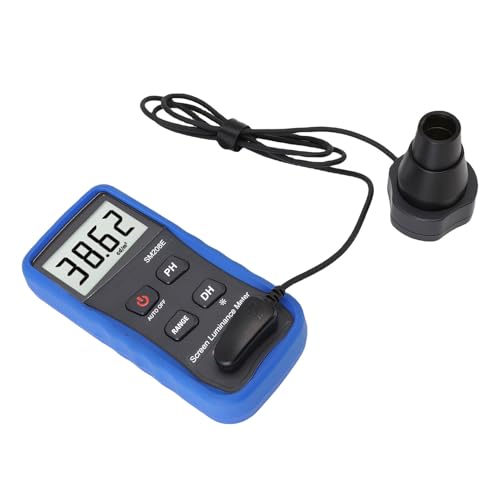
- Measures 0.01–39.990 cd/m²
- Stores and exports readings
- Designed for portable display checks
Best For: Brightness testing across home-office displays
Photo Editing Workflow

- Display Pro HL colorimeter included
- ColorChecker Passport Photo 2
- Supports mini-LED, OLED, and Apple XDR
Best For: Photographers building a consistent RAW-to-edit workflow
Brightness Measurement Pick
Portable Screen Brightness Meter

- Measures 0.01–39,990 cd/m²
- Stores multiple readings
- Works across monitors and other displays
Best For: Users who need documented luminance measurements
First-Time Color Calibration Pick

- Guided single-click calibration
- Includes 12 calibration targets
- Supports multiple laptop and desktop displays
Best For: Beginners and photographers seeking guided color calibration
Simple Dual-Display Pick

- Easy 1 2 3 software workflow
- Supports up to two displays
- Includes before-and-after comparison
Best For: Dual-monitor creative workspaces
High-Brightness Precision – Display Pro HL
The Calibrite Display Pro HL is a strong choice among monitor calibration tools for home offices that handle photo editing, design, HDR, or multiple displays. Its high-luminance sensor supports LCD, mini-LED, OLED, and compatible projectors up to 3000 nits.
Best For: Creative professionals who need detailed control over bright modern displays and consistent color across multiple monitors.
Pros:
- Measures displays up to 3000 nits, including compatible high-brightness and HDR panels.
- PROFILER software supports custom white point, luminance, contrast, gamma, presets, and patch sets.
- Includes validation, uniformity, flare-correction, and multi-display workflow tools.
- USB-C connectivity, USB-A adapter, travel pouch, and built-in 1/4-inch mount thread add flexibility.
Cons:
- Its advanced controls may be more than casual users need.
- High-luminance capability is most valuable on modern bright displays and professional workflows.
For a home office where color accuracy and display matching matter, the Display Pro HL offers unusually broad display support and thorough verification tools. It is particularly well suited to photographers, designers, and hybrid workstations.
Portable Everyday Calibration – ColorChecker Display
The Calibrite ColorChecker Display is a compact option for home-office users seeking straightforward monitor calibration tools for home offices. Its self-contained design and included ccStudio software make it easy to carry between workstations while supporting monitors and projectors.
Best For: Home users and mobile creatives who want a portable colorimeter for routine monitor or projector calibration.
Pros:
- Compact, portable design with intuitive ccStudio software.
- Optical design is built for repeatable results across display types.
- Rotatable diffuser arm supports tabletop projector profiling, ambient-light measurement, and optical protection.
- Integrated tripod mount provides additional flexibility for projector profiling.
Cons:
- The supplied notes do not indicate support for the advanced high-luminance workflows offered by newer models.
- Its feature set is geared toward simple calibration rather than extensive custom profiling.
This model makes sense when convenience and portability are priorities. It covers essential display and projector calibration without adding the more specialized controls intended for demanding HDR or studio workflows.
Advanced Display Analysis – SpyderPro Monitor Calibrator
The SpyderPro is a feature-rich choice among monitor calibration tools for home offices, especially for photography, design, and video editing. It supports current display technologies, high brightness levels, multi-monitor matching, projector calibration, and detailed screen analysis.
Best For: Advanced creators who need extensive calibration controls, display diagnostics, video color-management features, or multi-screen consistency.
Pros:
- Supports Wide LED, OLED, QD-OLED, Apple Liquid Retina XDR, and Mini LED displays up to 12,000 nits.
- Offers Standard and Deeper Calibration modes, plus adjustable gamma, white point, and brightness.
- Includes display analysis, uniformity checks, CheckCal verification, StudioMatch, and SpyderTune.
- Can calibrate projectors and export 3D LUTs for compatible video monitors.
Cons:
- The extensive feature set may be unnecessary for basic office work.
- Some video-oriented capabilities depend on compatible monitors and workflows.
SpyderPro is the most comprehensive option in this group for users who want calibration plus ongoing display assessment. Its broad brightness range and analysis tools make it a strong fit for demanding, evolving creative setups.
Simple Legacy Recalibration – Spyder4Pro Colorimeter
The Datacolor Spyder4Pro is a basic colorimeter for users who want automated display calibration without a complex feature set. It uses a full-spectrum sensor, can calibrate multiple displays, and includes a ReCAL assistant for quick repeat calibration.
Best For: Budget-conscious users with compatible older setups who need automated calibration and periodic display maintenance.
Pros:
- Automated color and brightness calibration simplifies setup.
- One sensor can calibrate multiple displays.
- Full-spectrum sensor and double-shielded filters are designed for accuracy and stability.
- ReCAL helps speed up calibration when display performance changes over time.
Cons:
- As an older Spyder4 model, it may not support newer display technologies or operating systems.
- The supplied notes do not list advanced analysis, HDR, or modern USB-C features.
- Its documented language information lists German, which may matter for some users.
The Spyder4Pro can still be useful for straightforward calibration, but buyers should verify compatibility with their computer and display before choosing it. It is better suited to established, compatible systems than to a new HDR-focused home office.
Complete Color Workflow – Spyder Celebration Kit
For home offices where photography and display consistency matter, the Datacolor Spyder Celebration Kit is a comprehensive choice among monitor calibration tools for home offices. It combines a 2024 monitor calibrator with camera color and white-balance references for a more consistent capture-to-display workflow.
Best For: Photographers who want monitor calibration plus camera white-balance and color-reference tools in one kit.
Pros:
- Includes a 2024 monitor calibrator compatible with OLED, mini-LED, and XDR Retina displays.
- Spyder Cube helps establish white, black, and neutral-gray values.
- Spyder Checkr 24 supports HSL color presets for image capture.
Cons:
- The full kit may include more camera-color tools than users who only need monitor calibration require.
- At 2.42 pounds, it is less lightweight than a calibration device alone.
This is a strong all-in-one option for photographers who want to manage both camera capture and monitor output. If you only need display calibration, a simpler colorimeter may be more focused.
Portable Brightness Testing – Display Brightness Meter
This portable display brightness meter takes a measurement-focused approach to monitor calibration tools for home offices. It is designed to evaluate brightness across multiple displays, store readings, and export data for later analysis.
Best For: Users who need portable brightness measurements for laptops, monitors, smartphones, or on-site display checks.
Pros:
- Measures brightness across a stated range of 0.01 to 39.990 cd/m².
- Can store measurements and export data for analysis.
- Lightweight design supports quick, portable measurements.
- Suitable for photography, film, printing, and design applications.
Cons:
- The supplied information emphasizes brightness measurement rather than complete color profiling.
- No included components are listed in the supplied specifications.
This meter may suit a home office that needs repeatable brightness readings across several devices. Buyers seeking a full color-management workflow should verify whether its measurement-focused functionality meets their calibration needs.
Photo Editing Workflow – Calibrite Photo Kit
The Calibrite Photo Kit combines monitor calibration and camera profiling, making it a versatile option among monitor calibration tools for home offices used for photo editing. Its Display Pro HL colorimeter and ColorChecker Passport Photo 2 are supported by Calibrite PROFILER software.
Best For: Photographers who want a consistent RAW capture-to-edit workflow across modern laptop and desktop displays.
Pros:
- Display Pro HL supports mini-LED, OLED, and Apple XDR panels.
- ColorChecker Passport Photo 2 supports custom RAW camera profiles.
- Includes white-balance and exposure references for repeatable capture.
- PROFILER software offers presets and adjustable white-point and gamma targets.
Cons:
- The kit is geared toward photography workflows and may be more than basic office users need.
- Its supplied dimensions and components indicate a multi-part kit rather than a single-purpose meter.
For photo-focused home offices, this kit provides a broad path from camera capture through display editing. It is especially appealing when custom profiles and support for high-luminance modern panels are priorities.
Brightness Measurement Pick – Portable Screen Brightness Meter
For home-office users who need monitor calibration tools for home offices with measurable brightness data, this portable luminance meter offers a more technical approach than a standard colorimeter. It measures displays from 0.01 to 39,990 cd/m² and stores multiple readings for later review.
Best For: Photographers, designers, and technically minded users who want quantitative brightness measurements across monitors, laptops, TVs, and other displays.
Pros:
- Wide luminance range for many digital display types.
- Stores multiple measurements for trend tracking and reporting.
- Can assist with monitor brightness and color-calibration work.
- Compact, lightweight design supports one-handed operation.
Cons:
- Its measurement-focused workflow may be more advanced than needed for casual office use.
- The supplied details do not list included components.
- At 1.93 pounds, it is less lightweight than some dedicated colorimeters.
This is a versatile choice when your calibration process includes documenting luminance rather than simply creating a monitor profile. It is particularly useful for home offices that also support photography, design, or production work.
First-Time Color Calibration Pick – Datacolor Spyder X Pro
The Datacolor Spyder X Pro is a straightforward option among monitor calibration tools for home offices, especially if you want guided software rather than manual measurement. Its wizard workflow, predefined targets, and room-light monitoring are designed to make calibration approachable.
Best For: First-time users, photographers, and home-office creatives calibrating one or more desktop or laptop displays.
Pros:
- Lens-based color engine supports accurate color, shadow detail, and white balance.
- Single-click calibration and guided workflow simplify setup.
- Offers 12 predefined calibration targets.
- Supports multiple laptops and desktop monitors with Spyder X software.
Cons:
- It is designed for displays rather than phones.
- The supplied warranty information specifies one year.
- Users seeking detailed standalone luminance logging may prefer a dedicated brightness meter.
For a home office where ease of use matters most, the Spyder X Pro provides a focused path to more consistent screen color. Its before-and-after view also makes it easier to evaluate the effect using your own images.
Simple Dual-Display Pick – Calibrite Display 123
The Calibrite Display 123 keeps monitor calibration tools for home offices simple with an Easy 1 2 3 software workflow and USB-C connection. It can calibrate up to two displays, making it a practical fit for a home office with a primary monitor and a secondary screen.
Best For: Photographers, editors, and dual-monitor users who want guided calibration and a quick way to compare results before and after setup.
Pros:
- Guided workflow is designed for approachable setup.
- Supports calibration of up to two displays.
- USB-C connection and adjustable counterweight aid screen placement.
- Built-in before-and-after check helps confirm the change.
Cons:
- The supplied details do not describe compatibility beyond the listed display support.
- It is intended for monitor calibration rather than broad luminance measurement across TVs and phones.
- Users with more than two displays may need another solution.
This is a good middle ground for creative home offices that want consistent color across two screens without a complicated calibration process. Its comparison view is useful for checking whether the adjustment produces a visible improvement.
How We Picked These Monitor Calibration Tools for Home Offices
We focused on the capabilities that matter in a home workspace: measurement accuracy, supported display types, software usability, brightness range, connection requirements, and workflow flexibility. The selection includes current Calibrite and Datacolor colorimeters, older models that may still appeal at a discount, bundled color-checking kits, and dedicated luminance meters.
Because products vary significantly, we also considered whether each tool is best suited to photography, design, video, general color management, or basic screen-brightness verification. Always confirm operating-system compatibility and software support before buying an older colorimeter.
Quick Comparison
- Best all-around capability: Calibrite Display Pro HL, particularly for bright LCD, Mini-LED, and OLED displays.
- Best for straightforward workflows: Calibrite Display 123, with a simplified setup aimed at beginners.
- Best-known alternatives: Datacolor Spyder X Pro and SpyderPro, depending on required features and budget.
- Best for color-reference workflows: Calibrite Photo Kit or Datacolor’s Spyder Celebration Kit.
- Best for brightness measurement: A dedicated digital screen luminance meter, especially when measuring phones, televisions, or multiple displays.
Key Buying Factors for Monitor Calibration Tools
Colorimeter Capability
A colorimeter measures the light produced by your display and helps calibration software build a profile. Check the tool’s supported panel technologies and brightness range, particularly if you use HDR, OLED, or a high-output Mini-LED monitor.
Software and Compatibility
The hardware is only part of the system. Look for current software, support for your operating system, adjustable targets, and a guided process you will actually use. Older products can be inexpensive, but discontinued software or limited compatibility may outweigh the savings.
Brightness and Viewing Conditions
Calibration cannot compensate for uncontrolled room lighting. Choose a practical brightness target for your workspace and avoid placing the screen in direct sunlight. If you need to verify absolute luminance across devices, consider a dedicated brightness meter rather than a colorimeter alone.
Workflow and Included Accessories
Photographers may benefit from a color checker for camera-to-screen consistency, while general office users may need only a basic calibration device. USB-C connectivity, storage cases, adapters, and bundled charts can also affect day-to-day convenience.
Who Should Buy Which Monitor Calibration Tools for Home Offices?
Home photographers and designers should prioritize a current colorimeter with dependable profiling software, such as the Display Pro HL or Spyder X Pro. Beginners may prefer a simpler Display 123-style workflow. Advanced creators working with bright HDR or OLED screens should check maximum luminance support before choosing.
Creators managing camera color can choose a kit that combines monitor calibration with a physical color checker. Users comparing brightness across phones, TVs, and monitors should consider a standalone luminance meter. For the best results, recalibrate periodically, keep ambient lighting consistent, and use the same display settings throughout your editing process.
