A multi-gigabit switch can remove bottlenecks between fast internet, Wi-Fi access points, NAS storage, and wired workstations. The right model depends on port speed, port count, management features, and how much room your network has to grow.
We selected 10 practical options for home offices, from compact plug-and-play 2.5GbE switches to higher-capacity 10GbE models with managed controls, SFP+ connectivity, and flexible mounting.
Best 10 Multi-Gigabit Network Switches for Home Offices Picks for 2026
Best Hybrid 10G Pick
VunLink 6-Port 10G/2.5G Switch

- Two 10GbE and four 2.5GbE RJ45 ports
- 60Gbps switching capacity with wire-speed forwarding
- Fanless, unmanaged desktop or wall-mount design
Best For: Mixed-speed home offices with 10GbE and 2.5GbE devices
Best 8-Port 2.5G Upgrade

- Eight 2.5Gbps RJ45 ports
- Auto-detects 100Mbps, 1Gbps, and 2.5Gbps links
- Fanless metal design with desktop or wall placement
Best For: Larger 2.5GbE home-office networks
Best Long-Warranty Option
TP-Link Omada DS108G-M2 2.5G Switch

- Eight 2.5Gbps ports with 40Gbps switching capacity
- Fanless metal housing for quiet operation
- Five-year warranty and desktop or wall mounting
Best For: Quiet 2.5GbE offices prioritizing long-term coverage
Best Full-Speed 10G Choice

- Five 10GbE ports and 100Gbps switching capacity
- Supports link speeds from 100Mbps through 10Gbps
- Fanless metal design with desktop or wall mounting
Best For: High-performance 10GbE home offices and NAS setups
Best Plug-and-Play Value

- Eight 2.5GbE ports with 40 Gbps switching capacity
- Auto-negotiates 100Mb, 1G, and 2.5G speeds
- Fanless and designed for desktop or wall mounting
Best For: Simple, silent 2.5GbE expansion in home offices
Best for Multi-Gig Uplinks
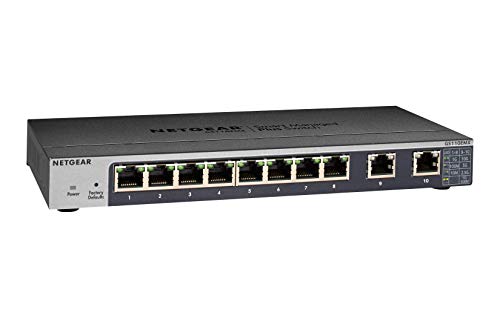
- 2× ports support up to 10G multi-gig speeds
- 8× additional 1GbE ports for standard devices
- Basic management with desktop, wall, or rack mounting
Best For: Mixed gigabit networks with fast NAS or core-network uplinks
Best for 10G Expansion

- Four 10G Ethernet ports
- 1G/10G SFP+ uplink
- Desktop or rackmount placement
Best For: Home offices building a 10G wired network
Best Hybrid 10G Pick – VunLink 6-Port 10G/2.5G Switch
For home offices that mix high-speed NAS, workstations, and everyday devices, this VunLink model is one of the more flexible multi-gigabit network switches for home offices. It combines four 2.5GbE RJ45 ports with two ports that support speeds up to 10GbE, while its unmanaged design keeps setup simple.
Best For: Home offices or small labs with a 10GbE NAS, server, or PC alongside several 2.5GbE devices.
Pros:
- Two 10GbE ports and four 2.5GbE ports support mixed-speed networks.
- 60Gbps switching capacity and wire-speed forwarding are suited to busy multi-device traffic.
- Fanless metal design supports quiet desktop or wall-mounted installation.
- Plug-and-play operation requires no software or configuration.
Cons:
- It has fewer total ports than the 8-port alternatives.
- There is no managed configuration for VLANs or other advanced controls.
This is a strong choice when your network needs both 10GbE connectivity and extra 2.5GbE capacity without adding configuration overhead. Its compact, quiet design also fits well in a workspace.
Best 8-Port 2.5G Upgrade – UGREEN 8-Port 2.5GbE Switch
UGREEN’s 8-port model is a straightforward way to expand a home office network around 2.5GbE devices. As multi-gigabit network switches for home offices go, it emphasizes port count, quiet operation, and automatic compatibility with 100Mbps, 1Gbps, and 2.5Gbps connections.
Best For: Home offices needing eight 2.5GbE connections for NAS systems, PCs, routers, cameras, or gaming equipment.
Pros:
- All eight RJ45 ports support up to 2.5Gbps.
- Auto-negotiation works with 100Mbps and 1Gbps devices.
- Metal housing, heatsinks, thermal pads, and ventilation support extended operation.
- Fanless construction, LED indicators, and desktop or wall placement keep installation practical.
Cons:
- It does not provide 5GbE or 10GbE ports.
- The unmanaged design does not offer advanced network management.
This switch makes sense for a mostly 2.5GbE setup where eight matching ports are more useful than a smaller number of faster uplinks. Its thermal design and two-year warranty add practical reassurance for an always-on office network.
Best Long-Warranty Option – TP-Link Omada DS108G-M2 2.5G Switch
The Omada DS108G-M2 focuses on dependable 2.5GbE expansion with eight ports and no setup complexity. It is a practical entry among multi-gigabit network switches for home offices, especially when quiet operation, flexible mounting, and a long warranty matter.
Best For: Home offices, workstations, and entertainment setups that need eight silent 2.5GbE connections.
Pros:
- Eight 2.5Gbps ports provide up to 40Gbps of switching capacity.
- Plug-and-play operation requires no central management or configuration.
- Fanless operation suits noise-sensitive workspaces.
- Metal casing supports durability and heat dissipation, with desktop or wall mounting.
Cons:
- All ports top out at 2.5Gbps rather than supporting 5GbE or 10GbE.
- It is an unmanaged switch without advanced traffic controls.
Choose this model if you want a simple, quiet 2.5GbE network expansion device backed by a notably long five-year warranty. It is well matched to offices that value reliable basics over configurable features.
Best Full-Speed 10G Choice – TP-Link TL-SX105 10G Switch
The TP-Link TL-SX105 is built for networks where every connected device may need more than 2.5GbE. Among multi-gigabit network switches for home offices, its five 10GbE ports and automatic support for 100Mbps through 10Gbps make it a strong fit for high-performance storage, workstation, and Wi-Fi infrastructure.
Best For: 10GbE home offices with a NAS, server, high-end PCs, or multi-gigabit wireless access points.
Pros:
- Five 10GbE ports provide up to 100Gbps of switching capacity.
- Auto-negotiation supports 100Mbps, 1Gbps, 2.5Gbps, 5Gbps, and 10Gbps links.
- Fanless operation and IEEE 802.3X flow control support quiet, reliable use.
- Sturdy metal casing allows desktop or wall-mounted installation.
Cons:
- It offers fewer ports than the 8-port 2.5GbE models.
- It is likely excessive for networks whose devices are limited to standard Gigabit speeds.
- The unmanaged design provides no advanced configuration features.
This is the better choice when your core devices already support 10GbE or you are building toward that standard. Automatic speed negotiation preserves compatibility with slower equipment while keeping the switch simple to deploy.
Best Managed Upgrade – QNAP QSW-L2110-10T-US
For home offices that need more than basic plug-and-play networking, the QNAP QSW-L2110-10T-US is a flexible choice among multi-gigabit network switches for home offices. It combines eight 2.5GbE ports with two 10GbE RJ45 ports, making it well suited to fast NAS connections, workstations, and high-speed uplinks.
Best For: Home offices, creators, and small teams connecting multi-gig workstations, Wi-Fi access points, and NAS storage.
Pros:
- Eight 2.5GbE ports and two 10GbE RJ45 ports support a mix of edge devices and high-speed uplinks.
- Lite-managed features include VLAN, QoS, IGMP Snooping, and Link Aggregation.
- Works with existing Cat 5e or Cat 6 cabling for a more gradual network upgrade.
- Fanless design supports quieter operation.
Cons:
- Managed features may be unnecessary for users seeking a strictly plug-and-play switch.
- All ports use RJ45 copper connectivity; no fiber ports are listed.
The QSW-L2110-10T-US stands out when you want both 2.5GbE expansion and 10GbE capacity without moving to a fully enterprise-focused platform. Its lite-managed controls add useful traffic-management options while the fanless design helps keep a home office quiet.
Best Plug-and-Play Value – TP-Link TL-SG108S-M2
The TP-Link TL-SG108S-M2 is a straightforward option for buyers comparing multi-gigabit network switches for home offices. Its eight 2.5GbE ports provide a simple way to connect compatible desktops, NAS devices, access points, and other multi-gig equipment without adding managed-network complexity.
Best For: Home offices and small workspaces that want an affordable, silent 2.5GbE desktop switch.
Pros:
- Eight 2.5GbE ports provide up to 40 Gbps of switching capacity.
- Auto-negotiation supports 100Mb, 1G, and 2.5G link speeds.
- Can upgrade compatible devices without requiring Cat 6 wiring.
- Fanless operation is suitable for noise-sensitive spaces.
Cons:
- Unmanaged design does not provide VLAN, QoS, or other configuration controls.
- No 10GbE ports are listed for faster uplinks.
Choose the TL-SG108S-M2 when ease of installation matters most. It offers eight matching 2.5GbE ports, silent operation, and flexible speed negotiation, making it a practical fit for a small office that does not need advanced traffic management.
Best for Multi-Gig Uplinks – NETGEAR GS110EMX
The NETGEAR GS110EMX is a useful choice among multi-gigabit network switches for home offices that need basic management and fast uplinks. It provides eight 1GbE ports alongside two ports that support 1G, 2.5G, 5G, and 10G multi-gig connections, giving you flexibility for a NAS, router, or core network link.
Best For: Home offices that need mostly gigabit connections with one or two configurable multi-gig uplinks.
Pros:
- Two ports support 1G, 2.5G, 5G, and 10G multi-gig speeds.
- Eight additional 1GbE ports support standard wired devices.
- Easy-to-use software provides basic management, configuration, security, and monitoring.
- Supports desktop, wall, or rackmount placement and includes mounting hardware.
Cons:
- Only two ports are multi-gig; the remaining eight are gigabit ports.
- Its mixed-port layout may be less suitable for offices with many 2.5GbE endpoints.
The GS110EMX makes the most sense for a mixed-speed network rather than an all-2.5GbE deployment. Its two versatile multi-gig ports can handle high-speed uplinks while the eight gigabit ports connect everyday office devices, and its compact mounting options suit varied installations.
Best All-Around 2.5G Upgrade – TP-Link TL-SG108-M2
For home offices moving beyond standard gigabit networking, the TP-Link TL-SG108-M2 is a straightforward choice among multi-gigabit network switches for home offices. Its eight 2.5Gbps ports provide up to 40Gbps of switching capacity, while auto-negotiation supports 100Mbps, 1Gbps, and 2.5Gbps devices.
Best For: Home offices with multiple 2.5G devices, such as a NAS, Wi-Fi 6 access point, workstation, or gaming PC.
Pros:
- Eight 2.5Gbps ports provide consistent multi-gig connectivity.
- Auto-negotiation helps accommodate mixed-speed devices.
- Fanless metal design supports quiet desktop operation.
- Plug-and-play setup with desktop or wall-mount placement.
Cons:
- It is unmanaged, so advanced network configuration features are not included.
- Cables are not included.
The TL-SG108-M2 is a practical balance of port count, speed, and simplicity. It is especially appealing when you want several 2.5G connections without adding configuration complexity or fan noise.
Best for 10G Expansion – NETGEAR XS505M
The NETGEAR XS505M is built for home offices that need faster wired links and an upgrade path to 10Gbps networking. It combines four 10G Ethernet ports with a 1G/10G SFP+ port, making it one of the more flexible multi-gigabit network switches for home offices.
Best For: Offices connecting multiple high-speed workstations, storage devices, or uplinks that use 10G Ethernet or SFP+.
Pros:
- Four 10G ports support high-speed wired connections.
- The 1G/10G SFP+ port adds uplink flexibility.
- Plug-and-play operation requires no software or configuration.
- Supports desktop or rackmount placement with hardware included.
Cons:
- It offers fewer total ports than an eight-port switch.
- The unit weighs 2.35kg, making it less compact for small desks.
Choose the XS505M when 10G capability matters more than maximizing port count. Its mounting options and SFP+ support also make it suitable for a more structured home-office network.
Best Mixed-Speed Option – NETGEAR GS108MX
The NETGEAR GS108MX suits home offices that want one high-speed connection alongside several conventional gigabit links. It provides one 10Gbps multi-gig port and eight 1Gbps Ethernet ports, with auto-negotiation and support for existing Cat5e or Cat6 cables.
Best For: Home offices with one 10G device or uplink and several standard gigabit computers, printers, or accessories.
Pros:
- One 10Gbps multi-gig port provides a high-speed connection.
- Eight 1Gbps ports accommodate everyday wired devices.
- Works with existing Cat5e or Cat6 Ethernet cables.
- Fanless, energy-efficient design supports quiet operation.
Cons:
- Only one port supports 10Gbps multi-gig speeds.
- It is unmanaged, so advanced controls are not available.
The GS108MX is a sensible choice when your network is mostly gigabit but includes one demanding device or uplink. Its compact metal housing and wall-mount option make installation flexible without adding fan noise.
How We Picked the Best Multi-Gigabit Network Switches for Home Offices
We focused on switches that suit common home-office layouts and real upgrade paths. Selection factors included the number and type of multi-gigabit ports, support for 2.5GbE and 10GbE devices, unmanaged versus managed operation, installation flexibility, and compatibility with existing Gigabit Ethernet equipment.
We also considered practical differences between RJ45 copper and SFP+ connections, desktop-friendly designs, rack-mount options, and whether a switch provides enough capacity for computers, NAS devices, access points, cameras, and printers.
Quick Comparison
For the simplest setup, an unmanaged 2.5GbE switch is usually the best value. Models with five to eight 2.5GbE ports work well for a workstation, NAS, access point, and several wired devices. A 10GbE switch makes more sense when you regularly move large files, edit media over a network, or want a faster backbone between switches.
Managed models add VLANs, traffic monitoring, link aggregation, and other controls. They cost more and require configuration, but those features can be valuable for advanced home networks or small businesses. SFP+ ports offer excellent flexibility and long-distance options, although they may require separate transceivers or DAC cables.
Key Buying Factors for Multi-Gigabit Network Switches for Home Offices
Port Speed and Layout
Check whether every port supports 2.5GbE or 10GbE, or whether only one or two ports provide higher speeds. A mixed layout can be ideal when a fast NAS or router needs priority while other devices use Gigabit connections.
RJ45 Versus SFP+
RJ45 ports use familiar Ethernet cabling and are generally easiest for home installations. SFP+ can support fiber or direct-attach connections, but it adds compatibility and cable-selection considerations. Confirm that your router, NAS, and adapters support the chosen connection type.
Managed Features and Installation
Unmanaged switches are plug-and-play and minimize setup time. Choose a managed or smart switch if you need VLAN segmentation, link aggregation, monitoring, or more control over traffic. Also check fan noise, power placement, wall-mounting, and rack compatibility before buying.
Cabling and Network Limits
Multi-gigabit performance depends on the entire path, including the router, network adapters, and cables. Cat 5e can often support 2.5GbE over typical home distances, while 10GbE installations may benefit from Cat 6 or better. Internet speed will also remain limited by your service plan.
Who Should Buy Which Multi-Gigabit Network Switches for Home Offices?
Choose a compact unmanaged 2.5GbE switch for a straightforward home office with a few fast devices. Select an eight-port 2.5GbE model if you expect to add more wired computers, access points, or storage. A five-port 10GbE switch suits a focused high-speed setup, while a larger 10GbE or mixed-speed switch is better for a central network cabinet or growing household.
Advanced users should consider a managed model when segmentation, monitoring, or aggregation matters. If you are replacing an older Gigabit switch without a specific need for configuration, an unmanaged multi-gigabit model will usually deliver the best balance of performance, simplicity, and cost.
