In 2026, choosing the right professional recording monitor can greatly impact your audio production. With models like the PreSonus Eris and Yamaha HS leading the pack, you’ll find features that enhance sound quality and versatility. Understanding what to look for in monitors is essential for achieving the best results in your projects. Let’s explore the top contenders and the key factors that can elevate your recordings to the next level.
PreSonus Eris 3.5 Studio Monitors (Powered Active Monitor Speakers)

If you’re looking for studio monitors that deliver professional sound quality in a compact size, the PreSonus Eris 3.5 studio monitors are an excellent choice. These powered speakers provide 50 Watts of Class AB amplification, ensuring you get impressive volume without losing tonal balance. With woven-composite woofers and 1-inch silk-dome tweeters, they offer tight bass and a natural high-frequency response, perfect for music production or hi-fi listening. You’ll appreciate the multiple connectivity options, including balanced and unbalanced inputs, plus customizable tuning controls to adapt the sound to your environment, making them a versatile addition to your audio setup.
Best For: Music producers, audiophiles, and anyone seeking high-quality sound in a compact monitor speaker.
Pros:
- Studio-quality sound with clear highs and tight bass from woven-composite woofers and silk-dome tweeters.
- Multiple connectivity options including balanced TRS, unbalanced RCA, and aux input for versatile audio setups.
- Customizable tuning controls allow adjustments for optimal sound based on personal preference and room acoustics.
Cons:
- Limited bass response compared to larger monitors without a subwoofer.
- Compact size may not suit all studio environments or larger spaces.
- Power-saving mode activates after 40 minutes of inactivity, which may interrupt usage during long sessions.
Yamaha HS3 Powered Studio Monitor in Black, Pair (HS3 B)

The Yamaha HS3 Powered Studio Monitor in Black is an excellent choice for aspiring producers and sound engineers who demand precision in their audio work. With a 3.5-inch cone woofer and a 0.75-inch dome tweeter, you’ll experience a clear frequency response from 70 Hz to 22 kHz. Its 26 W output power guarantees your tracks come alive. The HS3 features room control and high trim response controls, allowing you to tailor the sound to your environment. Plus, it includes essential accessories like a stereo mini-RCA cable and anti-slip pads, making setup a breeze. Enjoy superior sound quality with this reliable studio monitor pair.
Best For: The Yamaha HS3 Powered Studio Monitor is best for aspiring producers and sound engineers seeking precise and accurate audio reproduction for their studio work.
Pros:
- Excellent frequency response from 70 Hz to 22 kHz, ensuring clarity across a wide range of sounds.
- Built-in room control and high trim response controls for tailored sound adjustments.
- Includes essential accessories for easy setup, such as cables and anti-slip pads.
Cons:
- Limited output power of 26 W may not be sufficient for larger studio spaces.
- The 3.5-inch woofer may not deliver deep bass for certain genres of music.
- Compact size may not appeal to users looking for larger, more powerful monitors.
M-AUDIO BX4 Pair 4.5″ Studio Monitors

For those seeking superior sound quality in their recordings and multimedia projects, the M-AUDIO BX4 Pair 4.5″ Studio Monitors stands out with its robust 120W power output. These powered speakers deliver studio-quality sound through 4.5″ Kevlar low-frequency drivers and 1″ natural silk dome tweeters, ensuring deep, rich audio. The computer-optimized tweeter waveguide enhances imaging, while adjustable high and low EQ settings let you tailor the sound to your preference. With versatile connectivity options and rear ports for improved bass response, these monitors are perfect for gaming, podcasting, or DJ performances. Plus, you get essential cables and software right in the package.
Best For: Those looking for high-quality audio solutions for recording, gaming, podcasting, or DJ performances.
Pros:
- Studio-quality sound with 120W powered output and high-quality drivers for rich audio.
- Customizable sound through adjustable high and low EQ settings.
- Versatile connectivity options with multiple input types for easy integration with various devices.
Cons:
- Rear port design may require more space for optimal placement.
- Limited low-frequency response compared to larger studio monitors.
- Passive speaker weight may make setup less convenient for some users.
Mackie CR3.5 Powered Studio Monitors

Designed for aspiring producers and gamers alike, the Mackie CR3.5 Powered Studio Monitors deliver studio-quality sound that enhances every audio experience. With 3.5″ drivers, they excel in music production, gaming, and HiFi listening. You can easily connect to various devices using TRS and RCA connectors, plus a 3.5 mm input for gaming consoles and PCs. The tone control knob lets you customize sound, boosting bass or enhancing highs as needed. Switch between desktop and bookshelf modes for ideal placement, ensuring clear audio whether you’re close or at a distance. For deeper bass, consider pairing with the CR8SBT subwoofer.
Best For: Aspiring producers, gamers, and HiFi listeners seeking studio-quality sound in a versatile monitor.
Pros:
- High-quality sound with 3.5″ drivers suitable for various audio applications.
- Multiple connectivity options including TRS, RCA, and 3.5 mm inputs for easy connection to devices.
- Customizable sound with a tone control knob to enhance bass and treble according to user preference.
Cons:
- Limited low-end performance without an additional subwoofer for deeper bass.
- Desktop and bookshelf modes may require adjustment based on room acoustics and placement.
- Silk dome tweeter may not appeal to those preferring a more aggressive high-frequency response.
FEELWORLD CUT6 6 Inch Recording Monitor for DSLR

Offering a vibrant 6-inch 1920×1080 touch screen, the FEELWORLD CUT6 6 Inch Recording Monitor stands out as an excellent tool for filmmakers and content creators seeking superior visual clarity. Its USB2.0 recording function lets you capture video up to 1080p30 in MP4 format, streamlining your workflow. With HDMI 2.0 input supporting 4K 60Hz, you can easily connect to various devices. The monitor also features essential tools like focus peaking and false color, ensuring you get the shot right. Weighing just 1.23 pounds and compact, it’s perfect for on-the-go shooting, making your filming experience efficient and enjoyable.
Best For: The FEELWORLD CUT6 6 Inch Recording Monitor is best for filmmakers and content creators looking for a portable, high-quality recording solution with essential monitoring tools.
Pros:
- High-resolution display: 6-inch 1920×1080 touch screen provides vibrant visuals for precise framing and monitoring.
- Real-time recording capabilities: USB2.0 function allows for easy recording in MP4 format up to 1080p30, enhancing workflow efficiency.
- Compact and lightweight design: At just 1.23 pounds, it’s easy to transport, making it ideal for on-the-go shooting.
Cons:
- Limited battery and power options: Battery and power adapter are not included, which may require additional purchases for full functionality.
- Average customer rating: With a 3.3 out of 5 stars rating, some users may have experienced issues that could affect overall satisfaction.
- No 4K recording capability: While it supports 4K input, the recording is limited to 1080p, which may not meet the needs of all users.
PreSonus Eris 3.5BT Studio Monitors (Pair)
The PreSonus Eris 3.5BT Studio Monitors are an ideal choice for music producers and audio enthusiasts seeking exceptional sound quality in a compact design. These 3.5″ powered speakers deliver studio-quality audio, thanks to woven-composite woofers and 50 Watts of Class AB amplification. You’ll enjoy clear highs from the 1-inch silk-dome tweeters, ensuring impressive stereo imaging. With Bluetooth 5.0, you can easily connect wirelessly, while multiple wired options cater to various devices. Fine-tune your sound with high- and low-frequency controls, and switch to headphones via the front panel output. Pairing with the Eris Sub 8BT enhances your low-frequency experience.
Best For: Music producers and audio enthusiasts seeking compact studio monitors with exceptional sound quality and versatile connectivity options.
Pros:
- Studio-quality audio with woven-composite woofers and silk-dome tweeters for clear sound reproduction.
- Multiple connectivity options, including Bluetooth 5.0 and various wired inputs, for versatile device integration.
- Customizable audio output with high- and low-frequency tuning controls to suit personal preferences.
Cons:
- Limited low-frequency response without pairing with a subwoofer like the Eris Sub 8BT.
- The compact design may not provide the same volume and bass depth as larger studio monitors.
- The power-saving mode activates after 40 minutes of inactivity, which may interrupt use for some users.
PreSonus Eris E5 2-Way 5.25″ Near Field Studio Monitor

For anyone serious about achieving accurate mix translation, the PreSonus Eris E5 2-Way 5.25″ Near Field Studio Monitor stands out with its impressive 5.25-inch woven composite woofer. You’ll appreciate the solid low-end sound and minimal distortion, complemented by a 1-inch ultra-low-mass silk-dome tweeter for balanced highs. With 80 watts of Class AB bi-amplification, you’ll enjoy ample volume and a maximum continuous SPL of 102 dB. Plus, its versatile connectivity options—balanced XLR and 1/4-inch inputs, as well as unbalanced RCA inputs—make it adaptable for any setup. Acoustic tuning controls guarantee your sound is optimized, creating a truly professional monitoring experience.
Best For: Audio professionals and enthusiasts seeking accurate sound reproduction for mixing and monitoring in a studio environment.
Pros:
- High-quality sound: Features a 5.25-inch woven composite woofer and a 1-inch silk-dome tweeter for balanced audio across low and high frequencies.
- Versatile connectivity: Offers multiple input options including balanced XLR, 1/4-inch, and unbalanced RCA for compatibility with various audio equipment.
- Built-in protection features: Includes RF interference, output current limiting, over-temperature, transient, and subsonic protection for reliable performance.
Cons:
- Size limitations: The 5.25-inch woofer may not provide enough low-end for larger studio spaces without additional subwoofers.
- Power rating: While 80 watts is sufficient for nearfield monitoring, some users may desire more power for larger room setups.
- Acoustic tuning complexity: Users may need to invest time in adjusting acoustic controls to achieve optimal sound in different environments.
RH35 Unlimited Recording Camera Monitor (1080P 30FPS)
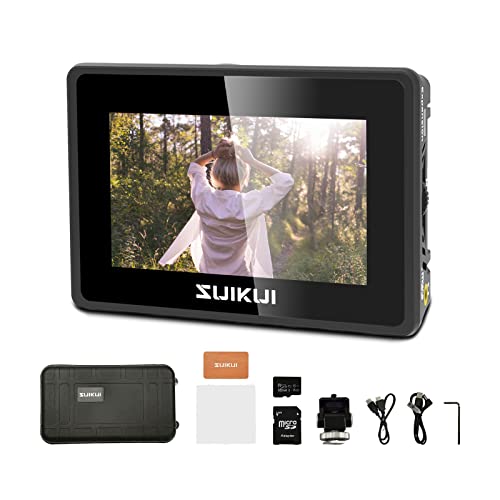
When you need reliable and high-quality recording capabilities, the RH35 Unlimited Recording Camera Monitor (1080P 30FPS) stands out as an essential tool for content creators. It offers full HD recording functions with HDMI input/output and captures videos in MP4 format on micro SD cards or USB flash drives, all without limits or damage. Featuring a 3.5-inch LCD with 600nit brightness, it guarantees clear visibility in various lighting conditions. Weighing just 120g, its compact design makes it portable, perfect for diverse applications—from medical scenes to sports and smartphone recordings. Enhance your content creation with this versatile monitor.
Best For: Content creators looking for a portable and reliable recording monitor for various applications.
Pros:
- Full HD recording capabilities with HDMI input/output for high-quality video capture.
- Compact and lightweight design (120g) making it easy to carry for on-the-go recording.
- Versatile applications suitable for medical, gaming, meetings, sports, and smartphone recordings.
Cons:
- Limited resolution of the LCD display at 800*480, which may not meet the needs of all users.
- Only supports recording at 30FPS, which might not be sufficient for fast-paced action scenes.
- No built-in storage, requiring external micro SD cards or USB drives for video storage.
Neewer F100 7inch Camera Field Monitor

Designed for videographers and content creators seeking precision, the Neewer F100 7-inch Camera Field Monitor stands out with its impressive HD Video Assist IPS panel. With a resolution of 1280 x 800 and a brightness of 450 nits, it offers vibrant visuals. Its ultra-thin design (17mm) makes it portable, while the 1200:1 contrast ratio guarantees sharp detail. Compatible with various devices, it features noise reduction and advanced monitoring tools like Peaking Focus Assist and Safe Frames. The package includes essential accessories like HDMI cables and a sunshade, making it a practical choice for any filming setup.
Best For: Videographers and content creators looking for a portable and high-quality field monitor to enhance their filming precision.
Pros:
- High-resolution IPS panel with 1280 x 800, ensuring vibrant visuals.
- Compact and ultra-thin design (17mm) for easy portability.
- Advanced monitoring features like Peaking Focus Assist and Safe Frames for precise focus and framing.
Cons:
- Limited to a maximum brightness of 450 nits, which may not be sufficient in very bright outdoor conditions.
- Some users may require additional adapters or converters for compatibility with certain camera models.
- The noise elimination feature may not completely eliminate background noise in all situations.
Acer KB242Y 23.8 Inch Full HD Monitor

The Acer KB242Y 23.8 Inch Full HD Monitor stands out with its 99% sRGB color coverage, making it an ideal choice for graphic designers and video editors who demand precise color accuracy. Its 1920 x 1080 resolution and zero-frame design enhance your viewing experience by providing maximum screen visibility. With a refresh rate of up to 120Hz and a 1ms response time, you’ll enjoy smooth gaming and video playback, free from smearing and ghosting. Plus, its FreeSync compatibility guarantees a tear-free experience during fast-paced action. This monitor is perfect for anyone seeking high-quality visuals and performance.
Best For: The Acer KB242Y 23.8 Inch Full HD Monitor is best for graphic designers, video editors, and gamers seeking precise color accuracy and smooth performance.
Pros:
- Excellent 99% sRGB color coverage for accurate color reproduction.
- Fast refresh rate of up to 120Hz and 1ms response time for seamless gaming and video playback.
- Zero-frame design maximizes screen visibility and enhances the overall viewing experience.
Cons:
- Brightness level of 250 nits may be insufficient for very bright environments.
- Limited connectivity options may not meet all user needs.
- Lacks advanced features like HDR support for enhanced dynamic range.
Factors to Consider When Choosing Professional Recording Monitors
When you’re choosing professional recording monitors, several key factors can impact your decision. You’ll want to take into account audio quality performance, speaker size, and frequency response range to guarantee accurate sound reproduction. Additionally, think about connectivity options and how your monitors will fit with your room’s acoustics.
Audio Quality Performance
Choosing professional recording monitors requires careful consideration of several audio quality performance factors to guarantee you get the best sound reproduction possible. First, look at the frequency response range; a broader range, like 70 Hz to 22 kHz, guarantees clarity in both low and high frequencies. The type of drivers matters too; woven-composite woofers and silk-dome tweeters deliver tight bass and natural highs. Amplification power, usually over 50 watts, allows for louder sound without distortion. Acoustic tuning controls let you adjust high and low frequencies to suit your preferences and room acoustics. Finally, monitor design features, such as bass reflex ports, can greatly impact low-frequency response, enhancing your overall listening experience.
Speaker Size Considerations
Selecting the right speaker size can greatly influence your monitoring experience. Larger woofers typically deliver better bass response, making them perfect for genres that rely on deep lows. If you’re in a compact space, smaller speakers with 3.5-inch drivers offer clarity and detail without overwhelming low-end frequencies. Your room size also matters; larger rooms benefit from bigger monitors to fill the space, while smaller rooms may require compact models to prevent overpowering sound. Additionally, larger speakers can handle higher power outputs for louder playback without distortion, but they may need more distance from walls to perform effectively. Smaller monitors can be placed closer to you for accurate sound. Choose wisely to enhance your recording environment!
Frequency Response Range
Understanding speaker size is just the beginning; frequency response range plays a vital role in achieving superior sound quality in your studio. The frequency response range indicates the span of frequencies your monitors can reproduce, typically from 20 Hz to 20 kHz for full-spectrum audio. A wider range allows you to hear both low bass notes and high treble sounds, fundamental for detailed mixing and mastering. Look for monitors with a flat frequency response, as minimal deviation guarantees accurate sound representation. Low-end response is essential for genres like electronic and hip-hop, while high-frequency response enhances the clarity of vocals and instruments. Choosing monitors with the right frequency response will markedly elevate your audio production quality.
Connectivity Options Available
When it comes to professional recording monitors, having the right connectivity options can greatly impact your setup and workflow. Look for monitors that offer balanced XLR/TRS inputs for your professional audio gear, as well as unbalanced RCA inputs for consumer devices. Many models also provide ⅛-inch TRS aux inputs, perfect for connecting smartphones and tablets. If you value convenience, consider monitors with built-in Bluetooth capabilities for seamless wireless streaming. Additionally, a headphone output is essential for direct monitoring, allowing you to listen without disturbing others. Versatile connectivity options enhance your flexibility, enabling efficient connections to audio interfaces, mixers, computers, and other multimedia sources, ensuring you get the most out of your recording experience.
Room Acoustics Compatibility
Since room acoustics can make or break the sound quality of your recordings, it’s essential to reflect on how your space interacts with your professional monitors. Assess your room’s reflective and absorptive properties, as they can notably influence sound quality. Be mindful of the size and shape, as these factors can create standing waves or distort audio playback. Choosing monitors with customizable high- and low-frequency tuning controls can help you adjust for your room’s unique characteristics. For smaller spaces, near-field monitors are ideal, allowing you to sit closer and reduce reflections. Finally, consider adding acoustic treatments like diffusers and bass traps to enhance clarity and balance in your listening environment, ensuring you get the best sound from your monitors.
Power Output Levels
Choosing the right power output for your professional recording monitors is essential, as it directly impacts your studio’s sound quality and overall listening experience. Typically, studio monitors range from 20 to 100 watts. Higher wattage monitors can deliver louder sound levels without distortion, making them ideal for larger spaces or dynamic audio. A common choice is 50 watts of Class AB amplification, balancing volume and tonal fidelity for clear sound reproduction. However, consider your room size; too much power in a small area can overwhelm the mix and cause feedback issues. Also, pay attention to the continuous power rating (SPL), as many professional models can achieve levels above 100 dB without distortion, ensuring you get the best performance possible.
Customization Features Offered
Power output plays a significant role in your studio’s sound dynamics, but customization features can elevate your monitoring experience even further. Look for monitors with high- and low-frequency tuning controls; these let you adjust audio output to suit your preference and room acoustics. Tone control knobs can enhance bass or treble, providing a tailored listening experience. Consider models offering placement options like desktop or bookshelf modes, optimizing sound based on your position. Connectivity options are essential too—ensure your monitors support various inputs like XLR, RCA, and aux for compatibility with different setups. Finally, built-in headphone outputs with amplifiers allow you to switch effortlessly between speaker and headphone monitoring, ensuring you never compromise on audio quality.
Design and Aesthetics
When selecting professional recording monitors, you’ll want to contemplate both design and aesthetics, as they can greatly influence your studio’s functionality and ambiance. Ergonomic placement is key; monitors should project sound efficiently while ensuring comfort during long sessions. Look for sleek, modern finishes that complement your studio’s setup, fostering a cohesive visual environment. The size and shape of the monitors matter too; well-proportioned cabinets help minimize resonance and distortion for clearer sound reproduction. Customizable options, like front-panel controls and adjustable stands, boost convenience, adapting to various layouts. Finally, consider color schemes and finishes that align with your studio’s overall theme, enhancing both professionalism and style. Make your choice wisely to create an inspiring workspace.
