Accurate monitoring starts with accurate measurement. The right tools make it easier to identify room issues, verify speaker performance, and dial in a cleaner listening setup.
Below, we’ve rounded up the best audio testing tools for studio monitors for calibration, cable checks, SPL reading, and system troubleshooting.
Best 10 Audio Testing Tools for Studio Monitors Picks for 2026
Speaker Measurement Tool
Dayton Audio DATS V3 Speaker Test System
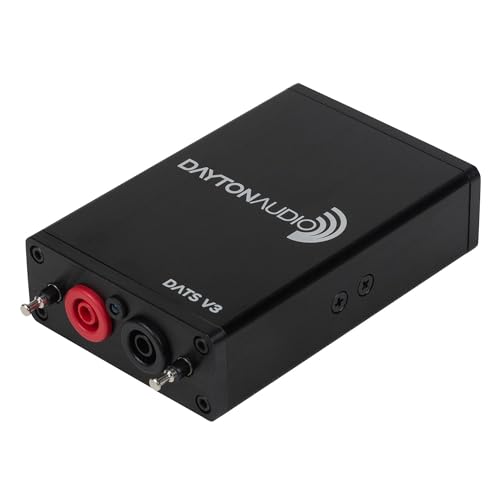
- Measures impedance for drivers and crossovers
- Auto-calculates Thiele/Small parameters
- Windows PC setup with included software
Best For: DIY speaker builders and loudspeaker troubleshooters
Measurement Mic
Superlux ECM999 Measurement Microphone

- Flat 20 Hz to 20 kHz omnidirectional response
- Handles up to 132 dB SPL
- Includes case, clip, and windscreen
Best For: Room calibration and speaker testing with phantom-powered interfaces
Spectrum Analyzer
Nobsound AK2515 Pro Audio Spectrum Analyzer

- 25x15 VFD display for band visualization
- 20 Hz to 20 kHz frequency coverage
- MIC and AUX inputs with AGC
Best For: Visual signal monitoring and casual spectrum analysis
Monitor Alignment System
Neumann MA 1 Calibration Microphone

- Automatic alignment for KH DSP speakers and subs
- Includes calibration software and microphone
- Works with macOS and Windows
Best For: Neumann KH speaker owners seeking automatic alignment
Cable Trace & Quick Fix
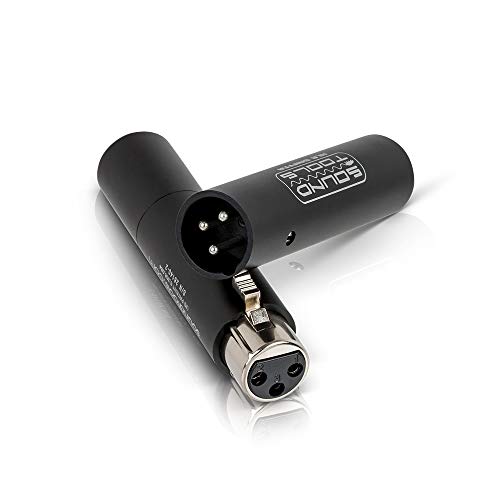
- Instant LED XLR/DMX cable checks
- Remote-end testing for solo use
- Rugged aluminum, pocket-sized build
Best For: Fast cable diagnostics in studio and live setups
Room Correction & Virtual Reference
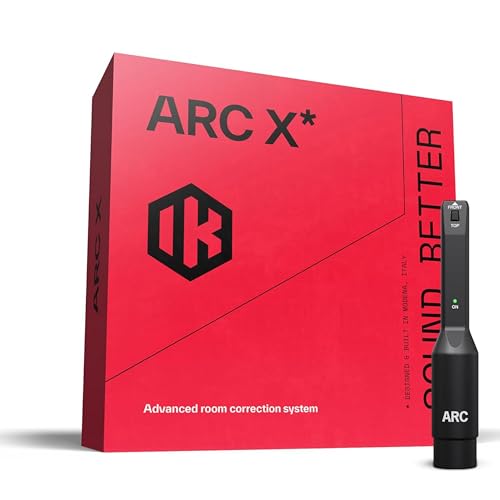
- Measures and corrects room response
- Virtual monitoring for 20+ systems
- Includes measurement mic and plug-in
Best For: Accurate monitor calibration and mix translation
All-in-One Signal Check

- Signal generator plus cable tester
- Checks phantom power and input levels
- USB-C rechargeable and portable
Best For: Multi-function troubleshooting for audio signal chains
Compact Live Sound Monitor
Galaxy Audio CM130 Portable Monitor

- Mini size for easy portability
- Battery powered with 2 AA batteries
- Low-cost, high-performance design
Best For: Portable, budget-friendly live sound checks
Visual Spectrum Analyzer
Nobsound VFD Spectrum Analyzer with Bluetooth
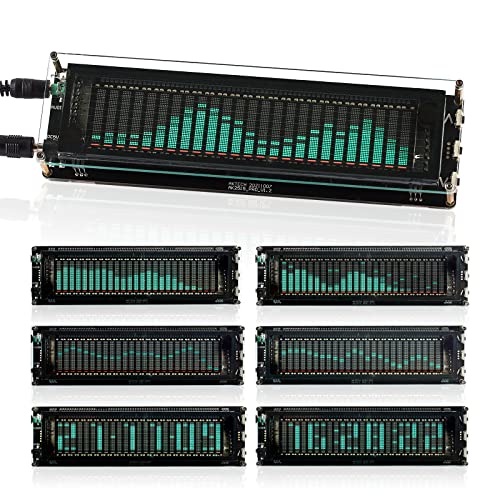
- 20Hz–20kHz display range
- Bluetooth, AUX, and mic inputs
- AGC with adjustable display modes
Best For: Home or studio setups that want a flexible visual analyzer
Portable Decibel Meter
VLIKE Handheld dB Meter with Backlight
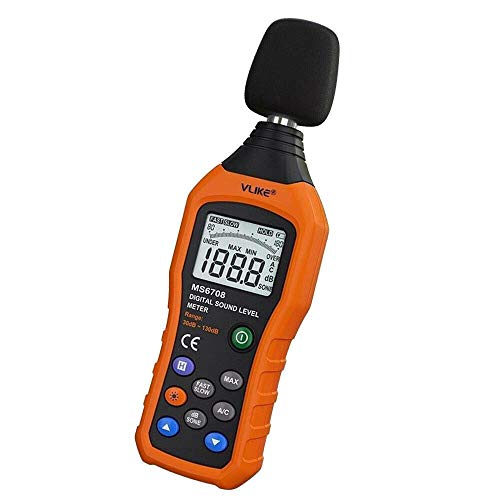
- 30 to 130 dB measuring range
- A/C mode with max locking
- Backlit portable handheld design
Best For: Quick handheld sound-level checks
Speaker Measurement Tool – Dayton Audio DATS V3 Speaker Test System
If you need audio testing tools for studio monitors or other loudspeaker builds, the Dayton Audio DATS V3 gives you direct impedance and parameter measurements from a Windows PC. It is aimed at DIY builders and technicians who want repeatable data for drivers, crossover networks, and complete systems instead of relying on guesswork.
Best For: DIY speaker builders and troubleshooters who want PC-based impedance and Thiele/Small measurements.
Pros:
- Measures impedance response for drivers, crossovers, resistors, inductors, and capacitors.
- Automatically calculates Thiele/Small parameters like Fs, Qts, and Re.
- Includes a built-in precision calibration resistor for repeatable results.
- Rugged aluminum housing with detachable test leads.
Cons:
- Windows-only compatibility.
- Not a standalone unit; it requires a PC and software setup.
For anyone focused on loudspeaker design and validation, DATS V3 is a practical measurement box that emphasizes accuracy over convenience. It is especially useful when you want hard data on component behavior and enclosure-related tuning.
Measurement Mic – Superlux ECM999 Measurement Microphone
The Superlux ECM999 is a straightforward choice when your audio testing tools for studio monitors need a microphone for room calibration and speaker testing. Its flat 20 Hz to 20 kHz response and omnidirectional pattern are designed to capture room sound accurately, and it works with a wide range of interfaces that provide phantom power.
Best For: Room calibration, studio acoustic measurements, and speaker testing with phantom-powered audio interfaces.
Pros:
- Flat 20 Hz to 20 kHz response for measurement work.
- Handles up to 132 dB SPL for louder test conditions.
- Works with 12V to 52V phantom power.
- Includes carrying case, mic clip, and windscreen.
Cons:
- XLR cable is required but not included.
- Calibration file details may require checking the packaging insert or contacting support.
This is a sensible measurement mic for users who need a reliable, portable option for room and speaker analysis. It focuses on accuracy and compatibility rather than extra features, which makes it easy to fit into an existing setup.
Spectrum Analyzer – Nobsound AK2515 Pro Audio Spectrum Analyzer
If you want audio testing tools for studio monitors that also provide a visual readout, the Nobsound AK2515 adds spectrum display and sound level monitoring in one unit. It covers 20 Hz to 20 kHz, supports MIC and 3.5 mm AUX inputs, and offers multiple display and gain settings for more customized monitoring.
Best For: Musicians and audio enthusiasts who want a visual spectrum analyzer with flexible input options.
Pros:
- 25×15 VFD display shows frequency bands clearly.
- Supports both MIC and 3.5 mm AUX inputs.
- Includes AGC plus multiple gain and display modes.
- Offers customizable brightness and several visual modes.
Cons:
- Focuses on visual analysis rather than calibrated measurement.
- Less suitable than a dedicated measurement mic for room correction work.
The AK2515 is useful when you want a hands-on analyzer that makes signal behavior easy to see at a glance. It is more of a display-driven monitoring tool than a precision calibration device, so it works best as a companion piece.
Monitor Alignment System – Neumann MA 1 Calibration Microphone
For users building a precise setup around Neumann KH speakers, the Neumann MA 1 is one of the more specialized audio testing tools for studio monitors. It pairs a measurement microphone with calibration software for automatic monitor alignment on compatible Neumann KH loudspeakers and subwoofers, with support for macOS and Windows.
Best For: Neumann KH speaker owners who want automatic monitor alignment and calibration.
Pros:
- Designed for automatic monitor alignment with KH DSP loudspeakers and subwoofers.
- Includes calibration software and a measurement microphone.
- Supports both macOS and Windows.
- Made specifically for studio monitoring use.
Cons:
- Compatibility is tied to Neumann KH speaker systems.
- Less general-purpose than standalone measurement mics.
The MA 1 is the most targeted option in this roundup, and that focus is its main strength. If your setup matches the supported Neumann hardware, it offers a streamlined path to monitor alignment without piecing together separate tools.
Cable Trace & Quick Fix – Portable XLR & DMX Tester
If you need audio testing tools for studio monitors and the cabling around them, this compact XLR and DMX tester is built for fast fault-finding. It gives instant LED feedback for XLR and 3-pin DMX cables, so you can diagnose issues quickly during studio sessions or on the road.
Best For: Sound engineers and studio techs who need a pocketable cable tester for fast XLR and DMX diagnostics.
Pros:
- Tests XLR and 3-pin DMX cables with instant LED indication.
- Remote-end testing lets one person troubleshoot without assistance.
- Rugged aluminum housing is made for stage and studio use.
- Compact, lightweight design is easy to carry in a pocket.
Cons:
- Focused on cable diagnostics rather than monitor calibration or room tuning.
- Requires an A23 battery for operation.
For straightforward cable checks, this is a practical grab-and-go tool that can reduce downtime when connections are the problem. It is best viewed as a fast diagnostic companion, not a full monitor measurement system.
Room Correction & Virtual Reference – ARC X Monitor Calibration
For studio monitoring workflow, this ARC X package is aimed at correcting what you hear from your speakers rather than testing cables. It measures your room with the included mic, applies phase-coherent correction, and adds virtual monitoring so you can check mixes against multiple reference systems.
Best For: Producers and mixers who want room correction, monitor calibration, and virtual speaker emulation in one system.
Pros:
- Uses VRM-based acoustic measurement for room correction.
- Includes low-latency plug-in correction for DAW use.
- Virtual monitoring emulates 20+ studio monitors and consumer systems.
- Includes a measurement mic and guided multi-point analysis.
Cons:
- It is a calibration and monitoring tool, not a cable tester.
- Setup is more involved than a simple handheld diagnostic device.
This is the most complete option here for dialing in how studio monitors translate in a room. If your main goal is more accurate monitoring rather than hardware troubleshooting, ARC X fits that job well.
All-in-One Signal Check – Portable Audio Tester
This compact unit is one of the most versatile audio testing tools for studio monitors and adjacent signal-chain checks. It combines a signal generator, XLR cable tester, phantom power checker, input level meter, and headphone monitoring, making it useful when you need to verify more than just a cable.
Best For: Audio professionals who want a portable multi-function tester for troubleshooting mixers, PA gear, and monitor signal paths.
Pros:
- Combines signal generation, cable testing, level metering, and monitoring.
- Outputs 1 kHz sine wave or pink noise through multiple connector types.
- Checks phantom power levels from 24V to 52V with LED indicators.
- USB-C rechargeable with fast charging and low-battery warning.
Cons:
- More of a troubleshooting tool than a dedicated monitor calibration system.
- Its feature set may be more than needed for very basic cable checks.
If you want one portable tester that covers several common studio and live-sound problems, this Xvive unit is the most flexible pick. It is especially handy when you need to generate a test tone, verify phantom power, and confirm signal flow from one tool.
Compact Live Sound Monitor – Galaxy Audio CM130 Portable Monitor
If you’re comparing audio testing tools for studio monitors, the Galaxy Audio CM130 is a simple, battery-powered option built for quick live sound checks. Its mini size and passive design make it easy to keep nearby when you want a no-fuss monitor for fast level verification.
Best For: Portable, low-cost monitoring when you need a compact tool for basic live sound checks.
Pros:
- Mini size makes it easy to carry and place near a setup.
- Low-cost, high-performance positioning for budget-minded buyers.
- Battery powered with 2 AA batteries required.
- Stainless steel material adds a durable feel.
Cons:
- Passive speaker amplification type may not suit every workflow.
- Limited detail is provided about advanced measurement features.
The CM130 is best viewed as a straightforward utility piece rather than a feature-heavy analyzer. If you mainly need a compact, portable monitor for quick checks, it fits that job well.
Visual Spectrum Analyzer – Nobsound VFD Spectrum Analyzer with Bluetooth
For buyers shopping for audio testing tools for studio monitors, the Nobsound VFD Audio Spectrum Analyzer is aimed more at visual feedback than strict measurement. It shows a wide 20Hz–20kHz range, supports mic, AUX, and Bluetooth input, and includes AGC to keep the display balanced at different volume levels.
Best For: Home audiophile or studio setups that need a flexible spectrum display with multiple input options.
Pros:
- 25×15 high-resolution VFD display gives clear frequency-bands visualization.
- 20Hz–20kHz range covers bass through treble.
- Bluetooth 5.0, 3.5mm AUX, and mic connectivity add flexibility.
- AGC, gain settings, and display modes help tailor the presentation.
Cons:
- It is a visual spectrum analyzer, not a dedicated precision meter.
- Requires 5V DC power, so it needs the right power setup.
This model is a strong fit if you want an attractive, customizable display that reacts to your audio. It works best when you value flexible connectivity and clear visual monitoring over formal measurement output.
Portable Decibel Meter – VLIKE Handheld dB Meter with Backlight
If you need audio testing tools for studio monitors that also work as a general noise meter, the VLIKE LCD Digital Audio Decibel Meter is a practical handheld option. It measures sound from 30 to 130 dB, includes A/C mode, and adds a backlight for easier reading in low light.
Best For: Quick handheld sound-level checks in rooms, workplaces, or monitor-testing environments.
Pros:
- 30 dB to 130 dB measuring range covers many common sound checks.
- A/C mode and max locking function add useful measurement options.
- Backlight helps with nighttime or dim-room use.
- Compact handheld design makes it easy to carry.
Cons:
- Batteries are not included and it requires 4 AAA batteries.
- It cannot keep and generate a report directly from the device.
This is a straightforward sound level meter for buyers who want portable decibel readings without extra complexity. It makes sense when your priority is quick checking and monitoring rather than logging or reporting.
How We Picked These Audio Testing Tools for Studio Monitors
We focused on tools that help real users solve real monitoring problems: speaker calibration, room measurement, cable verification, level checking, and basic diagnostic work. Priority went to products that are practical in studio environments, easy to use, and useful whether you’re setting up a small project room or maintaining a more advanced monitoring chain.
We also favored tools with clear measurement value, solid connectivity, and features that reduce guesswork during setup and troubleshooting.
Quick Comparison
Not every tool in this category does the same job. Some are built for room correction and monitor alignment, while others are better for cable testing, signal generation, or measuring sound pressure levels. If you need precise speaker tuning, choose a calibration-focused solution. If you need everyday diagnostics, a portable tester or meter may be the better fit.
Key Buying Factors for Audio Testing Tools for Studio Monitors
Measurement Type
Start by deciding what you need to measure. Room correction and monitor alignment tools help optimize frequency response and listening position. SPL meters and spectrum analyzers are better for tracking levels and spotting tonal imbalances. Cable testers and signal generators are best for fast troubleshooting.
Microphone and Input Quality
For acoustic measurement, the microphone matters as much as the software or display. Look for a calibration mic with a known response range and a test system that supports reliable input handling. For line-level checks, make sure the device can handle the outputs and connectors in your setup.
Ease of Use
Studio tools should save time, not create extra steps. Clear displays, simple controls, and portable designs are especially helpful if you move between rooms or work alone.
Compatibility
Make sure the tool fits your workflow. Some products are designed for computer-based analysis, while others work as standalone meters or handheld testers. Check whether the device supports your operating system, cabling, and measurement needs before buying.
Who Should Buy Which Audio Testing Tools for Studio Monitors?
If you’re tuning monitors and correcting room response, prioritize calibration and measurement systems. If you mainly need to confirm signal flow, test XLR runs, or verify phantom power, choose a portable diagnostic tester. If you want to monitor loudness or spot peaks during setup, a sound level meter or spectrum display is often enough.
For most studios, the best approach is to match the tool to the job rather than buying the most feature-rich option available. The most useful Audio Testing Tools for Studio Monitors are the ones you’ll actually use during setup, maintenance, and everyday checks.
