Smart home hubs can make a connected home feel simple instead of scattered. The right pick brings your devices, routines, and voice controls into one place.
From wall-mounted touchscreens to local automation systems, this roundup focuses on the smartest options for different homes, budgets, and ecosystems in 2026.
Best 10 Smart Home Hubs Picks for 2026
Wall-Mounted Alexa Control Panel
Amazon Echo Hub (newest model)

- 8-inch dashboard for devices, cameras, and routines
- Supports thousands of Alexa-compatible devices
- Wall-mountable smart home control center
Best For: Alexa households that want a dedicated wall-mounted controller
Local Automation Starter

- Home Assistant preinstalled for easy setup
- Silent, fanless hub with local data storage
- Expandable with Z-Wave, Zigbee, and Thread USB devices
Best For: Users who want official Home Assistant hardware with local-first control
Large Smart Display Hub
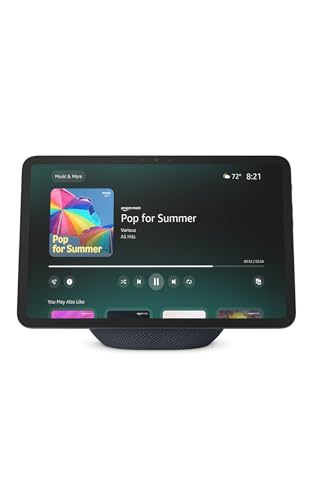
- 11-inch Full-HD display with built-in smart home hub
- Controls thousands of Alexa-compatible devices
- Also works for video calls, recipes, and photo display
Best For: Shoppers who want a big-screen Alexa display for home control
SmartThings Gateway Hub
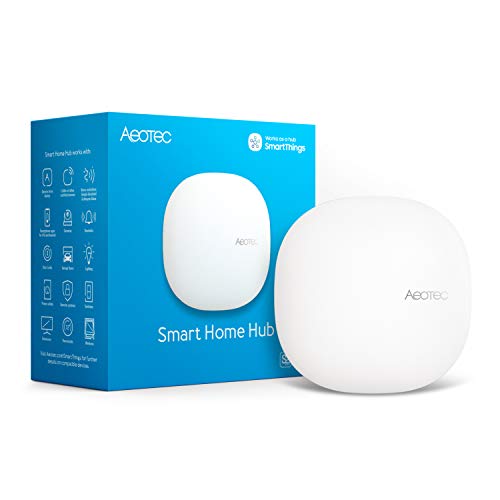
- Works with Matter, Z-Wave, Zigbee, Wi‑Fi, Alexa, and Google Home
- SmartThings app setup with local automation support
- Wi‑Fi or Ethernet connectivity for flexible installation
Best For: SmartThings households needing broad protocol compatibility
Smart Alarm Clock Hub
Echo Spot with Alexa and Wi‑Fi Extender
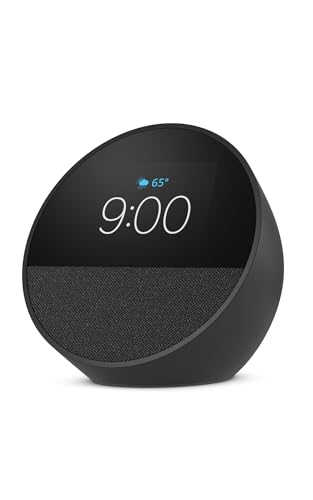
- Shows time, weather, and music info at a glance
- Controls compatible smart home devices with Alexa
- Adds up to 1,000 sq. ft. of Wi‑Fi coverage with eero Built-in
Best For: Compact bedside or countertop Alexa control
Security Command Display
eufy Smart Display E10 8-inch Control Panel
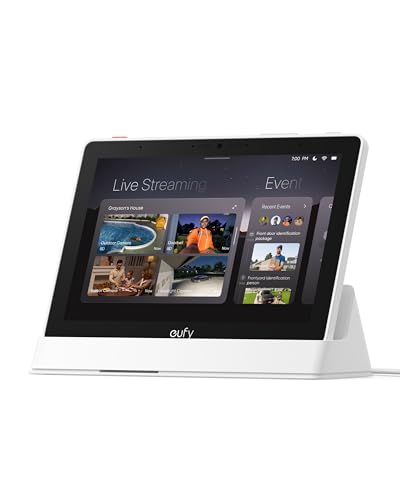
- Shows live feeds when doorbells, doors, or cameras trigger
- Views four simultaneous camera feeds at once
- Stores historical events locally for instant replay
Best For: Security-focused households needing instant live views
Kitchen Family Hub
Echo Show 15 with Fire TV and smart dashboard

- Large 15.6-inch Full HD screen for widgets and shared use
- Controls smart devices and checks live camera feeds
- Built-in Fire TV supports streaming and includes a remote
Best For: Busy families wanting one central kitchen display
Advanced Local Automation Hub

- Local automation processing for speed and privacy
- Supports Z-Wave, Zigbee, Matter, and Bluetooth
- No mandatory monthly subscription
Best For: Users who want advanced, locally controlled automations
Best Heavy-Duty Pick
- 8-inch Alexa-enabled smart home control panel
- Works with thousands of compatible devices
- Supports Zigbee, Matter, Thread, and more
Best For: Shoppers who want a simple wall-mounted Alexa dashboard
SmartThings Multi-Protocol Gateway
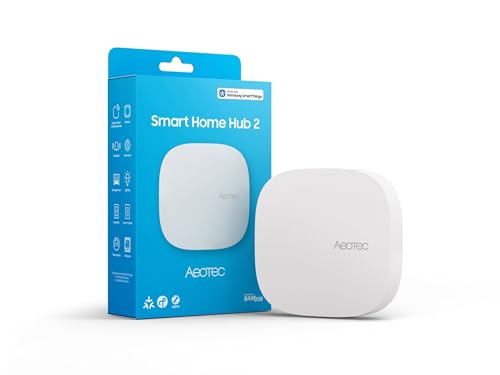
- SmartThings-based hub with Matter and Zigbee
- Local automations can keep working offline
- Wi-Fi and Ethernet setup for flexible install
Best For: SmartThings homes that do not need Z-Wave
Wall-Mounted Alexa Control Panel – Amazon Echo Hub (newest model)
If you want smart home hubs that make everyday control simpler, the Amazon Echo Hub is built as a dedicated 8-inch command center. It lets you arrange devices on a dashboard, launch routines, view cameras, and manage compatible home systems from one place. It also supports a wide range of Alexa-compatible devices and can be mounted on the wall for a cleaner setup.
Best For: Families and Alexa users who want a dedicated wall-mounted smart home control panel.
Pros:
- Customizable dashboard for devices, cameras, routines, and more
- Works with thousands of Alexa-compatible Wi‑Fi, Bluetooth, Zigbee, Matter, Sidewalk, and Thread devices
- Can arm and disarm compatible security systems
- Wall-mountable design with optional cable-hiding accessories
Cons:
- Some features require an Alexa+ and compatible Ring subscription sold separately
- Tabletop stand and in-wall cable options are sold separately
The Echo Hub stands out if you want a smart home hub that feels purpose-built rather than like a repurposed tablet. It is especially useful for households that want a central, always-ready control point for devices, routines, and security.
Local Automation Starter – Home Assistant Green
Home Assistant Green | Smart Home hub with Advanced Automation | Official Home Assistant Hardware
Check Price On AmazonFor buyers comparing smart home hubs, Home Assistant Green is an easy entry point into advanced automation. It ships with Home Assistant already installed, so setup starts by plugging in power and Ethernet. From there, you can control devices, reduce app clutter, and build automations that keep your home working together.
Best For: People who want an official Home Assistant hub with simple setup and local control.
Pros:
- Home Assistant comes preinstalled for quick setup
- Small, fanless, silent design with quad-core processor, 32GB storage, and 4GB RAM
- Controls the whole home from one hub and supports advanced automations
- Data stays at home on the device, with easy export and sharing options
Cons:
- Uses Ethernet for initial setup and connection
- Extra Z-Wave, Zigbee, and Thread support requires USB accessories sold separately
Home Assistant Green is a strong fit if you want a serious automation platform without starting from scratch. It emphasizes simplicity at launch, then gives you room to expand as your smart home grows.
Large Smart Display Hub – Amazon Echo Show 11
If you want smart home hubs with a bigger screen, the Amazon Echo Show 11 combines Alexa control with a vibrant 11-inch Full-HD display. It can manage compatible lights, thermostats, cameras, and more without a separate hub, while also doubling as a screen for recipes, calendars, video calls, and photo memories. The larger viewing area makes it easier to check information at a glance.
Best For: Buyers who want a large Alexa smart display that can also run their smart home.
Pros:
- 11-inch Full-HD screen with 60% more viewing area than Echo Show 8 (2025 release)
- Built-in smart home hub for controlling thousands of Alexa-compatible devices
- Can view camera feeds and manage routines with temperature, presence, or visual ID triggers
- Spatial audio, centered auto-framing camera, and video calling features
Cons:
- Larger footprint than smaller smart displays
- Many advanced experiences are tied to Alexa+
The Echo Show 11 is a good pick if you want a hub that does more than device control. It delivers a bigger screen for daily use while still handling core smart home tasks directly from the display or by voice.
SmartThings Gateway Hub – Aeotec Smart Home Hub
Among smart home hubs, the Aeotec Smart Home Hub is aimed at users who want broad device support and SmartThings automation in one gateway. It works with Wi‑Fi or Ethernet, connects through the SmartThings app, and supports thousands of compatible devices across major standards. That makes it a practical center for lighting, comfort, sensors, switches, and voice assistant integration.
Best For: SmartThings users who want a flexible hub with wide protocol support.
Pros:
- Supports Matter, Z-Wave, Zigbee, Wi‑Fi, Alexa, and Google Home
- Easy setup through the SmartThings app on mobile devices
- Automations can run locally for improved speed and reliability
- Works with Wi‑Fi or wired Ethernet connectivity
Cons:
- Designed for use in North America
- Advanced automations depend on the SmartThings app ecosystem
The Aeotec Smart Home Hub is a strong all-around option if your priority is compatibility and SmartThings automation. It gives you a familiar app-based setup while supporting several major smart home standards in one hub.
Smart Alarm Clock Hub – Echo Spot with Alexa and Wi‑Fi Extender
If you’re comparing smart home hubs for a nightstand, office, or kitchen, the newest Echo Spot is a compact pick that blends Alexa control, a clock display, and speaker features in one small device. It can show the time, weather, and song titles at a glance while also helping you manage compatible smart home devices.
Best For: People who want a bedside or countertop smart home hub with Alexa, a clock display, and everyday voice control.
Pros:
- Customizable display shows time, weather, song titles, and more.
- Controls compatible smart home devices and supports Alexa routines.
- Includes rich sound for music, podcasts, and audiobooks.
- eero Built-in can add up to 1,000 sq. ft. of Wi‑Fi coverage to an existing eero network.
Cons:
- Smaller screen limits how much information you can view at once.
- Wi‑Fi extender feature only works with an existing eero network.
- Best as a compact hub, not a full-room display or camera monitor.
The Echo Spot is a practical smart home hub if you want quick glanceable info and simple Alexa control in a small footprint. Its mix of clock, sound, and routines makes it especially useful where space is tight.
Security Command Display – eufy Smart Display E10 8-inch Control Panel
For shoppers focused on smart home hubs for security monitoring, the eufy Smart Display E10 is built around fast, hands-free awareness. Its 8-inch touchscreen lights up with live feeds and voice alerts when a doorbell rings, a door unlocks, or a camera detects motion.
Best For: Homes that want a dedicated security-first control panel for doorbells, cameras, and instant live views.
Pros:
- Automatically shows live video and alerts when activity is detected.
- Supports four simultaneous live feeds for an overview of your property.
- Historical events download to local storage for quick replay without buffering.
- 8-inch touchscreen is designed to be easy for kids and seniors to use.
Cons:
- Built primarily for security monitoring rather than general entertainment.
- Some advanced recognition features depend on HomeBase 3.
- Larger wall or countertop footprint than a compact smart display.
The E10 stands out as a purpose-built smart home hub for instant security oversight. If your priority is checking cameras, door events, and daily summaries in one place, this display keeps the workflow simple.
Kitchen Family Hub – Echo Show 15 with Fire TV and smart dashboard
If you want smart home hubs that can organize a busy household, the Echo Show 15 is designed to live in the kitchen and keep schedules, smart devices, and entertainment in one place. Its 15.6-inch Full HD screen is built for quick glances, control, and family-friendly use.
Best For: Families who want a large kitchen hub for calendars, smart home control, video calls, and streaming.
Pros:
- Large 15.6-inch Full HD display is ideal for widgets and shared viewing.
- Smart home dashboard lets you control devices and check live camera feeds.
- Built-in Fire TV supports streaming from major apps and includes a remote.
- Centered camera with auto-framing, zoom, and noise reduction improves video calls.
Cons:
- Larger size makes it better for kitchens or shared spaces than small rooms.
- Some streaming apps may require subscriptions.
- Designed more as a wall hub than a portable device.
The Echo Show 15 is a strong choice if you want a central smart home hub that doubles as an organizer and entertainment screen. It brings together household planning, device control, and Fire TV in one large display.
Advanced Local Automation Hub – Hubitat Elevation C-8 Pro
If you want smart home hubs that prioritize speed, privacy, and deep customization, the Hubitat Elevation C-8 Pro is built for that job. It processes core automations locally, so lights, locks, sensors, thermostats, and routines can keep working even if your internet goes down.
Best For: Experienced users who want a highly customizable hub with local control and broad multi-protocol support.
Pros:
- Local processing for fast response and better reliability
- Supports Z-Wave 800, Z-Wave Long Range, Zigbee 3.0, Matter 1.5, and Bluetooth devices
- No mandatory monthly subscription for core automations
- AI-assisted Visual Rule Builder plus advanced Rule Machine automations
Cons:
- Some features and integrations may require setup and configuration
- Best suited to users who want to build and manage more complex automations
Overall, the C-8 Pro stands out as a powerful hub for mixed-device homes that need flexibility and local reliability. It also benefits from ongoing software updates and an active user community, which adds long-term value for serious smart home builders.
Best Heavy-Duty Pick – Like-New Amazon Echo Hub
Among smart home hubs, the Echo Hub is designed to make day-to-day control simple from one 8-inch dashboard. You can tap the display or ask Alexa to manage lights, smart plugs, camera feeds, routines, and other compatible devices, making it a practical fit for a central wall-mounted control point.
Best For: Homeowners who want an easy-to-use Alexa control panel for quick, centralized smart home access.
Pros:
- 8-inch touchscreen makes controls easy to see and use
- Works with thousands of Alexa-compatible devices
- Supports Wi-Fi, Bluetooth, Zigbee, Matter, Sidewalk, and Thread devices
- Can be wall mounted and supports optional cable-hiding accessories
Cons:
- This listing is for a like-new refurbished unit, not a brand-new device
- Tabletop stand and some installation accessories are sold separately
If you want a clean, family-friendly smart home dashboard rather than a deeply technical controller, the Echo Hub is an appealing option. It also adds built-in security and privacy features, plus smart mounting options for rooms where a fixed control panel makes sense.
SmartThings Multi-Protocol Gateway – Aeotec Smart Home Hub2
If you’re comparing smart home hubs for a unified setup, the Aeotec Smart Home Hub2 focuses on SmartThings-powered control with Matter and Zigbee support. It’s designed to connect compatible devices, run many automations locally, and give you a straightforward path to building or expanding a mixed-device home.
Best For: SmartThings users who want Matter and Zigbee support with local automations and easy setup.
Pros:
- Works as a SmartThings hub through the SmartThings app
- Supports Matter and Zigbee for thousands of compatible devices
- Many local automations continue during internet outages
- Offers Wi-Fi or Ethernet setup for flexible installation
Cons:
- Z-Wave is not supported
- Best fit for users already comfortable with the SmartThings ecosystem
This is a strong pick if you want a current-generation hub centered on SmartThings, with local processing for better reliability. Just be aware of the Z-Wave limitation before you buy, especially if your home already uses that protocol.
How We Picked These Smart Home Hubs
We prioritized broad device compatibility, strong automation features, clear control interfaces, and ecosystem support. Because Smart Home Hubs serve different needs, we also weighed whether a model is best for voice-first homes, touchscreen control, advanced local automation, or SmartThings-style compatibility.
Quick Comparison: Which Type Fits Your Home?
If you want a simple central dashboard, a display-based hub is usually the easiest choice. If you care most about reliability and privacy, a local-control platform can be a better fit. For households already using Alexa or SmartThings, the most efficient option is often the hub that works natively with your existing setup.
Key Buying Factors for Smart Home Hubs
Compatibility
Check support for Matter, Zigbee, Z-Wave, Wi-Fi, and any ecosystem integrations you already rely on. The best Smart Home Hubs reduce friction, not add another layer of complexity.
Automation Style
Some hubs are built around simple scenes and voice commands, while others offer advanced rule-based automations and local processing. Choose based on how much control you want to customize.
Interface and Placement
Touchscreen models work well in kitchens, entryways, and family rooms. Smaller display hubs or compact voice devices may be better for bedrooms, offices, or limited counter space.
Local Vs. Cloud Control
Local automation can improve speed and resilience when the internet is down. Cloud-tied Smart Home Hubs often win on ease of setup and broader consumer-friendly features.
Who Should Buy Which Smart Home Hubs?
Choose a display-first hub if you want quick at-a-glance control for the whole household. Go with a local automation platform if reliability, privacy, and advanced routines matter most. Pick a SmartThings-compatible gateway if you already own a mixed device ecosystem and want flexible protocol support. For Alexa households, an Echo-based hub can be the most convenient all-in-one option.
In short, the best Smart Home Hubs are the ones that match your devices, your automation goals, and the way your home actually gets used every day.
